
Ulefone RugKing Pad Pro
Ulefone RugKing Pad Pro Android 16 Rugged Tablet User Manual
Model: RugKing Pad Pro | Brand: Ulefone
1. Pengenalan
This manual provides essential instructions for setting up, operating, and maintaining your Ulefone RugKing Pad Pro rugged tablet. Please read this manual thoroughly before using the device to ensure proper function and longevity.
2. Kandungan Pakej
Sahkan bahawa semua item terdapat dalam pakej produk anda:
- Ulefone RugKing Pad Pro Tablet x 1
- AC Charger (100~240V) x 1
- Type-C Data Cable (100 cm) x 1
- Protective Film (Pre-installed) x 1
- Metal Pry Opener x 1
- Portable Strap x 1
- Skru x 2
- Multilingual User Manual x 1
- Charging Instruction Card x 1
- Safety Warning Declaration x 1

Figure 2.1: Contents of the Ulefone RugKing Pad Pro package.
3. Produk Lebihview
The Ulefone RugKing Pad Pro is a rugged tablet designed for durability and performance. Familiarize yourself with its physical components.
3.1 Komponen Fizikal
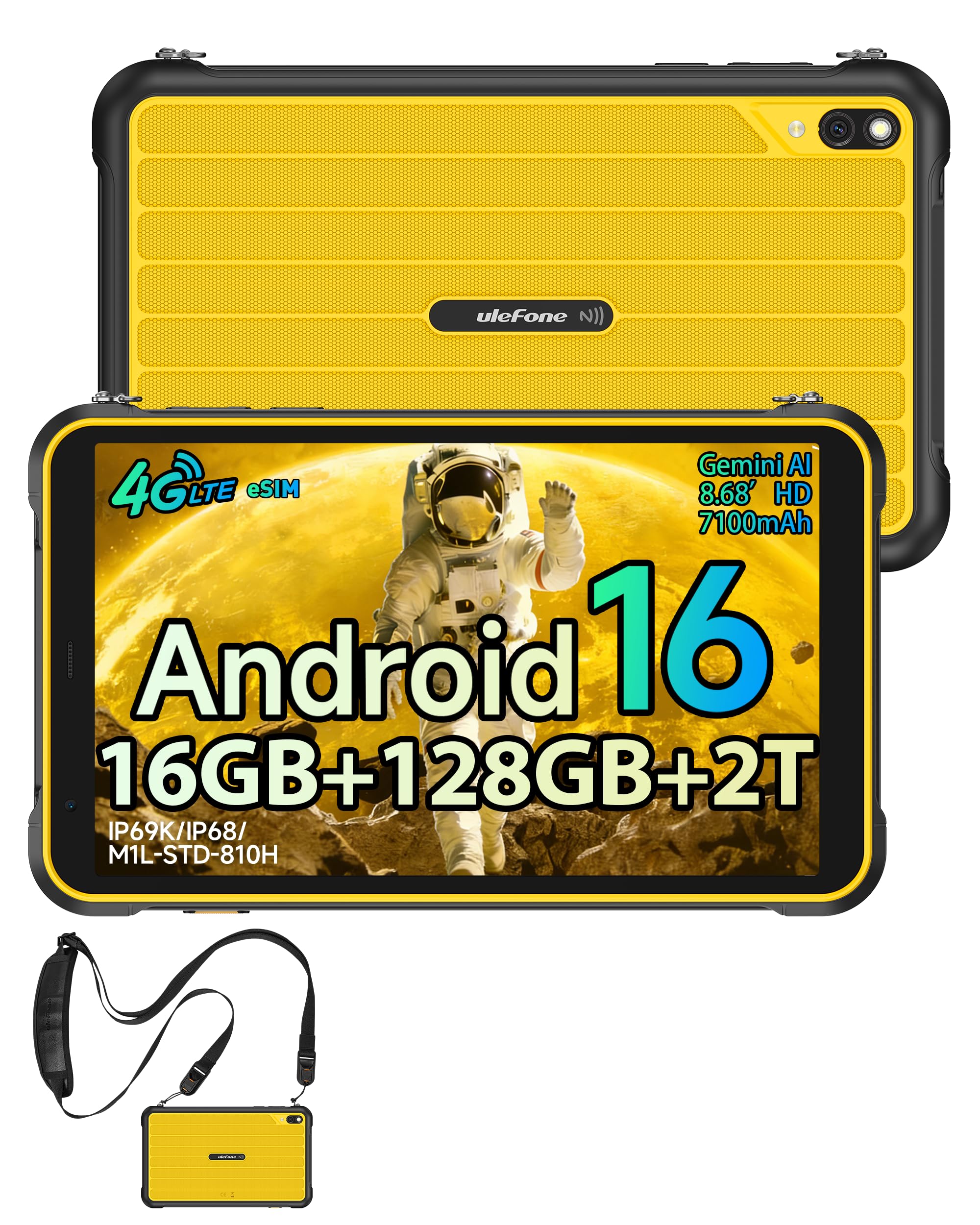
Rajah 3.1: Depan view of the Ulefone RugKing Pad Pro.

Rajah 3.2: Sisi view with buttons and ports.
- paparan: 8.68-inch, 90Hz refresh rate, Corning Gorilla Glass.
- Butang Kuasa: Terletak di sisi, digunakan untuk menghidupkan/mematikan atau membangunkan/menidurkan peranti.
- Butang Kelantangan: Laraskan tahap audio.
- Port USB Jenis-C: Untuk pengecasan dan pemindahan data.
- Gril Pembesar Suara: Pembesar suara stereo berganda untuk output audio.
- kamera: Kamera belakang 16MP, kamera hadapan 8MP.
- Lampu suluh: Integrated 133 lumen Super Torch.
- Slot Kad SIM/MikroSD: Supports dual SIM and up to 2TB microSD expansion.
- uSmart Expansion Connector: For compatible peripherals like endoscopes.
- Bicu Fon Kepala 3.5mm: For audio accessories.
4. Persediaan
4.1 Kuasa Awal Hidup
- Tekan dan tahan butang Butang Kuasa until the Ulefone logo appears.
- Ikut arahan pada skrin untuk memilih bahasa, rantau dan sambungkan ke rangkaian Wi-Fi anda.
- Sign in with your Google account or create a new one to access the Google Play Store and other services.
4.2 Persediaan Kad SIM dan eSIM
The RugKing Pad Pro supports dual physical SIM cards and eSIM functionality for 4G LTE connectivity.

Figure 4.1: Triple card slot for SIM and MicroSD.
4.2.1 Physical SIM Card Installation
- Cari dulang kad SIM di sisi tablet.
- Use the provided metal pry opener to eject the tray.
- Place your Nano-SIM cards into the designated slots.
- Masukkan semula dulang ke dalam tablet dengan berhati-hati.
4.2.2 eSIM Activation
To activate eSIM, navigate to Tetapan > Rangkaian & internet > SIM and follow the instructions to add a new mobile plan. You will typically need a QR code or activation code from your network provider.

Figure 4.2: eSIM connectivity feature.
5. Arahan Operasi
5.1 Sistem Pengoperasian Android 16
The RugKing Pad Pro runs on Android 16, offering a dynamic and fluid user interface with enhanced security and usability features. Enjoy desktop-like window views for multitasking and smarter notification management.

Figure 5.1: Android 16 user interface.
5.2 Paparan dan Interaksi
The 8.68-inch display with a 90Hz refresh rate provides smooth navigation and streaming. With 860 nits peak brightness, the screen is readable even in bright sunlight. Corning Gorilla Glass offers enhanced scratch resistance.

Figure 5.2: Display features including 90Hz refresh rate and Gorilla Glass.
5.2.1 Mod Sarung Tangan
For use in cold environments or industrial settings, enable Glove Mode in settings to allow touch input while wearing gloves. Note that some leather gloves may not be compatible due to material differences.

Figure 5.3: Tablet operation with gloves enabled.
5.3 Camera and Flashlight
The tablet features a 16MP rear camera for clear photos and document scanning, and an 8MP front camera for video calls. The integrated 133 lumen Super Torch provides bright illumination in low-light conditions.

Figure 5.4: Camera and Super Torch features.
5.4 Ketersambungan dan Navigasi
- 4G LTE: Stay connected with dual SIM or eSIM.
- NFC: Supports Google Pay and other NFC functions for identification and authentication.
- GPS: Integrated GPS, GLONASS, BeiDou, and Galileo for accurate navigation.
- Wi-Fi: Supports 802.11b/g/n standards.
- Bluetooth: Untuk menyambung aksesori wayarles.

Figure 5.5: NFC enabled device for various applications.

Figure 5.6: GPS navigation in a vehicle.
5.5 Ciri Istimewa
- Kunci Tersuai: Assign specific functions to a programmable key for quick access.
- ID Wajah: Buka kunci peranti anda menggunakan pengecaman muka.
- Radio FM: Listen to FM radio without headphones.
- uSmart Expansion Connector: Connect compatible external peripherals such as endoscopes (uSmart E01, E02) or digital microscopes (uSmart C01).

Figure 5.7: uSmart expansion connector and peripherals.
6. Ciri Ketahanan
The RugKing Pad Pro is built to withstand extreme conditions, certified with IP68, IP69K, and MIL-STD-810H standards.
- IP68: Dustproof and resistant to continuous immersion in water up to 2 meters for 30 minutes.
- IP69K: Dilindungi daripada semburan jet bertekanan tinggi dan suhu tinggi.
- MIL-STD-810H: Military-grade standard ensuring reliable resistance to shocks, vibrations, and extreme temperatures.

Figure 6.1: Rugged design and certifications.

Figure 6.2: Dust, water, and drop resistance tests.
7. Pengurusan Bateri
The RugKing Pad Pro is equipped with a 7100 mAh battery, offering extended usage. It supports 492 hours of standby time or 10 hours of video playback on a single charge.
7.1 Mengecas
- Pengecasan Standard: Connect the provided Type-C cable and AC charger to the tablet.
- Pengecasan Pin Pogo: The tablet is compatible with Pogo Pin charging docks (sold separately) for convenient charging.
- Reverse Charging (OTG): Use the tablet as a power bank to charge other devices via an OTG cable (sold separately).

Figure 7.1: Battery capacity and charging methods.
8. Storan dan Prestasi
Powered by an Unisoc T7250 Octa-core processor, the RugKing Pad Pro handles complex applications and demanding tasks efficiently. It comes with 16GB RAM (8GB physical + 8GB virtual) and 128GB internal storage, expandable up to 2TB via microSD card.

Figure 8.1: Octa-core processor for uninterrupted flow.

Figure 8.2: Memory and storage specifications.
*MicroSD card is sold separately for storage expansion. Dynamic RAM activation is user-configurable in Settings.
9. Penyelenggaraan
9.1 Membersihkan Peranti
- Gunakan kain lembut dan tidak berbulu untuk membersihkan skrin dan badan.
- Untuk kotoran degil, sedikit dampen kain dengan air. Elakkan bahan kimia yang keras atau bahan yang melelas.
- Ensure all port covers are securely closed before cleaning with liquids to maintain water resistance.
9.2 Kemas Kini Perisian
Regularly check for software updates to ensure optimal performance, security, and access to new features. Navigate to Tetapan > Sistem > Kemas kini sistem untuk menyemak dan memasang kemas kini yang tersedia.
9.3 Pengurusan Storan
Semula secara berkalaview anda yang disimpan files and applications. Delete unnecessary data to free up space and maintain device speed. Utilize the microSD card slot for large media files.
10. Penyelesaian masalah
| Masalah | Penyelesaian |
|---|---|
| Peranti tidak dihidupkan. | Pastikan bateri dicas. Sambungkan pengecas dan tunggu beberapa minit sebelum cuba menghidupkan semula. |
| Skrin tidak bertindak balas. | Perform a forced restart by holding the Power button for 10-15 seconds. If the issue persists, ensure Glove Mode is not causing interference if not needed. |
| Tidak dapat menyambung ke Wi-Fi. | Check if Wi-Fi is enabled in settings. Restart your router and the tablet. Verify the Wi-Fi password. |
| Kad SIM tidak dikesan. | Ensure the SIM card is correctly inserted into the tray. Restart the tablet. Check if the SIM card is active with your carrier. |
| Bateri cepat habis. | Reduce screen brightness, close unused apps, disable unnecessary connectivity features (Bluetooth, GPS, Wi-Fi) when not in use. Check for background app activity. |
11. Spesifikasi
| Ciri | Perincian |
|---|---|
| Nama Model | Ulefone RugKing Pad Pro |
| Sistem Operasi | Android 16 |
| Pemproses | Teras Okta Unisoc T7250 |
| RAM | 16 GB (8 GB fizikal + 8 GB maya) |
| Storan Dalaman | 128 GB |
| Storan Boleh Dikembangkan | Up to 2 TB via microSD |
| Saiz Paparan | 8.68 inci |
| Resolusi Paparan | 1400x800 piksel (HD+) |
| Kadar Segar Semula | 90 Hz |
| Perlindungan Paparan | Corning Gorilla Glass |
| Kamera Belakang | 16 MP |
| Kamera Depan | 8 MP |
| Rakaman Video | FHD 1080p |
| Kapasiti Bateri | 7100 mAh (Lithium Polimer) |
| Hayat Bateri (Purata) | 13 Days (standby), 10 Hours (video playback) |
| Ketersambungan | 4G LTE (Dual SIM, eSIM), Wi-Fi (802.11b/g/n), Bluetooth, NFC |
| Navigasi | GPS, GLONASS, BeiDou, Galileo |
| Penilaian Ketahanan | IP68, IP69K, MIL-STD-810H |
| Ciri Keselamatan | ID Wajah |
| Dimensi (L x W x T) | 20 x 10 x 1 cm |
| Berat badan | 450 Gram |
12. Waranti dan Sokongan
12.1 Maklumat Waranti
The Ulefone RugKing Pad Pro comes with a Waranti pengilang selama 2 tahun. Waranti ini melindungi kecacatan pada bahan dan mutu kerja di bawah penggunaan biasa. Sila simpan bukti pembelian anda untuk tuntutan waranti.


Figure 12.1: Ulefone brand and 2-year warranty indication.
12.2 Sokongan Pelanggan
For technical assistance, warranty claims, or further inquiries, please contact Ulefone customer support. A service center is available in Europe.
- Refer to the official Ulefone weblaman web untuk maklumat hubungan.
- Consult the "Multilingual User Manual" included in your package for additional information.
- The tablet includes a "Service Center 2.0" application for intelligent support.
Ask a question about this manual
Ask about setup, troubleshooting, compatibility, parts, safety, or missing instructions. Manuals+ will review the question and use this page’s manual context to help answer it.