
1. Pengenalan
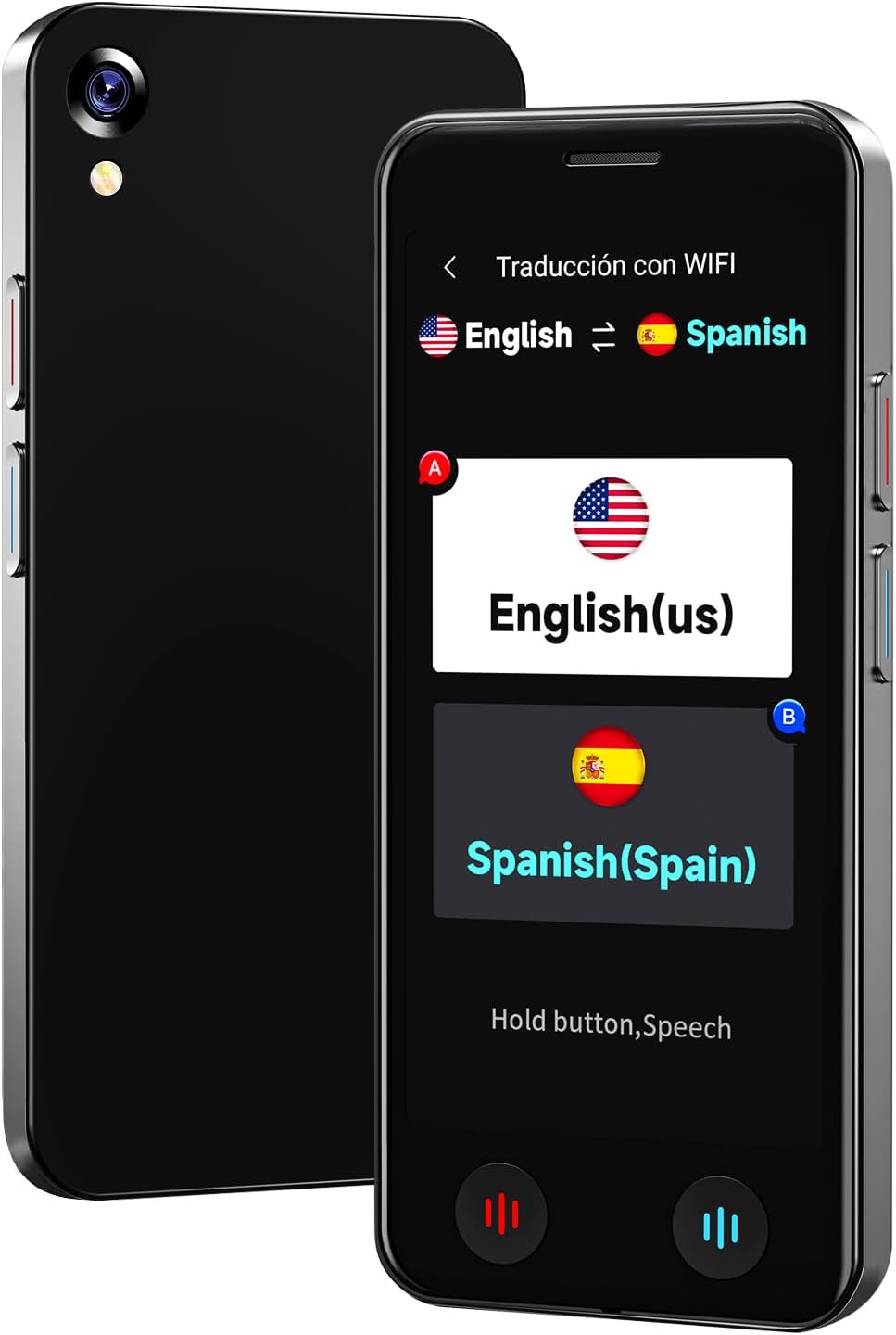
The VORMOR A20 AI Language Translator Device is a portable, real-time two-way translation tool designed to facilitate communication across language barriers. Featuring advanced AI technology, it supports online translation for 150 languages and accents, offline translation for 21 commonly used languages, and photo translation for up to 74 languages. Its compact design, long battery life, and integration with features like ChatGPT make it an ideal companion for international travel, business, and language learning.
2. Apa yang ada di dalam Kotak
- 1 x VORMOR A20 AI Language Translator Device
- 1 x Kabel Pengecasan USB-C
- 1 x Lanyard
- 1 x Clear Protective Case
- 1 x Manual Pengguna
3. Persediaan
- Mengecas Peranti: Connect the provided USB-C charging cable to the device and a power adapter (not included). A full charge takes approximately 1-2 hours.
- Hidupkan/Mati Kuasa: Press and hold the power button (usually on the side) for a few seconds to turn the device on or off.
- Pemilihan Bahasa Awal: Upon first use, follow the on-screen prompts to select your preferred system language.
- Sambungan Wi-Fi: For online translation and downloading offline language packages, navigate to the 'Settings' menu and connect to a stable Wi-Fi network.
- Attach Protective Case and Lanyard: For added protection and portability, carefully fit the clear protective case onto the device. Attach the lanyard to the designated loop hole on the device or case.
4. Arahan Operasi
The VORMOR A20 features a 5-inch HD touch screen and intuitive physical buttons for ease of use.
4.1. Terjemahan Suara Dalam Talian (150 Bahasa)
This mode requires an active internet connection (Wi-Fi or mobile data). It offers real-time, two-way translation with 98% accuracy and a response time of 0.5 seconds.
- From the main menu, select 'Online Translation' (Traducción con WIFI).
- Tap on the language displayed on the left to select your source language.
- Tap on the language displayed on the right to select your target language.
- Press and hold the corresponding physical button (red for source language, blue for target language) while speaking. Release the button to hear the translation.

4.2. Terjemahan Suara Luar Talian (21 Bahasa)
The device supports offline translation for 21 languages, allowing use without an internet connection. Ensure necessary language packages are downloaded in advance.
- From the main menu, select 'Offline Translation' (Traducción sin).
- To download packages: Go to 'Offline Package Management' in settings, connect to Wi-Fi, and select the languages you wish to download.
- Select your source and target languages from the available offline options.
- Press and hold the corresponding physical button while speaking. Release to translate.

4.3. Photo Translation (74 Online / 40 Offline Languages)
Utilize the built-in 8-megapixel camera and OCR technology to translate text from images.
- From the main menu, select 'Photo Translation' (Traducción de fotos).
- Point the camera at the text you wish to translate. Ensure the text is well-lit (use flash if needed).
- Pilih bahasa sumber dan bahasa sasaran.
- Tap the capture button to take a photo. The device will process and display the translated text.

4.4. Integrasi ChatGPT
Access the ChatGPT application for intelligent conversations and information retrieval.
- Select 'AI XiaoBei' from the main menu.
- Follow the on-screen instructions to interact with ChatGPT.
4.5. Fungsi Lain
- Rakaman Pintar: Record conversations and translate them later.
- Penukaran Unit: Convert various units of measurement.
- Penukaran Mata Wang: Get real-time currency exchange rates.
- Jam dunia: View times in different time zones.
- Terjemahan Kumpulan: Facilitate multi-person conversations (refer to on-screen instructions for setup).
5. Penyelenggaraan
- Pembersihan: Gunakan kain lembut dan kering untuk membersihkan peranti. Elakkan pembersih cecair atau bahan yang melelas.
- Penjagaan Bateri: To prolong battery life, avoid extreme temperatures and do not leave the device fully discharged for extended periods. The 2000mAh battery provides 6-8 hours of continuous use and 7 days of standby.
- Kemas Kini Perisian: The device supports OTA (Over-The-Air) updates. Periodically check for and install updates via Wi-Fi to ensure optimal performance and access to the latest features.
- Storan: Simpan peranti di tempat yang sejuk dan kering apabila tidak digunakan.
6. Penyelesaian masalah
- Peranti Tidak Dihidupkan: Ensure the device is fully charged. If the issue persists, try a different charging cable or adapter.
- Translation Inaccurate/Slow:
- For online translation, check your Wi-Fi connection strength.
- Pastikan anda telah memilih bahasa sumber dan bahasa sasaran yang betul.
- Bercakap dengan jelas dan pada kadar yang sederhana.
- Offline Translation Not Working: Verify that the required language packages have been successfully downloaded. This requires an initial internet connection.
- Photo Translation Issues: Ensure adequate lighting and clear focus on the text. The text should be within the frame and not blurry.
- Peranti Pembekuan/Tidak Responsif: Tekan dan tahan butang kuasa untuk memaksa mula semula.
7. Spesifikasi
| Jenama | BSTBOO (VORMOR) |
| Nombor Model | A20 |
| Saiz Skrin | Skrin Sentuh HD 5-inci |
| Kapasiti Bateri | Bateri Litium 2000mAh |
| Masa Bekerja Berterusan | 6-8 Jam |
| Masa Tunggu Sedia | 7 Hari |
| Masa Mengecas | 1-2 Jam |
| Kamera | 8 Million Pixel Rear Camera |
| Berat Barang | 0.22 Kilogram |
| Mikrofon | Built-In with Noise Cancellation, Speech Recognition |
| Jack Fon Kepala | Tiada bicu fon kepala |
8. Waranti dan Sokongan
Waranti: This VORMOR A20 AI Language Translator Device comes with a 1-year manufacturer's warranty from the date of purchase, covering defects in materials and workmanship.
Sokongan: For technical assistance, troubleshooting, or warranty claims, please contact our customer support team:
- e-mel: support@vormor.cn
- WhatsApp: +8618820461144
- Sumber Dalam Talian: Follow "VORMOR" on social media or visit vormor.co untuk kemas kini dan maklumat tambahan.


