
1. Pengenalan
Welcome to the OPPO Reno15c 5G user manual. This guide provides essential information to help you set up, operate, maintain, and troubleshoot your new smartphone. The OPPO Reno15c 5G combines advanced technology with a durable design, offering a seamless user experience.

Rajah 1.1: Depan view of the OPPO Reno15c 5G smartphone.

Rajah 1.2: Belakang view of the OPPO Reno15c 5G smartphone, showcasing the camera module and 'Dancing Aurora Design'.
2. Apa yang ada di dalam Kotak
Upon unboxing your OPPO Reno15c 5G, please ensure all the following items are present:
- OPPO Reno15c 5G Smartphone
- Penyesuai Kuasa (80W SuperVOOC)
- Kabel USB (Jenis-C)
- Sarung Telefon
- Ejector Dulang SIM
- Panduan Mula Pantas (dokumen ini)
- Maklumat Keselamatan
3. Persediaan
3.1. Memasukkan Kad SIM
- Cari dulang kad SIM di sisi peranti anda.
- Masukkan alat ejektor dulang SIM ke dalam lubang kecil di sebelah dulang dan tekan perlahan-lahan sehingga dulang terkeluar.
- Place your Nano-SIM card(s) into the designated slots on the tray. Ensure the gold contacts face downwards. The device supports Dual SIM.
- Carefully reinsert the SIM card tray into the phone until it clicks into place.

Rajah 3.1: Sisi view of the OPPO Reno15c 5G, showing the SIM card tray location.
3.2. Kuasa Awal Hidup dan Konfigurasi Asas
- Tekan dan tahan butang Kuasa (terletak di sebelah kanan) sehingga logo OPPO muncul.
- Ikut arahan pada skrin untuk memilih bahasa, rantau dan sambungkan ke rangkaian Wi-Fi anda.
- Log masuk dengan akaun Google anda atau buat akaun baharu untuk mengakses perkhidmatan Google dan Gedung Play.
- Set up your preferred security methods, such as fingerprint recognition, face unlock, PIN, or pattern.
3.3. Mengecas Peranti
Before first use, it is recommended to fully charge your device. Use the provided 80W SuperVOOC Power Adapter and USB Cable for optimal charging speed.
- Sambungkan kabel USB ke penyesuai kuasa.
- Palamkan penyesuai kuasa ke salur keluar dinding.
- Connect the USB Type-C end of the cable to the charging port at the bottom of your phone.
- Penunjuk pengecasan akan muncul pada skrin.

Figure 3.2: Visual representation of the 7000mAh battery and 80W SuperVOOC Flash Charge capabilities.
4. Mengendalikan Peranti Anda
4.1. Display and User Interface
The OPPO Reno15c 5G features a 120Hz Smart Adaptive OLED screen, providing a smooth and vibrant visual experience. The display also incorporates 2160Hz PWM dimming for eye protection.

Figure 4.1: The 120Hz Smart Adaptive OLED display of the OPPO Reno15c 5G.
The device runs on ColorOS 16, based on Android 15, offering a smooth, smart, and secure user interface. The All-New Trinity Engine optimizes performance for lasting fluidity.

Figure 4.2: ColorOS 16 interface highlighting smooth performance.
4.2. Ciri-ciri Kamera
The OPPO Reno15c 5G is equipped with an advanced camera system for vivid photography and videography.
- Kamera Utama Ultra-Jelas 50MP: Capture detailed images in various lighting conditions.
- 50MP Ultra Wide Selfie Camera: Features a 100° FOV, ideal for group selfies.
- AI Flash Photography 2.0: Utilizes a dual flash system for clear shots in low light.
- AI Portrait Glow: Allows professional relighting of photos after capture.
- 4K Ultra-Clear Video: Record high-resolution videos with stability.
- Dwi-View Video: Record simultaneously with both front and rear cameras.

Gambar 4.3: Cthample of a wide-angle selfie captured with the 50MP Ultra Wide Selfie Camera.
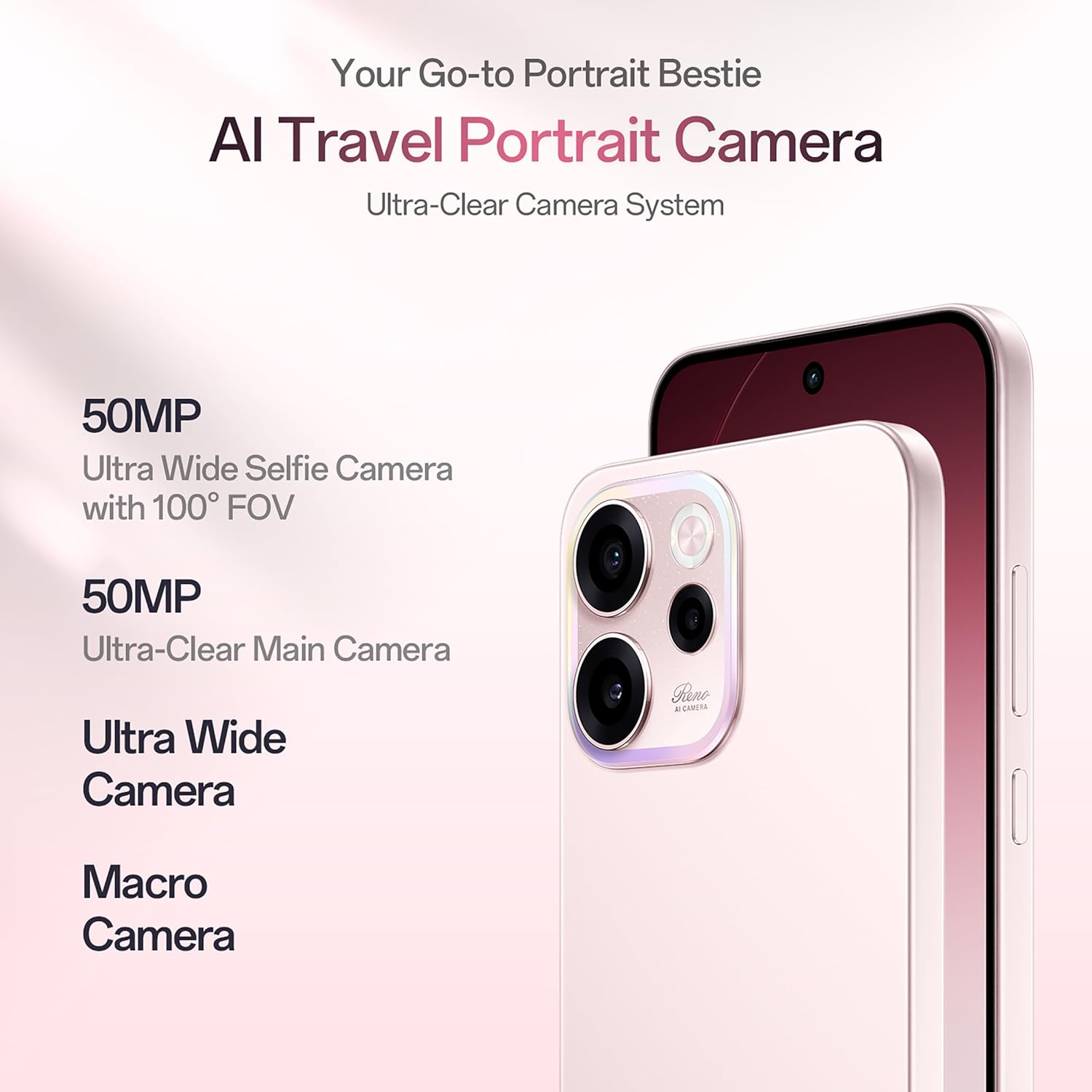
Figure 4.4: Demonstrating 4K Ultra-Clear Video recording on the OPPO Reno15c 5G.
4.3. Prestasi dan Bateri
Powered by the 4nm Snapdragon 6 Gen 1 platform and AI HyperBoost 2.0, the Reno15c 5G ensures stable and cool performance for gaming and multitasking. The 7000mAh battery, combined with 80W SuperVOOC flash charge, provides extended usage and rapid recharging.

Gambar 4.5: Lebihview of the Snapdragon 6 Gen 1 Mobile Platform and its performance enhancements.
4.4. Connectivity and AI Features
The device supports 5G connectivity and features AI LinkBoost 3.0 for enhanced network performance, including AI Gaming Antenna System Acceleration, AI Super Wi-Fi Booster, and AI Network Booster for Teamfights.

Figure 4.6: Explanation of AI LinkBoost 3.0 for optimized connectivity.
Integrated AI Super Tools include real-time AI Translate for conversations and photos, AI Call Summary, VoiceScribe for notes, and AI Mind Space for organizing digital content. Deep Gemini integration and Circle to Search further enhance AI capabilities.

Figure 4.7: AI Mind Space for intelligent organization and recall of screen content.
4.5. Security and Durability
The Reno15c 5G is built with IP69 All-Weather Armour, providing resistance against hot water jets and submersion up to 2 meters. Its All-Round Armour architecture offers superior drop protection. Security features include OPPO Lock for anti-theft and military-grade Private Computing Cloud (PCC) with end-to-end hardware encryption.

Figure 4.8: The OPPO Reno15c 5G demonstrating its IP69 water and dust resistance.
5. Penyelenggaraan
5.1. Membersihkan Peranti Anda
- Gunakan kain lembut dan tidak berbulu untuk mengelap skrin dan badan telefon dengan lembut.
- Elakkan penggunaan bahan kimia yang keras, bahan kasar atau semburan aerosol.
- Untuk calitan degil, sedikit dampen kain dengan air atau pembersih skrin yang direka khusus untuk elektronik.
5.2. Kemas Kini Perisian
Semak dan pasang kemas kini perisian secara kerap untuk memastikan peranti anda mempunyai ciri terkini, tampung keselamatan dan peningkatan prestasi.
- Pergi ke tetapan > Perihal peranti > Versi ColorOS.
- Ketik pada Semak kemas kini.
- If an update is available, follow the on-screen instructions to download and install it. Ensure your device has sufficient battery and a stable internet connection.
5.3. Pengurusan Storan
To maintain optimal performance, regularly manage your device's storage.
- Padam yang tidak perlu files, apps, and media.
- Kosongkan data cache untuk aplikasi dalam tetapan > Apl > Pengurusan apl > [Select App] > Storage usage > Kosongkan cache.
- Utilize cloud storage services for backups of photos and videos.
6. Penyelesaian masalah
This section addresses common issues you might encounter with your OPPO Reno15c 5G.
| Masalah | Penyelesaian yang Mungkin |
|---|---|
| Peranti tidak dihidupkan | Ensure the battery is charged. Connect the charger and wait a few minutes before attempting to power on. If it still doesn't turn on, perform a force restart by holding the Power button and Volume Up button simultaneously for about 10 seconds. |
| Bateri cepat habis | Check for background apps consuming power. Reduce screen brightness, disable unnecessary features like GPS or Bluetooth when not in use. Review battery usage in Settings to identify power-hungry apps. |
| Apl ranap atau beku | Clear the app's cache (Settings > Apps > App management > [App Name] > Storage usage > Clear cache). If the issue persists, try reinstalling the app. Ensure your device software is up to date. |
| Tidak dapat bersambung ke Wi-Fi/Data Mudah Alih | Restart your phone and the Wi-Fi router. Check if Airplane Mode is off. Verify SIM card insertion and mobile data settings. Reset network settings (Settings > System settings > Back up and reset > Reset phone > Reset network settings). |
| Penderia cap jari tidak berfungsi | Ensure your finger is clean and dry. Re-register your fingerprints in Settings > Password & security > Fingerprint. If the issue persists, ensure the screen is clean and free from damage. |
If you encounter issues not listed here or if the suggested solutions do not resolve your problem, please contact OPPO customer support.
7. Spesifikasi
Key technical specifications for the OPPO Reno15c 5G:
| Ciri | Perincian |
|---|---|
| Jenama | OPPO |
| Model | Reno15c 5G |
| Sistem Operasi | Android 15 (ColorOS 16) |
| Memori RAM | 12 GB |
| Kapasiti Storan | 256 GB |
| Saiz Skrin | 6.57 Inci |
| Jenis Paparan | AMOLED, 120Hz Smart Adaptive |
| warna | Afterglow Pink |
| Slot Kad SIM | Dual SIM |
| Jenis Penyambung | USB Jenis C |
| Keselamatan Biometrik | Pengecaman Cap Jari |
| Tahap Ketahanan Air | IP69 Kalis Air |
| Kuasa Bateri | 7000 mAh |
| Berat Barang | 196 Gram |
| Dimensi Item | 15.8 x 7.5 x 0.7 Sentimeter |
| Teknologi Selular | 5G |
| Pembekal Tanpa Wayar | Tidak dikunci untuk Semua Pengangkut |
| Tahun Model | 2026 |
8. Waranti dan Sokongan
8.1. Maklumat Waranti
Your OPPO Reno15c 5G comes with a limited warranty:
- Telefon bimbit: 12 Bulan
- Adapter & Cable: 6 Bulan
Please retain your proof of purchase for warranty claims. The warranty covers manufacturing defects and does not cover damage caused by misuse, accidents, or unauthorized repairs.
8.2. Sokongan Pelanggan
Untuk bantuan teknikal, perkhidmatan atau pertanyaan lanjut, sila hubungi khidmat pelanggan OPPO:
- Pengeluar: OPPO MOBILES INDIA PVT LTD.
- Alamat: TINGKAT 5, Menara B, BANGUNAN, N-8, DLF Cyber City, DLF Fasa 2, Gurugram, Haryana 122002
- Nombor Bebas Tol: 18001032777
Anda juga boleh layari laman rasmi OPPO website for more support resources, FAQs, and service center locations.