
1. Pengenalan
Thank you for choosing the Oraimo Necklace 5 ANC Wireless Neckband Earphones. This manual provides essential information for setting up, operating, and maintaining your earphones. Please read it carefully to ensure optimal performance and longevity of your device.
The Oraimo Necklace 5 ANC earphones are designed for daily music listening, long commutes, hands-free calls, active lifestyles, gaming, and video playback. They feature Active Noise Cancellation (ANC) for an immersive audio experience.
2. Produk Lebihview
2.1 Kandungan Pakej
The following items are included in your Oraimo Necklace 5 package:
- Oraimo Necklace 5 Earphones x1
- Manual Pengguna x1
- Kabel Pengecasan Jenis-C x1
- Extra Ear Tips (S/L sizes) x2 pairs

Figure 2.1: What's in the Box - Oraimo Necklace 5 Earphones, Type-C charging cable, extra ear tips, and user manual.
2.2 Komponen Fon Telinga
Familiarize yourself with the main components of your Oraimo Necklace 5 earphones:
- Ikat leher: Flexible band that rests around your neck.
- Earbud: In-ear design with silicone ear tips.
- Panel Kawalan: Integrated buttons for power, volume, playback, and call management.
- mikrofon: Untuk panggilan bebas tangan.
- Port Pengecasan Jenis-C: Untuk mengecas peranti.

Rajah 2.2: Depan view of the Oraimo Necklace 5 Earphones, showing the neckband and earbuds.
3. Persediaan
3.1 Mengecas Fon Telinga
- Sambungkan kabel pengecas Jenis-C yang disediakan ke port pengecasan pada tali leher.
- Sambungkan hujung kabel yang satu lagi ke penyesuai kuasa USB (tidak disertakan) atau port USB komputer.
- The indicator light will show the charging status. A full charge typically takes a few hours.
Nota: A quick 10-minute charge can provide up to 12 hours of playback time.
3.2 Menghidupkan/Mematikan
The Oraimo Necklace 5 features a magnetic auto switch for convenient power control:
- Hidupkan kuasa: Separate the magnetic earbuds to automatically power on the earphones.
- Matikan: Clip the magnetic earbuds together to automatically power off the earphones.

Figure 3.1: Magnetic Auto Switch for powering the earphones on and off.
3.3 Berpasangan Bluetooth
- Ensure the earphones are powered on (separate the earbuds).
- Pada peranti anda (telefon pintar, tablet, komputer riba), dayakan Bluetooth.
- Cari untuk available Bluetooth devices and select "Oraimo Necklace 5" from the list.
- Sebaik sahaja disambungkan, anda akan mendengar gesaan audio dan lampu penunjuk akan mengesahkan sambungan.
4. Arahan Operasi
4.1 Pembatalan Bising Aktif (ANC)
The Oraimo Necklace 5 features Active Noise Cancellation to reduce ambient noise.
- To activate/deactivate ANC, locate the dedicated ANC button on the control panel and press it.
- An audio prompt will confirm the ANC status.

Figure 4.1: Active Noise Cancellation in action, muting external noise.
4.2 Main Semula Muzik dan Kawalan Kelantangan
Use the control buttons on the neckband to manage your audio:
- Main/Jeda: Tekan butang pelbagai fungsi sekali.
- Lagu Seterusnya: Tekan dan tahan butang Naik Kelantangan.
- Trek Sebelumnya: Tekan dan tahan butang Kurangkan Kelantangan.
- Kelantangan: Tekan butang Kelantangan Naik.
- Perlahankan suara: Tekan butang Kurangkan Kelantangan.
4.3 Pengurusan Panggilan
The earphones support hands-free calling with clear sound quality and AI Call Noise Cancellation.
- Jawab/Tamatkan Panggilan: Tekan butang pelbagai fungsi sekali.
- Tolak Panggilan: Tekan dan tahan butang berbilang fungsi.
- Personalized Vibration Alert: The neckband will vibrate for incoming calls, ensuring you don't miss important communications.

Figure 4.2: Personalized Vibration Alert for incoming calls.
4.4 Sambungan Dwi Peranti
The Oraimo Necklace 5 can connect to two devices simultaneously, allowing for seamless switching.
- Pair the earphones with your first device.
- Disconnect Bluetooth on the first device, then pair with the second device.
- Reconnect Bluetooth on the first device. The earphones should now be connected to both.
- Audio akan bertukar secara automatik kepada peranti yang memainkan kandungan atau menerima panggilan.

Figure 4.3: Dual Device Connection for seamless switching between devices.
4.5 Sound360 Spatial Audio
Experience enhanced audio with Sound360 Spatial Audio, providing a more immersive listening experience.

Figure 4.4: Sound360 Spatial Audio for redefined surround sound.
5. Penyelenggaraan
5.1 Pembersihan
- Regularly clean the earbuds and ear tips with a soft, dry, lint-free cloth.
- Tanggalkan hujung telinga dan bersihkannya dengan sabun lembut dan air jika perlu, pastikan ia kering sepenuhnya sebelum dipasang semula.
- Jangan gunakan bahan kimia yang keras atau bahan kasar untuk pembersihan.
5.2 Penyimpanan
- Simpan fon telinga di tempat yang sejuk dan kering jauh dari cahaya matahari langsung dan suhu yang melampau.
- When not in use, clip the magnetic earbuds together to prevent tangling and conserve battery.
5.3 Tahan Air
The Oraimo Necklace 5 earphones are water resistant, making them suitable for active lifestyles and protection against sweat. However, they are not designed for submersion in water. Avoid exposing them to heavy rain or swimming.
6. Penyelesaian masalah
If you encounter any issues with your Oraimo Necklace 5 earphones, please refer to the following common solutions:
- Tiada Kuasa: Ensure the earphones are charged. Connect them to a power source using the Type-C cable.
- Tidak boleh berpasangan: Make sure Bluetooth is enabled on your device and the earphones are in pairing mode (usually indicated by a flashing light). Try turning Bluetooth off and on again on your device.
- Tiada Bunyi: Check the volume levels on both your earphones and your connected device. Ensure the earphones are properly paired and selected as the audio output.
- Kualiti Bunyi Lemah: Ensure there are no obstructions between the earphones and your device. Move closer to your device to avoid interference. Check if ear tips are properly sealed in your ears.
- ANC Tidak Berfungsi: Ensure the ANC feature is activated using its dedicated button.
If the problem persists, try resetting the earphones (refer to the manufacturer's website or contact support for specific reset instructions if not detailed here).
7. Spesifikasi
| Ciri | Spesifikasi |
|---|---|
| Nama Jenama | Oraimo |
| Nombor Model | OEB-611 |
| Nama Model | Open Fit |
| warna | Hitam |
| Teknologi Ketersambungan | Tanpa wayar |
| Teknologi Komunikasi Tanpa Wayar | Bluetooth |
| Faktor Bentuk Fon Kepala | Dalam Telinga |
| Penempatan Telinga | Di Telinga |
| Impedans | 32 Ohm |
| Kawalan Bunyi | Pembatalan Bunyi Aktif |
| Julat Kekerapan | 20 Hz - 20000 Hz |
| bahan | Plastik, Silikon |
| Tahap Ketahanan Air | Tahan Air |
| Ciri Khas | Noise Cancellation, Personalized Vibration Alert, Magnetic Auto Switch, Sound360 Spatial Audio, Dual Device Connection |
| Jenis Kawalan | Kawalan Butang |
| Kaedah Kawalan | Butang Tekan |
| Berat Barang | 1 Gram |
| Penerangan Waranti | Satu Tahun |
| Peranti Serasi | Desktop Computers, Digital Video Game Consoles, Laptops, Android, iPhone, Game Controllers |
| Kegunaan Disyorkan Untuk Produk | Gaming, Making Calls, Cycling, Outdoors |
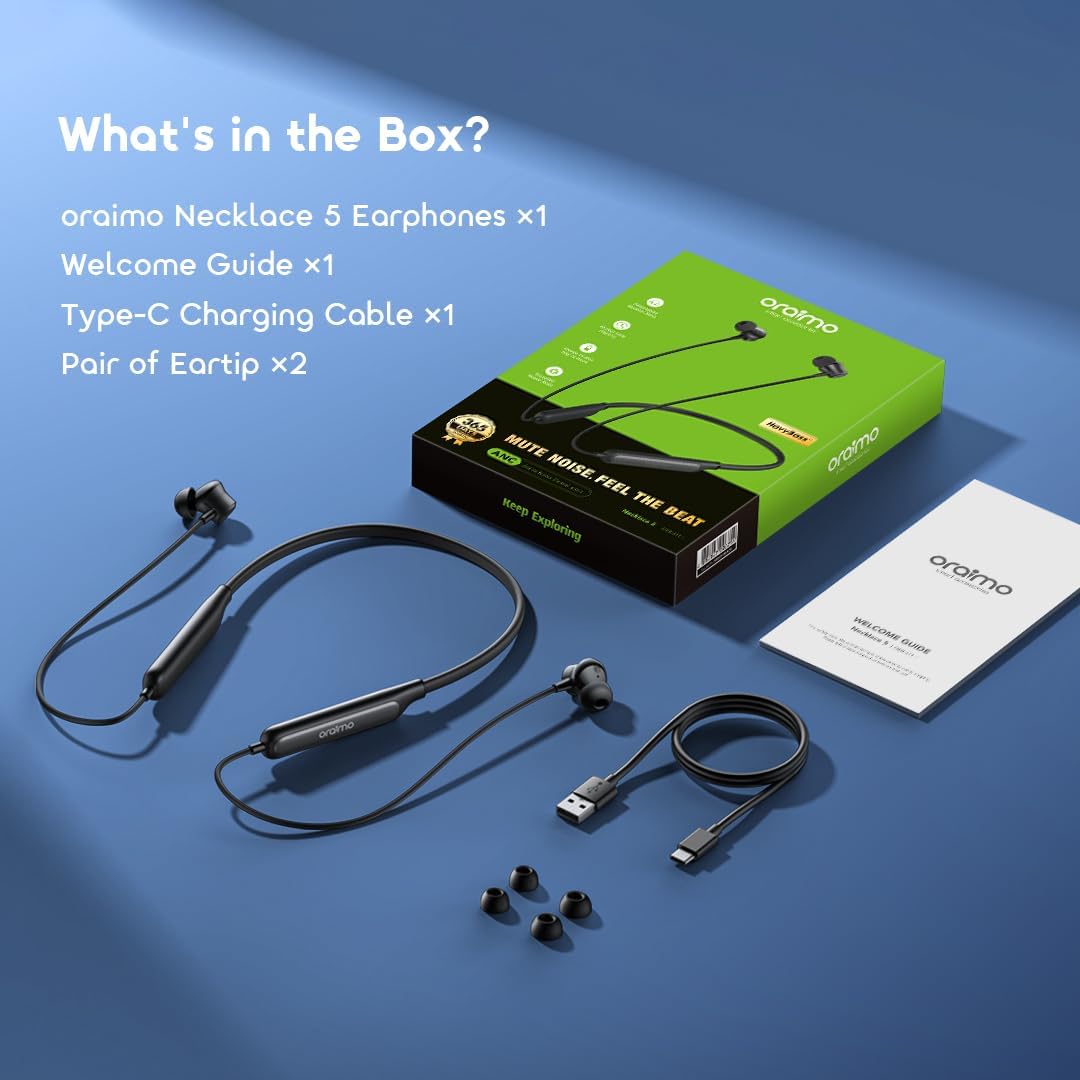
Figure 7.1: Battery performance, showing 40 hours playtime with ANC off and 28 hours with ANC on.
8. Waranti dan Sokongan
8.1 Maklumat Waranti
Your Oraimo Necklace 5 ANC Wireless Neckband Earphones come with a waranti setahun dari tarikh pembelian. Waranti ini meliputi kecacatan pembuatan dan memastikan produk anda berfungsi seperti yang dimaksudkan di bawah penggunaan biasa.
Sila simpan bukti pembelian anda untuk tuntutan waranti.
8.2 Sokongan Pelanggan
For further assistance, technical support, or warranty inquiries, please visit the official Oraimo website or contact their customer service department. Contact details can typically be found on the product packaging or the official Oraimo support page.