
1. Pengenalan
This manual provides essential information for the safe assembly, operation, and maintenance of your URLIFE E20 Electric Bike. Please read this manual thoroughly before your first ride to ensure proper usage and to maximize the lifespan of your e-bike. Retain this manual for future reference.
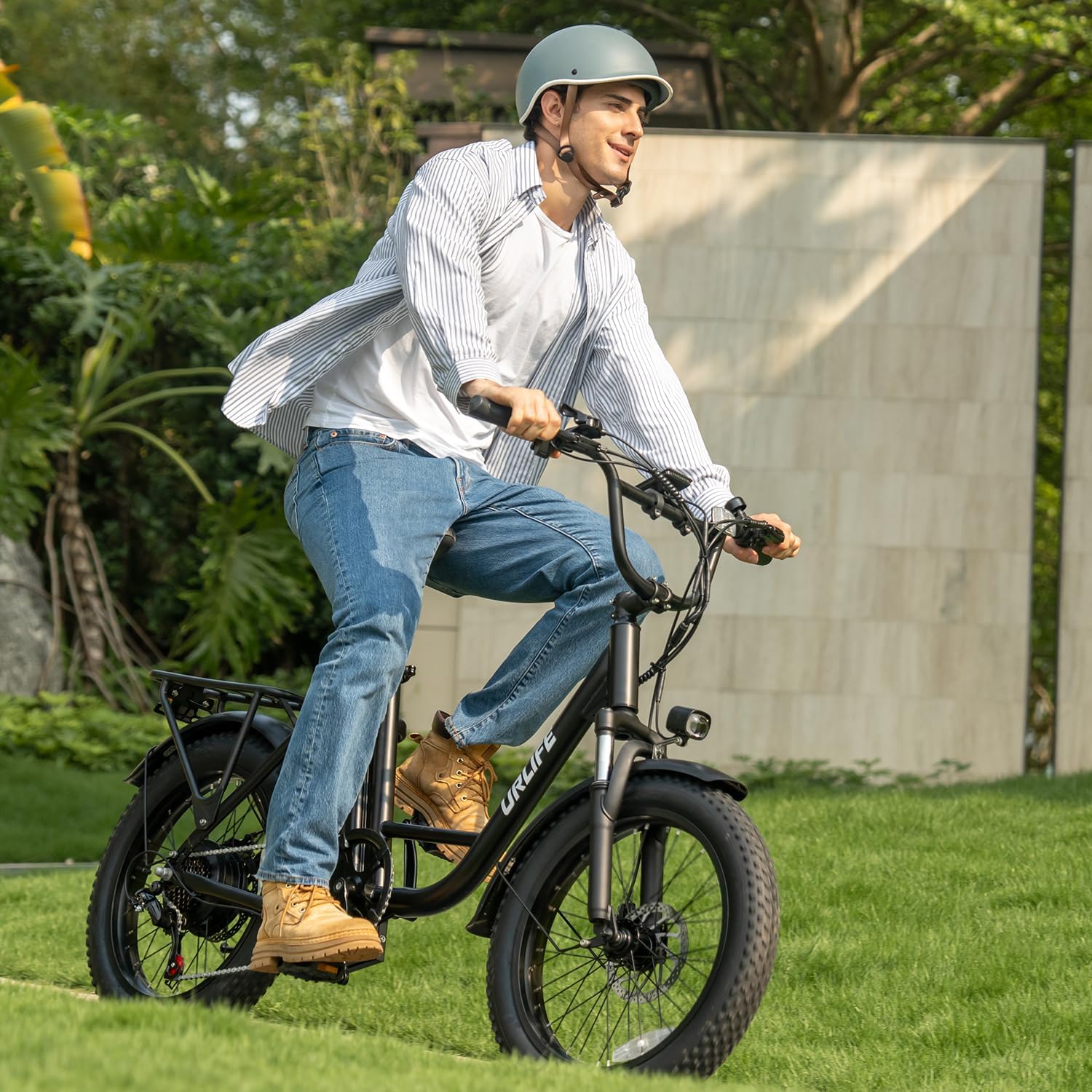
Rajah 1.1: URLIFE E20 Electric Bike in use.
2. Maklumat Keselamatan
Your safety is paramount. Always adhere to local traffic laws and regulations when operating the e-bike. Failure to follow safety guidelines can result in serious injury or property damage.
2.1 Langkah Keselamatan Am
- Always wear a certified helmet and appropriate safety gear (gloves, eye protection) when riding.
- Perform a pre-ride inspection before each use, checking brakes, tire pressure, lights, and battery charge.
- Jangan menunggang di bawah pengaruh alkohol atau dadah.
- Be aware of your surroundings and ride defensively. Avoid distractions such as mobile phones.
- Ensure all components, especially handlebars and wheels, are securely fastened before riding.
2.2 Keselamatan Bateri
- Use only the charger provided by URLIFE.
- Do not overcharge the battery. Disconnect the charger once the battery is fully charged (typically 3-5 hours).
- Jangan dedahkan bateri kepada suhu yang melampau atau cahaya matahari langsung.
- If the battery is damaged or shows signs of overheating, discontinue use immediately and contact support.
3. Kandungan Pakej
awak URLIFE E20 Electric Bike is shipped 90% pre-assembled. Please verify that all the following components are present in the package:
- URLIFE E20 Electric Bike (main frame with rear wheel, motor, and battery installed)
- Roda Depan
- Perhimpunan Hendal
- Seat Post and Saddle
- Pedal (Kiri dan Kanan)
- Pengecas Bateri
- Assembly Tools (Allen wrenches, spanner)
- Manual Pengguna (dokumen ini)
4. Arahan Perhimpunan
Follow these steps to complete the assembly of your URLIFE E20 Electric Bike. It is recommended to have a second person assist with some steps for easier assembly.
4.1 Membongkar dan Pemeriksaan Awal
- Keluarkan semua komponen dari pembungkusan dengan berhati-hati.
- Inspect for any shipping damage. Contact customer support immediately if any damage is found.
4.2 Pemasangan Hendal
- Attach the handlebar to the stem. Ensure the handlebar is centered and aligned correctly.
- Tighten the stem bolts securely using the provided Allen wrench. Amaran: Insufficient tightening can lead to loss of control.

Figure 4.1: Ergonomic Handlebar for comfortable riding position.
4.3 Front Wheel Attachment
- Insert the front wheel into the fork dropouts.
- Ensure the brake rotor is correctly seated within the brake caliper.
- Secure the wheel using the quick-release skewer or axle nuts.
4.4 Pemasangan Pedal
- Identify the Left (L) and Right (R) pedals.
- The Left pedal threads counter-clockwise, and the Right pedal threads clockwise.
- Apply a small amount of grease to the pedal threads and screw them into the crank arms. Tighten firmly with a spanner.
4.5 Pelarasan Tiang Tempat Duduk dan Pelana
- Masukkan tiang tempat duduk ke dalam tiub tempat duduk bingkai.
- Adjust the saddle height to a comfortable riding position where your feet can touch the ground when stopped.
- Secure the seat post with the quick-release lever or bolt.
5. Arahan Operasi
Familiarize yourself with the controls and functions of your URLIFE E20 Electric Bike before riding.
5.1 Menghidupkan/Mematikan
- To power on the e-bike, press and hold the power button on the LCD display for a few seconds.
- Untuk mematikan kuasa, tekan dan tahan butang kuasa sekali lagi.
5.2 Fungsi Paparan LCD
The integrated LCD display provides real-time information about your ride.

Figure 5.1: Color HD LCD Display.
- Mod Kelajuan: Memaparkan kelajuan semasa.
- Penunjuk Bateri: Menunjukkan baki cas bateri.
- Peringkat PAS: Indicates the current pedal-assist level.
- Paparan berangka: Shows trip distance, odometer, or other metrics.
5.3 Mod Menunggang
The URLIFE E20 offers three riding modes:

Figure 5.2: Three Riding Modes.
- Mod Elektrik Tulen: Engages the motor via a throttle for propulsion without pedaling.
- Mod Bantuan Pedal (PAS): Provides motor assistance as you pedal. Adjust the assist level via the display controls.
- Mod Sukan: Combines pedal power with maximum motor assistance for enhanced performance.
5.4 Penukaran Gear
The e-bike is equipped with a 7-speed gearing system for adapting to various terrains and riding conditions.

Figure 5.3: Precise 7-Speed Gearing.
- Use the shifter on the handlebar to change gears.
- Shift to lower gears for climbing hills and higher gears for flat terrain or downhill riding.
5.5 Lights Operation
The e-bike features bright front and rear safety lights for improved visibility.

Figure 5.4: Bright Front & Rear Safety Lights.
- Turn on the lights using the dedicated button on the handlebar or display control panel.
- Pastikan lampu berfungsi sebelum menunggang dalam keadaan cahaya malap.
6. Bateri dan Pengecasan
The URLIFE E20 is equipped with a 48V 13AH lithium battery, offering a range of up to 80 miles.

Figure 6.1: 48V 13AH Long-Range Battery.
6.1 Prosedur Pengecasan
- Locate the charging port on the e-bike frame.
- Sambungkan pengecas ke port pengecasan, kemudian palamkan pengecas ke soket dinding standard.
- The charging indicator on the charger will show the charging status.
- Charging typically takes 3-5 hours for a full charge. Disconnect the charger once complete.
6.2 Penjagaan Bateri
- Elakkan daripada menghabiskan bateri sepenuhnya sebelum mengecas semula.
- Store the e-bike and battery in a cool, dry place when not in use.
- If storing for an extended period, charge the battery to approximately 50-70% and recharge every 1-2 months.
7. Penyelenggaraan
Regular maintenance ensures the longevity and safe operation of your URLIFE E20 Electric Bike.
7.1 Pemeriksaan Rutin
- Tayar: Check tire pressure before each ride. The 20" x 3" fat tires provide excellent traction across various terrains.
- Brek: Ensure brake levers are firm and responsive. Adjust as needed.
- rantai: Keep the chain clean and lubricated for smooth gear changes.
- Pengikat: Periodically check all bolts and nuts for tightness, especially on the handlebars, wheels, and seat post.

Figure 7.1: 20 inch x 3.0 Fat Tires for all-terrain performance.
7.2 Pembersihan
- Lap bingkai dengan iklanamp kain. Elakkan menggunakan pencuci tekanan tinggi secara langsung pada komponen elektrik.
- Clean the drivetrain regularly to remove dirt and grime.
8. Penyelesaian masalah
Bahagian ini membincangkan isu-isu biasa yang mungkin anda hadapi dengan URLIFE E20 Electric Bike.
| Masalah | Kemungkinan Punca | Penyelesaian |
|---|---|---|
| Basikal elektrik tidak boleh dihidupkan | Bateri tidak dicas atau tidak disambungkan dengan betul. | Pastikan bateri dicas sepenuhnya dan dipasang dengan kukuh. Periksa butang kuasa. |
| Motor tidak membantu | PAS level is set to 0, or a sensor issue. | Increase PAS level on the display. Check for loose cable connections. |
| Brek terasa lemah | Brake pads worn or cable tension is low. | Inspect brake pads for wear. Adjust brake cable tension. Consult a bike mechanic if unsure. |
| Handlebar feels loose | Stem bolts are not sufficiently tightened. | Re-tighten all stem bolts securely using an Allen wrench. |
| Battery range is shorter than expected | Riding conditions (hills, heavy load), high assist level, or tire pressure. | Maintain proper tire pressure. Use lower assist levels when possible. Avoid carrying excessive weight. |
9. Spesifikasi
Spesifikasi teknikal terperinci untuk URLIFE E20 Electric Bike.

Rajah 9.1: URLIFE E20 Electric Bike Dimensions.
| Ciri | Spesifikasi |
|---|---|
| Nombor Model | E20 |
| Dimensi Produk | 176 x 72 x 122 cm |
| Berat Barang | 36 kg (79.4 lbs) |
| Cadangan Berat Maksimum | 120 kg (265 lbs) |
| Motor Wattage | 250 watts (Peak 1000W) |
| Bateri | Bateri Litium 48V 13AH (Jam 624 Watt) |
| Kelajuan Maks | 28 MPH (45 km/j) |
| Julat Maks | 80 batu (128 km) |
| Masa Mengecas | 3-5 jam |
| Saiz Roda | 20 Inci |
| Lebar Tayar | 3 Inci (Tayar Gemuk) |
| Bahan Bingkai | Keluli Karbon |
| Jenis Penggantungan | Dual (Front Fork Suspension) |
| Bilangan Kelajuan | 7 |
| Gaya Brek | Cakera |
| Penilaian Kalis Air | IP54 (Display) |
| Pensijilan | Diperakui UL 2849 |
10. Waranti dan Sokongan
URLIFE is committed to providing quality products and customer satisfaction.
10.1 Waranti Produk
The URLIFE E20 Electric Bike comes with a Waranti 1 Tahun from the date of purchase, covering manufacturing defects. This warranty does not cover damage due to misuse, accidents, or normal wear and tear.
10.2 Sokongan Pelanggan
For any questions, concerns, or technical assistance, please contact URLIFE customer support. When contacting support, please provide your model number (E20) and a detailed description of the issue, including photos or videos if applicable.
e-mel: perkhidmatan @urlifebike.com
We guarantee a response within 24 hours.
10.3 Authorized Sellers
To ensure you receive genuine URLIFE products and valid warranty support, please purchase only from authorized sellers. URLIFE-US and URLIFE-EBIKE are official distributors.