
1. Pengenalan
This manual provides essential instructions for the proper use and maintenance of your XIAOMI REDMI Buds 8 Pro wireless earbuds. Please read this manual thoroughly before using the product to ensure optimal performance and longevity.
2. Apa yang ada di dalam Kotak
Sahkan bahawa semua item terdapat dalam pakej:
- XIAOMI REDMI Buds 8 Pro Wireless Earbuds
- Sarung Pengecas Tanpa Wayar
- Kabel Pengecas USB
- Petua Telinga (pelbagai saiz)
- Manual Pengguna (dokumen ini)
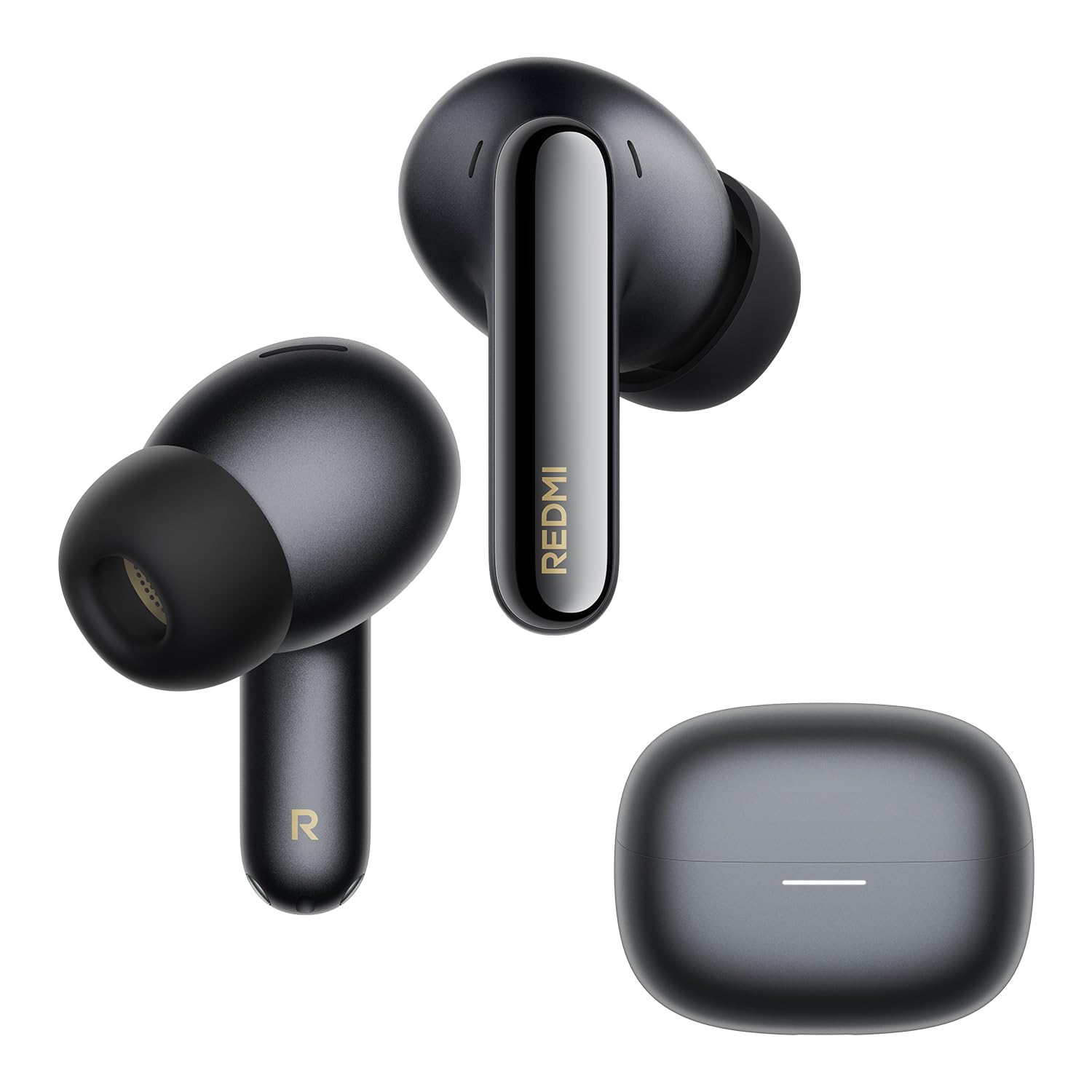
Image: The XIAOMI REDMI Buds 8 Pro earbuds and their charging case, typically included in the product package.
3. Ciri-ciri Produk
- Pembatalan Bunyi Aktif (ANC): Up to 55 dB intelligent ANC with ultra-wide frequency noise cancellation (up to 5 kHz) to reduce ambient noise.
- ANC Adaptif: Real-time noise cancellation that identifies environmental noise and automatically adjusts to your surroundings and earbud fit.
- Kosongkan Panggilan: AI noise reduction with a triple microphone system ensures clear calls, even in windy conditions (up to 12 m/s wind resistance).
- Audio Resolusi Tinggi: Hi-Res Audio certified with powerful triple coaxial drivers for detailed and rich sound.
- Audio Dolby: Enhanced audio experience with clear dialogue and realistic surround sound for various media.
- Dimensional Audio: Immersive audio with dynamic head tracking for music, videos, and games.
- Hayat Bateri yang Panjang: Up to 8 hours on a single charge, and up to 33 hours with the charging case.
- Pengecasan Cepat: 5 minutes of charging provides approximately 2 hours of playback.
- Rintangan Air dan Habuk IP54: Protection against splashes and dust.
- Bluetooth 5.4: Improved connection stability and efficiency.
- Sambungan Berbilang Peranti: Sambungkan ke dua peranti secara serentak untuk pensuisan yang lancar.
- Google Fast Pair: Gandingan pantas dan mudah dengan peranti Android.
- Xiaomi Earbuds App: Customize gestures, audio settings, and more.

Image: Illustration demonstrating the noise reduction capabilities of the earbuds.
4. Persediaan
4.1. Mengecas Fon Telinga dan Sarung
- Letakkan fon telinga ke dalam bekas pengecasan.
- Sambungkan kabel pengecas USB ke port pengecasan pada bekas dan ke sumber kuasa.
- The indicator light on the case will show charging status. Ensure the case is fully charged before first use.
A full charge takes approximately 60 minutes for the earbuds and case.
4.2. Pairing with a Device (Google Fast Pair)
- Pastikan Bluetooth diaktifkan pada peranti Android anda.
- Open the charging case with the earbuds inside and place it near your device.
- A pop-up notification for Google Fast Pair should appear on your device. Tap to connect.
- If the notification does not appear, manually search for "REDMI Buds 8 Pro" in your device's Bluetooth settings.

Image: Visual representation of the Google Fast Pair process with a smartphone and the earbud case.
4.3. Sambungan Berbilang Peranti
The earbuds support simultaneous connection to two devices. Once paired with two devices, the earbuds will automatically switch audio sources between them. For example, if you are listening to music on a tablet and receive a call on your phone, the earbuds will switch to the phone call.

Image: Diagram illustrating the multi-device connection feature, showing earbuds connected to both a smartphone and a tablet.
4.4. Memasang Putik Telinga
Select the ear tips that provide the best seal and comfort for your ears. A good seal is crucial for optimal sound quality and noise cancellation performance.
5. Arahan Operasi
5.1. Kawalan Sentuh
The REDMI Buds 8 Pro feature touch controls on each earbud. Specific gestures can be customized via the Xiaomi Earbuds app.
| Tindakan | Fungsi |
|---|---|
| Ketik Tunggal | Main/Jeda, Jawab Panggilan |
| Ketik Dua Kali | Laluan Seterusnya, Tamatkan Panggilan |
| Ketik Tiga Kali | Previous Track, Activate Voice Assistant |
| Press and Hold (Left Earbud) | Togol Mod ANC/Ketelusan |
| Press and Hold (Right Earbud) | Togol Mod ANC/Ketelusan |
5.2. Pembatalan Bunyi Aktif (ANC) dan Mod Ketelusan
The earbuds feature multiple ANC modes and a Transparency mode. Use the touch controls or the Xiaomi Earbuds app to switch between modes:
- ANC Hidupkan: Mengurangkan bunyi ambien untuk pengalaman mendengar yang mengasyikkan.
- Mod Ketelusan: Allows you to hear your surroundings while listening to audio, useful for awareness in urban environments.
- ANC Dimatikan: Mod pendengaran standard tanpa pembatalan hingar aktif.

Image: Illustration showing the "Immersive Commute Mode" with icons for airplane, train, and public transport, indicating optimized noise cancellation for these environments.
5.3. Xiaomi Earbuds App
Download the Xiaomi Earbuds app from your device's app store (Google Play Store for Android, Apple App Store for iOS) to access advanced features:
- Sesuaikan kawalan sentuh.
- Adjust ANC levels and modes.
- Equalizer settings for personalized audio.
- Kemas kini firmware.
- Battery status display.

Image: Screenshots of the Xiaomi Earbuds app interface, showing various settings and controls for the earbuds.
6. Penyelenggaraan
6.1. Pembersihan
- Bersihkan fon telinga dan bekas pengecas dengan kerap menggunakan kain yang lembut, kering dan tidak berbulu.
- Tanggalkan hujung telinga dan bersihkannya dengan air dan sabun lembut jika perlu, pastikan ia benar-benar kering sebelum dipasang semula.
- Gently clean the charging contacts on both the earbuds and inside the case with a dry cotton swab to ensure proper connection.
6.2. Penyimpanan
Apabila tidak digunakan, simpan fon telinga dalam bekas pengecasnya untuk melindunginya daripada habuk dan kerosakan serta memastikan ia dicas.
6.3. Rintangan Air dan Debu (IP54)
The earbuds are rated IP54 for dust and splash resistance. This means they can withstand light rain and sweat but are not suitable for swimming, showering, or submersion in water. Avoid exposing them to high-pressure water or extreme humidity.

Image: Illustration depicting the IP54 rating, showing earbuds with water droplets, indicating splash and dust resistance.
7. Penyelesaian masalah
7.1. Earbuds Not Charging or Turning On
- Verify the charging case battery level. If low, charge the case first.
- Inspect the charging contacts on the earbuds and inside the case for dirt, deformation, or damage. Ensure clean and proper contact.
- Attempt to reset the earbuds: Place them in the case with the lid open. Press and hold the function button on the bottom of the case for 10 seconds until the LED flashes rapidly. The earbuds will reset to factory settings and enter pairing mode. Then, re-pair them with your device.
- Jika masalah berterusan, hubungi sokongan pelanggan.

Image: A section from a manual detailing steps to troubleshoot charging or power-on issues for the earbuds.
7.2. Disconnections or Audio Latency
Disconnections or audio latency can be influenced by environmental factors, network conditions, and the processing speed of the audio codec. As true wireless earbuds, the REDMI Buds 8 Pro may experience slight audio delay during transmission from the phone to the primary and secondary earbuds.
Pertimbangkan perkara berikut:
- Pastikan peranti anda berada dalam julat Bluetooth (sehingga 10 meter).
- Kurangkan gangguan daripada peranti wayarles lain.
- Update the earbud firmware via the Xiaomi Earbuds app.
- If using the LDAC audio codec and a sampling rate of 96 kHz or higher, dimensional audio effects may not be supported, potentially affecting performance.

Image: A section from a manual addressing potential disconnections or audio latency issues.
7.3. Dimensional Audio Compatibility
The REDMI Buds 8 Pro are compatible with dimensional audio. To enable this feature:
- In the Xiaomi Earbuds app, connect the REDMI Buds 8 Pro, go to the home page, select [Audio], then enable [Dimensional Audio] (Immersive Sound).
- On Xiaomi or REDMI phones, go to Bluetooth device list, tap the icon next to REDMI Buds 8 Pro, select [Dimensional Audio], then enable [Immersive Sound].
Nota:
- Dimensional audio is not compatible with all Xiaomi phones. Some models may not support this function even after updating to the latest system version. Compatibility will gradually improve with future system updates.
- If the audio codec is set to LDAC and the sampling rate is 96 kHz or higher, dimensional audio effects are not supported.
8. Spesifikasi
| Ciri | Perincian |
|---|---|
| Nama Model | XIAOMI REDMI Buds 8 Pro |
| Nombor Model | M2535E1 |
| warna | Hitam |
| Penempatan Telinga | Dalam Telinga |
| Teknologi Ketersambungan | Wayarles (Bluetooth) |
| Versi Bluetooth | 5.4 |
| Julat Bluetooth | 10 Meter |
| Kawalan Bunyi | Pembatalan Bising Aktif (ANC) |
| Respons Kekerapan | 20 Hz - 40000 Hz |
| Impedans | 16 ohm |
| Sensitiviti | 123 dB |
| Jenis Pemacu Audio | Pemandu Dinamik |
| Saiz Pemacu Audio | 14.2 Milimeter |
| Latensi Audio | 45 milisaat |
| Jenis Kawalan | Kawalan Sentuh |
| Hayat Bateri (Earbud) | Sehingga 8 Jam |
| Hayat Bateri (dengan Sarung) | Sehingga 33 Jam |
| Masa Mengecas | 60 Minit |
| Tahap Ketahanan Air | IP54 (Splash and Dust Resistant) |
| Dimensi Produk | 3.06 x 2.13 x 2.45 cm |
| Berat Produk | 46.9 Gram |
| bahan | plastik |
| Peranti Serasi | Semua peranti berdaya Bluetooth |
9. Maklumat Waranti
The XIAOMI REDMI Buds 8 Pro comes with a Waranti pengilang selama 2 tahunSila simpan bukti pembelian anda untuk tuntutan jaminan. Jaminan ini meliputi kecacatan bahan dan mutu kerja di bawah penggunaan biasa. Ia tidak meliputi kerosakan yang disebabkan oleh salah guna, kemalangan, pengubahsuaian tanpa kebenaran atau haus dan lusuh biasa.
For detailed warranty terms and conditions, please refer to the official XIAOMI webtapak atau hubungi perkhidmatan pelanggan mereka.
10. Sokongan
For further assistance, technical support, or service inquiries regarding your XIAOMI REDMI Buds 8 Pro, please utilize the following resources:
- Xiaomi Earbuds App: The app provides access to FAQs, troubleshooting tips, and direct support options.
- Official Xiaomi Webtapak: Visit the official XIAOMI website for product information, support articles, and contact details for your region.
- Perkhidmatan Pelanggan: Rujuk kepada maklumat hubungan yang diberikan dalam pembungkusan produk anda atau pada pegawai rasmi website for direct customer service.


