
DOOGEE Blade10 Power
Manual Pengguna Telefon Pintar Lasak DOOGEE Blade10 Power
Model: Blade10 Power
pengenalan
This manual provides detailed instructions for the safe and efficient use of your DOOGEE Blade10 Power rugged smartphone. Please read this manual thoroughly before operating the device and retain it for future reference.
The DOOGEE Blade10 Power is designed for durability and performance, featuring a large 10300mAh battery, Android 16 with Gemini AI integration, 24GB RAM, 256GB internal storage (expandable to 2TB), a 6.6-inch HD+ 90Hz display, and a 50MP AI main camera. It is built to withstand challenging environments with IP68/IP69K and MIL-STD-810H certifications.
Persediaan
1. Tanpa Peti Masuk
Carefully open the product packaging and ensure all components are present. The package typically includes the DOOGEE Blade10 Power smartphone, a charger, a USB cable, a screen protector, and a user manual.
Video: DOOGEE Blade 10 Power Unboxing. This video demonstrates the unboxing process and contents of the product package.
2. Pemasangan Kad SIM dan Kad TF
The Blade10 Power supports a triple card slot design, allowing for two SIM cards and one TF (microSD) card. Ensure the device is powered off before inserting or removing cards.
- Cari dulang kad SIM di sisi peranti.
- Gunakan alat ejektor SIM yang disediakan untuk membuka dulang.
- Place your Nano SIM cards and TF card into the designated slots on the tray.
- Masukkan semula dulang dengan berhati-hati ke dalam peranti sehingga ia berbunyi pada tempatnya.

Image: Illustration of the triple card slot, showing placement for two Nano SIM cards and one TF card.
3. Hidupkan dan Pengecasan Awal
Press and hold the power button until the DOOGEE logo appears. For optimal performance, it is recommended to fully charge the device before first use. The device supports 18W fast charging.

Image: The DOOGEE Blade10 Power connected to a charger, highlighting its 10300mAh battery and 18W fast charging capability.
Mengendalikan Telefon Pintar Anda
1. Sistem Pengendalian Android 16
The DOOGEE Blade10 Power operates on Android 16, offering enhanced performance, privacy controls, and system efficiency. It integrates Google Gemini AI for features such as real-time translation, text and image recognition, and smart route planning.

Image: The Android 16 operating system interface, showcasing its features and a small Android robot figure.

Image: Visual representation of Gemini AI capabilities, including content creation, image analysis, and code development.
2. Ciri Paparan
The device features a 6.6-inch HD+ IPS screen with a 90Hz refresh rate for smooth visuals. It has a notch-less punch design and 380 nits brightness for visibility in various lighting conditions.
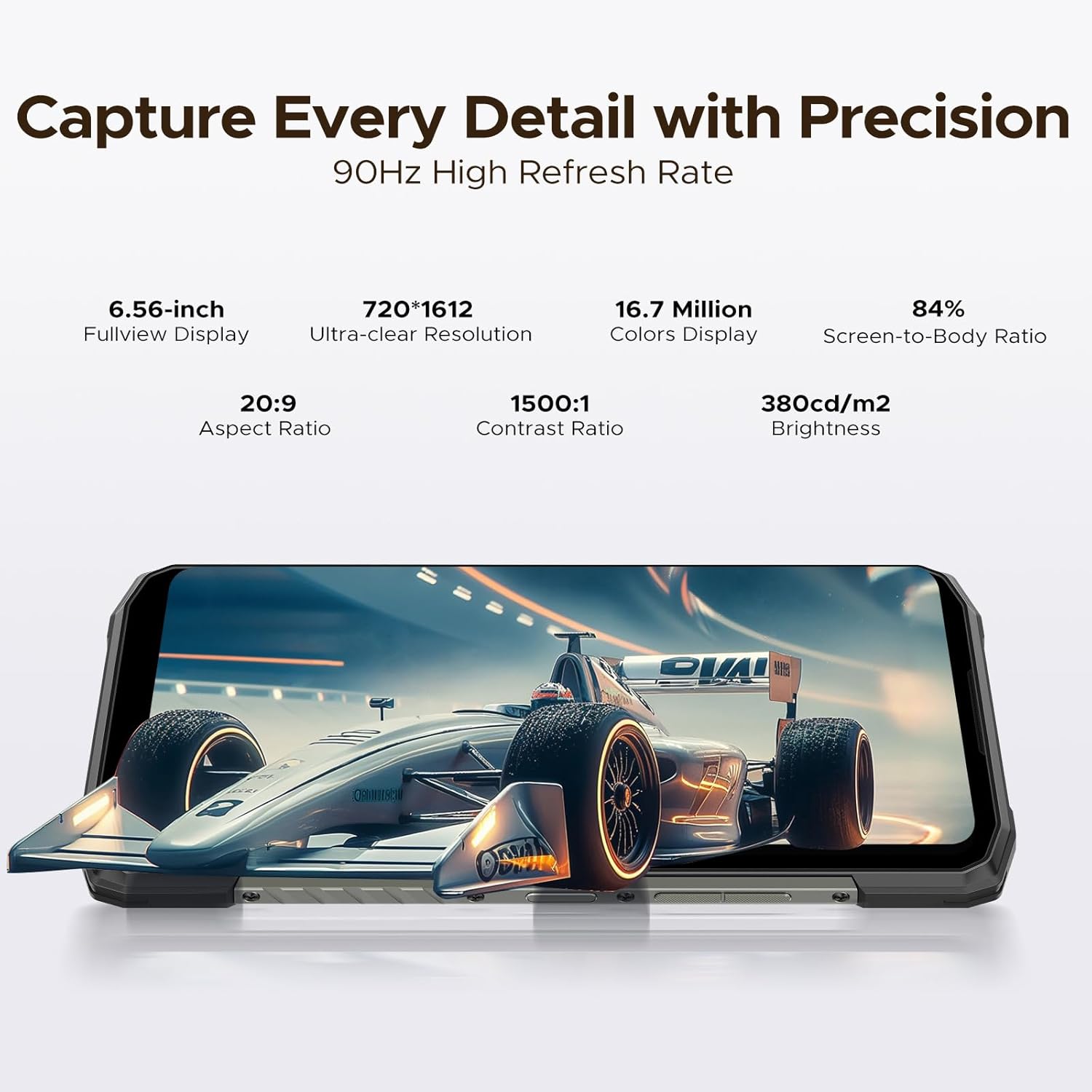
Image: The 6.6-inch HD+ IPS display of the Blade10 Power, highlighting its 90Hz refresh rate and other display specifications.
Mod Sarung Tangan
The Glove Mode feature allows for accurate and responsive touch input even when wearing gloves, facilitating use in various environments.

Image: A hand wearing a glove interacting with the smartphone screen, demonstrating the Glove Mode functionality.
3. Kefungsian Kamera
The Blade10 Power is equipped with a 50MP AI main camera, supporting HDR, Pro Mode, and Panorama. The 8MP front camera is suitable for selfies and video calls.

Imej: A terperinci view of the 50MP AI main camera system on the rear of the Blade10 Power.

Imej: Cthamples of various photography modes available on the Blade10 Power, including Portrait, HDR, Pro, and Panorama.
4. Prestasi dan Storan
The device features 24GB RAM (16GB physical + 8GB virtual) and 256GB internal storage, expandable up to 2TB via TF card. It is powered by an efficient T615 Octa-Core Chipset.
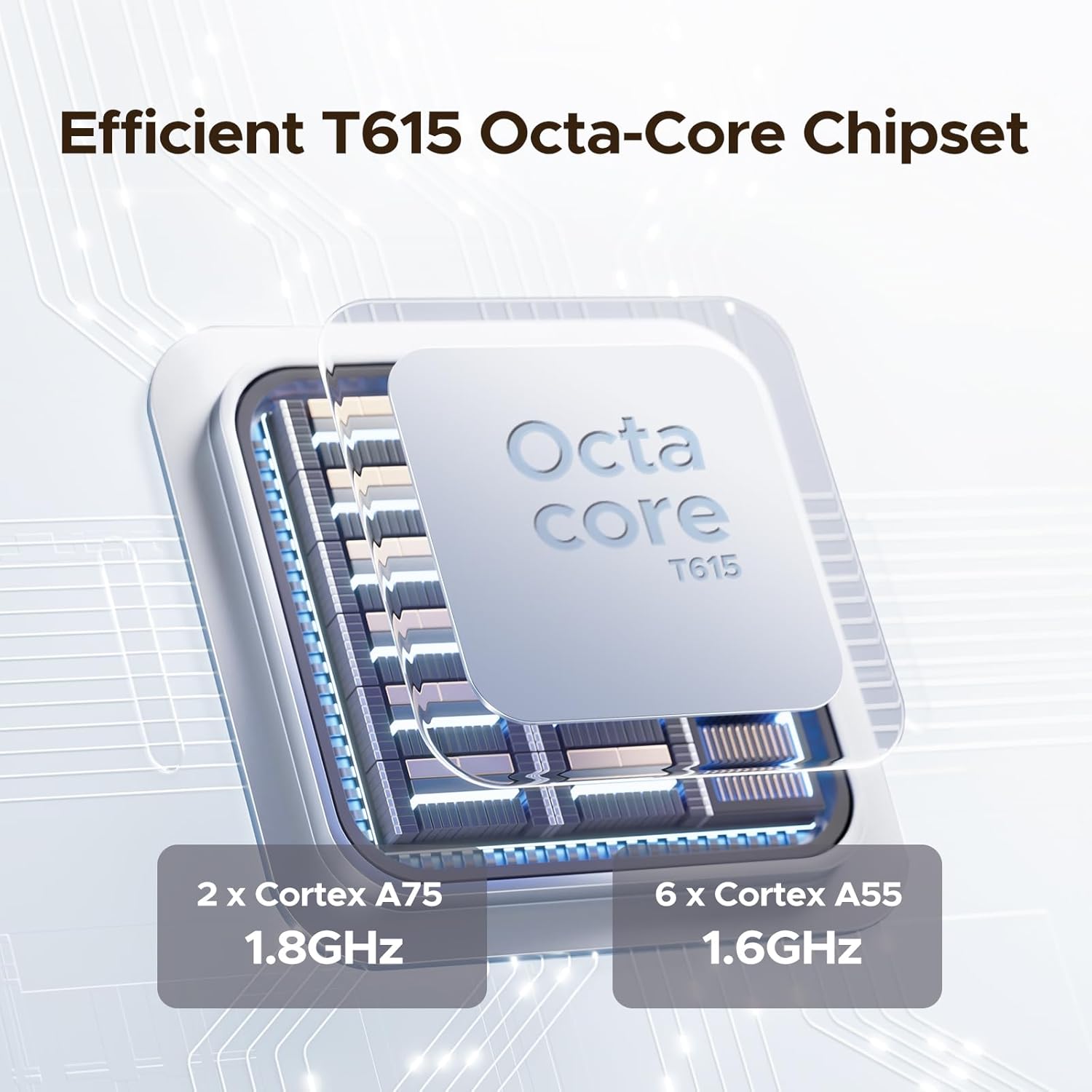
Image: Diagram illustrating the T615 Octa-Core Chipset, detailing its core configuration.

Image: Visual representation of the 24GB RAM and 256GB ROM, emphasizing expandable storage up to 2TB.
5. Biometric Security and Connectivity
The Blade10 Power includes both face recognition and fingerprint recognition for secure unlocking. It supports NFC for convenient transactions and Wi-Fi 6E for fast wireless connectivity.

Image: Demonstrations of the side fingerprint recognition and face recognition features for device security.

Image: Icons illustrating key features such as the triple card slot, navigation system, NFC, custom button, and smart gesture controls.
Penyelenggaraan dan Ketahanan
The DOOGEE Blade10 Power is built to withstand harsh conditions, featuring IP68/IP69K water and dust resistance, and MIL-STD-810H compliance for shock resistance.
- Tahan Air dan Debu: Rated IP68/IP69K, meaning it can withstand submersion in water up to 1.5 meters for 30 minutes and is protected against dust and high-pressure water jets.
- Rintangan Kejutan: MIL-STD-810H compliant, designed to endure drops from up to 1.5 meters.

Imej: Meletup view of the smartphone's construction, detailing its robust components like high-strength cover, titanium alloy, and TPU protection.

Image: The Blade10 Power shown in water and mud, illustrating its IP68/IP69K and MIL-STD-810H durability ratings.
Arahan Pembersihan
To clean your device, power it off and wipe it with a soft, damp cloth. Avoid using harsh chemicals or abrasive materials that could damage the device's protective coatings.
Menyelesaikan masalah
If you encounter issues with your DOOGEE Blade10 Power, consider the following general troubleshooting steps:
- Peranti tidak dihidupkan: Pastikan bateri telah dicas. Sambungkan peranti ke pengecasnya dan tunggu beberapa minit sebelum cuba menghidupkannya semula.
- Apl membeku atau ranap: Close and restart the problematic application. If the issue persists, clear the app's cache or reinstall it.
- Sambungan rangkaian yang lemah: Check your SIM card installation. Ensure you are within network coverage. Restart the device. Verify network band compatibility with your carrier.
- Ketidakresponsifan skrin sentuh: Restart the device. If the issue continues, perform a factory reset (note: this will erase all data).
- Bateri cepat habis: Kurangkan kecerahan skrin, tutup aplikasi yang tidak digunakan dan lumpuhkan ciri yang tidak diperlukan seperti Wi-Fi, Bluetooth atau GPS apabila tidak digunakan.
Untuk isu yang lebih rumit, rujuk sokongan rasmi DOOGEE webtapak atau hubungi perkhidmatan pelanggan.
Spesifikasi
| Ciri | Spesifikasi |
|---|---|
| Jenama | DOOGEE |
| Model | Blade10 Power |
| Sistem Operasi | Android 16 |
| RAM | 24 GB (16GB fizikal + 8GB maya) |
| Storan Dalaman | 256 GB |
| Storan Boleh Dikembangkan | Sehingga 2 TB melalui kad TF |
| Saiz Skrin | 6.6 Inches HD+ IPS |
| Resolusi | 1280 x 720 (Max Display Resolution: 1920 x 1080) |
| Kadar Segar Semula | 90 Hz |
| Kamera Utama | Kamera AI 50 MP |
| Kamera Depan | 8 MP |
| Kapasiti Bateri | 10300 mAh |
| Mengecas | Pengecasan Pantas 18W, Pengecasan Songsang OTG |
| Ketahanan | IP68/IP69K, MIL-STD-810H |
| Slot Kad SIM | Triple SIM (2 Nano SIM + 1 TF Card) |
| Keselamatan Biometrik | Face Recognition, Fingerprint Recognition |
| Ketersambungan | 4G LTE, Wi-Fi 6E, NFC |
| Jack Fon Kepala | 3.5 mm |
Network Band Compatibility: Sebelum pembelianasing, verify compatibility with your local frequency bands. Supported bands include: GSM: B2/3/5/8; WCDMA: B1/2/4/5/8; TDD: B34/38/39/40/41; FDD: 1/2/3/4/5/7/8/18/19/20/25/26/28AB/66.
Waranti dan Sokongan
DOOGEE offers comprehensive customer support for your Blade10 Power smartphone.
- Jaminan Wang Dikembalikan 30 Hari: If you are not satisfied with your purchase, you may be eligible for a money-back guarantee and free return within 30 days.
- Waranti Terhad 2 Tahun: The device comes with a 2-year limited warranty covering manufacturing defects. Please retain your proof of purchase for warranty claims.
- Sokongan Dalam Talian 24/7: For any inquiries or technical assistance, 24/7 online support is available. Refer to the official DOOGEE weblaman web untuk maklumat hubungan.

Image: Summary of customer service offerings, including money-back guarantee, limited warranty, and online support.
Sumber Tambahan
For more information, updates, or to access additional support, please visit the official DOOGEE webtapak:
Video: DOOGEE Blade 10 Power Android 16 Rugged Phone overview. Video ini memberikan gambaran umumview of the smartphone's features and capabilities.
Ask a question about this manual
Ask about setup, troubleshooting, compatibility, parts, safety, or missing instructions. Manuals+ will review the question and use this page’s manual context to help answer it.