
1. Pengenalan
This user manual provides comprehensive instructions for the installation, operation, and maintenance of your Polarlander B5350 Car Stereo. Please read this manual thoroughly before using the product to ensure proper functionality and to prevent damage. Keep this manual for future reference.
2. Maklumat Keselamatan
- Keselamatan Memandu: Always prioritize safe driving. Do not operate the system in a way that distracts you from the road.
- Pemasangan: Professional installation is recommended. Ensure all wiring is correctly connected to prevent short circuits or damage.
- Bekalan Kuasa: Connect the unit to a 9-30V DC power supply. Incorrect voltage boleh menyebabkan kerosakan.
- Suhu: Kendalikan unit dalam julat suhu yang ditetapkan dari -20 ℃ hingga 60 ℃.
- Kelembapan: Jauhkan unit daripada air dan kelembapan berlebihan.
3. Kandungan Pakej
Sahkan bahawa semua item terdapat dalam pakej:
- Unit Utama (Stereo Kereta)
- Waterproof Power Cord
- Fixed Mounting Bracket Set (Hardware bracket + Sunshade)
- MINI-USB to USB2.0 Cable
- Manual Pengguna (dokumen ini)

Image 3.1: Contents of the Polarlander B5350 package, including the main unit, power cord, mounting bracket, and USB cable.
4. Produk Lebihview
The Polarlander B5350 is a double DIN car stereo featuring a 5.0-inch touchscreen display with 800x480 resolution. It supports wireless CarPlay and Android Auto, Bluetooth 5.0, and various media playback options.
4.1 Panel Hadapan dan Paparan
The front panel features the 5.0-inch touchscreen, which is the primary interface for controlling the unit. The display provides access to various functions including navigation, media playback, and phone calls.

Imej 4.1: Cthamples of the user interface display, showing various application icons and menu layouts.
4.2 Side and Rear Connections
The unit includes several ports for connectivity and expansion:
- Jack fon kepala: For private audio listening.
- Slot Kad TF: For media playback from a TransFlash (MicroSD) card.
- MINI to USB Interface: For connecting USB devices or the provided MINI-USB to USB2.0 cable.
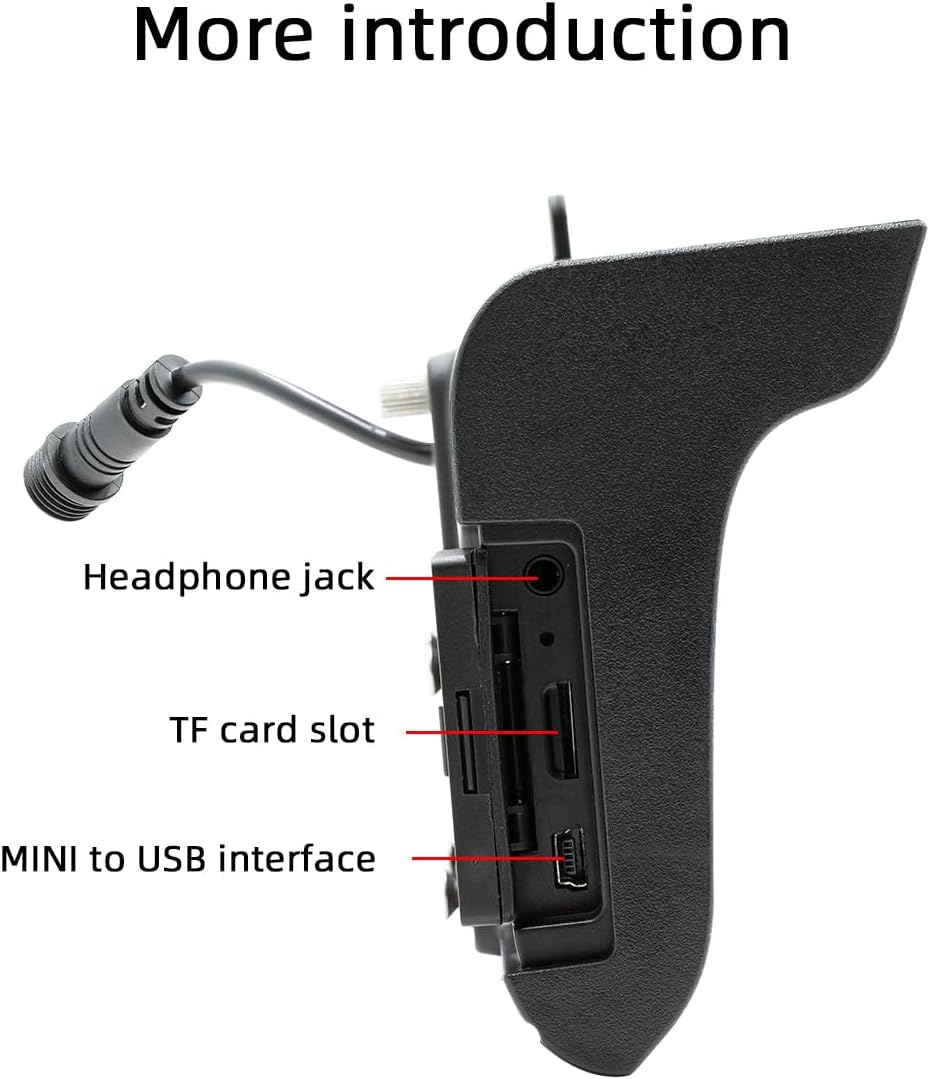
Imej 4.2: Sisi view illustrating the headphone jack, TF card slot, and MINI to USB interface.
The rear of the unit houses a built-in 1W speaker and mounting points for the bracket.

Imej 4.3: Belakang view of the unit, highlighting the built-in 1W speaker.
5. Pemasangan
This unit is designed for double DIN installation. Due to the complexity of vehicle wiring and dashboard configurations, professional installation is highly recommended. Incorrect installation can lead to vehicle damage or malfunction of the stereo unit.
5.1 General Installation Steps (Consult a professional)
- Putuskan sambungan bateri kenderaan untuk mengelakkan seluar pendek elektrik.
- Remove the existing car stereo or dashboard trim to access the double DIN slot.
- Connect the wiring harness from the vehicle to the stereo's power and speaker connections. Ensure correct polarity.
- Connect any additional inputs/outputs such as the reversing camera, AUX-in, or RCA audio outputs.
- Mount the stereo securely into the double DIN slot using the provided mounting bracket set.
- Sambungkan semula bateri kenderaan dan uji kefungsian unit.
- Pasang semula trim papan pemuka.
Note: The waterproof power cord should be routed carefully to avoid damage and ensure proper sealing.
6. Persediaan Awal
6.1 Menghidupkan/Mematikan
The unit will power on automatically when the vehicle's ignition is turned on. To power off, turn off the vehicle's ignition.
6.2 Tetapan Bahasa
Upon first use, you may be prompted to select your preferred language. Navigate through the on-screen menu to select from English, Chinese, Spanish, Portuguese, Russian, German, French, Polish, Turkish, Arabic, Hebrew, Italian, Czech, Japanese, or Korean.
7. Arahan Operasi
7.1 Navigasi Skrin Sentuh
The 5-inch touchscreen is the primary control interface. Tap icons to open applications, swipe to navigate menus, and use pinch-to-zoom gestures where applicable (e.g., in navigation apps).
7.2 Kawalan Roda Stereng
If your vehicle supports steering wheel controls, connect the appropriate wires during installation. The unit supports programmable steering wheel controls, allowing you to map functions like volume, track skip, and mode selection to your vehicle's buttons.
7.3 Seven-Color Key Backlights
The unit features adjustable seven-color key backlights. Access the settings menu to customize the backlight color to match your vehicle's interior lighting or your personal preference.
8. Ketersambungan
8.1 Bluetooth 5.0
The unit features Bluetooth 5.0 for wireless audio streaming and hands-free calling. The default Bluetooth name is "SWL-BT".
- Dayakan Bluetooth pada telefon bimbit anda.
- On the car stereo, navigate to the Bluetooth menu.
- Cari untuk available devices on your phone and select "SWL-BT".
- Sahkan kod pasangan jika digesa.
The unit supports connecting to two Bluetooth devices simultaneously, such as a mobile phone and a Bluetooth earphone.

Image 8.1: Illustration of the dual Bluetooth connection capability, powered by a Bluetooth 5.0 chip.
8.2 Wireless & Wired CarPlay / Android Auto
Connect your smartphone to access functions like navigation, phone calls, messages, and music directly on the car stereo display. Both wired and wireless connections are supported.

Image 8.2: Display showing the CarPlay and Android Auto interfaces, demonstrating mobile phone function integration.
8.2.1 Sambungan Tanpa Wayar
For wireless CarPlay or Android Auto, ensure your phone's Wi-Fi and Bluetooth are enabled. Follow the on-screen prompts on the car stereo to pair your device wirelessly.
8.2.2 Sambungan Berwayar
Connect your smartphone to the unit's USB port using a compatible USB cable. The system will automatically detect and launch CarPlay or Android Auto.
9. Main Semula Media
The Polarlander B5350 supports multiple methods for media playback:
- Bluetooth (BT) Playback: Stream audio wirelessly from your paired smartphone.
- Main balik Kad TF: Insert a TF (MicroSD) card into the designated slot to play audio and video files.
- Main balik USB: Connect a USB flash drive to the USB port for audio and video file main balik.
- AUX masuk: Connect external audio devices via the auxiliary input.
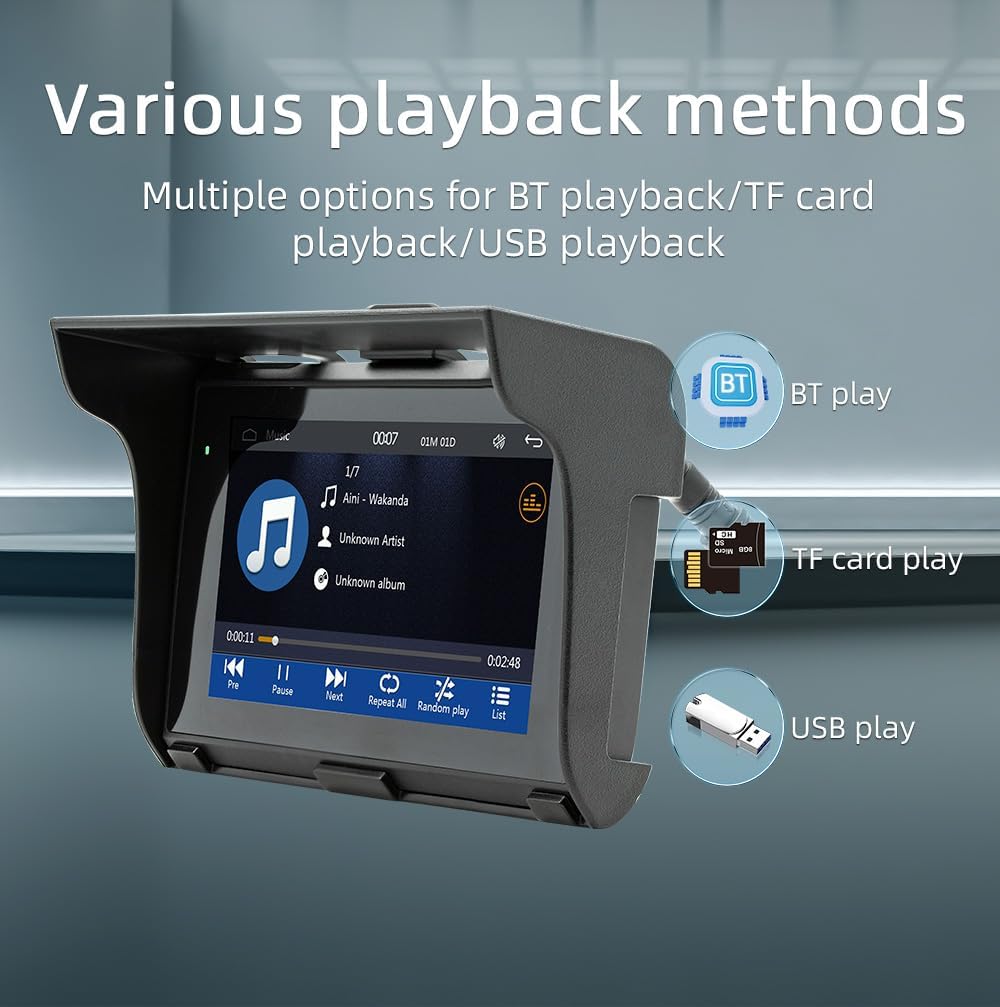
Image 9.1: Visual representation of the various media playback methods available: Bluetooth, TF card, and USB.
9.1 Format Media yang Disokong
- Format Audio: MP3, AAC, APE, OGG, M4A, RA, WAV
- Format Video: H263, H264, H265, DIVX HD, AVI, FLV, MKV, MPEG, MP4, WMV9, VC, ASF, TS, QT
- Format Imej: JPEG, PNG, BMP, GIF, TIFF
10. Operasi Radio AM/FM
The unit includes an AM/FM radio receiver. To access the radio function, select the "Radio" icon from the main menu.
- Mengimbas: Use the scan function to automatically search for and save available radio stations.
- Penalaan Manual: Tala secara manual kepada frekuensi tertentu menggunakan kawalan pada skrin.
- Pratetap: Simpan stesen kegemaran anda untuk pratetap butang untuk akses pantas.
The radio allows you to stay updated with real-time traffic, news broadcasts, and weather forecasts.
11. Driving Recorder Function (Optional)
The Polarlander B5350 supports an optional car driving recorder. When connected, the unit can display and record your driving dynamics, providing additional security and peace of mind.

Image 11.1: The car stereo displaying footage from an optional driving recorder camera.
Note: The driving recorder camera is an optional accessory and is not included in the standard package.
12. Penyelesaian masalah
| Masalah | Kemungkinan Punca | Penyelesaian |
|---|---|---|
| Unit tidak dihidupkan. | No power connection or incorrect wiring. | Check power cables and fuse. Ensure correct 9-30V DC supply. |
| Tiada bunyi. | Volume too low, mute activated, or speaker wiring issue. | Increase volume, check mute status, verify speaker connections. |
| Sambungan Bluetooth gagal. | Bluetooth not enabled on phone/unit, or device out of range. | Ensure Bluetooth is active on both devices. Move phone closer to unit. Re-pair device. |
| CarPlay/Android Auto tidak bersambung. | Incorrect cable, phone settings, or app issues. | Use a certified USB cable. Check phone settings for CarPlay/Android Auto. Restart phone and unit. |
| Skrin sentuh tidak bertindak balas. | System freeze or temporary software issue. | Restart the unit (turn off/on ignition). If issue persists, consult support. |
13. Spesifikasi
| Ciri | Perincian |
|---|---|
| Jenis Produk | Car Stereo (Double Din) |
| Saiz Paparan | 5.0 inci |
| Resolusi Paparan | 800x480 |
| Kuasa Keluaran | Pembesar suara 1W terbina dalam |
| Bekerja Voltage | 9~30V DC |
| Suhu Operasi | -20 ℃ hingga 60 ℃ |
| Versi Bluetooth | 5.0 (Nama lalai: SWL-BT) |
| Memori Berlari | 1Gbit DRAM |
| Format Audio yang Disokong | MP3, AAC, APE, OGG, M4A, RA, WAV |
| Format Video yang Disokong | H263, H264, H265, DIVX HD, AVI, FLV, MKV, MPEG, MP4, WMV9, VC, ASF, TS, QT |
| Format Gambar yang Disokong | JPEG, PNG, BMP, GIF, TIFF |
| Input/Output | SD Card, USB, AUX-in, RCA Audio output, Reversing camera input |
| Nombor Bahagian Pengilang | B5350 |
14. Penyelenggaraan
- Membersihkan Paparan: Gunakan kain lembut dan tidak berbulu untuk mengelap skrin sentuh dengan lembut. Jangan gunakan pembersih atau pelarut yang melelas.
- Pembersihan Am: Keep the unit free from dust and debris. Use a soft brush or compressed air for hard-to-reach areas.
- Sambungan Kabel: Periksa semua sambungan kabel secara berkala untuk memastikan ia selamat.
15. Waranti dan Sokongan
Untuk maklumat jaminan dan sokongan teknikal, sila rujuk dokumentasi yang disediakan semasa pembelian atau hubungi peruncit anda. Simpan bukti pembelian anda untuk sebarang tuntutan jaminan.
For further assistance, visit the official Polarlander webtapak atau hubungi bahagian perkhidmatan pelanggan mereka.