
Produk Selesaiview
The Baseus 45W Ultra Slim 10000mAh Power Bank (Model E00310) is a portable charging solution designed for various electronic devices. It features built-in USB-C cables for convenience and supports 45W fast charging. This power bank is CCC certified and suitable for travel due to its compact size and airline-approved capacity.
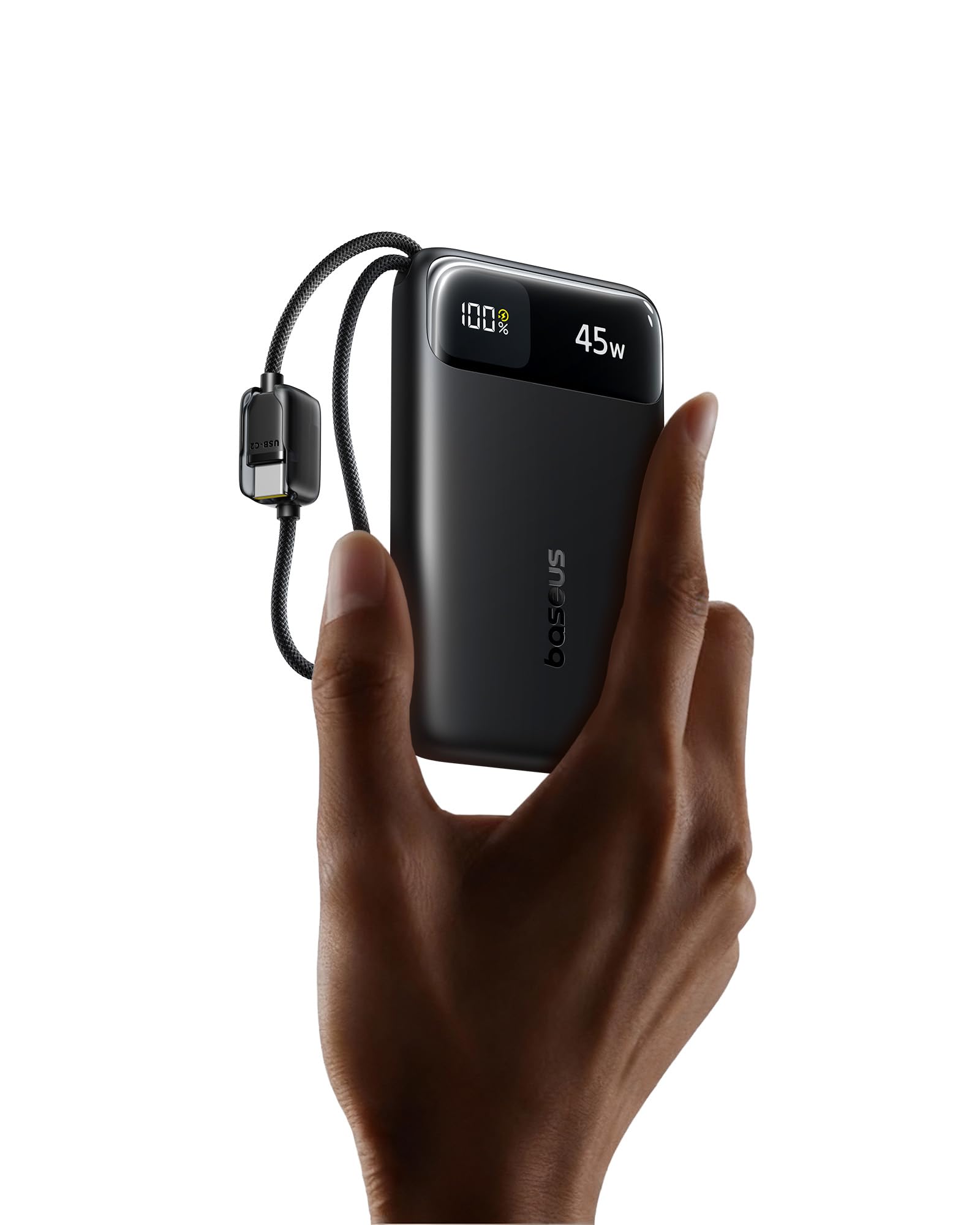
Ciri-ciri Utama
- Reka Bentuk Ultra-Nipis & Mudah Alih: Measures 4.3 × 2.6 × 0.7 inches and weighs 7 oz, making it easy to carry.
- Kapasiti Tinggi 10,000mAh: Menyediakan pelbagai caj untuk telefon pintar dan peranti lain.
- Pengecasan Kelajuan Tinggi 45W: Delivers fast charging for compatible devices, boosting an iPhone 17 Pro to 67% and a Samsung S25 Ultra to 60% in approximately 30 minutes.
- Dual Built-in USB-C Cables: Eliminates the need for external cables, offering convenience and tangle-free use. Cables are tested for durability.
- Four-in-One Charging: Features two built-in USB-C cables, one USB-C port, and one USB-A port, allowing simultaneous charging of up to four devices.
- 30W Rapid Input: Enables quick recharging of the power bank itself.
- Kawalan Suhu NTC: Built-in sensors monitor temperature for safe operation during high-speed charging.
- Pelbagai Perlindungan Keselamatan: Guards against overcurrent, overvoltage, overheating, over-discharge, and short circuits.
- Airline-Approved: Suitable for air travel due to its capacity and compact build.

Panduan Persediaan
Pengecasan Awal Bank Kuasa
- Connect one of the built-in USB-C cables or an external USB-C cable to the power bank's USB-C input port.
- Plug the other end of the cable into a compatible USB wall charger (30W or higher recommended for rapid charging).
- The digital display on the power bank will show the charging status and current battery percentage.
- Charge the power bank until it reaches 100% for optimal initial use.

Arahan Operasi
Mengecas Peranti Anda
- Menggunakan Kabel USB-C Terbina Dalam:
- Pull out one of the built-in USB-C cables from the power bank.
- Connect the USB-C end to your compatible device (e.g., smartphone, tablet).
- The power bank will automatically begin charging your device. The digital display will show the remaining battery level and output wattage.
- Using USB-C or USB-A Ports:
- Sambungkan kabel pengecas peranti anda sama ada pada port output USB-C atau port output USB-A pada bank kuasa.
- Sambungkan hujung kabel anda yang satu lagi ke peranti anda.
- Pengecasan akan bermula secara automatik.
- Pengecasan serentak: The power bank supports charging up to four devices concurrently using its two built-in USB-C cables, one USB-C port, and one USB-A port.

Maklumat Paparan Digital
Paparan digital bersepadu menyediakan maklumat masa nyata:
- Bateri Percentage: Menunjukkan baki paras cas bank kuasa.
- Output/Input Wattage: Displays the current power output when charging devices or input wattage when recharging the power bank.

Penyelenggaraan dan Penjagaan
- Pembersihan: Gunakan kain lembut dan kering untuk membersihkan permukaan bank kuasa. Elakkan menggunakan bahan kimia yang keras atau bahan yang melelas.
- Storan: Simpan bank kuasa di tempat yang sejuk dan kering jauh dari cahaya matahari langsung, suhu yang melampau dan kelembapan.
- Kesihatan Bateri: For optimal battery longevity, fully charge the power bank at least once every three months if not in regular use.
- Penjagaan Kabel: Avoid excessive bending or pulling of the built-in cables to prevent damage.
Menyelesaikan masalah
- Bank kuasa tidak mengecas peranti:
- Ensure the power bank itself has sufficient charge. Check the digital display.
- Verify that the charging cables are securely connected to both the power bank and your device.
- Cuba gunakan kabel atau port lain pada bank kuasa.
- Sahkan peranti anda serasi dengan spesifikasi output bank kuasa.
- Bank kuasa tidak dicas semula:
- Ensure the wall charger is functioning correctly and provides adequate power (30W recommended).
- Check the connection of the charging cable to both the power bank and the wall charger.
- Try a different wall charger or cable.
- Power bank becomes warm during use:
- It is normal for the power bank to generate some heat during charging or discharging, especially during high-speed operations.
- If the power bank becomes excessively hot, disconnect it immediately and allow it to cool down. Ensure it is used in a well-ventilated area.
- The built-in NTC temperature control system is designed to prevent overheating. If persistent excessive heat occurs, contact customer support.

Spesifikasi Produk
| Jenama | Baseus |
| Nombor Model | E00310 |
| Kapasiti Bateri | 10000 Miliamp Jam (mAh) |
| Jenis Penyambung | USB Jenis A, USB Jenis C |
| Sumber Kuasa | Bateri |
| Voltage | 5 Volt |
| Bilangan Pelabuhan | 4 (2x Built-in USB-C, 1x USB-C, 1x USB-A) |
| Berat Barang | 7.16 Auns |
| Item Dimensions (L x W x Th) | 4.33" x 2.67" x 0.7" |
| Ciri Khas | Portable, Lightweight, Ultra Slim, 45W Fast Charging, Built-in Two USB-C Cables, CCC Certified, Pocket Size, Smart Display, Low Current Mode |
| Pengeluar | Shenzhen Baseus Technology Co., Ltd. |
Maklumat Keselamatan
- Jangan dedahkan bank kuasa kepada suhu yang melampau (panas atau sejuk), cahaya matahari langsung atau kelembapan yang tinggi.
- Elakkan daripada menjatuhkan, menjejaskan atau membuka peranti.
- Jauhkan daripada air dan cecair mudah terbakar.
- Jangan gunakan jika bank kuasa rosak, bengkak atau bocor.
- Jauhkan daripada kanak-kanak.
- Buang produk secara bertanggungjawab mengikut peraturan tempatan.
Waranti dan Sokongan
This Baseus power bank comes with a Waranti Pengeluar 2 Tahun.
For technical support, warranty claims, or further inquiries, please contact Baseus customer service or visit the official Baseus Brand Store:
Video Produk
Tayangan video produk rasmicasing the features and usage of the Baseus Enerfill FC11 45W 10000mAh Power Bank.