
1. Produk Lebihview
The HONOR Magic8 Lite 5G is a robust and feature-rich smartphone designed for durability and high performance. It boasts industry-leading resistance to drops, water, and dust, a long-lasting battery, a high-resolution camera, and an immersive display, all powered by an efficient processor with advanced AI capabilities.
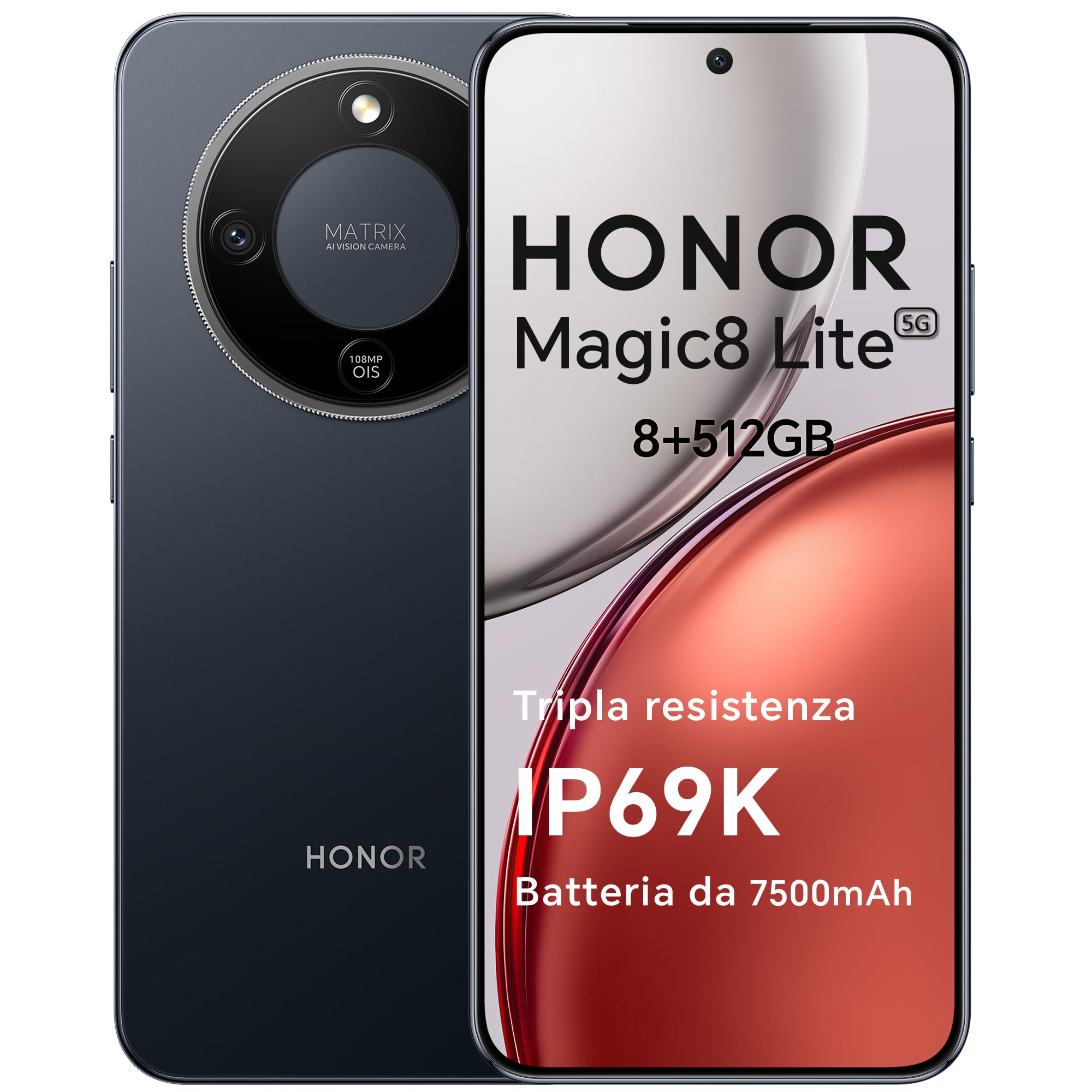
Figure 1: HONOR Magic8 Lite 5G Smartphone, Midnight Black variant.
Ciri-ciri Utama:
- Triple Resistance: SGS Five-Star Overall Drop Resistance (up to 2.5 meters), IP69K and IP68 water and dust resistance.
- Bateri tahan lama: 7500 mAh silicon-carbon battery with up to 3 days of autonomy and 66W SuperCharge. Functions as a portable power bank.
- Sistem Kamera Lanjutan: 108 MP Ultra-Sensing Camera with Optical Image Stabilization (OIS) and Electronic Image Stabilization (EIS) for clear photos and stable 4K videos. Includes AI photography features.
- Paparan Imersif: 6.79-inch 1.5K OLED display with 6000 nits peak brightness, 120 Hz refresh rate, and HONOR Eye Comfort Display technology.
- Prestasi Kuat: Snapdragon 6 Gen 4 (4nm) mobile platform for smooth multitasking and gaming, integrated with Google Gemini and other AI functionalities.
2. Persediaan Peranti
2.1 Kandungan Pakej
Sahkan bahawa pakej anda mengandungi item berikut:
- Telefon Pintar 8G HONOR Magic5 Lite
- Kabel USB-C
- Power Adapter (66W SuperCharge)
- Alat Ejector SIM
- Panduan Mula Pantas
- Kad Waranti
2.2 Memasukkan Kad SIM
- Cari dulang kad SIM di sisi peranti anda.
- Masukkan alat ejektor SIM ke dalam lubang kecil di sebelah dulang dan tekan dengan kuat sehingga dulang terkeluar.
- Place your Nano-SIM card(s) into the designated slots on the tray. Ensure the gold contacts face downwards. The device supports Dual SIM functionality.
- Masukkan semula dulang kad SIM ke dalam telefon dengan berhati-hati.
The device also supports eSIM functionality. Refer to your carrier for activation details.
2.3 Pengecasan Awal dan Penghidupan Kuasa
- Connect the USB-C cable to the phone's charging port and the other end to the 66W power adapter. Plug the adapter into a power outlet.
- Biarkan telefon dicas selama sekurang-kurangnya 15 minit sebelum penggunaan pertama.
- To power on, press and hold the Power button (located on the side) until the HONOR logo appears on the screen.
- Ikut arahan pada skrin untuk melengkapkan persediaan awal, termasuk pemilihan bahasa, sambungan Wi-Fi dan persediaan akaun Google.

Figure 2: The 7500mAh silicon-carbon battery provides extended usage.
3. Arahan Operasi
3.1 Navigasi Asas
- Skrin Sentuh: Ketik untuk memilih, leret untuk menatal, cubit untuk mengezum.
- Skrin Utama: Akses apl, widget dan pemberitahuan.
- Gerak isyarat: Customize navigation gestures in Settings for a fluid experience.
3.2 Penggunaan Kamera
The HONOR Magic8 Lite 5G features a 108 MP Ultra-Sensing Camera with OIS and EIS for superior image and video capture.
- Open the Camera app from your home screen or lock screen.
- Select your desired mode (Photo, Video, Portrait, Night, Pro, etc.).
- Ketik butang pengatup untuk mengambil foto atau memulakan/menghentikan rakaman video.
- Utilize AI features like AI Eraser, AI Cutout, and AI Outpainting for enhanced photo editing.
- For underwater photography, ensure the device is properly sealed and use the dedicated underwater mode.

Gambar 3: Cthamples of high-quality images captured by the 108 MP camera.
3.3 Pengurusan Bateri
The 7500 mAh battery is designed for extended use. To optimize battery life:
- Dayakan mod penjimatan kuasa apabila bateri lemah.
- Laraskan kecerahan skrin dan tetapan tamat masa skrin.
- Close background apps not in use.
- The device supports reverse charging, allowing it to act as a power bank for other devices. Connect the devices using a compatible USB-C cable.

Figure 4: The device can charge other accessories, acting as a power bank.
3.4 Ciri Paparan
The 6.79-inch 1.5K OLED display offers vibrant visuals and eye comfort features.
- Mod Keselesaan Mata: Reduces blue light to prevent eye strain. Activate it in Display Settings.
- Kadar Segar Semula Dinamik: The 120 Hz adaptive refresh rate adjusts automatically for smooth scrolling and power efficiency.
- Kecerahan yang tinggi: With 6000 nits peak brightness, the display remains clear even in direct sunlight.

Figure 5: The 1.5K OLED display offers exceptional clarity and color.
3.5 AI Features and Google Gemini
The device integrates advanced AI functionalities and Google Gemini for enhanced user experience.
- Google Gemini: Interact with Gemini for real-time translation, information retrieval, and more.
- AI Writing Tools: Utilize AI to assist with text composition and productivity tasks.
- Portal Ajaib: A shortcut for AI-powered tasks.

Figure 6: Google Gemini integration for intelligent assistance.
3.6 Fungsi NFC
The HONOR Magic8 Lite 5G supports Near Field Communication (NFC) for quick and secure transactions and data exchange.
- Enable NFC in your phone's Settings.
- Tap your phone to compatible NFC readers for mobile payments or to share content with other NFC-enabled devices.
4. Penyelenggaraan
4.1 Membersihkan Peranti Anda
Despite its IP69K and IP68 ratings for water and dust resistance, proper cleaning helps maintain your device's longevity.
- Gunakan kain lembut dan tidak berbulu untuk mengelap skrin dan badan.
- Elakkan menggunakan bahan kimia yang keras, bahan pelelas atau udara termampat.
- If the device gets wet, wipe it dry with a clean cloth before charging or opening any ports.
4.2 Kemas Kini Perisian
Regular software updates provide security patches, new features, and performance improvements. Ensure your device is connected to Wi-Fi and has sufficient battery before initiating an update.
- Navigasi ke Tetapan > Sistem & kemas kini > Kemas kini perisian untuk menyemak kemas kini yang tersedia.
4.3 Penjagaan Bateri
The 7500 mAh battery is designed for a long lifespan. To maximize its performance:
- Avoid extreme temperatures (below -30°C or above 55°C) as they can degrade battery performance.
- Use only HONOR-approved chargers and cables.
- Elakkan daripada mengalirkan bateri sepenuhnya dengan kerap.

Figure 7: The device is designed to operate in a wide range of temperatures.
5. Penyelesaian masalah
This section addresses common issues you might encounter with your HONOR Magic8 Lite 5G.
5.1 Peranti Tidak Dihidupkan
- Pastikan bateri dicas. Sambungkan pengecas dan tunggu beberapa minit sebelum cuba menghidupkan semula.
- Tekan dan tahan butang Kuasa selama sekurang-kurangnya 10-15 saat untuk memaksa mulakan semula.
5.2 Isu Pengecasan
- Check if the charging cable and adapter are securely connected.
- Try using a different HONOR-approved charger and cable.
- Periksa port pengecasan untuk sebarang serpihan atau kerosakan.
5.3 Kamera Tidak Berfungsi
- Mulakan semula peranti.
- Clear the cache and data of the Camera app in Settings > Apps > Camera > Storage.
- Ensure no other apps are currently using the camera.
5.4 Water/Dust Exposure
While the device is highly resistant, prolonged exposure or exposure to high-pressure jets (beyond IP69K/IP68 limits) can cause damage.
- If the device gets wet, dry it thoroughly before charging.
- Do not intentionally submerge the device in water beyond specified depths or for extended periods.
- If you suspect water damage, contact customer support.

Figure 8: The device is designed with advanced water resistance.
For other issues, refer to the official HONOR support webtapak atau hubungi perkhidmatan pelanggan.
6. Spesifikasi
| Ciri | Spesifikasi |
|---|---|
| Jenama | KEHORMATAN |
| Model | Magic8 Lite |
| RAM | 8 GB |
| Storan Dalaman | 512 GB |
| warna | Hitam Tengah Malam |
| Kapasiti Bateri | 7500 mAh |
| Paparan | 6.79-inch 1.5K AMOLED, 120Hz, 6000 nits peak brightness |
| Kamera Belakang | 108 MP with OIS |
| Pemproses | Snapdragon 6 Gen 4 (4nm) |
| Tahan Air & Debu | IP69K, IP68 |
| Rintangan Jatuh | SGS Five-Star Overall Drop Resistance (up to 2.5m) |
| Ketersambungan | 5G, Dual SIM, NFC |
| asal usul | China |
| ASIN | B0G43TWKGS |

Figure 9: Detailed product information sheet.
For more detailed energy efficiency information, please refer to the EPREL database: https://eprel.ec.europa.eu/qr/2515767
7. Waranti dan Sokongan
7.1 Maklumat Waranti
Warranty terms and conditions are typically provided with your purchase documentation. Please retain your proof of purchase for warranty claims. For specific warranty details, refer to the warranty card included in your product package or visit the official HONOR webtapak untuk wilayah anda.
7.2 Sokongan Pelanggan
For technical assistance, service, or further inquiries, please contact HONOR customer support:
- rasmi Webtapak: https://www.honor.com/de/
- Self-Repair Support: https://www.honor.com/de/support/self-repair/
- Sokongan E-mel: support@honor.com