
pengenalan
This manual provides detailed instructions for the installation, operation, and maintenance of your PolarLander AV252B Universal 1-DIN In-Dash Car Audio Player. Please read this manual thoroughly before using the product to ensure proper function and safety. Keep this manual for future reference.
Maklumat Keselamatan
- Ensure all wiring is correctly connected to prevent damage to the unit or vehicle. Incorrect wiring can cause fire or electrical shock.
- Always connect the unit to a 12V DC power supply with a negative ground.
- Jangan kendalikan unit dengan cara yang mengalihkan perhatian anda daripada memandu. Sentiasa mengutamakan keselamatan jalan raya.
- Avoid exposing the unit to extreme temperatures, direct sunlight, or high humidity.
- Jangan cuba membuka atau mengubah suai unit. Rujuk semua servis kepada kakitangan yang berkelayakan.
Kandungan Pakej
Sahkan bahawa semua item terdapat dalam pakej:
- 1 x PolarLander AV252B 12V Bluetooth Vehicle MP3 Audio Player
- 1 x Manual Pengguna Bahasa Inggeris (dokumen ini)
- Pendawaian abah-abah
- Perkakasan Pemasangan (jika berkenaan)
Produk Selesaiview
The PolarLander AV252B is a versatile 1-DIN in-dash car audio player featuring Bluetooth connectivity, FM radio, USB, SD card, and AUX-in support. It is designed for easy integration into most vehicles with a standard 1-DIN slot.

Imej: Depan view of the PolarLander AV252B car audio player, showing the display, control knob, and various buttons.
Kawalan dan Sambungan Panel Hadapan
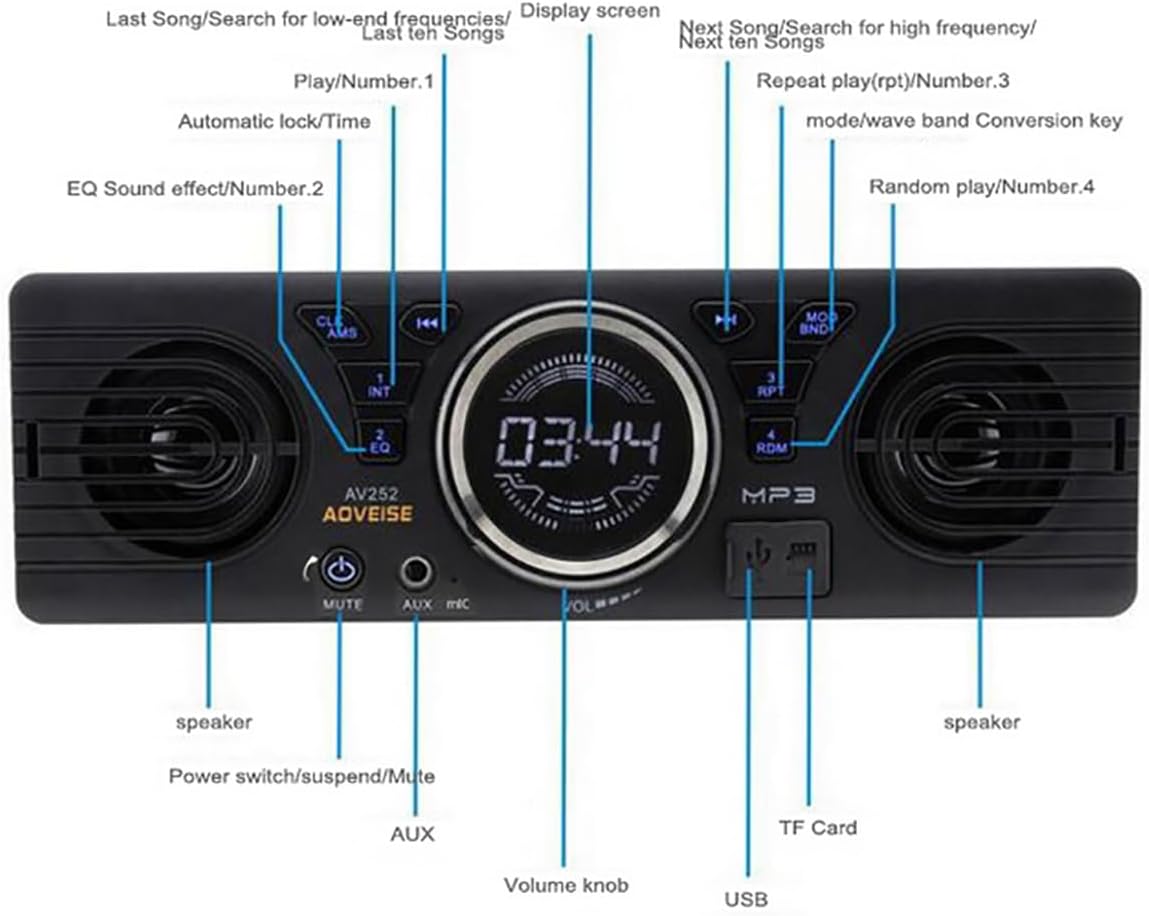
Image: Diagram illustrating the front panel controls of the AV252B unit, with labels for each button and port.
- CLK/AMS Button: Short press for clock display, long press to set time. In radio mode, short press for automatic station search.
- INT/EQ Button: Short press for intro play (first 10 seconds of each track). Long press to cycle through EQ sound effects (Jazz, Rock, Pop, Classical, etc.).
- MUTE/Power Button: Short press to mute/unmute audio. Long press to power the unit on/off.
- Port AUX-IN: Bicu 3.5mm untuk menyambungkan peranti audio luaran.
- MIC: Built-in microphone for Bluetooth hands-free calls.
- Tombol Kelantangan: Rotate to adjust volume. Press to select functions in menu.
- Port USB: For connecting USB flash drives for media playback and charging.
- Slot Kad TF: For inserting TF (MicroSD) cards for media playback.
- MOD/BND Button: Short press to switch between modes (FM, Bluetooth, USB, SD, AUX). In radio mode, long press to switch between FM bands.
- RPT/Number 3 Button: Short press for repeat play.
- RDM/Number 4 Button: Short press for random play.
- Next Song/Search Button: Short press for next track/station. Long press for fast forward.
- Previous Song/Search Button: Short press for previous track/station. Long press for fast rewind.
- Skrin Paparan: Shows current time, radio frequency, track information, etc.
- Penceramah: Pembesar suara bersepadu untuk output audio.
Pemasangan
Dimensi

Imej: Atas ke bawah view of the AV252B unit showing its length (178mm / 7 inches) and height (58mm / 2.3 inches).

Imej: Sisi view of the AV252B unit showing its depth (54mm).
The installation size is 187mm x 49mm, suitable for standard 1-DIN center consoles. The unit's dimensions are approximately 178mm (length) x 58mm (height) x 54mm (depth).
Gambarajah Pendawaian
Refer to the following diagram for correct wiring connections. Incorrect wiring can cause damage to the unit or vehicle.

Image: A detailed wiring diagram for the car radio, showing connections for antenna, ignition switch, battery, and RCA audio outputs.
- Kawat kuning: Connect to the car's battery positive (+) (constant 12V).
- Kawat Merah: Connect to the car's ACC ignition switch (switched 12V).
- Kawat Hitam: Connect to the car's battery negative (-) / ground.
- Kawat Biru: Sambung ke automatic antenna (jika berkenaan).
- White RCA: Left RCA audio output.
- Red RCA: Right RCA audio output.
- Soket Antena: Sambungkan ke antena radio kenderaan.
Important: The car radio cannot be turned on if the red and yellow wires are not connected to the 12V power positive at the same time. Ensure the black wire is securely connected to ground.
Physical Installation Steps
Follow these general steps for installing the unit into your vehicle's dashboard. Specific vehicle models may vary.

Image: A series of six images demonstrating the step-by-step process of removing an old car radio and installing a new one, including dashboard disassembly, wiring, and reassembly.
- Langkah 1: Carefully remove the trim panels and screws securing the existing car radio or blank panel in your dashboard.
- Langkah 2: Use removal tools to extract the old radio or the factory blanking plate from the dashboard slot.
- Langkah 3: If applicable, install the mounting sleeve or cage into the dashboard opening.
- Langkah 4: Disconnect any existing wiring from the old unit.
- Langkah 5: Connect the wiring harness of the AV252B unit to your vehicle's wiring, following the wiring diagram provided above. Ensure all connections are secure.
- Langkah 6: Carefully slide the AV252B unit into the dashboard opening until it clicks into place or is secured with screws. Reassemble any removed trim panels.
Arahan Operasi
Hidupkan/Mati Kuasa
Tekan dan tahan butang MUTE/Power butang untuk menghidupkan atau mematikan unit.
Kawalan Kelantangan
Putar Tombol Kelantangan mengikut arah jam untuk meningkatkan kelantangan dan lawan arah jam untuk mengurangkan kelantangan.
Pemilihan Mod
Tekan ke MOD/BND button repeatedly to cycle through available modes: FM Radio, Bluetooth, USB, SD Card, and AUX-in.
Operasi Radio FM
- Carian automatik: In FM mode, long press the CLK/AMS button to automatically search for and store strong stations.
- Penalaan Manual: Gunakan Previous/Next Song/Search buttons to manually tune to frequencies.
- Pemilihan Band: Tekan lama MOD/BND button to switch between FM bands (FM1, FM2, FM3).
Bluetooth Pairing and Audio Playback
The unit features built-in Bluetooth 2.1 + EDR for hands-free calls and audio streaming.
- Ensure the unit is powered on and in Bluetooth mode (select using MOD/BND butang).
- Pada peranti mudah alih anda, dayakan Bluetooth dan cari peranti yang tersedia.
- Select "AV252B" (or similar name) from the list of devices to pair. No password is typically required.
- Once paired, you can play audio from your device, and it will stream through the car audio player.
- For hands-free calls, the built-in microphone will capture your voice.
Main Semula USB/Kad SD
Masukkan pemacu kilat USB ke dalam Port USB or a TF (MicroSD) card into the Slot Kad TF. The unit will automatically switch to USB/SD mode and begin playing compatible audio files (MP3/WMA).
- Gunakan Previous/Next Song/Search butang untuk menavigasi trek.
- Tekan RPT for repeat play (e.g., repeat current track).
- Tekan RDM for random play.
AUX-in Operation
Sambungkan peranti audio luaran (cth., telefon pintar, pemain MP3) ke Pelabuhan AUX-IN using a 3.5mm audio cable. Select AUX mode using the MOD/BND button. Audio will play through the car speakers.
Kesan Bunyi EQ
Tekan lama INT/EQ button to cycle through preset equalizer settings such as Jazz, Rock, Pop, and Classical.
Menetapkan Jam
Tekan pendek CLK/AMS button to display the time. Long press it to enter time setting mode. Use the Tombol Kelantangan to adjust hours and minutes, and press the knob to confirm.
Penyelenggaraan
- Pembersihan: Gunakan kain lembut dan kering untuk membersihkan permukaan unit. Jangan gunakan pembersih atau pelarut yang melelas.
- habuk: Pastikan slot kad USB dan SD bebas daripada habuk dan serpihan.
- Suhu: Avoid prolonged exposure to direct sunlight or extreme temperatures, which can affect the unit's lifespan.
Menyelesaikan masalah
| Masalah | Kemungkinan Punca | Penyelesaian |
|---|---|---|
| Unit tidak dihidupkan. | Incorrect wiring (Red/Yellow wires not connected to 12V, Black wire not grounded). Blown fuse. | Check all power connections (Red to ACC, Yellow to constant 12V, Black to ground). Check vehicle's fuse box and the unit's fuse. |
| Tiada bunyi. | Volume too low. Mute function active. Speaker wires disconnected. Incorrect source selected. | Increase volume. Press MUTE button. Check speaker wiring. Select correct input mode (FM, BT, USB, AUX). |
| Penerimaan radio FM yang lemah. | Antenna not connected or damaged. Weak signal area. | Ensure antenna is securely connected. Try tuning to a stronger station or move to an area with better reception. |
| Bluetooth tidak bersambung. | Unit not in Bluetooth mode. Device not discoverable. Already paired with another device. | Switch unit to Bluetooth mode. Ensure your mobile device's Bluetooth is on and discoverable. Disconnect from other devices. |
| USB/SD card not recognized. | Tidak disokong file format. Card/drive corrupted. Incorrectly inserted. | pastikan files are MP3/WMA format. Try a different USB/SD card. Reinsert the card/drive correctly. |
Spesifikasi
| Ciri | Spesifikasi |
|---|---|
| Nombor Model | AV252B |
| Input Voltage | 12V DC |
| Kuasa Keluaran | 60W x 4 (Max) |
| Versi Bluetooth | 2.1 + EDR |
| Julat Frekuensi FM | 87.5 - 108 MHz |
| Format Audio Disokong | MP3, WMA |
| Ketersambungan | Bluetooth, USB, TF Card, AUX-in, RCA Output |
| Impedans | 4ohm / 8ohm |
| Respons Kekerapan | 20 - 20000Hz |
| Sensitiviti | Kurang daripada 12dB |
| Dimensi (Unit) | 180 x 42 x 50mm (lebih kurang) |
| Saiz Panel | 188 x 15 x 58mm (lebih kurang) |
Waranti dan Sokongan
This product is covered by a standard manufacturer's warranty. For specific warranty terms, please refer to the documentation provided at the time of purchase or contact your retailer. For technical support or service inquiries, please reach out to your product vendor or the PolarLander customer service department.