
pengenalan
Thank you for choosing the MACAP MI40 Luxe On-Demand Espresso Grinder. This manual provides essential information for the safe and efficient operation, maintenance, and care of your new grinder. Please read all instructions carefully before use and retain this manual for future reference.

The MACAP MI40 Luxe On-Demand Espresso Grinder, featuring a sleek black finish and integrated touchscreen display.
Maklumat Keselamatan
Sentiasa ikuti langkah berjaga-jaga keselamatan asas apabila menggunakan peralatan elektrik untuk mengurangkan risiko kebakaran, renjatan elektrik dan kecederaan.
- Baca semua arahan sebelum mengendalikan pengisar.
- Do not immerse the grinder, cord, or plug in water or other liquids.
- Cabut plag dari soket apabila tidak digunakan, sebelum memasang atau membuka bahagian-bahagiannya, dan sebelum membersihkan.
- Elakkan sentuhan dengan bahagian yang bergerak.
- Jangan kendalikan sebarang perkakas dengan kord atau palam yang rosak, atau selepas perkakas tidak berfungsi atau rosak dalam apa jua cara. Hubungi sokongan pelanggan untuk mendapatkan bantuan.
- Penggunaan lampiran yang tidak disyorkan atau dijual oleh pengilang boleh menyebabkan kebakaran, kejutan elektrik atau kecederaan.
- Jangan gunakan di luar rumah.
- Jangan biarkan kord itu tergantung di tepi meja atau kaunter, atau menyentuh permukaan panas.
- Ensure the hopper lid is securely in place before operating.
- Only grind whole roasted coffee beans. Do not grind other substances such as nuts, spices, or instant coffee.
Persediaan
1. Membongkar
- Keluarkan semua komponen dari pembungkusan dengan berhati-hati.
- Inspect the grinder for any signs of damage. If damaged, do not operate and contact your retailer.
- Tanggalkan semua filem pelindung dan bahan pembungkusan.
2. Pengenalan Komponen
Familiarize yourself with the main parts of your MI40 Luxe grinder:
- Hopper: Holds whole coffee beans.
- Tudung Hopper: Covers the hopper.
- Grind Adjustment Dial: Located below the hopper, used to set grind fineness.
- Paparan skrin sentuh: For programming and selecting dosing options.
- Dosing Spout: Where ground coffee is dispensed.
- Pemegang Portafilter: Supports the portafilter during grinding.
- Suis kuasa: Located on the side of the grinder.
3. Perhimpunan Permulaan
- Install the Hopper: Place the hopper onto the grinder body, ensuring it seats correctly. Rotate it slightly until it locks into position.
- Install the Hopper Lid: Place the lid securely on top of the hopper.
4. penempatan
Place the grinder on a stable, flat, and dry surface. Ensure there is adequate ventilation around the unit.
5. Sambungan Kuasa
Palamkan kord kuasa ke salur keluar elektrik yang dibumikan. Pastikan voltage matches the specifications listed on the grinder's rating label.
Arahan Operasi
1. Filling the Hopper
Lift the hopper lid and pour whole roasted coffee beans into the hopper. Do not overfill. Replace the lid securely.
2. Grind Adjustment (Nice Grind Control Dial)
The MI40 Luxe features a stepless grind adjustment dial for precise control. To adjust the grind fineness:
- Turn the grinder ON using the power switch.
- Rotate the grind adjustment dial. Turning it clockwise results in a finer grind, and counter-clockwise results in a coarser grind.
- For espresso, start with a fine setting and adjust incrementally based on extraction time and taste. It is recommended to adjust the grind while the burrs are running to prevent jamming.

Terperinci view of the Nice Grind Control Dial for precise grind fineness adjustment.
3. Touchscreen Dosing
The touchscreen allows for programmable dosing for single and double shots.
- Hidupkan kuasa: Ensure the grinder is powered on. The touchscreen will illuminate.
- Select Dose: On the main screen, you will see icons for single and double shot doses. Tap the desired dose icon.
- Adjust Dose Time (if needed): To program the dose time, press and hold the desired dose icon until it enters programming mode. Use the '+' and '-' buttons on the screen to adjust the grinding time in seconds. Tap the icon again to save.
- Place Portafilter: Position your portafilter securely in the portafilter holder beneath the dosing spout.
- Mula Mengisar: Tap the selected dose icon once to start grinding. The grinder will automatically stop after the programmed time.
- Manual Grinding: Some models may offer a manual grind option, typically by pressing a dedicated button or holding a dose icon briefly. Refer to the on-screen prompts.
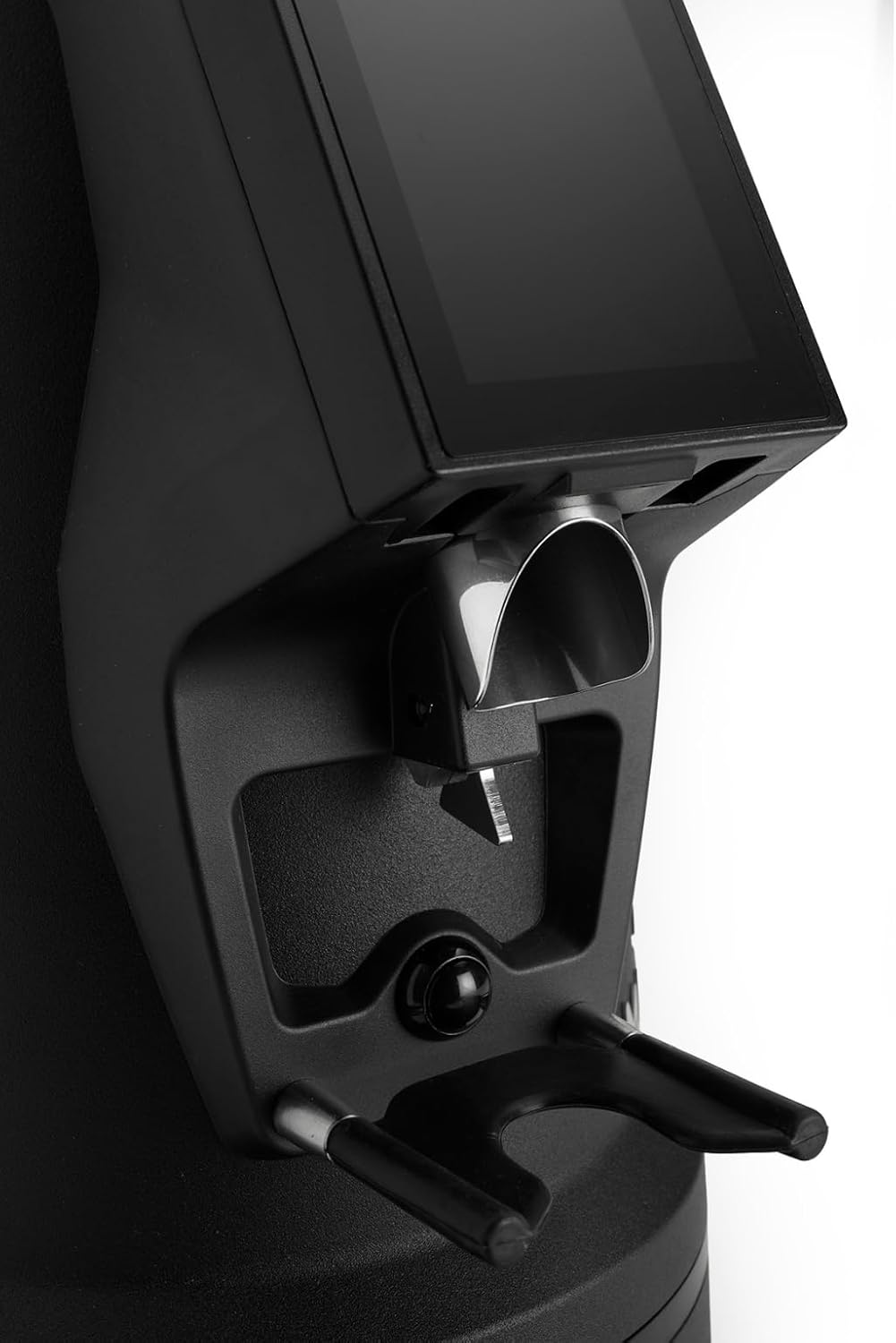
The dosing spout and portafilter holder, designed for efficient and clean coffee dispensing.
Penyelenggaraan
Regular cleaning and maintenance ensure optimal performance and longevity of your grinder.
1. Pembersihan Harian
- Hopper: Empty any remaining beans and wipe the inside of the hopper with a dry cloth.
- Dosing Spout: Use a brush or vacuum cleaner to remove any residual coffee grounds from the dosing spout and portafilter holder area.
- Luaran: Lap bahagian luar pengisar dengan iklanamp kain. Jangan gunakan pembersih yang melelas atau rendam unit di dalam air.
2. Burrs Cleaning (Weekly/Bi-weekly)
To maintain grind consistency, the burrs should be cleaned regularly.
- Unplug the Grinder: Always disconnect the power before cleaning the burrs.
- Remove Hopper: Empty the hopper and remove it from the grinder body.
- Access Burrs: Depending on the model, you may need to unscrew the top burr carrier. Refer to the specific instructions for your MI40 Luxe model.
- Burr Bersih: Use a stiff brush or a vacuum cleaner to remove all coffee grounds from both the stationary and rotating burrs. Do not use water.
- Pasang semula: Carefully reassemble the burr carrier and hopper, ensuring all parts are securely in place.
3. Penjagaan Am
- Simpan pengisar di tempat yang sejuk dan kering.
- Avoid exposing the grinder to direct sunlight or extreme temperatures.
Menyelesaikan masalah
Jika anda menghadapi masalah dengan pengisar anda, rujuk kepada masalah dan penyelesaian biasa berikut:
| Masalah | Kemungkinan Punca | Penyelesaian |
|---|---|---|
| Pengisar tidak dihidupkan | No power, power switch off, or safety interlock not engaged. | Check power cord connection, ensure power switch is ON, verify hopper is correctly seated. |
| No coffee grinding / Grinder jams | Beans not feeding, burrs clogged, or grind setting too fine. | Ensure hopper has beans. Unplug, remove hopper, clean burrs. Adjust to a coarser setting. |
| Pengisaran yang tidak konsisten | Burr kotor atau haus. | Clean burrs thoroughly. If problem persists, burrs may need replacement. |
| Pengisar tidak bising | Foreign object in burrs or loose components. | Unplug and inspect burrs for foreign objects. Ensure all parts are securely fastened. |
If the problem persists after attempting these solutions, please contact MACAP customer support or your retailer.
Spesifikasi
| Ciri | Perincian |
|---|---|
| Model | MI40 Luxe |
| Jenama | Macap |
| Jenis Burr | Flat Burrs |
| Saiz Burr | 65 mm |
| Pelarasan Kisar | Stepless (Nice Grind Control Dial) |
| Dos | Touchscreen Programmable On-Demand |
| Kapasiti Hopper | 2.6 paun (lebih kurang 1.2 kg) |
| bahan | Keluli Tahan Karat |
| Berat Barang | 19.6 Paun (lebih kurang 8.9 kg) |
| Dimensi (L x W x H) | 12" x 7.6" x 22" (lebih kurang 30.5cm x 19.3cm x 55.9cm) |
| Motor | High-Torque |
Waranti & Sokongan
Your MACAP MI40 Luxe Grinder is covered by a manufacturer's warranty. For specific warranty terms and conditions, please refer to the warranty card included with your product or visit the official Macap website. For technical support, spare parts, or service inquiries, please contact your authorized Macap dealer or the customer support team.
Maklumat Hubungan:
- Refer to your purchase documentation for retailer contact details.
- Visit the official Macap website for global support information.