
Produk Selesaiview
The Blaupunkt Bremen SQR 46 DAB Retro Car Stereo is a modern reinterpretation of the classic 1-DIN car radio from the 1980s. It combines vintage aesthetics with contemporary technology, offering a comprehensive in-car entertainment experience. This unit features Bluetooth connectivity, dual USB ports, SD card slot, AUX input, and AM/FM radio, along with DAB+ digital tuner capabilities. The package includes the receiver, a fully enclosed under-dash/overhead installation mounting kit, and a 22-inch radio antenna, providing a complete solution for various vehicle installations.
Apa yang ada dalam Kotak
- Blaupunkt Bremen SQR 46 DAB Retro Car Stereo Receiver: The main head unit for audio playback and control.
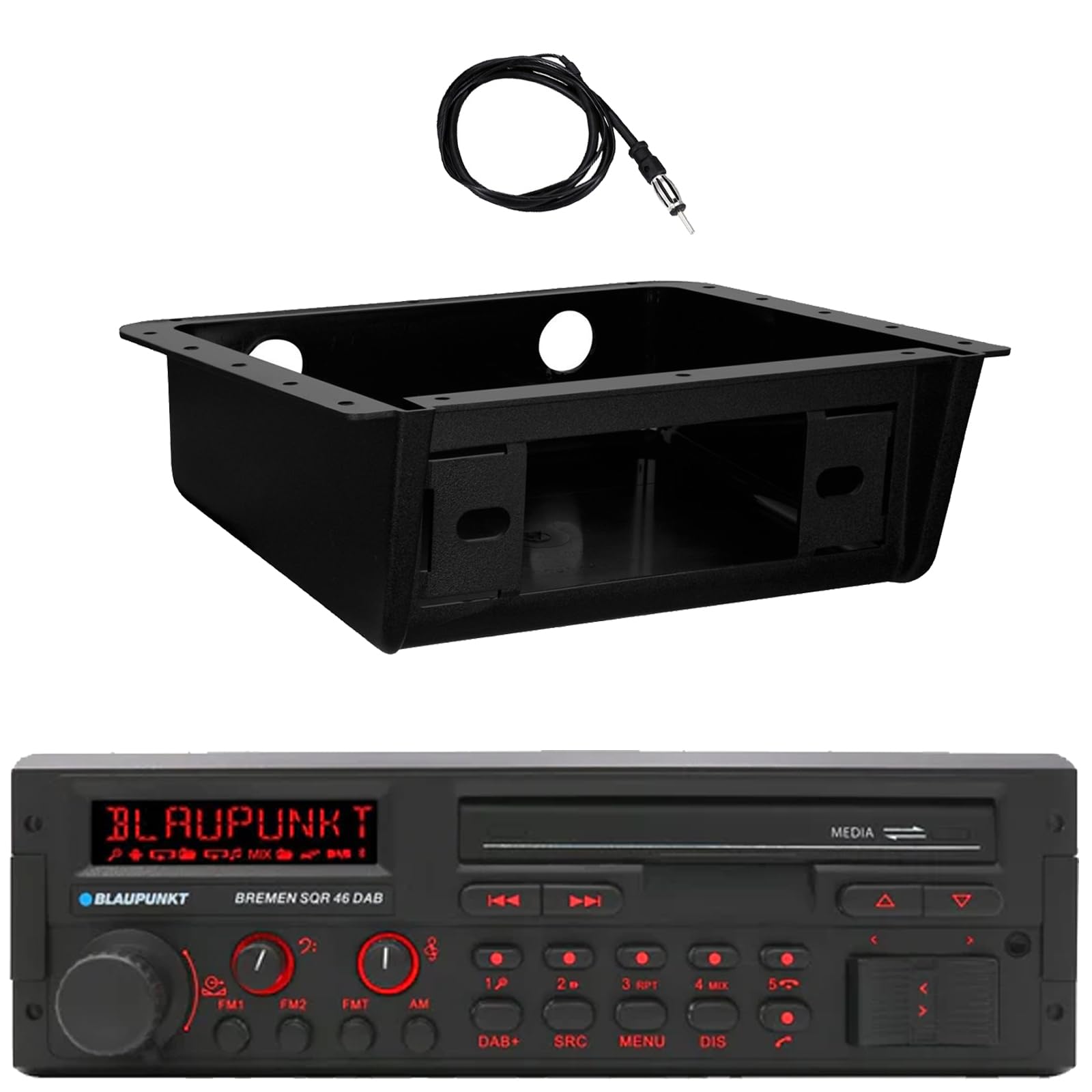
Imej: Depan view of the Blaupunkt Bremen SQR 46 DAB car stereo receiver, showing the display, control knobs, and buttons.
- Fully Enclosed Under Dash/Overhead Installation Mounting Kit: A premium housing designed for secure installation of the receiver under the dashboard or overhead.

Image: Black, rectangular under-dash/overhead mounting kit, designed to house a single DIN car stereo.
- 22" Radio Antenna: A flexible marine-grade antenna for improved AM/FM radio reception.

Image: Coiled black wire antenna with a silver connector at one end.
Persediaan dan Pemasangan
Proper installation is crucial for optimal performance. It is recommended that installation be performed by a qualified professional. This section provides general guidelines.
1. Memasang Penerima
- Under Dash/Overhead Installation: The included mounting kit is designed to fully enclose the single DIN receiver. Secure the kit to a suitable flat surface under the dashboard or overhead using appropriate fasteners (not included).
- Insert the Blaupunkt Bremen SQR 46 receiver into the mounting kit. Ensure it is securely seated and locked into place.
- Alternatively, the unit can be installed in a standard single DIN opening in your vehicle's dashboard.
2. Sambungan Pendawaian
- Sambungan Kuasa: Connect the yellow wire to a constant 12V power source, the red wire to a switched 12V accessory power source, and the black wire to a chassis ground.
- Sambungan Pembesar Suara: Connect the speaker wires to your vehicle's speakers, ensuring correct polarity for each speaker.
- Sambungan Antena: Connect the 22" radio antenna to the antenna input on the rear of the receiver. Route the antenna cable away from other wiring to minimize interference.
- Input Tambahan: If using external devices, connect them to the AUX-in port.
- Output RCA: Untuk menyambung luaran amplifiers, use the RCA pre-outs.
3. Kuasa Awal Hidup
- After all connections are made, turn on your vehicle's ignition.
- Tekan butang kuasa pada penerima untuk menghidupkannya.
- Follow any on-screen prompts for initial setup, such as language selection or clock setting.
Arahan Operasi
Kawalan Asas
- Butang Kuasa: Tekan untuk menghidupkan atau mematikan unit.
- Tombol Kelantangan: Rotate to adjust the volume level. Press to mute/unmute.
- Butang SRC (Sumber): Press to cycle through available audio sources: AM, FM, DAB+, Bluetooth, USB, SD, AUX.
- Butang MENU: Access system settings and audio adjustments.
- DIS (Display) Button: Change display information or dim the display.
- Track/Tune Buttons (<< / >>): Use to skip tracks in media modes or tune radio frequencies.
Radio Operation (AM/FM/DAB+)
- Tekan ke SRC butang sehingga AM, FM, atau DAB+ dipilih.
- Gunakan Track/Tune buttons to manually tune frequencies or seek for the next strong station.
- Stesen Pratetap: Press and hold numbered buttons (1-6) to save the current station as a preset. Press briefly to recall a saved station.
Operasi Bluetooth
- Berpasangan:
- Pastikan Bluetooth didayakan pada peranti mudah alih anda.
- Pilih Bluetooth as the source on the receiver using the SRC butang.
- On your mobile device, search for available Bluetooth devices and select "Blaupunkt Bremen SQR 46".
- Sahkan pasangan jika digesa.
- Penstriman Audio: Setelah dipasangkan, anda boleh menstrim audio daripada peranti anda. Gunakan Track/Tune buttons on the receiver to skip tracks.
- Panggilan Bebas Tangan: When a call comes in, the unit will display caller information. Press the green call button to answer, or the red call button to reject/end.
Main Semula USB/Kad SD
- Insert a USB drive into one of the USB ports or an SD card into the SD card slot.
- The unit will automatically switch to the USB or SD source and begin playback. If not, press the SRC butang untuk memilih sumber yang betul.
- Gunakan Track/Tune buttons to navigate through tracks.
Input AUX
- Connect an external audio device (e.g., MP3 player) to the AUX-in port using a 3.5mm audio cable.
- Pilih AUX as the source using the SRC butang.
- Kawal main balik daripada peranti yang disambungkan.
Tetapan Audio
- Tekan ke MENU button to access audio settings such as Bass, Treble, Balance, Fader, and Equalizer presets.
- Rotate the volume knob to adjust values and press it to confirm selections.
Penyelenggaraan
- Membersihkan Unit: Gunakan kain lembut dan kering untuk mengelap panel hadapan dan paparan. Untuk kotoran degil, sedikitampen kain dengan air. Elakkan menggunakan bahan kimia yang keras, pembersih yang melelas, atau pelarut.
- USB/SD Ports: Pastikan slot kad USB dan SD bebas daripada habuk dan serpihan.
- Penjagaan Am: Elakkan daripada mendedahkan unit kepada suhu yang melampau, cahaya matahari langsung untuk tempoh yang lama, atau kelembapan yang berlebihan.
Menyelesaikan masalah
| Masalah | Kemungkinan Punca | Penyelesaian |
|---|---|---|
| Tiada kuasa | pendawaian yang salah; Fius yang ditiup; Pencucuhan kenderaan padam. | Check power and ground connections. Verify vehicle fuse and unit fuse. Ensure vehicle ignition is on. |
| Tiada bunyi | Kelantangan terlalu rendah; Redam diaktifkan; Pendawaian pembesar suara yang salah; Sumber tidak dipilih. | Tingkatkan kelantangan. Nyahaktifkan bisu. Periksa sambungan pembesar suara. Pilih sumber audio yang betul. |
| Bluetooth tidak bersambung | Peranti tidak dalam mod berpasangan; Unit tidak dalam sumber Bluetooth; Gangguan. | Ensure Bluetooth is enabled on device and unit. Put device in pairing mode. Try re-pairing. Move closer to the unit. |
| Penerimaan radio yang lemah | Antena tidak disambungkan; Antena rosak; Kawasan isyarat lemah. | Check antenna connection. Inspect antenna for damage. Try tuning to a stronger station or moving to a different location. |
| USB/SD tidak dimainkan | Tidak disokong file format; Corrupted media; Incorrect source selected. | pastikan files are in a supported format (e.g., MP3, WMA). Try a different USB drive/SD card. Select USB/SD source. |
Spesifikasi
| Ciri | Perincian |
|---|---|
| Jenama | BLAUPUNKT |
| Nombor Model | Bremen SQR 46 |
| Teknologi Ketersambungan | Bantu, Bluetooth |
| Jenis Pengawal | Butang Tekan |
| Ciri Khas | Built-In Bluetooth, USB, SD Card, AUX-in, DAB+ digital tuner |
| Peranti Serasi | Amplifier, Smartphones, USB drives, SD cards |
| Mod Keluaran Audio | Stereo |
| Jenis Output Audio | RCA (6 channels) |
| Kiraan Unit | 1 (Penerima) |
| Komponen yang Disertakan | Receiver, Stereo Install Kit, Radio Antenna |
Maklumat Waranti
This Blaupunkt Bremen SQR 46 DAB Retro Car Stereo comes with a Waranti Pengeluar 1 Tahun. This warranty covers defects in materials and workmanship under normal use. Please retain your proof of purchase for warranty claims. For detailed terms and conditions, refer to the warranty card included with your product or visit the official Blaupunkt webtapak.
Sokongan Pelanggan
For further assistance, technical support, or warranty inquiries, please contact Blaupunkt customer service. You can typically find contact information on the official Blaupunkt webtapak atau dalam dokumentasi yang disediakan bersama produk anda.
rasmi Webtapak: www.blaupunkt.com (Please note: This link is a general placeholder. Refer to your product's specific documentation for the most accurate support contact information.)