
pengenalan
The ATTACK SHARK X8 Ultimate is a high-performance wireless gaming mouse designed for precision and responsiveness. It features a lightweight design, tri-mode connectivity, an advanced PixArt PAW3950MAX sensor, and an 8K polling rate for an optimal gaming experience.

Imej: Selesaiview of the ATTACK SHARK X8 Ultimate Wireless Gaming Mouse highlighting its key features.
Ciri-ciri Utama:
- Reka Bentuk Ultra Ringan: Weighing only 55g, with a Nano-ice coating for comfortable grip during extended use.
- Kadar Undian 8K: Supports up to 8KHz polling rate in both wireless and wired modes for low latency and fast response.
- Kesambungan Tri-mod: Seamlessly switch between Bluetooth, 2.4GHz wireless, and wired USB connections.
- PixArt PAW3950MAX Sensor: Advanced gaming sensor with up to 42,000 DPI sensitivity, 700 IPS accuracy, and 60G acceleration.
- Durable Switches & Long Battery Life: Equipped with Omron micro switches rated for over 100 million clicks and an 800mAh battery providing up to 800 hours of intermittent use at 1000Hz polling rate.
- Cloud Driver: Inovatif web-based driver for DPI adjustment, polling rate settings, competitive mode, customized buttons, macro recording, and personalized key mapping.
Kandungan Pakej
Sila semak pakej untuk item berikut:
- ATTACK SHARK X8 Ultimate Wireless Gaming Mouse
- Penerima USB (2.4GHz)
- Kabel Pengecasan/Data USB-C
- Manual Pengguna (dokumen ini)
Panduan Persediaan
1. Mengecas Tetikus
Before first use, it is recommended to fully charge the mouse. Connect the provided USB-C cable to the mouse's charging port and the other end to a USB power source (e.g., computer USB port, USB wall adapter).

Image: The ATTACK SHARK X8 Ultimate mouse connected via its USB-C charging cable, illustrating the 800mAh battery capacity.
The LED indicator on the mouse will show charging status. A full charge provides up to 800 hours of intermittent use at a 1000Hz polling rate.
2. Connecting the Mouse (Tri-mode Connectivity)
The X8 Ultimate mouse offers three connection modes: 2.4GHz Wireless, Bluetooth, and Wired USB.

Image: The ATTACK SHARK X8 Ultimate mouse illustrating its three connection modes: Type-C wired, 2.4GHz wireless, and Bluetooth wireless.
2.1. Sambungan Wayarles 2.4GHz
- Locate the USB receiver (dongle) included in the package.
- Palamkan penerima USB ke dalam port USB yang tersedia pada komputer anda.
- Turn on the mouse using the power switch located on the bottom. Ensure it is set to 2.4GHz mode (usually indicated by a specific switch position or LED color).
- Tetikus harus bersambung secara automatik ke komputer anda.
2.2. Sambungan Bluetooth
- Turn on the mouse and set it to Bluetooth mode (usually indicated by a specific switch position or LED color).
- Pada komputer atau peranti anda, pergi ke tetapan Bluetooth dan dayakan Bluetooth.
- Cari untuk new devices. The mouse should appear as "ATTACK SHARK X8 Ultimate" or similar.
- Select the mouse to pair.
2.3. Sambungan USB Berwayar
- Sambungkan kabel USB-C yang disediakan ke port hadapan tetikus.
- Sambungkan hujung kabel USB-C yang satu lagi ke port USB yang tersedia pada komputer anda.
- Tetikus akan bertukar secara automatik ke mod berwayar dan mula mengecas.
Arahan Operasi
1. Fungsi Asas Tetikus
- Klik Kiri: Tindakan utama.
- Klik kanan: Menu tindakan/konteks sekunder.
- Roda Tatal: Tatal ke atas/bawah, klik tengah.
- Butang Sisi: Typically for forward/backward navigation in web browsers. These can be customized.
2. Pelarasan DPI
The X8 Ultimate features an adjustable DPI range from 50 to 42,000. DPI settings can be changed using the dedicated DPI button (if present) or through the Cloud Driver software. Refer to the Cloud Driver section for detailed customization.

Image: The ATTACK SHARK X8 Ultimate mouse highlighting the PixArt PAW3950MAX sensor and its capabilities (750 IPS, 60G, 8000Hz wireless polling rate, 50-42000 DPI).
3. Polling Rate Settings
The mouse supports an 8KHz polling rate for both wireless (2.4GHz) and wired modes, reducing operation latency to 0.163ms. The polling rate can be configured via the Cloud Driver software.

Image: Visual representation of the 8000Hz polling rate feature of the ATTACK SHARK X8 Ultimate mouse.
4. Cloud Driver Software
The X8 Ultimate utilizes an innovative cloud-driven webpage for customization. This eliminates the need for traditional software installation.
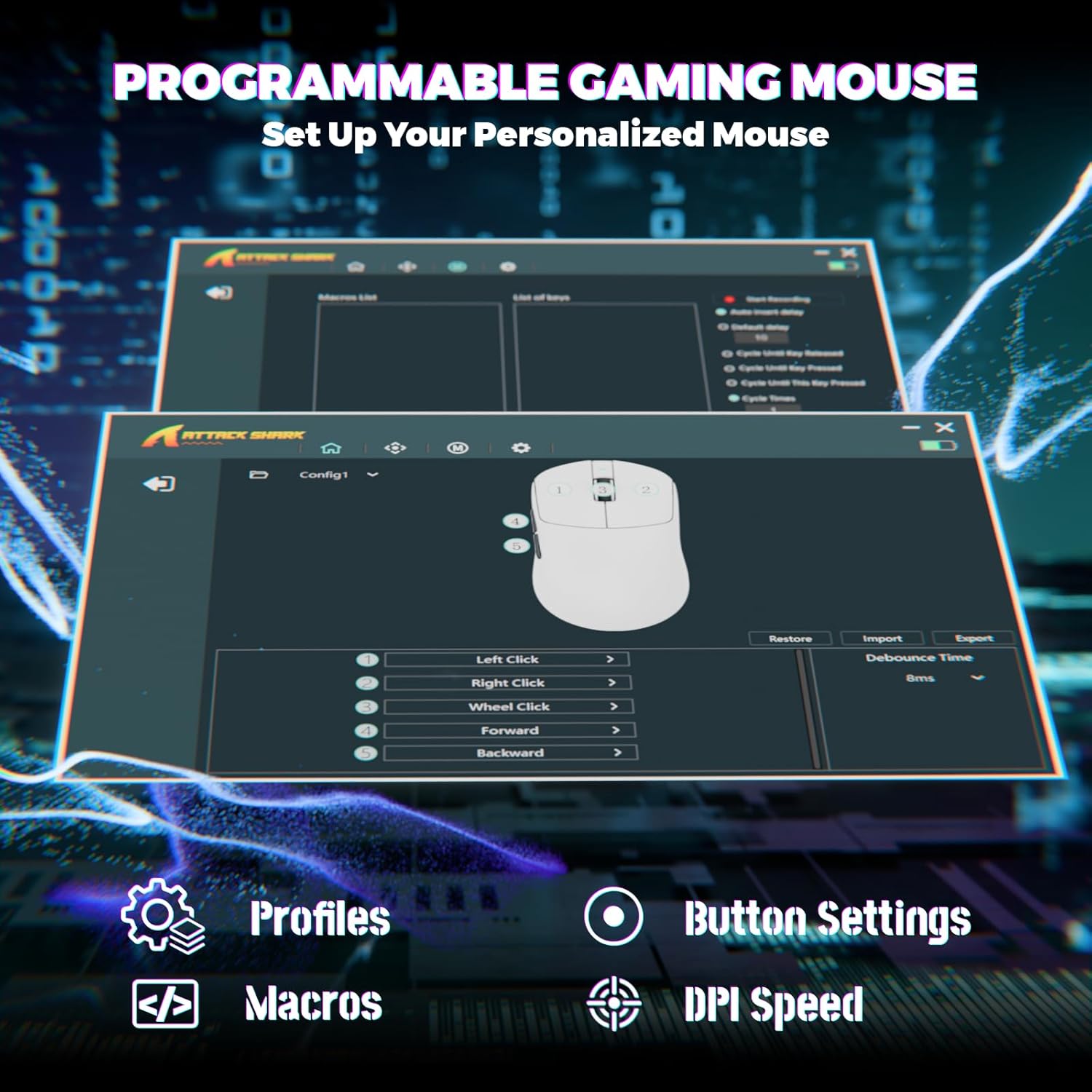
Image: Screenshot of the Cloud Driver interface for the ATTACK SHARK X8 Ultimate mouse, showing options for profiles, button settings, macros, and DPI speed.
To access the Cloud Driver:
- Ensure your mouse is connected to your computer.
- Buka a web browser and navigate to the official ATTACK SHARK support page or the specific Cloud Driver URL (refer to packaging or official website for the exact link).
- The open-source driver will automatically identify your computer system.
- From the Cloud Driver interface, you can:
- Adjust DPI sensitivity.
- Set polling rate.
- Configure competitive modes.
- Customize button assignments.
- Rakam dan tetapkan makro.
- Personalize key mapping and other advanced functions.
Penyelenggaraan
1. Pembersihan
Untuk mengekalkan prestasi dan penampilan yang optimum, bersihkan tetikus anda dengan kerap:
- Gunakan kain lembut dan tidak berbulu sedikit dampdisapu dengan air atau larutan pembersih lembut.
- Avoid harsh chemicals, solvents, or abrasive materials.
- Clean the optical sensor on the bottom of the mouse gently with a cotton swab to ensure accurate tracking.
2. Penjagaan Bateri
Untuk memanjangkan hayat bateri:
- Avoid exposing the mouse to extreme temperatures (hot or cold).
- Do not fully discharge the battery frequently. Charge it when the battery indicator is low.
- Jika menyimpan tetikus untuk tempoh yang lama, caskannya kepada kira-kira 50% sebelum penyimpanan.
Menyelesaikan masalah
If you encounter issues with your ATTACK SHARK X8 Ultimate mouse, try the following solutions:
- Tetikus tidak bertindak balas:
- Pastikan tetikus dihidupkan.
- Periksa tahap bateri dan cas jika perlu.
- Verify the connection mode (2.4GHz, Bluetooth, or Wired) is correctly selected and established.
- Untuk 2.4GHz, pastikan penerima USB dipasang dengan selamat.
- For Bluetooth, ensure Bluetooth is enabled on your device and the mouse is paired.
- Try connecting the mouse via the wired USB cable.
- Sambungan atau lag sekejap-sekejap:
- Ensure the USB receiver is not obstructed and is close to the mouse.
- Elakkan menggunakan tetikus berhampiran peranti wayarles lain yang boleh menyebabkan gangguan.
- Update your computer's USB or Bluetooth drivers.
- DPI or button settings not working:
- Access the Cloud Driver software to verify and reconfigure your settings.
- Ensure the mouse firmware is up to date (check via Cloud Driver).
- Mouse tracking issues:
- Bersihkan penderia optik di bahagian bawah tetikus.
- Gunakan tetikus pada permukaan yang bersih dan seragam atau pad tetikus berkualiti tinggi.
Spesifikasi
| Ciri | Penerangan |
|---|---|
| Jenama | SERANGAN JEUNG |
| Model | X8 Ultimate |
| Teknologi Ketersambungan | 2.4Ghz Wireless, Bluetooth, USB (Tri-mode) |
| Teknologi Pengesanan Pergerakan | Optical (PixArt PAW3950MAX Sensor) |
| Sensitiviti DPI | 50 - 42,000 DPI (Boleh Laras) |
| Kadar Mengundi | Up to 8000Hz (Wireless/Wired) |
| Pecutan | 60G |
| Kadar Penjejakan | 700IPS |
| Berat badan | 55g (Ultra-Lightweight) |
| Kapasiti Bateri | 800mAh |
| Jenis Suis | Omron Micro Switches (100 Million Clicks lifespan) |
| Kuantiti Butang | 5 (Boleh Diprogram) |
| Orientasi Tangan | Ambidextrous |
| Peranti Serasi | Gaming Console, Personal Computer, Tablet |
| Platform Perkakasan | PC |
| UPC | 752010401109 |

Image: The ATTACK SHARK X8 Ultimate mouse emphasizing its 59g ultra-light design and smooth-gliding double-layer feet.

Imej: Terperinci view of the optical micro switches inside the ATTACK SHARK X8 Ultimate mouse, highlighting their instant click and zero rebound lag features, and 100 million click lifespan.
Waranti dan Sokongan
The ATTACK SHARK X8 Ultimate Wireless Gaming Mouse comes with a Waranti 1 Tahun dari tarikh pembelian.
For technical support, warranty claims, or further assistance, please contact ATTACK SHARK customer service through their official website or the retailer where the product was purchased. Please have your proof of purchase and product model information ready.
Kedai Rasmi ATTACK SHARK: Kedai ATTACK SHARK di Amazon