
1. Pengenalan
Terima kasih kerana membeliasing the ELEPHAS BL128MINI Mini Projector. This manual provides essential information for setting up, operating, and maintaining your projector. Please read it thoroughly before use to ensure optimal performance and longevity of the device.
2. Kandungan Pakej
Sahkan bahawa semua item yang disenaraikan di bawah disertakan dalam pakej anda:
- 1 x ELEPHAS BL128MINI Projector
- 1 x Alat Kawalan Jauh
- 1 x Manual Pengguna (dokumen ini)
- 1 x Kabel HDMI
- 1 x Detachable Tripod
3. Produk Lebihview
3.1 Ciri-ciri Utama
- Resolusi HD Penuh 1080P: Supports 1920 x 1080 resolution for clear images.
- 24-bit True Color: Delivers vibrant and accurate colors.
- Tayangan Skrin Besar: Capable of projecting up to a 200-inch screen.
- Detachable Tripod: Provides stable placement and flexible positioning.
- Built-in HIFI Speaker: Offers integrated audio output.
- Pelbagai Pilihan Kesambungan: Includes USB, HDMI, AV, and Audio ports.

Image 3.1: The ELEPHAS BL128MINI Projector offers 1080P Full HD resolution with 24-bit true color, an 8000:1 contrast ratio, and enhanced brightness for a vivid viewpengalaman dalam.
3.2 Projector Ports and Controls
Familiarize yourself with the various ports and controls on your projector for proper connection and operation.

Image 3.2: Rear panel of the ELEPHAS BL128MINI Projector, highlighting DC power input, USB ports, HDMI port, AV port, and audio output. Compatible devices include Xbox, TV Stick, PC, Smartphone, USB drives, speakers, and headphones.
4. Persediaan
4.1 Sambungan Kuasa
- Sambungkan penyesuai kuasa ke port DC IN pada projektor.
- Palamkan penyesuai kuasa ke salur keluar dinding.
4.2 Tripod Installation
The included detachable tripod allows for stable placement on various surfaces.
- Locate the tripod mounting screw hole on the bottom of the projector.
- Screw the tripod securely into the mounting hole.
- Adjust the tripod legs to achieve the desired height and angle for projection.

Image 4.2: The detachable tripod provides stability for the projector, whether placed on a desktop or uneven outdoor surfaces.
4.3 Jarak Penempatan dan Unjuran
Position the projector on a flat, stable surface. The optimal projection distance ranges from 3.3 to 9.8 feet for screen sizes between 50 and 200 inches.

Image 4.3: Recommended projection distances for achieving various screen sizes, from 50 to 200 inches.
5. Arahan Operasi
5.1 Hidupkan/Mati Kuasa
- Hidupkan kuasa: Tekan butang kuasa pada projektor atau alat kawalan jauh.
- Matikan: Tekan butang kuasa sekali lagi. Projektor akan memasuki mod siap sedia.
5.2 Pelarasan Fokus
Putar gelang fokus pada kanta projektor sehingga imej yang diunjurkan jelas dan tajam.
5.3 Pemilihan Sumber Input
Use the 'Source' button on the remote control or the projector to select the desired input source (HDMI, USB, AV).
5.4 Menyambung Peranti Luaran
The projector supports various external devices:
- HDMI: Connect laptops, PCs, TV boxes, TV sticks, gaming consoles (e.g., Xbox), or other HDMI-enabled devices using the provided HDMI cable.
- USB: Masukkan pemacu kilat USB ke dalam port USB untuk memainkan media files secara langsung.
- DARI: Gunakan port AV untuk peranti lama dengan output video komposit.
- Telefon Pintar/Tablet: For iOS and Android devices, an additional HDMI adapter (not included) is required for connection.
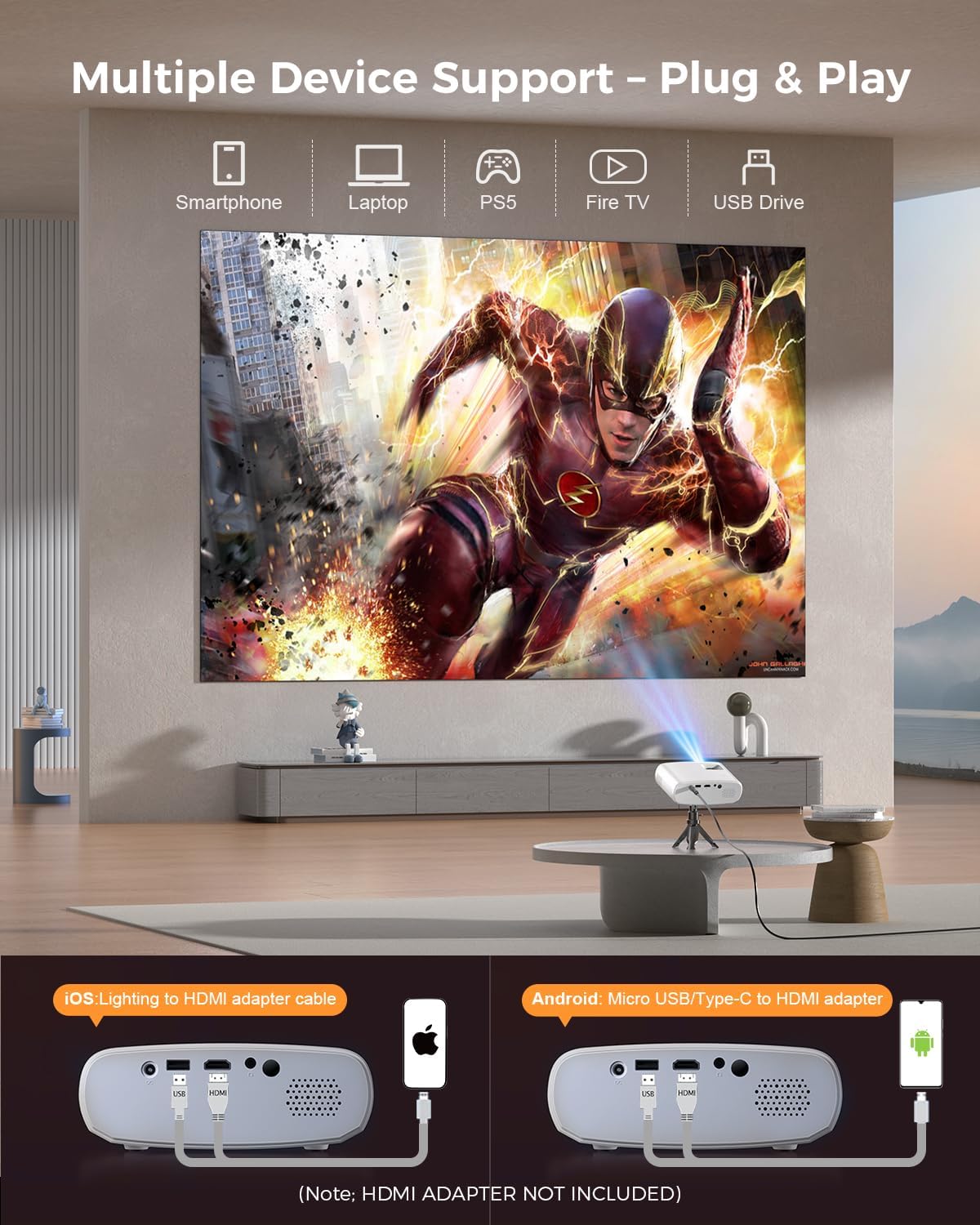
Image 5.4: The projector supports multiple devices via HDMI and USB. Note that an HDMI adapter is required for direct smartphone connection (not included).
5.5 Keluaran Audio
The projector has a built-in HIFI speaker. For external audio, connect headphones or external speakers to the Audio Out port.
6. Penyelenggaraan
6.1 Pembersihan
- Kanta: Use a soft, lint-free cloth or lens cleaning paper. Avoid abrasive materials.
- Casing: Lap projektor casing with a soft, dry cloth. Do not use liquid cleaners or solvents.
- Pengudaraan: Ensure ventilation openings are clear of dust and obstructions to prevent overheating.
6.2 Penyimpanan
When not in use, store the projector in a cool, dry place, away from direct sunlight and extreme temperatures. Use the original packaging or a protective bag to prevent dust accumulation.
7. Penyelesaian masalah
| Masalah | Kemungkinan Punca | Penyelesaian |
|---|---|---|
| Tiada imej ditayangkan | Kabel kuasa longgar; Sumber input salah; Peranti tidak disambungkan dengan betul. | Check power connection; Select correct input source; Reconnect HDMI/USB cable. |
| Imej kabur | Fokus tidak dilaraskan; Projektor terlalu dekat/jauh dari skrin. | Adjust focus ring; Adjust projection distance. |
| Tiada bunyi | Volume too low; Muted; External audio device not connected. | Increase volume; Unmute; Check external audio connections. |
| Alat kawalan jauh tidak berfungsi | Bateri lemah/mati; Halangan antara alat kawalan jauh dan projektor. | Gantikan bateri; Pastikan garis penglihatan yang jelas kepada penerima IR. |
| Cannot play Netflix/Hulu/Prime Video | Perlindungan hak cipta HDCP. | Use an external streaming device like Amazon Fire Stick or Roku Stick (not included). |
8. Spesifikasi
| Ciri | Perincian |
|---|---|
| Model | BL128MINI |
| Jenama | GAJAH |
| Resolusi Paparan | 1920 x 1080 (1080P Full HD) |
| Teknologi Ketersambungan | HDMI, USB, AV, Audio Out |
| Ciri Khas | HDMI Connectivity, Portable, Built-in Speakers, Detachable Tripod |
| Penggunaan yang Disyorkan | Dalaman/Luar |
| Berat Barang | 1.96 paun (lebih kurang 0.89 kg) |
| Dimensi Produk | 6 x 4.4 x 2.4 inci (lebih kurang 15.2 x 11.2 x 6.1 cm) |
9. Waranti dan Sokongan
ELEPHAS projectors are certified with CE, FCC, and RoHS standards.
- Factory Support: We provide 3-years factory support for this product.
- Sokongan Teknikal: Sokongan teknikal seumur hidup disediakan.
- Perkhidmatan Pelanggan: 24/7 professional service is provided.
- Pulangan: A 30-day return or exchange policy is in place.
For further assistance, please refer to the contact information provided on the product packaging or the official ELEPHAS webtapak.

Image 9.1: ELEPHAS offers comprehensive customer support, including 24/7 professional service, a 30-day return policy, and lifetime technical support.