
1. Pengenalan
Thank you for choosing the GEEKOM GT1 Mega Mini PC. This manual provides essential information for setting up, operating, maintaining, and troubleshooting your device. Please read it carefully before use and keep it for future reference.
The GEEKOM GT1 Mega is a high-performance mini PC equipped with the Intel Core Ultra 9 185H processor, Intel AI Boost (dedicated NPU), and integrated Intel Arc graphics. It is designed for demanding tasks such as AI applications, advanced multitasking, 4K video editing, photo retouching, virtualization, and professional software.
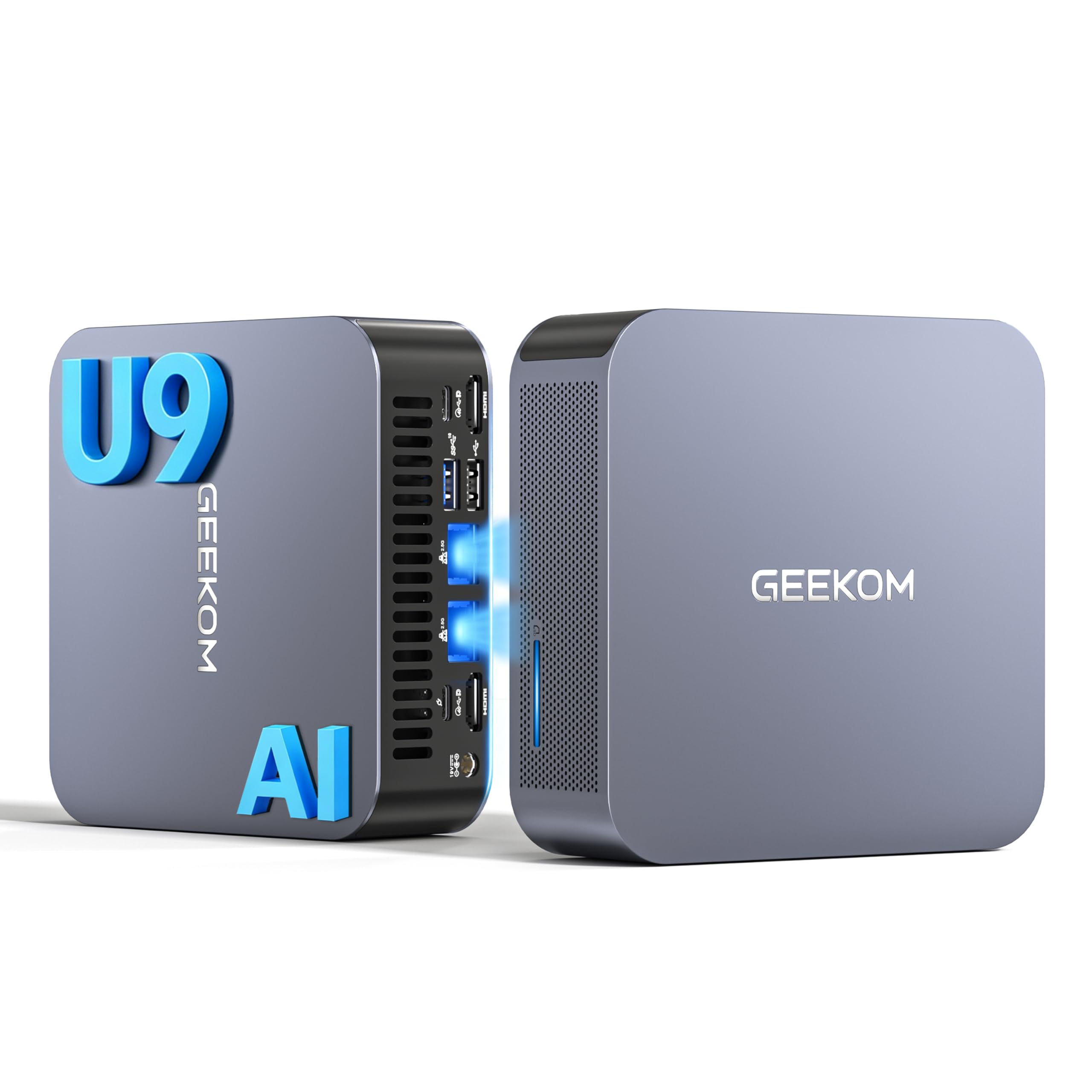
Imej 1.1: Depan view of the GEEKOM GT1 Mega Mini PC.
2. Maklumat Keselamatan
Please observe the following safety guidelines to prevent damage to your device or injury to yourself:
- Gunakan hanya penyesuai kuasa yang disediakan bersama peranti.
- Jangan dedahkan peranti kepada air, lembapan atau suhu yang melampau.
- Elakkan meletakkan peranti di bawah cahaya matahari langsung atau berhampiran sumber haba.
- Pastikan pengudaraan yang betul; jangan sekat sebarang bukaan pengudaraan.
- Do not attempt to open or repair the device yourself. Contact qualified personnel for service.
- Jauhkan peranti daripada medan magnet yang kuat.
3. Kandungan Pakej
Sahkan bahawa semua item terdapat dalam pakej anda:
- 1 x GEEKOM GT1 Mega Mini PC
- 1 x VESA Mount dengan Skru
- 1 x Penyesuai Kuasa
- 1 x Kabel HDMI
- 1 x Manual Pengguna
- 1 x Kad Terima Kasih

Image 3.1: Contents included in the GEEKOM GT1 Mega Mini PC package.
4. Produk Lebihview
4.1. Front and Rear Ports
The GEEKOM GT1 Mega Mini PC offers a comprehensive set of ports for versatile connectivity:

Image 4.1: Diagram illustrating the front and rear ports of the GEEKOM GT1 Mega Mini PC.
- Pelabuhan hadapan:
- 4 x USB 3.2 Gen2 Type-A (one with Always On power)
- Bicu fon kepala 1 x 3.5mm
- 1 x Butang Kuasa
- Port Belakang:
- 2 x USB4 (40 Gbps, eGPU compatible, one with power delivery)
- 2 x HDMI 2.0
- 2 x RJ45 2.5Gbps Ethernet Ports
- 1 x USB 3.2 Gen2 Jenis-A
- 1 x USB 2.0 Jenis-A
- 1 x Input DC
- 1 x Pembaca Kad SD
- 1 x Slot Kunci Kensington
4.2. Ciri-ciri Utama
- Pemproses: Intel Core Ultra 9 185H (16 Cores, 22 Threads, up to 5.1 GHz) with Intel AI Boost (NPU).
- Grafik: Integrated Intel Arc Graphics.
- Ingatan: 16GB DDR5 5600MHz dual-channel RAM (upgradable up to 128GB).
- Storan: 1TB NVMe PCIe Gen4 SSD (expandable up to 4TB).
- Rangkaian: Dual 2.5G Ethernet, WiFi 7, Bluetooth 5.4.
- Sokongan Paparan: Up to four 4K displays or one 8K display via USB4 and HDMI.
- penyejukan: IceBlast 2.0 advanced cooling system with dual copper heat pipes and high-efficiency fan.
- Chassis: Premium metallic chassis, 0.78 L volume, withstands pressure up to 200 kg.
5. Persediaan
5.1. Sambungan Awal
- Paparan Sambungkan: Connect your monitor(s) to the Mini PC using the HDMI or USB4 ports. The GT1 Mega supports up to four 4K displays or one 8K display.
- Sambung Peranti: Palamkan papan kekunci, tetikus anda dan sebarang peranti USB lain ke dalam port USB yang tersedia.
- Sambungkan Rangkaian: For wired internet, connect an Ethernet cable to one of the 2.5G RJ45 ports. For wireless, ensure your WiFi network is available during initial setup.
- Sambungkan Kuasa: Sambungkan penyesuai kuasa ke port input DC pada Mini PC, kemudian pasangkan penyesuai ke soket kuasa.
5.2. But Pertama
- Tekan butang kuasa di hadapan Mini PC.
- The device will boot into Windows 11 Pro. Follow the on-screen instructions to complete the initial Windows setup, including language, region, network connection, and user account creation.
- Once Windows is set up, it is recommended to check for and install any available system updates.

Imej 5.1: Cthample of a multi-monitor setup with the GEEKOM GT1 Mega Mini PC.
6. Arahan Operasi
6.1. Hidupkan/Mati Kuasa
- Hidupkan kuasa: Tekan butang kuasa sekali.
- Tutup: Klik butang Mula dalam Windows, kemudian pilih Kuasa > Matikan.
- Mulakan semula: Klik butang Mula dalam Windows, kemudian pilih Kuasa > Mulakan semula.
- tidur: Klik butang Mula dalam Windows, kemudian pilih Kuasa > Tidur.
6.2. Kesambungan Rangkaian
- Berwayar (Ethernet): Connect an Ethernet cable to one of the two 2.5G RJ45 ports. The system will automatically detect the connection.
- Wayarles (Wi-Fi 7): In Windows, click the network icon in the taskbar, select your Wi-Fi network, enter the password, and connect.
- Bluetooth 5.4: To pair Bluetooth devices, go to Windows Settings > Bluetooth & devices, turn on Bluetooth, and select 'Add device'.
6.3. Konfigurasi Paparan
The Mini PC supports multiple displays. To configure them:
- Right-click on the desktop and select 'Display settings'.
- Windows will detect connected displays. You can arrange them, change resolution, and set display modes (Extend, Duplicate, Second screen only).
7. Penyelenggaraan
7.1. Pembersihan
- Bersihkan bahagian luar Mini PC dengan kerap menggunakan kain lembut dan kering.
- Use compressed air to gently clear dust from the ventilation openings to maintain optimal cooling performance.
- Jangan gunakan pembersih cecair atau bahan yang melelas.
7.2. Kemas Kini Sistem
Keep your Windows operating system and drivers updated to ensure optimal performance and security:
- Go to Windows Settings > Windows Update to check for and install system updates.
- Visit the GEEKOM official website for the latest driver updates for your GT1 Mega.
7.3. Peningkatan Perkakasan
The GEEKOM GT1 Mega allows for memory and storage upgrades:
- RAM: The device supports up to 128GB of DDR5 SODIMM memory.
- SSD: The 1TB NVMe PCIe Gen4 SSD can be expanded up to 4TB. An additional M.2 2242 SATA SSD slot is available for up to 2TB.
For detailed instructions on how to perform hardware upgrades, please refer to the comprehensive guide on the GEEKOM support website or consult a professional technician.

Image 7.1: Illustration of the GEEKOM GT1 Mega's upgradable DDR5 memory and SSD storage.

Imej 7.2: Meletup view of the GEEKOM GT1 Mega, highlighting the IceBlast 2.0 cooling system components.
8. Penyelesaian masalah
If you encounter issues with your GEEKOM GT1 Mega, refer to the following common solutions:
| Masalah | Kemungkinan Punca | Penyelesaian |
|---|---|---|
| Tiada kuasa | Power adapter not connected, faulty outlet | Ensure power adapter is securely connected to both the PC and a working power outlet. Try a different outlet. |
| Tiada paparan | Monitor not connected, incorrect input source, faulty cable | Check HDMI/USB4 cable connections. Ensure monitor is on and set to the correct input source. Try a different cable or monitor. |
| No internet (Wi-Fi) | Wi-Fi dilumpuhkan, kata laluan salah, masalah penghala | Check Wi-Fi settings in Windows. Verify Wi-Fi password. Restart your router. |
| No internet (Ethernet) | Ethernet cable disconnected, network driver issue | Ensure Ethernet cable is securely connected. Check network adapter status in Device Manager. Update network drivers. |
| Sistem perlahan/tidak responsif | Too many applications running, overheating, outdated drivers | Close unnecessary applications. Ensure proper ventilation. Update drivers and Windows. |
If the problem persists, please contact GEEKOM customer support for further assistance.
9. Spesifikasi
Detailed technical specifications for the GEEKOM GT1 Mega Mini PC:
| Ciri | Spesifikasi |
|---|---|
| Jenama | GEEKOM |
| Nama Model | GT1 Mega |
| Sistem Operasi | Windows 11 Pro |
| Model CPU | Intel Core Ultra 9-185H |
| Kelajuan CPU | 5.1 GHz (Max Turbo Frequency) |
| Grafik | Grafik Intel Arc Bersepadu |
| RAM | 16 GB DDR5 (5600MHz, expandable to 128 GB) |
| Penyimpanan | 1 TB NVMe PCIe Gen4 SSD (expandable to 4 TB) |
| Teknologi Cakera Keras | SSD |
| Ketersambungan | 2x 2.5G Ethernet, Wi-Fi 7, Bluetooth 5.4 |
| Port USB | 2x USB4 (40Gbps), 5x USB 3.2 Gen2 Type-A, 1x USB 2.0 Type-A |
| Output Video | 2x HDMI 2.0, 2x USB4 (DisplayPort 1.4) |
| Resolusi Paparan Maks | 8K (via USB4), 4K (via HDMI) |
| Output Audio | 3.5mm Audio Jack |
| Pembaca Kad | Pembaca Kad SD |
| Bekalan Kuasa | Type C/EF – 2 pins (European/Hybrid FR-DE plug) |
| Pensijilan | CE, FCC, RoHS |

Image 9.1: GEEKOM GT1 Mega Mini PC certifications including CB, ROHS, FCC ID, EPR, CEC, UKCA, UL4200A.
10. Waranti dan Sokongan
The GEEKOM GT1 Mega Mini PC comes with a 3-year manufacturer's warranty and professional technical support.
10.1. Maklumat Waranti
Your device is covered by a 3-year warranty from the date of purchase, ensuring peace of mind against manufacturing defects. Please retain your proof of purchase for warranty claims.
10.2. Sokongan Teknikal
For any technical issues or support inquiries, please use one of the following methods:
- Contact Seller on Amazon: Log in to your Amazon account, navigate to 'Your Orders', and click 'Get Help' for assistance.
- Sokongan E-mel: Send an email to the GEEKOM support team at pan.he@geekom.tw. Our team will respond as soon as possible.