
1. Arahan Keselamatan Penting
Sila baca semua arahan dengan teliti sebelum menggunakan perkakas ini. Simpan manual ini untuk rujukan pada masa hadapan.
- Jangan gunakan di luar atau di permukaan basah.
- Jangan biarkan digunakan sebagai mainan. Perhatian yang rapi diperlukan apabila digunakan oleh atau berhampiran kanak-kanak.
- Gunakan hanya seperti yang diterangkan dalam manual ini. Gunakan hanya lampiran yang disyorkan pengilang.
- Jangan gunakan dengan kord atau palam yang rosak. Jika perkakas tidak berfungsi sebagaimana mestinya, telah terjatuh, rosak, ditinggalkan di luar rumah, atau terjatuh ke dalam air, kembalikannya ke pusat servis.
- Jangan tarik atau bawa dengan kord, gunakan kord sebagai pemegang, tutup pintu pada kord, atau tarik kord di sekeliling tepi atau sudut yang tajam. Jangan jalankan perkakas di atas kord. Jauhkan kord dari permukaan yang dipanaskan.
- Jangan cabut plag dengan menarik kord. Untuk mencabut palam, pegang palam, bukan kordnya.
- Jangan pegang palam atau perkakas dengan tangan yang basah.
- Jangan letakkan sebarang objek ke dalam bukaan. Jangan gunakan dengan mana-mana bukaan yang disekat; jauhkan daripada habuk, serabut, rambut dan apa sahaja yang boleh mengurangkan aliran udara.
- Jauhkan rambut, pakaian longgar, jari dan semua bahagian badan daripada bukaan dan bahagian yang bergerak.
- Jangan ambil apa-apa yang terbakar atau berasap, seperti rokok, mancis, atau abu panas.
- Jangan ambil cecair mudah terbakar atau mudah terbakar, seperti petrol, atau gunakan di kawasan yang mungkin terdapat.
- Jangan ambil bahan toksik (cth, peluntur klorin, ammonia, pembersih longkang).
- Jangan gunakan tanpa cawan habuk dan/atau penapis di tempatnya.
- Matikan semua kawalan sebelum mencabut plag.
- Gunakan lebih berhati-hati semasa membersihkan di tangga.
- Do not use to pick up large debris or sharp objects as this may damage the vacuum.
2. Produk Lebihview
The Tikom V750 is a versatile cordless stick vacuum cleaner designed for efficient cleaning of various surfaces. It features a powerful motor, multiple suction modes, and a comprehensive filtration system.
Komponen yang Disertakan
Pakej termasuk item berikut:
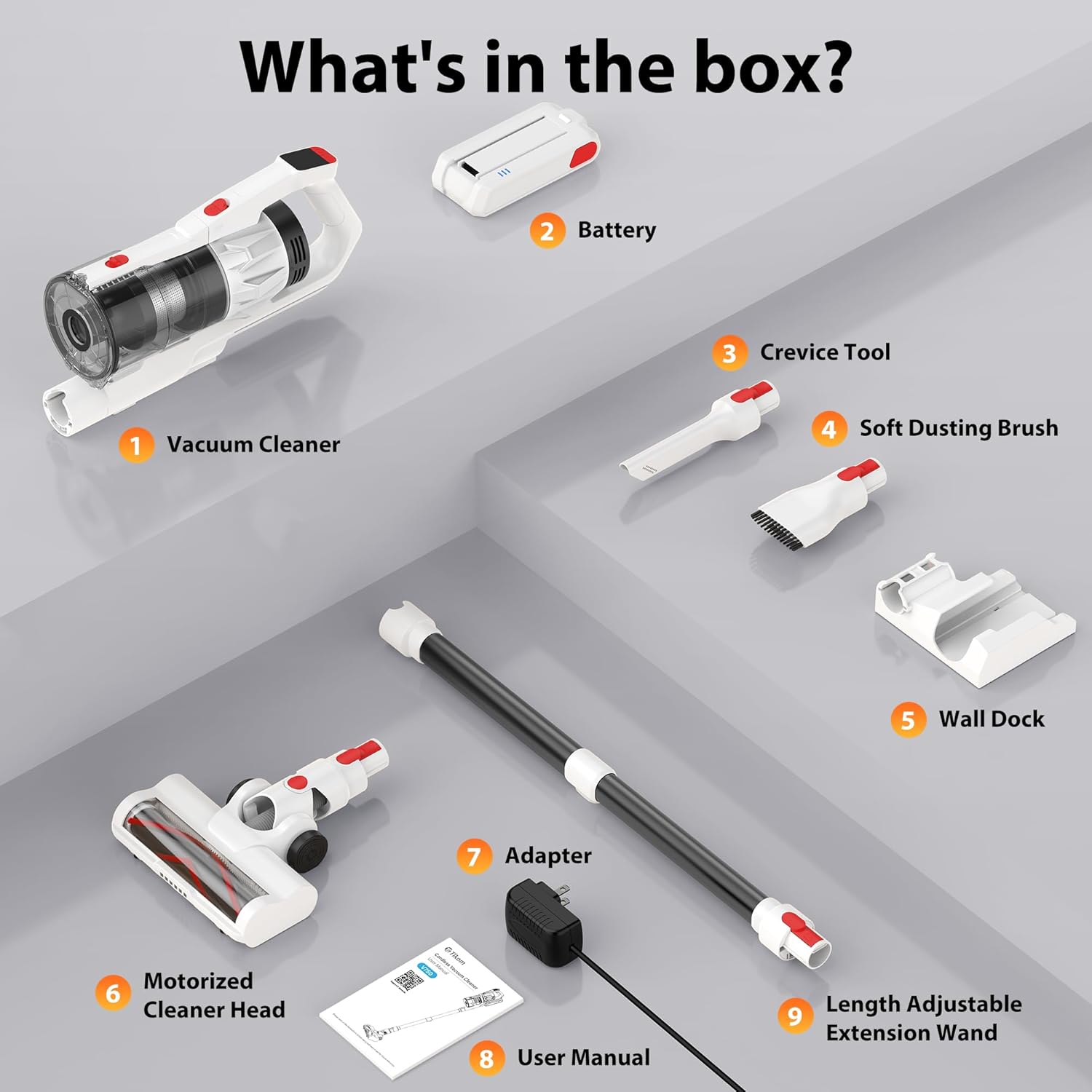
- Vacuum Cleaner Main Body
- Bateri boleh dicas semula
- Alat Celah
- Berus Debu Lembut
- Wall Dock (with 4 screws and plastic expansion anchors)
- Ketua Pencuci Bermotor
- Penyesuai Kuasa/Pengecas
- Manual Pengguna
- Length Adjustable Extension Wand
- Penapis HEPA (prapasang)
3. Persediaan dan Pemasangan
Pengecasan Awal
Before first use, fully charge the battery. The detachable 7*2600 mAh battery can be charged in two ways:
- Directly on the vacuum: Connect the power adapter to the charging port on the vacuum cleaner.
- Independently: Remove the battery from the vacuum and connect the power adapter directly to the battery.
A full charge typically takes 4-5 hours. The LED display will indicate charging status.

The battery provides approximately 50 minutes of runtime on low suction and 25 minutes on high suction.
Memasang Vakum
- Insert the extension wand into the main vacuum body until it clicks securely.
- Attach the motorized cleaner head to the other end of the extension wand until it clicks.
- For handheld use, attach desired accessories (crevice tool or soft dusting brush) directly to the main vacuum body.
Pemasangan Pemasangan Dinding
The included wall dock provides convenient storage and charging. Choose a suitable location near a power outlet. Use the provided screws and plastic expansion anchors to securely mount the dock to the wall. Ensure the vacuum cleaner cannot be started while the battery is charging on the wall mount for safety.

4. Arahan Operasi
Menghidupkan/Mematikan dan Mod Sedutan
Press the power button to turn the vacuum cleaner on or off. The Tikom V750 offers two suction levels:
- Sedutan Rendah: Suitable for light cleaning and extending battery life.
- Sedutan Tinggi: Provides maximum power for stubborn dirt and debris.
Toggle between suction modes using the dedicated button on the handle.

Paparan Pintar LED
The intuitive color LED display provides real-time information:
- Ikon Tahap Bateri: Menunjukkan baki cas bateri.
- Suction Level Indicator: Displays current suction mode (Low/High).
- Malfunction Warnings: Alerts you to potential issues, such as a brush roll error.

Using Attachments and Features
The V750 comes with various attachments for versatile cleaning:

- Ketua Pencuci Bermotor: Ideal for floors and carpets. Features a 180° rotatable design and 6 LED lights for cleaning dark areas. The V-shaped roller brush is designed to prevent hair tangling.
- Soft Dusting Brush: Use for delicate surfaces, furniture, and keyboards.
- Alat Celah: Sesuai untuk celah sempit, sudut dan kawasan yang sukar dicapai.
- Tongkat Sambungan: Connects the main body to the cleaner head or other tools for extended reach, allowing cleaning of high areas like ceilings or curtains.

The vacuum is suitable for various floor types, including hard floors and carpets.

5. Penyelenggaraan
Regular maintenance ensures optimal performance and extends the life of your Tikom V750.
Mengosongkan Dust Cup
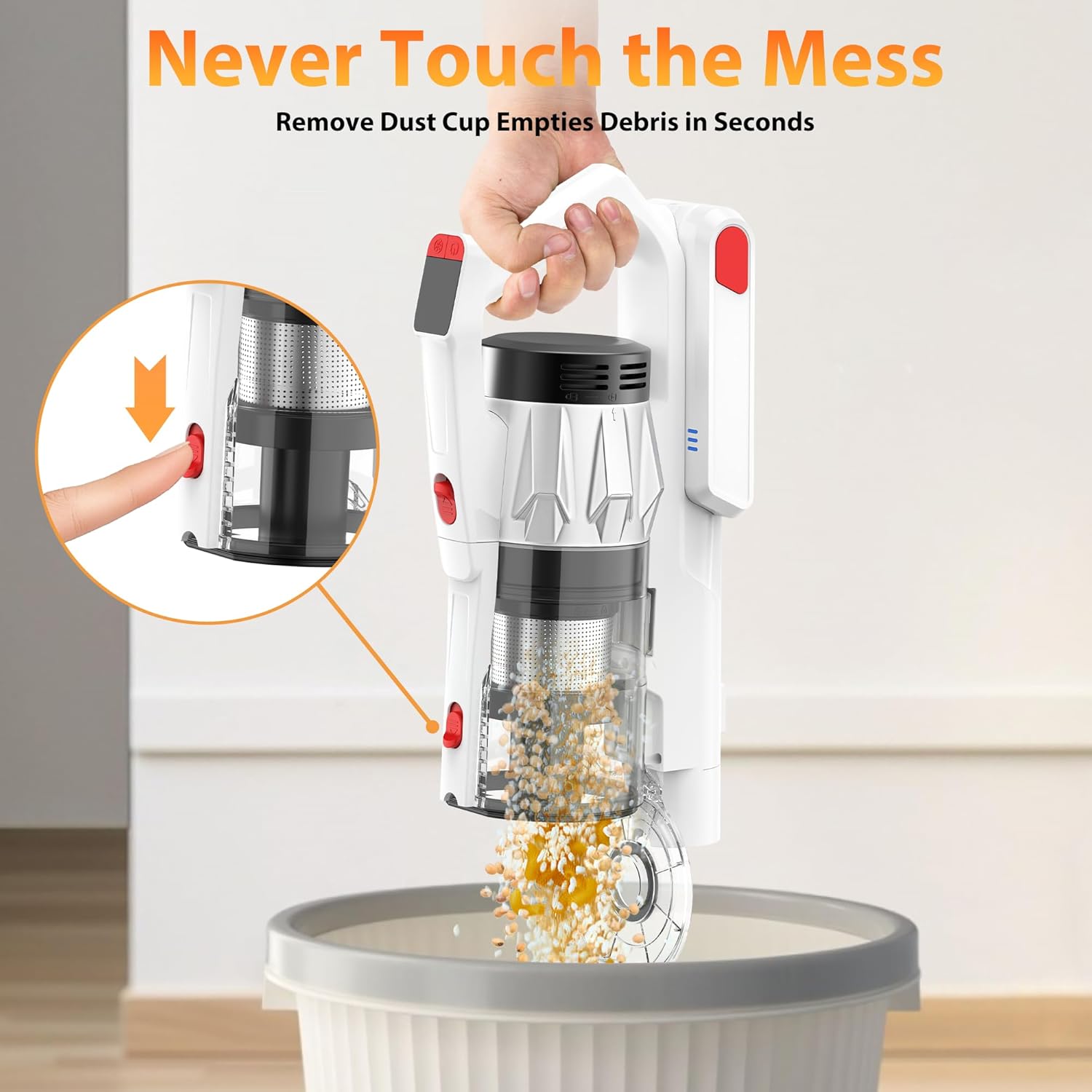
The 1.5L dust cup features a one-click pop-up lid for easy emptying. Position the dust cup over a trash bin and press the release button to open the lid and dispose of debris without touching it.
Membersihkan Penapis
The Tikom V750 utilizes a 7-stage HEPA filtration system. The entire dust cup and HEPA filter are detachable and washable.
- Detach the dust cup from the main body.
- Tanggalkan penapis HEPA dan komponen penapis lain daripada cawan habuk.
- Rinse the dust cup and filters under running water until clean.
- Allow all components to air-dry completely before reassembling. Do not use the vacuum with wet filters.

Membersihkan Gulungan Berus
The motorized cleaner head features an anti-tangle V-shaped roller brush. Periodically check the brush roll for tangled hair or debris. To clean:
- Turn off the vacuum and disconnect the cleaner head.
- Locate the brush roll release mechanism (usually a latch or button).
- Keluarkan gulungan berus.
- Use scissors or a brush to remove any tangled hair or fibers.
- Masukkan semula gulungan berus dan selamatkannya di tempatnya.

6. Penyelesaian masalah
If you encounter issues with your Tikom V750, refer to the following common problems and solutions:
| Masalah | Kemungkinan Punca | Penyelesaian |
|---|---|---|
| Vakum tidak dihidupkan | Bateri tidak dicas atau tidak dipasang dengan betul. | Pastikan bateri dicas sepenuhnya dan diklik pada tempatnya dengan selamat. |
| Kuasa sedutan rendah | Dust cup is full, filters are clogged, or brush roll is obstructed. | Empty dust cup. Clean or replace filters. Remove any obstructions from the brush roll. |
| Gulung berus tidak berputar | Obstruction in brush roll, or brush roll error indicated on LED display. | Turn off vacuum and remove any tangled hair or debris from the brush roll. Check for damage. |
| Masa jalan bateri pendek | Battery not fully charged, or operating on high suction mode continuously. | Ensure battery is fully charged. Use low suction mode for longer runtime. Battery life naturally degrades over time. |
| Bunyi yang tidak biasa | Halangan pada laluan udara atau gulungan berus. | Check and clear any blockages in the nozzle, wand, or dust cup. Clean the brush roll. |
If the problem persists after attempting these solutions, please contact Tikom customer support.
7. Spesifikasi
| Ciri | Spesifikasi |
|---|---|
| Nama Model | V750 |
| Jenama | Tikom |
| Kuasa Motor | 500W |
| Kuasa Sedutan | Sehingga 45,000Pa |
| Jenis Bateri | 7*2600mAh Lithium-Ion (Detachable) |
| Masa jalan | Up to 50 minutes (Low suction), 25 minutes (High suction) |
| Masa Mengecas | 4-5 jam |
| Kapasiti Cawan Habuk | 1.5 Liter |
| Sistem Penapisan | 7-Stage HEPA Filtration |
| Ciri Khas | LED Smart Display, Anti-Tangle V-Roller Brush, LED Headlights, Wall Dock, One-Click Dust Emptying |
| Syor Permukaan | All floors (Hard Floor, Carpet) |
| Berat Barang | 5.5 paun |
| Dimensi (L x W x H) | 10.3"L x 7.6"W x 17.1"H |
8. Waranti dan Sokongan
For warranty information or technical support, please refer to the warranty card included with your product or contact Tikom customer service directly. You can typically find contact details on the official Tikom webtapak atau melalui platform pembelian anda.
Please have your model number (V750) and purchase date ready when contacting support.