
1. Pengenalan
This manual provides detailed instructions for the ECHTPower EP05 Wireless PC Gaming Controller. This multi-platform controller features a TFT screen for on-the-fly adjustments, Hall-Effect joysticks for precision, dual Hall triggers, a 1000Hz polling rate, and customizable RGB lighting. It is compatible with Windows PC, Nintendo Switch, Android, and iOS devices.
Video: ECHTPower PC Controller with Intelligent Screen. This official video provides an overview of the controller's features and design.
2. Ciri-ciri Utama
- Smart TFT Screen Control: Adjust vibration, RGB lighting, turbo settings, trigger travel, and button mapping directly on the integrated screen without external software.
- Hall-Effect Joysticks: Designed to prevent joystick drift, providing stable and smooth control for various game genres.
- Pencetus Dewan Berganda: Offers adjustable trigger travel (2mm for rapid fire, 6mm for precise control) for an optimized gaming experience.
- Kadar Undian 1000Hz: Ensures ultra-fast input and responsiveness in 2.4GHz wireless or wired modes.
- Sokongan Pelbagai Platform: Connects via Bluetooth, 2.4G wireless, or USB-C wired to Windows PC, Switch, Android, and iOS devices. (Note: Not compatible with Xbox or PlayStation.)
- Conductive Gel Buttons: Provides sharp feedback and durability, rated for 3 million presses.
3. Kandungan Pakej
Setelah membuka bungkusan, sila pastikan semua barang ada:
- ECHTPower EP05 Wireless PC Gaming Controller
- Kabel Pengecas USB-C
- Penerima Tanpa Wayar 2.4G (Dongle USB)
- Manual Pengguna
4. Persediaan dan Ketersambungan
4.1 Mengecas Pengawal
Before first use, fully charge the controller using the provided USB-C cable. Connect the USB-C end to the controller and the USB-A end to a power source (e.g., PC, USB wall adapter).
4.2 Menghidupkan/Mematikan
Untuk menghidupkan pengawal, tekan dan tahan MATI/HIDUP button located on the front of the controller until the RGB lights illuminate and the TFT screen activates. To power off, press and hold the same button until the lights turn off.
4.3 Menyambung ke Peranti
The controller supports three connection modes: Bluetooth, 2.4G Wireless, and Wired USB-C.
- Bluetooth Connection (for Switch, Android, iOS):
- Pastikan pengawal dimatikan.
- Switch the rear mode selector to the appropriate platform (e.g., "SW" for Switch, "PHONE" for Android/iOS).
- Press and hold the pairing button (often indicated by a Bluetooth icon or a dedicated pairing button) until the RGB lights flash rapidly.
- On your device, go to Bluetooth settings and select "ECHTPower EP05" to pair.
- 2.4G Wireless Connection (for PC):
- Pastikan pengawal dimatikan.
- Switch the rear mode selector to "PC" or "Receiver".
- Insert the 2.4G wireless receiver into an available USB port on your PC.
- Power on the controller. It should automatically connect to the receiver. The TFT screen will indicate connection status.
- Wired USB-C Connection (for PC):
- Connect the USB-C cable to the controller and the USB-A end to your PC.
- The controller will automatically switch to wired mode and be recognized by your PC.
Important: Always switch the rear mode selector to the correct platform before attempting to pair or connect.

Image: The ECHTPower EP05 controller shown with its 2.4G wireless dongle and USB-C cable, highlighting the various connection methods available.
5. Mengendalikan Pengawal
5.1 Using the TFT Screen
The integrated TFT screen allows for direct customization of controller settings. Navigate the menu using the D-pad and action buttons (A, B, X, Y).

Imej: A terperinci view of the controller's TFT screen, showing options for adjusting settings such as light brightness, vibration, and volume.
5.2 Adjusting RGB Lighting
Access the RGB lighting settings via the TFT screen. You can adjust brightness, choose from various lighting effects (e.g., marquee, flow, gradient), and select specific colors.

Image: The ECHTPower EP05 controller showcasing its adjustable RGB lights, with the TFT screen displaying lighting options.
5.3 Customizing Vibration
The controller offers four levels of adjustable vibration intensity. Use the TFT screen to select your preferred feedback level (0%, 30%, 60%, 100%).

Image: The controller displaying its four-level adjustable vibration settings on the TFT screen, ranging from 0% to 100%.
5.4 Dual Hall Triggers
The dual Hall triggers can be switched between two modes:
- Short-travel (2mm): Ideal for rapid-fire actions in shooter games.
- Long-travel (6mm): Provides precise control for racing games or other applications requiring nuanced input.

Image: An illustration of the ECHTPower EP05's dual Hall triggers, demonstrating the 2mm short-travel for quick shooting and 6mm long-travel for precise control in racing games.
5.5 Programmable Back Buttons
The controller features mappable back buttons (M1, M2) for enhanced customization. These can be programmed via the TFT screen to replicate other button inputs or execute macros.
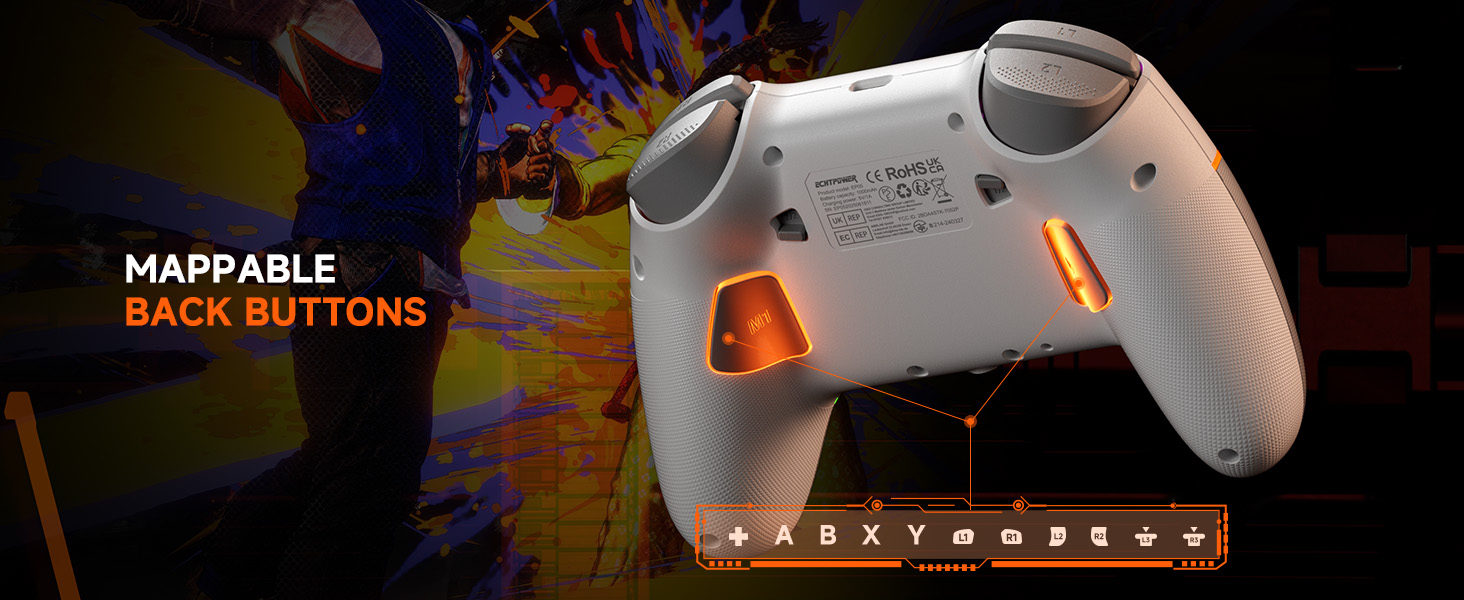
Image: The underside of the ECHTPower EP05 controller, highlighting the mappable back buttons (M1, M2) for custom assignments.
6. Penyelenggaraan
- Pembersihan: Gunakan kain lembut dan kering untuk membersihkan pengawal. Elakkan pembersih atau pelarut yang kasar.
- Storan: Simpan pengawal di tempat yang sejuk dan kering jauh dari cahaya matahari langsung dan suhu yang melampau.
- Penjagaan Bateri: Untuk jangka hayat bateri yang optimum, elakkan daripada kerap mencas sepenuhnya pengawal. Caskannya secara berkala.
7. Penyelesaian masalah
- Pengawal tidak bersambung:
- Pastikan pengawal dicas.
- Verify the rear mode selector is set to the correct platform (PC, SW, PHONE).
- For 2.4G, ensure the receiver is properly inserted and the controller is in 2.4G mode.
- Untuk Bluetooth, pastikan Bluetooth peranti anda dihidupkan dan pengawal berada dalam mod berpasangan.
- Cuba mulakan semula kedua-dua pengawal dan peranti.
- Hanyut kayu riang:
- The Hall-Effect joysticks are designed to prevent drift. If you experience issues, ensure the controller's firmware is up to date (check the manufacturer's webtapak).
- Perform a calibration if available through the controller's TFT screen settings.
- Lampu RGB tidak berfungsi:
- Check the RGB settings on the TFT screen to ensure they are enabled and configured correctly.
- Laraskan tahap kecerahan.
- Hayat bateri pendek:
- Pastikan pengawal dicas sepenuhnya sebelum digunakan.
- Reduce RGB lighting brightness or turn off lighting effects to conserve battery.
- Disable vibration if not needed.
8. Spesifikasi
| Ciri | Perincian |
|---|---|
| Model | EP05 |
| Ketersambungan | Bluetooth, Wayarles 2.4G, Berwayar USB-C |
| Kadar Mengundi | 1000Hz (2.4G/Wired) |
| Kayu bedik | Hall-Effect (No Drift) |
| Pencetus | Dual Hall-Effect (Adjustable 2mm/6mm) |
| Jenis Skrin | TFT |
| Kapasiti Bateri | 1000mAh |
| Platform yang Serasi | Windows PC, Nintendo Switch, Android, iOS |
| warna | putih |
9. Waranti dan Sokongan
9.1 Maklumat Waranti
This ECHTPower EP05 controller comes with a Waranti Terhad 2 Tahun. Please retain your proof of purchase for warranty claims. The warranty covers manufacturing defects and malfunctions under normal use. It does not cover damage caused by misuse, accidents, unauthorized modifications, or normal wear and tear.
9.2 Sokongan Pelanggan
For technical support, warranty claims, or general inquiries, please contact ECHTPower customer service:
- e-mel: service@echtpower.com
- Webtapak: www.echtpower.com
Please provide your product model (EP05) and a detailed description of your issue when contacting support.