
pengenalan
Thank you for choosing the MageGee AIR68 Wireless Hall Effect Gaming Keyboard. This manual provides detailed instructions for setting up, operating, maintaining, and troubleshooting your new device. Please read it carefully to ensure optimal performance and longevity.

Image: The MageGee AIR68 Wireless Hall Effect Gaming Keyboard, showcasinsusun aturnya yang padat 60% dan pencahayaan RGB.
Kandungan Pakej
Pastikan semua item ada dalam pakej:
- Magnetic Switch Keyboard (MageGee AIR68)
- 4 Poseidon Switches (Spare)
- Penerima USB 2.4G
- Kabel Jenis-C
- Cap Kekunci & Penarik Suis 2-dalam-1
- User Manual & User Guide

Image: A visual representation of the MageGee AIR68 keyboard and its included accessories, such as spare switches, USB receiver, Type-C cable, and keycap/switch puller.
Persediaan
Pengaktifan Awal
For first-time use, locate the power switch underneath the Caps Lock key. Gently remove the Caps Lock keycap using the provided puller. Flip the switch downward to activate the keyboard.

Image: The MageGee AIR68 keyboard demonstrating its 60% ultra-compact layout, highlighting its space-saving design compared to a full-sized keyboard.

Imej: Dari dekat view of the MageGee AIR68 keyboard showing the location of the power switch beneath the Caps Lock key, with instructions to flip it downward for activation.
Pilihan Kesambungan
The MageGee AIR68 supports three connection modes: Bluetooth, 2.4GHz Wireless, and USB Type-C Wired.
- USB Type-C Wired: Connect the keyboard directly to your computer using the provided Type-C cable. This mode offers an 8000Hz polling rate.
- Wayarles 2.4GHz: Plug the 2.4G USB receiver into an available USB port on your device. Press Fn + R on the keyboard to switch to 2.4GHz mode. This mode offers a 1000Hz polling rate.
- Bluetooth: Tekan Fn + Q, Fn + W, atau Fn + E to select one of three Bluetooth channels. The keyboard will enter pairing mode. Cari untuk "MageGee AIR68" on your device's Bluetooth settings and connect. This mode offers a 1000Hz polling rate.

Image: Diagram illustrating the three connectivity modes (Bluetooth, 2.4GHz, USB-C) of the MageGee AIR68 keyboard and compatible devices like laptops, tablets, PCs, and phones.

Image: A close-up of the MageGee AIR68 keyboard showing the Type-C port and cable connected, emphasizing stable, lag-free wired performance and charging capability.
Arahan Operasi
Kawalan Lampu Latar RGB
The AIR68 features vibrant RGB backlighting and a unique lightbox. Use the following FN key combinations to adjust lighting effects:
- Fn + | \: Tukar kesan pencahayaan.
- Fn + Enter: Switch lighting colors.
- Fn + Ins: Switch lightbox effects.
- Fn + P: Switch lightbox colors.
- Fn + BackSpace: Matikan lampu latar.
- Fn + Anak Panah Kiri: Kurangkan kelajuan lampu latar.
- Fn + Anak Panah Kanan: Tingkatkan kelajuan lampu latar.
- Fn + Anak Panah Atas: Tingkatkan kecerahan lampu latar.
- Fn + Anak Panah Bawah: Kurangkan kecerahan lampu latar.

Image: The MageGee AIR68 keyboard displaying various RGB backlight and lightbox effects, with key combinations for adjustment.

Imej: Berbilang views of the MageGee AIR68 keyboard's lightbox, showcasing its adjustable and vibrant RGB lighting effects.
Adjustable Actuation and Rapid Trigger
The Hall Effect magnetic switches allow for precise actuation point adjustment and Rapid Trigger (RT) technology. The actuation point can be set between 0.1mm and 3.4mm with 0.01mm accuracy. Rapid Trigger enables instantaneous key activation and reset based on key movement, not a fixed point.
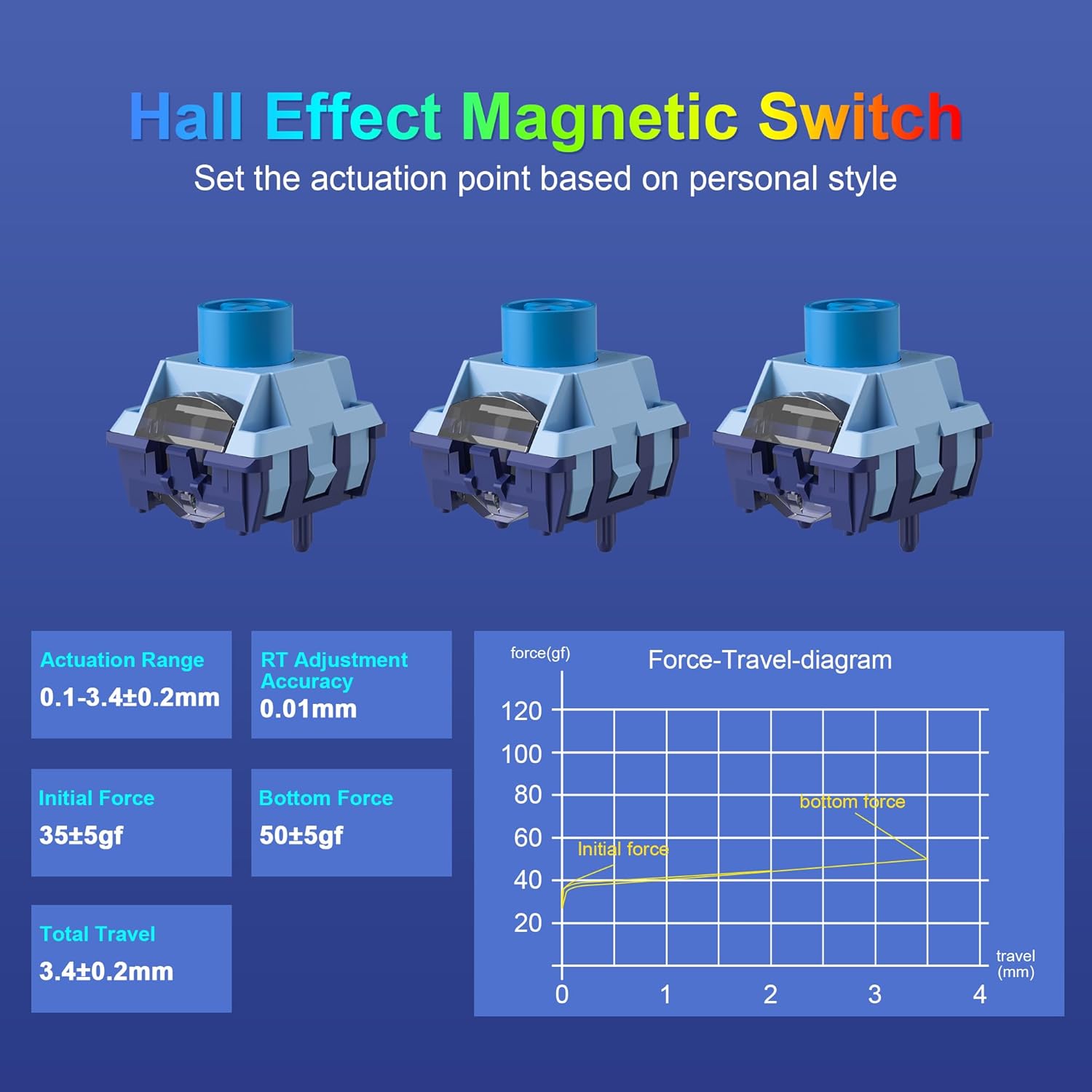
Image: A diagram illustrating the Hall Effect magnetic switches, showing actuation range, RT adjustment accuracy, initial force, bottom force, and total travel specifications, along with a force-travel diagram.

Image: A visual comparison between adjustable actuation points of magnetic switches and fixed actuation points of regular switches, highlighting the 0.01mm RT accuracy of the MageGee AIR68.
Advanced Gaming Functions (Software Required)
Utilize the dedicated MageGee AIR68 software (Windows compatible only) to unlock advanced features:
- DKS (Dynamic Keystroke): Assign multiple actions to a single key press based on pressure.
- MT (Press and Click): Configure keys for different actions on press and release.
- TGL (Toggle Switch): Toggle functions on/off with a single key.
- Kekunci Snap (SOCD): Optimize directional inputs for fighting games.
- Custom Macros: Create and assign complex key sequences.
- Pemetaan Semula Kunci: Change key assignments.
- Kesan Pencahayaan RGB: Fine-tune lighting patterns and colors.
- Pelarasan Titik Aktuasi: Precisely set individual key actuation points.
The software also allows for macro recording and sleep time adjustments.

Image: A screenshot of the MageGee AIR68 customization software interface, showing options for Rapid Trigger, Advanced Key Settings, Key Remap, Macro Recording & Editing, RGB Settings, and Sleep Time. Note: Software is Windows compatible only.

Image: An illustration of the MageGee AIR68 keyboard with icons representing advanced key functions like Dynamic Keystroke (DKS), Press and Click (MT), Toggle Switch (TGL), and Snap Key (SOCD), which are configurable via software.
Hayat Bateri
The keyboard is equipped with a 6000mAh rechargeable battery. To check the battery level, press Fn + Right ALT.
- With RGB lighting ON: Approximately 24 hours of use.
- With RGB lighting OFF: Approximately 300 hours of use.

Image: A graphic showing the 6000mAh battery capacity of the MageGee AIR68 keyboard, with estimated battery life of 24 hours with RGB on and 300 hours with RGB off. Instructions to check battery level (Fn+Right ALT) are also shown.
Penyelenggaraan
Suis Boleh Tukar Panas
The MageGee AIR68 features a hot-swappable PCB, allowing you to easily remove and replace switches without soldering. Use the provided 2-in-1 keycap and switch puller for this process.
- Gently remove the keycap using the keycap puller.
- Use the switch puller to grasp the switch firmly and pull it straight up.
- Align the pins of the new switch with the holes on the PCB and press down gently until it clicks into place. Ensure the switch is seated correctly to avoid bending pins.
- Gantikan penutup kekunci.

Imej: Dari dekat view of the MageGee AIR68 keyboard demonstrating the hot-swappable feature, with a switch being removed using a switch puller. It also highlights the south-facing LEDs.

Imej: Meletup view of the MageGee AIR68 keyboard showing individual switches and keycaps, illustrating how switches can be easily removed and replaced.
Pembersihan
To clean your keyboard, power it off and disconnect it from your device. Use a soft, lint-free cloth dampened with a small amount of water or a mild cleaning solution. For deeper cleaning, remove keycaps and use compressed air to clear debris from between switches.
Menyelesaikan masalah
- Papan kekunci tidak bertindak balas:
- Ensure the power switch under the Caps Lock key is in the ON position.
- Check the connection: For wired mode, ensure the Type-C cable is securely connected. For 2.4GHz, ensure the USB receiver is plugged in and the keyboard is in 2.4G mode (Fn+R). For Bluetooth, ensure it's paired and in the correct Bluetooth channel (Fn+Q/W/E).
- Charge the keyboard if the battery is low.
- Kunci tidak mendaftar atau hantu:
- The keyboard features N-key rollover, so ghosting should not occur. If keys are not registering, try reseating the switch using the switch puller.
- Ensure the keyboard firmware is up to date via the software.
- Pencahayaan RGB tidak berfungsi:
- Ensure the backlight is not turned off (Fn+BackSpace).
- Adjust brightness (Fn+Up/Down Arrow).
- Check settings in the MageGee software.
- Perisian tidak mengesan papan kekunci:
- Ensure the keyboard is connected via USB Type-C cable. The software is only compatible with Windows.
- Mulakan semula perisian dan/atau komputer anda.
Spesifikasi
| Ciri | Perincian |
|---|---|
| Jenama | MageGee |
| Nombor Model | AIR68 |
| Teknologi Ketersambungan | Bluetooth, 2.4G Wireless, USB Type-C Wired |
| Jenis Suis | Hall Effect Magnetic Switch (MageGee Poseidon) |
| Julat Pengaktifan | 0.1mm - 3.4mm (±0.2mm) |
| RT Adjustment Accuracy | 0.01mm |
| Kadar Mengundi | 8000Hz (Wired), 1000Hz (Wireless) |
| Masa Tindak Balas | 0.125ms (8000Hz) |
| Kapasiti Bateri | 6000mAh |
| Susun atur papan kekunci | 60% Compact (68-key QWERTY) |
| Kekunci Kekunci | Double-shot PBT, Shine-Through |
| Pencahayaan latar | RGB with Lightbox (South-facing LEDs) |
| Panas-Boleh Tukar | ya |
| Anti-Ghosting | N-Key Rollover |
| Sistem Operasi yang Serasi | Windows, Mac (Software Windows only) |
| Komponen yang Disertakan | Keyboard, 4 Spare Switches, 2.4G USB Receiver, Type-C Cable, 2-in-1 Puller, Manual |

Imej: Tamatview graphic highlighting key features of the MageGee AIR68 keyboard, including magnetic switches, 8000Hz polling rate, 0.01mm accuracy, tri-mode connectivity, hot-swappable design, RGB backlight, 60% compact layout, and PBT keycaps.
Waranti
The MageGee AIR68 keyboard comes with a Waranti 1 tahun dari tarikh pembelian. Waranti ini meliputi kecacatan pembuatan dan mutu kerja. Ia tidak meliputi kerosakan yang disebabkan oleh salah guna, kemalangan, pengubahsuaian tanpa kebenaran atau haus dan lusuh biasa. Sila simpan bukti pembelian anda untuk tuntutan waranti.
Sokongan
For further assistance, technical support, or to inquire about warranty services, please visit the official MageGee webtapak atau hubungi sokongan pelanggan mereka. Anda juga boleh merujuk kepada Kedai MageGee di Amazon untuk maklumat produk dan kemas kini.