
1. Pengenalan
The Reflexion HIF2082DAB is a versatile retro-style music system designed to combine nostalgic aesthetics with modern audio technology. This unit integrates a turntable, CD player, DAB+/FM radio, USB playback and recording capabilities, and Bluetooth 5.3 connectivity. It is equipped with external speakers to deliver clear and powerful sound, making it a comprehensive audio solution for various environments.
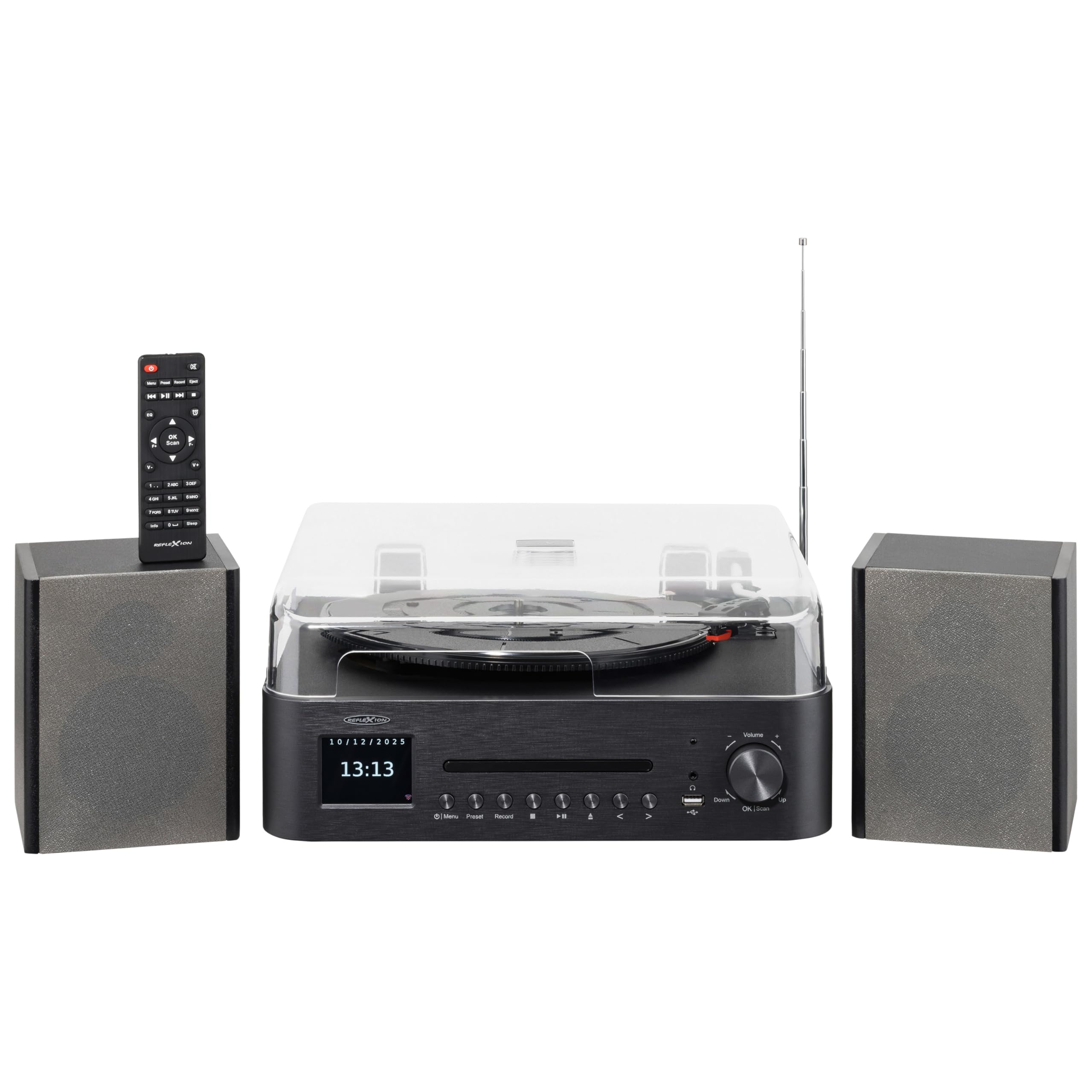
Image 1.1: The Reflexion HIF2082DAB Retro Turntable with included external speakers.
2. Arahan Keselamatan
- Baca semua arahan dengan teliti sebelum mengendalikan peranti.
- Simpan manual untuk rujukan masa hadapan.
- Jangan dedahkan unit kepada hujan atau lembapan untuk mengelakkan kebakaran atau kejutan elektrik.
- Pastikan pengudaraan yang betul; jangan sekat sebarang bukaan pengudaraan.
- Letakkan unit pada permukaan yang stabil dan rata.
- Hanya gunakan lampiran/aksesori yang ditentukan oleh pengilang.
- Cabut palam unit semasa ribut petir atau apabila tidak digunakan untuk tempoh yang lama.
- Rujuk semua servis kepada kakitangan perkhidmatan yang berkelayakan.
3. Kandungan Pakej
Sila pastikan semua item yang disenaraikan di bawah disertakan dalam pakej anda:
- 1 x Reflexion HIF2082DAB Main Unit
- 2 x Stereo Speakers
- 1 x Kabel Kuasa
- 1 x Remote Control (2 AAA batteries not included)
- 1 x Manual Arahan

Image 3.1: Included remote control and power cable.
4. Produk Lebihview
4.1 Panel Hadapan dan Kawalan
The front panel features the main display, control buttons for various functions, and the CD tray. The volume knob and USB port are also located here for easy access.
4.2 Top Panel (Turntable)
The top panel houses the semi-automatic turntable, including the platter, tonearm, and stylus. A protective dust cover is also provided.

Imej 4.1: Jarak dekat view of the turntable with auto-stop and tonearm return features highlighted.
4.3 Sambungan Panel Belakang
The rear panel includes connections for the external speakers, Line Out for connecting to an external amplifier, and Aux In for connecting external audio sources.

Image 4.2: Rear panel showing speaker terminals, Line Out, Aux In, and power input.
5. Persediaan
5.1 Membongkar dan Meletakkan
- Keluarkan semua komponen dari pembungkusan dengan berhati-hati.
- Place the main unit and speakers on a stable, level surface, ensuring adequate ventilation around the unit.
- Jauhkan unit daripada cahaya matahari langsung, sumber haba dan kelembapan.
5.2 Menyambung Pembesar Suara
- Connect the included stereo speakers to the speaker terminals on the rear of the main unit. Ensure correct polarity (red to red, black to black).
5.3 Sambungan Kuasa
- Insert the power cable into the AC input on the rear of the unit.
- Plug the other end of the power cable into a suitable wall outlet (AC 100-240V).
5.4 Persediaan Awal
- Upon first power-on, the unit may prompt you to select a language and set the time/date. Follow the on-screen instructions using the navigation buttons and OK/Scan button.
6. Arahan Operasi
6.1 Operasi Meja Putar
- Memilih Kelajuan: Choose the appropriate speed (33, 45, or 78 RPM) using the speed selector switch.
- Memainkan Rekod: Place a record on the platter. Remove the stylus protector. Gently lift the tonearm using the cueing lever and position it over the desired track. Lower the tonearm slowly onto the record.
- Fungsi Auto Henti: The turntable features an auto-stop function that automatically stops the platter when a record finishes playing. The tonearm will also return to its rest position.
6.2 Pemain CD
- Press the CD mode button.
- Press the Eject button to open the CD tray. Place a CD (audio CD or MP3 CD) with the label side up.
- Press Eject again to close the tray. Playback will begin automatically.
- Use the Skip/Search buttons to navigate tracks and Play/Pause for playback control.
6.3 Radio DAB+/FM
- Press the DAB+ or FM mode button.
- Imbasan Auto: For DAB+, the unit will automatically scan for available stations. For FM, press and hold the OK/Scan button to perform an auto scan.
- Penalaan Manual: Use the navigation buttons to manually tune to a frequency.
- Pratetap: Save your favorite stations by pressing and holding the Preset button, then selecting a preset number. Recall saved stations by pressing the Preset button and selecting the desired number.
6.4 Kesambungan Bluetooth
- Press the Bluetooth mode button. The display will show "Pairing" or similar.
- Dayakan Bluetooth pada peranti mudah alih anda (telefon pintar, tablet, dll.).
- Cari untuk "Reflexion HIF2082DAB" in your device's Bluetooth list and select it to pair.
- Once paired, you can stream audio from your device to the HIF2082DAB.
6.5 Main Semula dan Rakaman USB
- Main balik USB: Insert a USB flash drive (up to 32GB, FAT format) containing MP3 files into the USB port. Press the USB mode button. The unit will automatically detect and play MP3 files.
- USB Recording (from Vinyl): While playing a vinyl record, press the Record button. The unit will begin recording the audio directly to the connected USB drive as an MP3 file. Press Record again to stop.
6.6 Penggera dan Pemasa Tidur
- penggera: The unit features two adjustable alarms. Access the alarm settings through the menu to set wake-up times and desired audio sources (e.g., radio, CD).
- Pemasa Tidur: Set the sleep timer (up to 90 minutes) to automatically turn off the unit after a specified duration. This is useful for falling asleep to music.
7. Penyelenggaraan
7.1 Membersihkan Unit
- Lap unit dengan kain lembut dan kering. Jangan gunakan pembersih atau pelarut yang melelas.
- Untuk penutup habuk, gunakan kain lembut yang sedikitamp kain, kemudian keringkan sehingga bersih.
7.2 Penjagaan Stilus
- Regularly clean the stylus using a soft brush, brushing gently from back to front.
- Replace the stylus when sound quality deteriorates or after approximately 300-500 hours of use to prevent damage to your records.
8. Penyelesaian masalah
| Masalah | Kemungkinan Punca | Penyelesaian |
|---|---|---|
| Tiada kuasa | Kabel kuasa tidak disambungkan; Salur keluar kuasa rosak | Ensure power cable is securely connected; Try a different outlet |
| Tiada bunyi | Volume too low; Speakers not connected; Incorrect input mode | Increase volume; Check speaker connections; Select correct source mode |
| Meja putar tidak berputar | Speed selector incorrect; Auto-stop engaged | Check speed setting; Ensure tonearm is over the record |
| Penerimaan radio yang lemah | Antena tidak dipanjangkan; Isyarat lemah | Fully extend the telescopic antenna; Reposition the unit for better reception |
| Penggandingan Bluetooth gagal | Device too far; Bluetooth not enabled on device; Unit not in pairing mode | Move device closer; Enable Bluetooth; Ensure unit is in pairing mode |
9. Spesifikasi
- Jenama: Reflexion
- model: HIF2082DAB
- warna: Hitam
- Dimensi (L x W x H): 32.9 x 37.1 x 16 cm (12.95 x 14.61 x 6.3 inci)
- Berat produk: 6.5 Kilogram (14.33 lbs)
- Teknologi Bluetooth: ya
- Bilangan Penceramah: 2 (External Stereo Speakers)
- Max Speaker Power: 2 x 160 W (Peak Power)
- Kelajuan Meja Putar: 33, 45, 78 RPM
- paparan: 2.8" Color TFT Display
- Keserasian USB: Up to 32GB, FAT format (for MP3 playback and recording)
- Radio: DAB+, FM
- Ciri-ciri tambahan: CD Player (MP3/Audiobook compatible), USB Recording, Remote Control, Dual Alarms, Sleep Timer, Auto-Stop with Tonearm Return, Line Out, Aux In.
10. Waranti dan Sokongan
For warranty information and customer support, please refer to the warranty card included in your package or contact your local Reflexion dealer or service center. Keep your proof of purchase for any warranty claims.
For further assistance, you may also visit the official Reflexion website or consult the contact information provided in the original product documentation.