
1. Pengenalan
This manual provides detailed instructions for the safe installation, operation, and maintenance of your Philips LED 4-Inch Slim Downlight. This product features a canless design, dimmable functionality, and offers five selectable color temperatures (CCTs) to suit various lighting needs. Please read this manual thoroughly before installation and retain it for future reference.

Figure 1: Philips LED 4-inch slim downlight showing its canless design, dimmable function, 5 CCT options, and suitability for damp lokasi.
2. Maklumat Keselamatan
AMARAN: Risiko Kebakaran atau Renjatan Elektrik.
- Sentiasa matikan kuasa pada pemutus litar sebelum pemasangan atau servis.
- Produk ini mesti dipasang mengikut kod pemasangan yang berkenaan oleh orang yang biasa dengan pembinaan dan pengendalian produk serta bahaya yang terlibat.
- Pastikan semua sambungan elektrik selamat dan mematuhi kod dan peraturan tempatan.
- Jangan ubah, pindah atau tanggalkan pendawaian, lamp pemegang, atau komponen elektrik yang lain.
- Sesuai untuk damp locations. Do not use in areas with direct water exposure.
- IC dinilai untuk sentuhan langsung dengan penebat.
3. Kandungan Pakej
Sahkan bahawa semua komponen hadir sebelum memulakan pemasangan:
- Philips LED 4-Inch Slim Downlight (quantity as per pack)
- Junction Box (one per downlight)
- Manual Arahan (dokumen ini)
4. Arahan Pemasangan
- Matikan Kuasa: Before starting, ensure the power to the installation area is turned off at the circuit breaker.
- Sediakan Pembukaan Siling: Cut a circular hole in the ceiling at the desired location. Refer to the product specifications for the exact hole size (typically 4.25 inches or 108 mm for a 4-inch downlight). Ensure there are no obstructions behind the ceiling before cutting.
-
Wayar Kotak Persimpangan: Open the junction box cover. Connect the household electrical wires (live, neutral, ground) to the corresponding wires inside the junction box using the provided screwless connectors. Ensure all connections are secure. Close the junction box cover.

Figure 2: Screwless junction box wiring for easy connection.
-
Pilih Suhu Warna (CCT): Before inserting the downlight into the ceiling, locate the CCT selection switch on the side of the junction box or the downlight itself. Choose your desired color temperature (2700K, 3000K, 3500K, 4000K, or 5000K) by sliding the switch to the appropriate setting.

Figure 3: CCT selection switch on the junction box.
- Sambungkan Lampu Depan ke Kotak Persimpangan: Plug the downlight's connector cable into the corresponding receptacle on the junction box. Ensure a firm connection.
-
Sisipkan Lampu Bawah: Gently push the spring clips on the downlight upwards and insert the downlight into the prepared ceiling opening. The clips will secure the fixture in place. Ensure the downlight is flush with the ceiling surface.
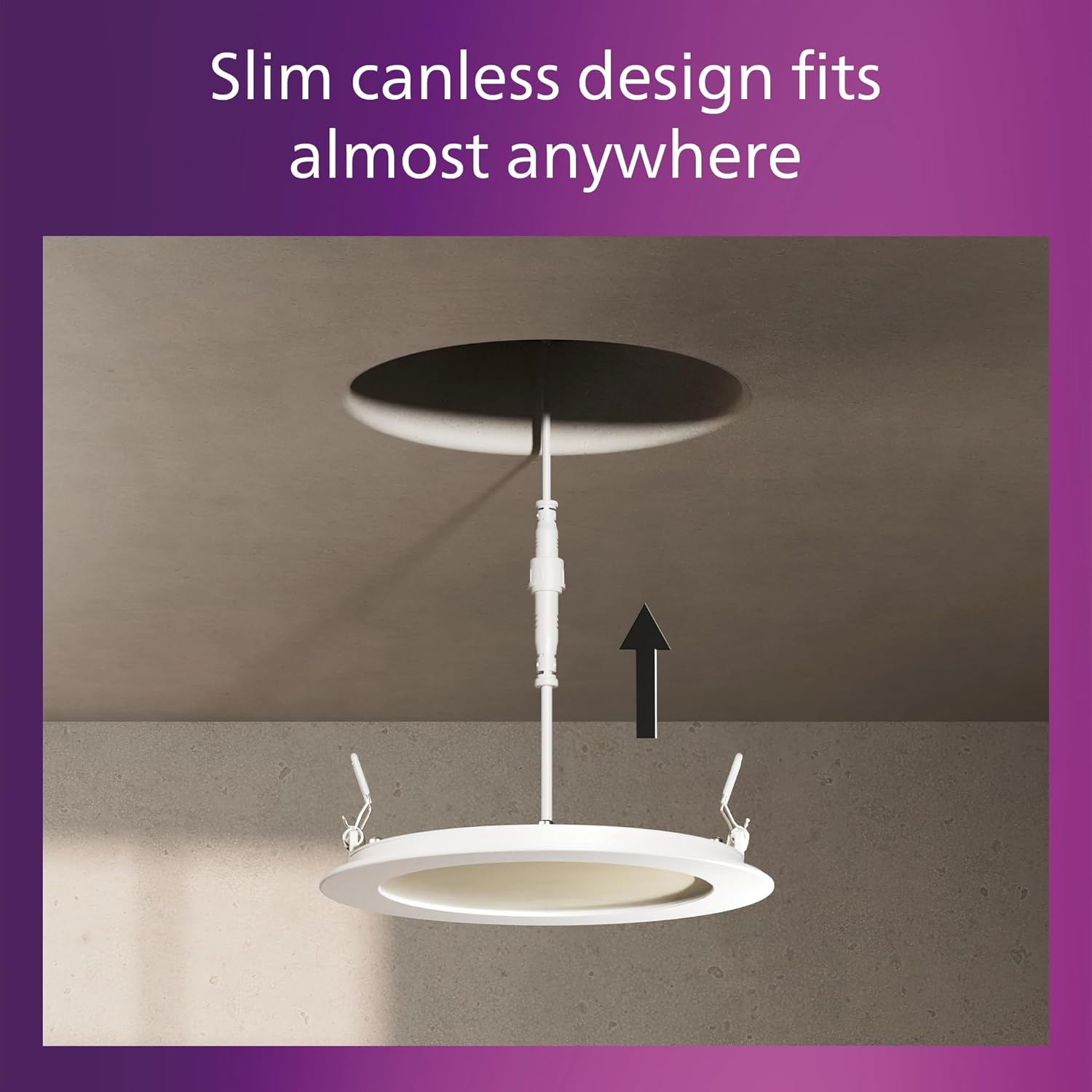
Figure 4: Installing the slim canless downlight into the ceiling.
- Pulihkan Kuasa: Setelah pemasangan selesai, pulihkan kuasa pada pemutus litar.
The Philips LED Slim Downlight is IC rated, meaning it is suitable for direct contact with insulation, providing safe installation in various ceiling types.

Figure 5: IC rated for safe installation in insulated ceilings.
5. Arahan Operasi
The Philips LED Slim Downlight is designed for simple operation:
- Hidupkan/Mati Kuasa: Use your standard wall switch to turn the downlight on or off.
-
Peredupan: This downlight is dimmable from 100% down to 5% brightness. Use a compatible dimmer switch (sold separately) to adjust the light output to your preferred level. Refer to the troubleshooting section for dimmer compatibility information.

Figure 6: Smooth dimming capability from 100% to 5% brightness.
- Suhu Warna: The color temperature is set during installation using the switch on the junction box. It cannot be changed during normal operation without accessing the junction box.
6. Penyelenggaraan
The Philips LED Slim Downlight requires minimal maintenance:
- Pastikan kuasa dimatikan sebelum membersihkan.
- Lapkan lekapan dengan lembut, kering atau sedikit damp kain. Jangan gunakan pembersih atau pelarut yang melelas.
- No user-serviceable parts inside. Do not attempt to open or repair the fixture.
7. Penyelesaian masalah
| Masalah | Kemungkinan Punca | Penyelesaian |
|---|---|---|
| Cahaya tidak menyala. |
|
|
| Cahaya berkelip atau malap dengan tidak betul. |
|
|
| Suhu warna tidak betul. |
|
|
Carta Keserasian Dimmer
For optimal dimming performance, use dimmers listed in the compatibility chart below. Performance may vary with other dimmer models.

Figure 7: Dimmer compatibility chart.
8. Spesifikasi
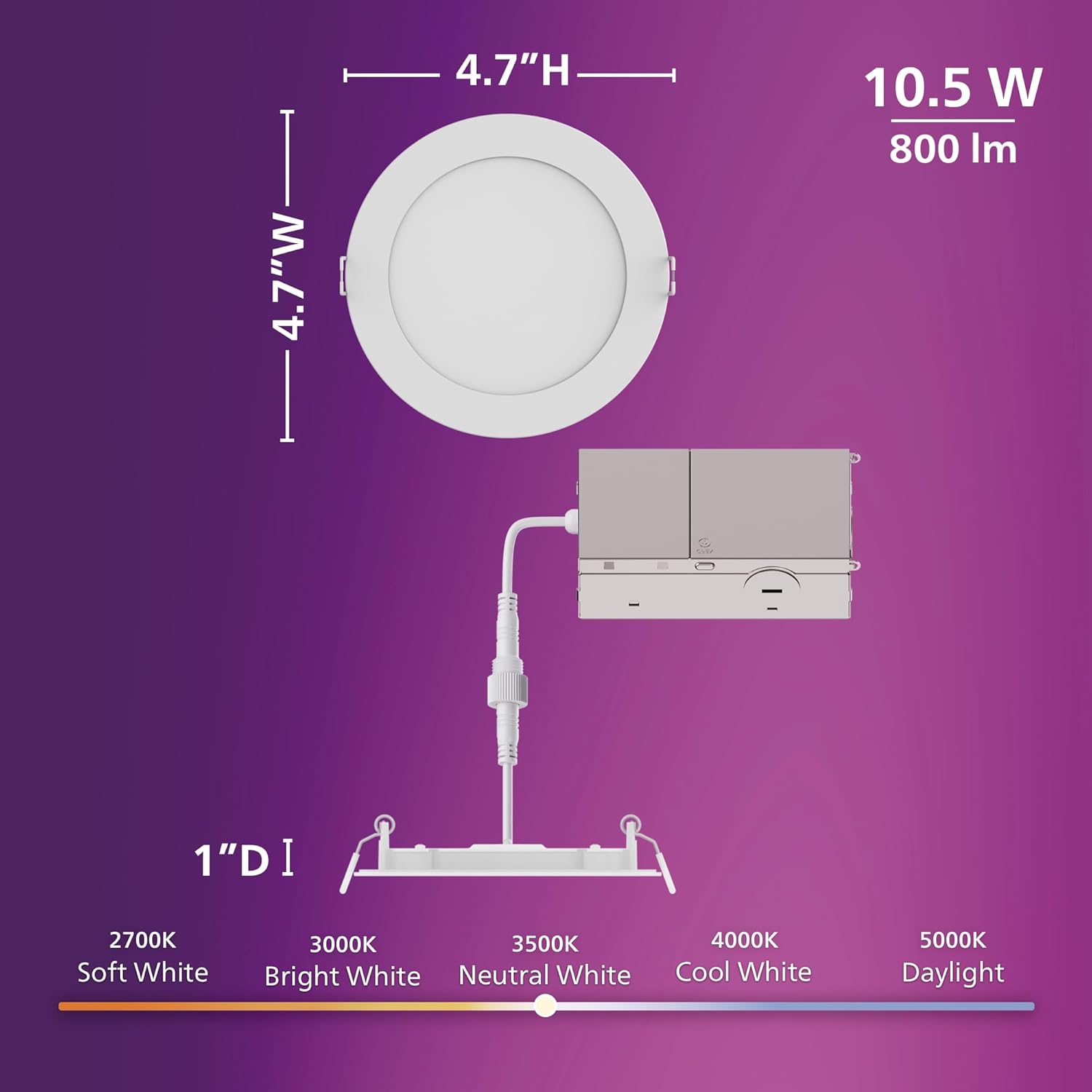
Figure 8: Product dimensions and CCT switch location.
| Ciri | Perincian |
|---|---|
| Nombor Model | 608869 |
| Jenama | PHILIPS |
| Sumber Cahaya | LED |
| Wattage | 10.5 watt |
| Kecerahan | 800 lumen |
| Voltage | 120 volt |
| Suhu Warna (CCT) | 2700K, 3000K, 3500K, 4000K, 5000K (boleh dipilih) |
| Boleh dimalapkan | Ya (hingga 5%) |
| Jam Hidup | 25,000 jam |
| Jenis Pemasangan | Flush Mount, Canless Design |
| Jenis Bilik | Dalaman |
| bahan | plastik |
| Dimensi Produk | 11.9L x 11.9W x 11.9H centimetres (approx. 4.7 x 4.7 x 4.7 inches) |
| Tahap Ketahanan Air | Kalis Air (Sesuai untuk damp lokasi) |
| Pensijilan | IC Rated, ETL, FCC certified |
9. Maklumat Waranti
This Philips LED 4-Inch Slim Downlight is covered by a Waranti Pengeluar 2 Tahun dari tarikh pembelian. Waranti ini melindungi kecacatan pada bahan dan mutu kerja di bawah penggunaan biasa. Sila simpan bukti pembelian anda untuk tuntutan waranti.
The warranty does not cover damage caused by improper installation, misuse, abuse, accidents, or unauthorized modifications.
10. Sokongan Pelanggan
If you have any questions, require technical assistance, or need to make a warranty claim, please contact Philips customer support. Refer to the product packaging or the official Philips webtapak untuk maklumat hubungan terkini.
Untuk maklumat lanjut, layari: www.philips.com