
1. Pengenalan
Thank you for choosing the FINOTI F204 RC Drone. This manual provides essential information for the safe operation, setup, and maintenance of your drone. Please read this manual thoroughly before operating the aircraft to ensure proper function and to avoid damage or injury. Keep this manual for future reference.

Figure 1.1: The FINOTI F204 RC Drone in its folded, portable configuration.
2. Produk Lebihview
2.1 Ciri-ciri Utama
- 4K Professional HD Camera: Captures high-resolution photos and 1080p videos with a 1/1.28-inch sensor.
- 3-Axis Mechanical Stabilizing Gimbal: Ensures smooth and stable footage during flight.
- Laser Obstacle Avoidance: Intelligently detects obstacles ahead for safer flight.
- Kedudukan GPS: Provides stable hovering, intelligent following, and precise return-to-home functions.
- Motor Tanpa Berus: Offers powerful, quiet, and durable performance.
- Reka Bentuk Lipat: Padat dan mudah alih untuk pengangkutan yang mudah.
- Masa Penerbangan yang Panjang: Sehingga 25 minit dengan sekali cas.
- 5G WiFi Image Transmission: Real-time video feed to your smartphone.
- Kawalan Mesra Pengguna: Features like one-key takeoff/landing and headless mode for ease of use.
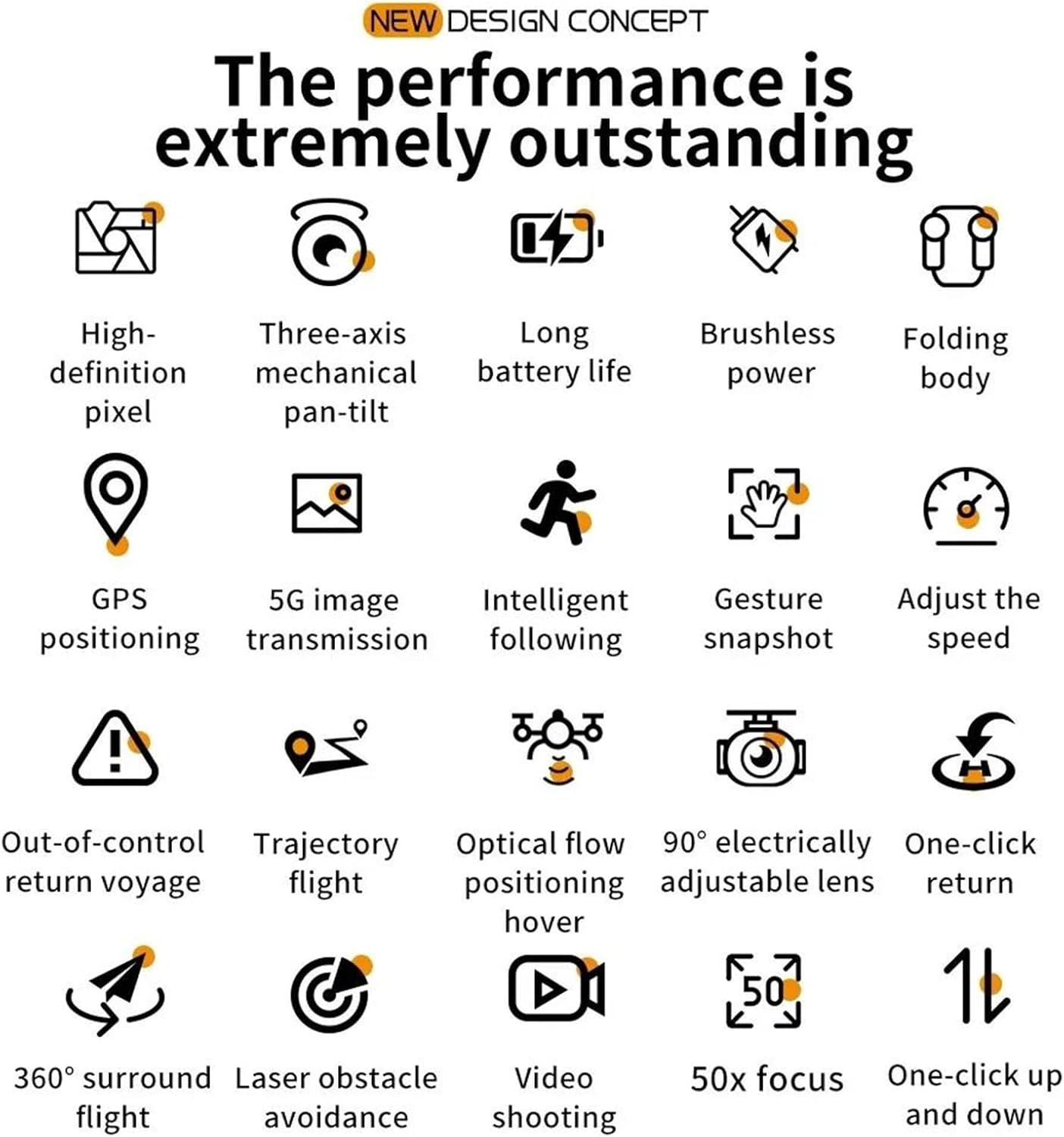
Figure 2.1: Visual representation of the drone's core features, including high-definition pixel, three-axis mechanical pan-tilt, long battery life, brushless power, folding body, GPS positioning, 5G image transmission, intelligent following, gesture snapshot, speed adjustment, out-of-control return, trajectory flight, optical flow positioning hover, 90° electrically adjustable lens, one-click return, 360° surround flight, laser obstacle avoidance, video shooting, 50x focus, and one-click up and down.
2.2 Kandungan Pakej
Sila semak kandungan pakej semasa membuka kotak. Jika ada barang yang hilang atau rosak, hubungi peruncit anda.
- FINOTI F204 RC Drone
- Alat Kawalan Jauh
- Flight Battery (Single Battery variant)
- Kabel Pengecas USB
- Baling-baling ganti
- Pemutar skru
- Manual Pengguna
2.3 Komponen Dron
Familiarize yourself with the drone's main parts:
- Foldable Arms with Motors and Propellers
- 4K HD Camera with 3-Axis Gimbal
- Laser Obstacle Avoidance Sensor
- Lampu Penunjuk LED
- Petak Bateri

Figure 2.2: The drone's three-axis mechanical stabilizing gimbal, capable of vertical, horizontal, and overhead shooting, with examples of 45° frontal, side 65°, and 110° vertical camera angles.
2.4 Komponen Alat Kawalan Jauh
The remote controller is your primary interface for controlling the drone. Refer to the diagram below for button functions.
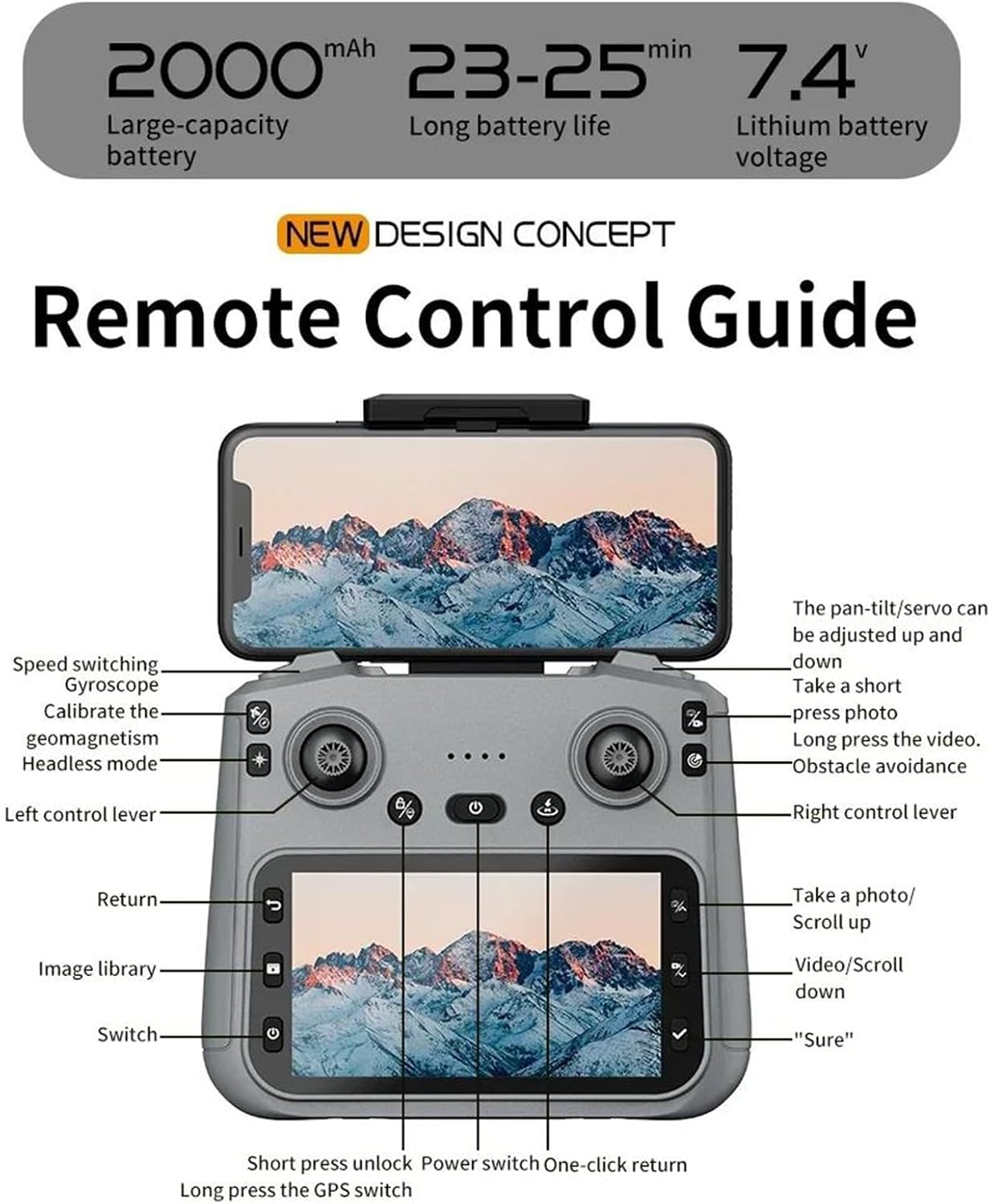
Figure 2.3: Remote Control Guide. Key controls include: Speed switching, Gyroscope, Calibrate geomagnetism, Headless mode, Left control lever, Return, Image library, Switch, Short press unlock, Power switch, One-click return, Long press GPS switch, Pan-tilt/servo adjustment, Take a short press photo, Long press video, Obstacle avoidance, Right control lever, Take a photo/Scroll up, Video/Scroll down, and 'Sure' button.
3. Panduan Persediaan
3.1 Mengecas Bateri Penerbangan
- Keluarkan bateri penerbangan dari dron.
- Sambungkan bateri ke kabel pengecas USB yang disediakan.
- Pasangkan kabel USB ke dalam penyesuai kuasa USB 5V/2A (tidak disertakan).
- Penunjuk pengecasan pada bateri akan menunjukkan statusnya (contohnya, merah untuk pengecasan, hijau untuk dicas penuh).
- Charging typically takes 120-150 minutes. Do not leave batteries unattended while charging.
3.2 Memasang Baling-baling
Ensure propellers are installed correctly according to their rotation direction (A and B). Match the propellers to the corresponding motor arms.
- Buka lipatan lengan dron.
- Attach the propellers to the motor shafts, ensuring a secure fit. Use the provided screwdriver if necessary.
3.3 Menyediakan Alat Pengawal Jauh
- Install 3x AA batteries (not included) into the remote controller.
- Panjangkan pemegang telefon pada alat kawalan jauh dan pasang telefon pintar anda dengan selamat.
3.4 Downloading and Connecting the App
- Scan the QR code in the manual or search for the designated drone app (e.g., 'FINOTI Drone' or similar, check packaging) in your smartphone's app store.
- Pasang apl.
- Hidupkan dron dan alat kawalan jauh.
- On your smartphone, go to Wi-Fi settings and connect to the drone's Wi-Fi network (e.g., 'FINOTI-F204-XXXX').
- Open the drone app. The live video feed should appear, indicating a successful connection.
4. Operasi Penerbangan
4.1 Senarai Semak Pra-Penerbangan
- Ensure drone battery and remote controller batteries are fully charged.
- Propellers are correctly installed and free from damage.
- Choose an open area free from obstacles, people, and electromagnetic interference.
- Check weather conditions; avoid flying in strong winds (above 10 KM/H) or rain.
- Ensure the drone and app are connected and GPS signal is acquired (if applicable).

Figure 4.1: The drone utilizing GPS positioning for stable flight and to prevent loss of contact.
4.2 Pairing the Drone and Controller
- Letakkan drone di permukaan rata dan rata.
- Hidupkan dron.
- Hidupkan alat kawalan jauh.
- Push the left joystick up then down. The drone's indicator lights will stop flashing and become solid, indicating successful pairing.
4.3 Berlepas dan Mendarat
- Berlepas Satu Kunci: Press the one-key takeoff button on the remote controller (refer to Figure 2.3). The drone will automatically ascend to a safe height and hover.
- Berlepas Manual: Push both joysticks down and outwards to unlock the motors. Then, slowly push the left joystick up to ascend.
- Pendaratan Satu Kunci: Tekan butang pendaratan satu kekunci. Drone akan secara automatik turun dan mendarat.
- Pendaratan Manual: Slowly pull the left joystick down to descend. Once landed, push both joysticks down and inwards to lock the motors.
4.4 Kawalan Asas Penerbangan
Refer to the Remote Control Guide (Figure 2.3) for joystick and button functions.
- Kayu Joy Kiri (Pendikit/Kuap): Atas/Bawah untuk ketinggian, Kiri/Kanan untuk putaran (yaw).
- Kayu Bedik Kanan (Pitch/Roll): Atas/Bawah untuk pergerakan ke hadapan/belakang (pitch), Kiri/Kanan untuk pergerakan kiri/kanan (guling).
- Penukaran Kelajuan: Adjust flight speed (e.g., low, medium, high) using the dedicated button.
4.5 Ciri Penerbangan Lanjutan
- Mod GPS: Provides stable hovering and precise positioning. Ensure sufficient GPS satellites are acquired before flight.
- Mod Ikut Saya: The drone will automatically follow the remote controller or a designated subject (via app).
- Penerbangan Trajektori: Draw a path on the app interface, and the drone will fly along the specified route.
- Laser Obstacle Avoidance: The drone uses its laser sensor to detect and avoid obstacles, enhancing flight safety. This feature is particularly useful in complex environments.

Figure 4.2: The drone equipped with a laser obstacle avoidance sensor to intelligently detect potential hazards, ensuring a safer flight experience.
- 360° Surround Flight: Dron itu boleh mengorbit sesuatu tempat yang menarik.
- Kedudukan Aliran Optik: Assists with stable hovering indoors or in areas with weak GPS signals.
- Pulangan Satu Klik: Press the return button, and the drone will automatically fly back to its takeoff point.
5. Operasi Kamera
The F204 drone is equipped with a 4K professional HD camera for capturing aerial photos and videos.

Figure 5.1: The drone's anti-shake dual cameras, featuring a built-in Electronic Image Stabilization (EIS) chip for improved image quality. The image also contrasts self-stabilizing gimbal shooting effect with non-stabilized shooting.
5.1 Mengambil Foto
- Alat Kawalan Jauh: Press the dedicated photo button (short press) on the remote controller (refer to Figure 2.3).
- Kawalan Apl: Tap the photo icon in the drone app interface.
- Gesture Snapshot: Perform the designated hand gesture (refer to app instructions) while facing the drone's camera to trigger a photo.
5.2 Merakam Video
- Alat Kawalan Jauh: Press and hold the video button on the remote controller to start/stop recording.
- Kawalan Apl: Tap the video icon in the drone app interface to start/stop recording.
5.3 Pelarasan Gimbal
The drone features a 3-axis mechanical gimbal for camera stabilization. You can adjust the camera angle during flight:
- Use the pan-tilt/servo adjustment wheel/button on the remote controller (refer to Figure 2.3) to tilt the camera up or down.
- The camera supports 90° electrically adjustable lens movement.
6. Penyelenggaraan
6.1 Cleaning the Drone
- Always power off the drone and remove the battery before cleaning.
- Use a soft, dry cloth to wipe the drone's body.
- For the camera lens, use a specialized lens cleaning cloth and solution.
- Remove any debris from the motors and propellers.
6.2 Penjagaan dan Penyimpanan Bateri
- Simpan bateri di tempat yang sejuk dan kering, jauh daripada cahaya matahari langsung dan sumber haba.
- Jangan cas berlebihan atau terlalu nyahcas bateri.
- Untuk penyimpanan jangka panjang, cas bateri sehingga kapasiti lebih kurang 50-60%.
- Inspect batteries regularly for any signs of swelling or damage. Discontinue use if damaged.
6.3 Penggantian Baling-Baling
- If a propeller is damaged, replace it immediately with a new one.
- Ensure you use the correct type of propeller (A or B) for the corresponding motor arm.
- Use the provided screwdriver to remove and install propellers.
7. Penyelesaian masalah
Bahagian ini menangani isu biasa yang mungkin anda hadapi.
| Masalah | Kemungkinan Punca | Penyelesaian |
|---|---|---|
| Drone tidak dihidupkan | Bateri tidak dicas atau tidak dipasang dengan betul | Charge battery fully; ensure it is securely inserted. |
| Drone cannot pair with controller | Incorrect pairing sequence; low controller battery | Follow pairing steps (Section 4.2); replace controller batteries. |
| Penerbangan/Hanyut Tidak Stabil | Drone not calibrated; damaged propeller; strong wind | Calibrate gyroscope/geomagnetism (refer to Figure 2.3); replace damaged propellers; avoid flying in strong winds. |
| Tiada suapan video langsung dalam apl | Wi-Fi not connected; app not open; drone/phone too far | Ensure phone is connected to drone's Wi-Fi; restart app; keep drone and phone within range. |
| Fungsi GPS tidak berfungsi | Insufficient GPS signal; flying indoors | Fly in an open outdoor area; wait for sufficient GPS satellites to be acquired. |
8. Spesifikasi
| Ciri | Spesifikasi |
|---|---|
| Model | F204 (Model Number: 66655594-SINGLEBATTERY) |
| Jenama | FINOTI |
| Jenis Motor | Motor tanpa berus |
| Masa Penerbangan Maks | 23-25 minit |
| Berat Drone | 245g |
| Kamera | 4K Professional HD Camera |
| Resolusi Video | 1080p HD Recording |
| Saiz Sensor | 1/1.28 Inci |
| Gimbal | 3-Axis Mechanical Stabilizing Gimbal, 90° Electrically Adjustable Lens |
| Mengelak Halangan | Laser Barrier Avoidance |
| GPS | ya |
| Jarak Jauh | Sehingga 1000 meter |
| Kekerapan Operasi | 2.4 GHz (Aircraft), 5G WiFi (Image Transmission) |
| Ketersambungan | Pengawal APP, Alat Kawalan Jauh, WiFi |
| Berat Berlepas Maks | <1kg |
| Rintangan Kelajuan Angin Maksimum | <10 KM/J |
| Kapasiti Bateri | 2000mAh, 7.4V Lithium Battery |
9. Waranti dan Sokongan
Specific warranty information for the FINOTI F204 RC Drone is not provided in this manual. For details regarding warranty coverage, return policies, or technical support, please refer to the product packaging, the retailer's website, or contact FINOTI customer service directly.
Always ensure you purchase from authorized sellers to guarantee valid warranty and support services.