
HomeWizard HWE-KWH1
HomeWizard 1-Phase Wi-Fi kWh Meter (MID Certified) Instruction Manual
Model: HWE-KWH1
1. Pengenalan
The HomeWizard 1-Phase Wi-Fi kWh Meter is designed to provide accurate, real-time energy consumption data for single-phase electrical installations. This MID-certified meter is suitable for official billing purposes and offers comprehensive monitoring capabilities via the HomeWizard app. It is ideal for tracking energy usage of large consumers such as electric vehicle charging stations, heat pumps, and solar installations.
2. Maklumat Keselamatan
Amaran: Installation of this device involves working with high voltage electricity. Improper installation can lead to serious injury or death.
- Pemasangan mesti dilakukan oleh juruelektrik yang berkelayakan mengikut kod dan peraturan elektrik tempatan.
- Ensure the main power supply is disconnected before attempting any installation or maintenance.
- Jangan buka peranti casing. Tiada bahagian yang boleh diservis pengguna di dalamnya.
- Jauhkan peranti daripada air dan kelembapan berlebihan.
- Kendalikan peranti dalam volum yang ditentukantage dan penarafan arus (100A, 230V).
3. Kandungan Pakej
Sahkan bahawa semua item terdapat dalam pakej:
- HomeWizard 1-Phase Wi-Fi kWh Meter (Model: HWE-KWH1)
- Panduan Mula Pantas
4. Produk Lebihview
The HomeWizard kWh Meter is a compact device designed for DIN rail mounting, providing precise energy measurement and Wi-Fi connectivity for smart home integration.

Figure 4.1: HomeWizard kWh Meter showing its compact dimensions (10.6 x 3.6 x 6.6 cm).

Figure 4.2: Key features of the HomeWizard kWh Meter, including backlit LCD, intuitive button control, impulse LED, DIN rail mounting, and security seal orifice.
Ciri-ciri Utama:
- MID Certified: Ensures accuracy for official billing and leasintujuan g.
- Kesambungan Wi-Fi: Real-time data access via the HomeWizard app.
- 1-Phase Measurement: Suitable for single-phase electrical systems.
- Pemasangan Rel DIN: Easy installation in standard electrical panels.
- Reka bentuk padat: Fits into most electrical cabinets.
- Skrin LCD bercahaya belakang: Direct on-site display of measurements.
- Intuitive Button Control: Simple navigation.
- Impulse LED: Indicates current energy consumption.
- Security Seal Orifice: For protection against tampering.
5. Persediaan dan Pemasangan
The HomeWizard kWh Meter is designed for installation in your electrical panel. Due to the nature of electrical work, professional installation is highly recommended.
5.1. Keperluan Pemasangan
- Technical knowledge of electrical installations is required.
- Standard 35mm DIN rail for mounting.
- 2.4 GHz Wi-Fi network for app connectivity.
5.2. Langkah Pemasangan (Pemasangan Profesional Disyorkan)
- Putuskan Kuasa: Before starting, ensure the main power supply to your electrical panel is completely switched off.
- Mount the Meter: Securely attach the HomeWizard kWh Meter onto a 35mm DIN rail within your electrical panel.
- Wire the Meter: Connect the meter according to the wiring diagram provided in the quick start guide and local electrical standards. Ensure correct phase and neutral connections, and connect the load.
- Pulihkan Kuasa: Once wiring is complete and verified, restore power to the electrical panel.
- Sambungan Wi-Fi: Follow the instructions in the Quick Start Guide to connect the meter to your 2.4 GHz Wi-Fi network.
- Penyepaduan Apl: Download the HomeWizard app from your device's app store and follow the in-app instructions to add and configure your new kWh meter.

Figure 5.1: The HomeWizard kWh Meter being installed on a DIN rail in an electrical cabinet. Professional installation is advised.
6. Arahan Operasi
The HomeWizard kWh Meter provides real-time energy data directly on its LCD screen and through the HomeWizard mobile application.
6.1. On-Device Display
- The backlit LCD screen displays current energy consumption (kWh) and other relevant metrics.
- Use the intuitive button control to cycle through different display modes and view historical data directly on the device.
- The impulse LED will flash to indicate active energy consumption.
6.2. HomeWizard App Integration
The HomeWizard app is the primary interface for monitoring and managing your energy data.
- Muat turun Apl: Cari untuk "HomeWizard" in your smartphone's app store (iOS or Android).
- Buat Akaun: If you don't have one, create a HomeWizard account and log in.
- Tambah Peranti: Follow the in-app instructions to add your kWh meter. Ensure your phone is connected to the same 2.4 GHz Wi-Fi network as the meter during setup.
- Monitor Consumption: View real-time and historical energy consumption data, including grid draw, grid feed-in, and consumption by specific appliances (if configured with other HomeWizard devices).
- Insights and Optimization: The app provides insights into your energy usage patterns, helping you identify large consumers and optimize your energy consumption.

Figure 6.1: The HomeWizard app interface showing real-time energy consumption data, including grid usage and solar production.

Figure 6.2: A smartphone displaying the HomeWizard app, illustrating its user-friendly interface for energy monitoring.
6.3. Aplikasi
The HomeWizard kWh Meter is versatile and can be used to monitor various high-consumption devices and energy sources:
- Pam Haba
- Electric Vehicle (EV) Charging Stations
- Penghawa Dingin
- Solar Panels (for production monitoring)
- Pemanas Air Elektrik
- Hobs Induksi
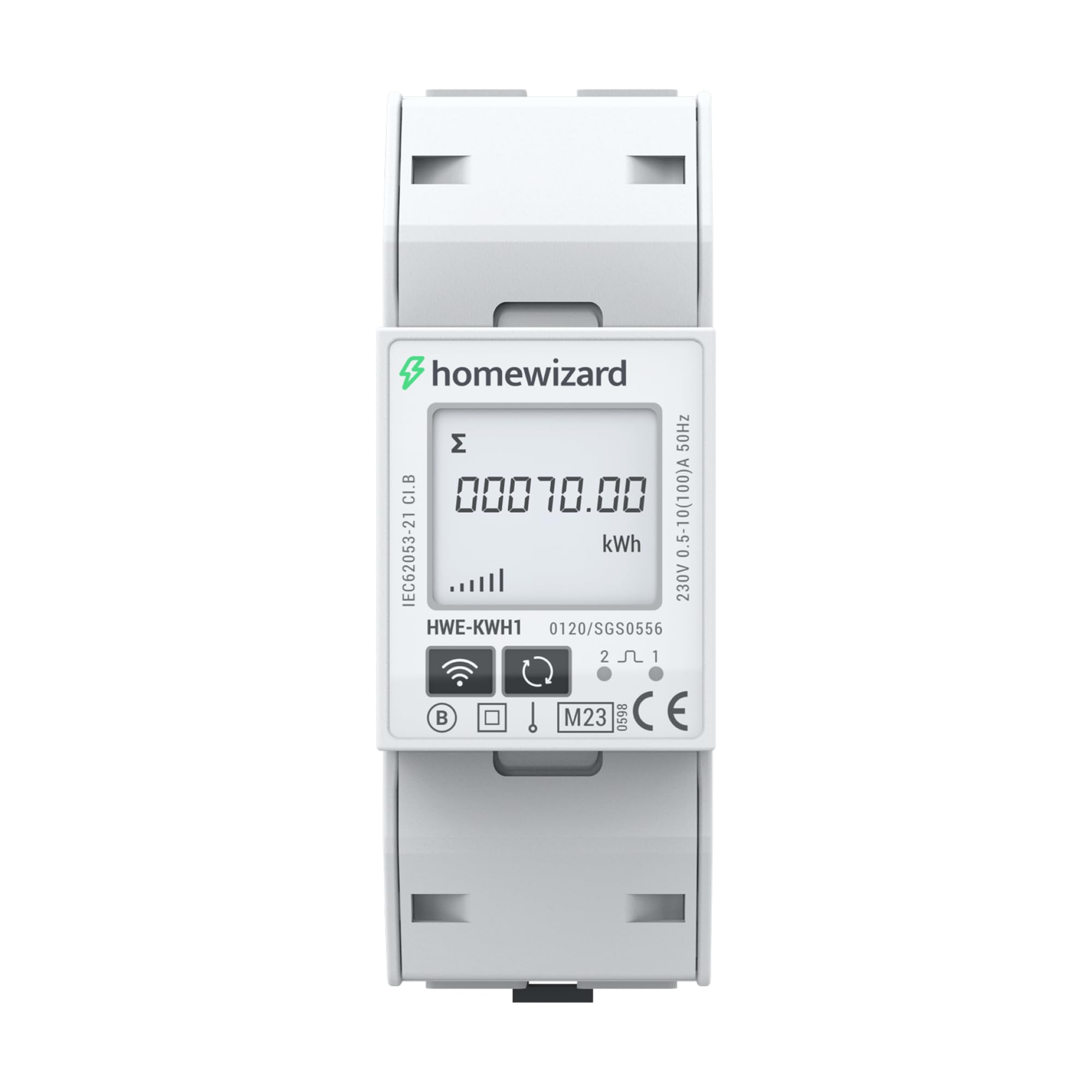
Figure 6.3: The HomeWizard kWh Meter monitoring an electric vehicle charging station and solar panel output.
7. Penyelenggaraan
The HomeWizard kWh Meter is designed for maintenance-free operation.
- Pembersihan: Jika perlu, lap bahagian luar peranti dengan lembut dengan kain kering dan lembut. Jangan gunakan pembersih cecair atau pelarut.
- Kemas kini Firmware: Ensure your device's firmware is up to date through the HomeWizard app to benefit from the latest features and improvements.
- Tiada Bahagian Boleh Servis Pengguna: Do not attempt to open or repair the device. Refer to qualified personnel for any issues.
8. Penyelesaian masalah
If you encounter issues with your HomeWizard kWh Meter, try the following steps:
- Tiada Kuasa/Paparan Mati:
- Check the main power supply to the electrical panel.
- Ensure all wiring connections are secure (consult a qualified electrician).
- Tiada Sambungan Wi-Fi:
- Sahkan rangkaian Wi-Fi anda ialah 2.4 GHz. Peranti tidak menyokong rangkaian 5 GHz.
- Ensure the Wi-Fi signal strength is adequate at the meter's location.
- Mulakan semula penghala Wi-Fi anda.
- Attempt to re-pair the device with the HomeWizard app.
- Bacaan yang salah:
- Confirm that the meter is correctly wired according to the installation diagram.
- Ensure the meter is MID certified for accurate measurements.
- Apl Tidak Memaparkan Data:
- Periksa sambungan internet anda pada telefon pintar anda.
- Ensure the HomeWizard app is updated to the latest version.
- Log out and log back into the HomeWizard app.
- If the issue persists, contact HomeWizard support.
9. Spesifikasi
| Jenama | HomeWizard |
| Model | HWE-KWH1 |
| Dimensi Produk (L x W x H) | 10.6 x 3.6 x 6.6 cm |
| Berat Barang | 167 gram |
| warna | Kelabu |
| bahan | plastik |
| Voltage | 230 Volt |
| Penilaian Semasa | 100 A |
| Penggunaan Kuasa | 2 Watt |
| MID Certified | ya |
| Bateri Termasuk | Tidak |
| Bateri Diperlukan | Tidak |
| Pertama Tersedia | 19 November 2025 |
10. Waranti dan Sokongan
10.1. Maklumat Waranti
The HomeWizard kWh Meter comes with a 2-year availability for spare parts. For specific warranty terms and conditions, please refer to the documentation provided with your purchase or visit the official HomeWizard webtapak.
10.2. Kemas Kini Perisian
Software updates are provided to enhance functionality and security. Information regarding guaranteed software updates is not available in the provided data. Please check the HomeWizard app or weblaman web untuk maklumat terkini.
10.3. Sokongan Pelanggan
For technical assistance, troubleshooting, or any other inquiries, please contact HomeWizard customer support.
- Pengeluar: HomeWizard
- Penjual: HomeWizard BV (on Amazon.fr)
- Refer to the HomeWizard webtapak untuk butiran hubungan dan sumber sokongan.
Dokumen Berkaitan - HWE-KWH1
 |
EU Data Act Transparency Declaration - HomeWizard P1 Meter Transparency declaration for the HomeWizard P1 Meter, detailing data generation, storage, access, retention, and privacy practices under the EU Data Act. |
 |
Hotsy HWE Series Electric Powered - Electric Heated Pressure Washer Operator's Manual Operator's manual for Hotsy HWE Series electric-powered, electric-heated pressure washers, covering operation, maintenance, safety, and troubleshooting. Includes model numbers HWE-4020C, HWE-4030C, HWE-4020F, and HWE-4030F. |
 |
Hotsy HWE Series Electric Heated Pressure Washer Operator's Manual Comprehensive operator's manual for Hotsy HWE series electric-powered, electric-heated pressure washers. Covers safety, operation, assembly, maintenance, and troubleshooting for models HWE-4020C, HWE-4030C, HWE-4020F, and HWE-4030F. |
 |
LUNOS Drilling Template for External Hoods 1/HWE, 1/HAZ, 1/HES, 1/HWE-2, 1/HAZ-2 Technical specifications and dimensions for the LUNOS drilling template used for installing external ventilation hoods (models 1/HWE, 1/HAZ, 1/HES, 1/HWE-2, 1/HAZ-2). Includes guidance on printing size and bore diameters. |
 |
Manuale d'uso Lavatrice Hoover HWE 413AMBS-1-S Questo manuale d'uso fornisce istruzioni dettagliate per l'installazione, l'uso, la manutenzione e la risoluzione dei problemi della lavatrice Hoover modello HWE 413AMBS-1-S. |
Ask a question about this manual
Ask about setup, troubleshooting, compatibility, parts, safety, or missing instructions. Manuals+ will review the question and use this page’s manual context to help answer it.