
1. Pengenalan
This manual provides essential information for setting up, operating, maintaining, and troubleshooting your Ulefone RugKing 2 Pro Rugged Phone. Please read it carefully to ensure optimal performance and longevity of your device.
1.1. Produk Lebihview
Video: Ulefone RugKing 2 Pro Product Overview. Video ini memberikan gambaran umumview tentang ciri dan reka bentuk telefon.
1.2. Apa yang ada di dalam Kotak
- 1x Ulefone RugKing 2 Pro Phone
- 1x AC Power Charger (100~240V)
- 1x USB-A to Type-C Data Cable (100cm)
- 1x Protective film (Pre-installed)
- 1x Tempered glass screen protector
- 1x Pry Opener
- 1x Lanyard
- 1x Multi-language user manual

Image: The complete package contents of the Ulefone RugKing 2 Pro, including the phone, charger, cable, screen protector, pry opener, lanyard, and user manual.
Note: Additional accessories like the Desk Charging Dock, Armor Case, Bike Mount, and Car Mount are sold separately.
2. Persediaan
2.1. Pemasangan Kad SIM dan Kad MicroSD
The Ulefone RugKing 2 Pro supports two Nano SIM cards and one MicroSD card for expandable storage up to 2TB. Follow these steps to install them:
- Cari dulang kad SIM di sisi telefon.
- Use the provided pry opener to gently open the SIM card tray.
- Carefully place your Nano SIM cards and MicroSD card into the designated slots on the tray. Ensure they are correctly oriented.
- Slide the tray back into the phone until it is securely closed.
Video: Ulefone RugKing 2 Pro Unboxing Video. This video demonstrates the unboxing process, including the installation of SIM and MicroSD cards.
2.2. Hidupkan dan Pengecasan Awal
To power on your device, press and hold the power button located on the side of the phone until the Ulefone logo appears. For initial charging, connect the provided USB-A to Type-C cable to the phone and the AC power charger to a wall outlet. The phone also supports dock charging with a separately sold accessory.

Image: The Ulefone RugKing 2 Pro placed on its dedicated desk charging dock, indicating charging functionality.
3. Arahan Operasi
3.1. Fungsi Asas
- Hidupkan/Mati Kuasa: Tekan dan tahan butang kuasa.
- Kawalan Kelantangan: Use the volume up/down buttons on the side.
- Kunci Tersuai: The programmable custom key can be configured for single click, double click, or long press actions.
- Buka Kunci Wajah: Set up face recognition for quick and secure unlocking.

Image: A visual summary of additional features like NFC, GPS, Face Unlock, Custom Key, and the charging dock.
3.2. Operasi Kamera
The RugKing 2 Pro features a 13MP rear camera and a 5MP front camera. Open the camera application to capture photos and videos. Various modes and settings are available within the app.

Image: Demonstrates the 13MP rear camera capturing a landscape and the 5MP front camera taking a group selfie.
3.3. AI Assistant Features (Ulefone AI Pro & Google Gemini)
Leverage the integrated AI capabilities for enhanced productivity:
- AI Recording Summary: Automatically transcribes and summarizes recordings.
- AI Writing Assist: Provides smart formatting, translation, style rewriting, and proofreading.
- Ulefone Screen Search: Circle or select content on your screen to search for information.
- AI Calculator: Supports handwriting calculation for mathematical problems.

Image: Visual representation of the Ulefone AI Pro features, showcasing AI Recording Summary, AI Writing Assist, Ulefone Screen Search, and AI Calculator.
3.4. Water-Lock Mode
Activate Water-Lock mode to disable the touchscreen in wet conditions, preventing accidental touches. This is useful when using the phone near water or in the rain.

Image: The Ulefone RugKing 2 Pro on a bike in the rain, demonstrating the Water-Lock Mode feature.
3.5. Lampu Suluh Terbina dalam
The phone includes a powerful 110 Lumens flashlight. It can be activated via a dedicated button or through the quick settings panel for use in low-light environments.

Image: The Ulefone RugKing 2 Pro's flashlight in action, highlighting its utility in outdoor settings.
3.6. Ketersambungan dan Navigasi
- Dual 4G: Supports two 4G SIM cards simultaneously.
- NFC: Untuk pembayaran tanpa sentuh dan pemindahan data.
- GPS: Integrated GPS, GLONASS, BeiDou, and Galileo for accurate navigation.
- Headset-Free FM Radio: Enjoy FM radio without needing a headset as an antenna.
4. Penyelenggaraan
4.1. Ciri Ketahanan
The Ulefone RugKing 2 Pro is designed for rugged environments, featuring IP68/IP69K water and dust resistance and MIL-STD-810H certification for drop resistance. The 5.45" HD+ Corning Gorilla Glass screen provides enhanced protection against scratches and impacts.
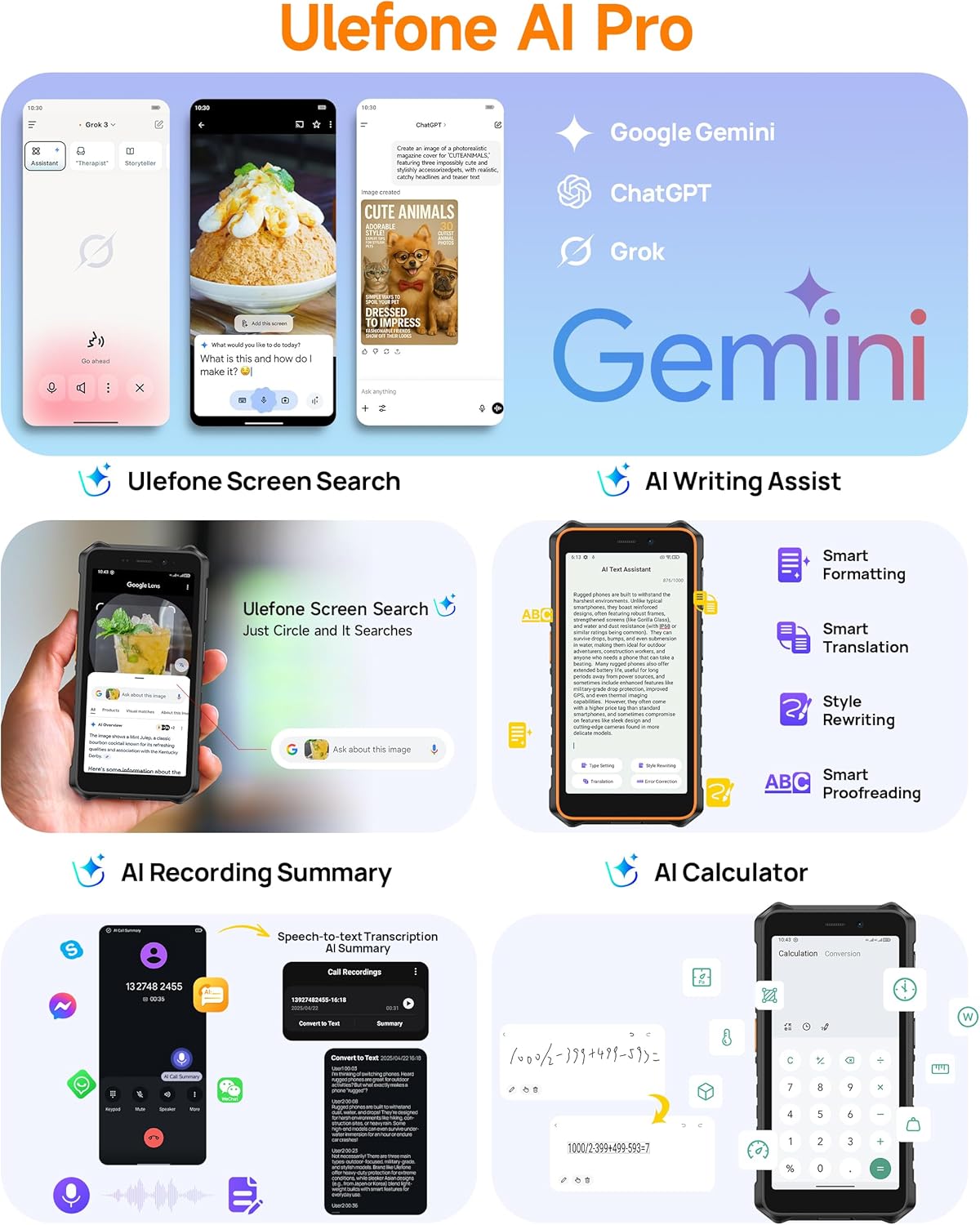
Image: Demonstrates the extreme durability of the Ulefone RugKing 2 Pro, highlighting its water, dust, and drop resistance.
Video: Ulefone RugKing 2 Pro Design. This video showcases the phone's robust design and various color accents.
4.2. Membersihkan Peranti Anda
To clean your phone, wipe it with a soft, damp cloth. For stubborn dirt, use a mild soap solution and rinse thoroughly with clean water. Ensure all ports are securely closed before cleaning to maintain water resistance.
5. Penyelesaian masalah
5.1. Isu Biasa
- Telefon tidak dihidupkan: Pastikan bateri telah dicas. Sambungkan ke pengecas dan cuba lagi.
- Skrin sentuh tidak bertindak balas: If in wet conditions, check if Water-Lock mode is active. If not, restart the device.
- Kad SIM tidak dikesan: Ensure the SIM card is correctly inserted and the tray is fully closed. Verify that your carrier is supported (Note: Not compatible with AT&T or Cricket).
- Isyarat rangkaian yang lemah: Move to an open area. Check with your service provider for network coverage in your location.
For further assistance, please refer to the official Ulefone support channels.
6. Spesifikasi
| Ciri | Perincian |
|---|---|
| Jenama | Ulefone |
| Nama Model | RugKing 2 Pro |
| Sistem Operasi | Android 15 |
| Saiz Terpasang Memori RAM | 8 GB (4GB fizikal + 4GB maya) |
| Kapasiti Penyimpanan Memori | 128 GB (Boleh dikembangkan sehingga 2TB melalui MicroSD) |
| Saiz Skrin | 5.45 Inches HD+ Corning Gorilla Glass |
| Resolusi | 720 x 1440 Pixels (HD+) |
| Kadar Segar Semula | 90Hz |
| Kecerahan Puncak | 650 nits |
| Kamera Menghadap Belakang | 13 MP |
| Front Photo Sensor Resolution | 5 MP |
| Kapasiti Bateri | 4500 mAh |
| Masa Berbual | 20 Jam |
| Masa Tunggu Sedia | 315 Jam |
| Tahap Ketahanan Air | IP68/IP69K Kalis Air |
| Pensijilan Ketahanan | MIL-STD-810H Certified |
| Kiraan Slot Kad SIM | Dual SIM (Nano) |
| Teknologi Ketersambungan | Bluetooth, NFC, USB Type-C, Wi-Fi, 4G LTE |
| Sistem Navigasi Satelit yang Disokong | BeiDou, GLONASS, GPS, Galileo |
| Ciri-ciri Tambahan | Built-In Flashlight (110 Lumens), Custom Key, Outdoor Toolbox, Gloves Mode, Face Unlock, Widevine L1 Certified |
| Dimensi Item | 6.26 x 3.15 x 0.62 inci |
7. Aksesori Pilihan
Enhance your Ulefone RugKing 2 Pro experience with these separately sold accessories:
- Desk Charging Dock: Untuk pengecasan yang mudah.
- Kotak Perisai: Provides additional protection and mounting options.
- Armor Mount Pro (Bike Mount): Securely attach your phone to a bicycle.
- Armor Mount Next-Gen (Car Mount): Universal car mount for dashboard and windshield.
Video: Ulefone RugKing 2 Pro Accessory Ecosystem Showcase. This video demonstrates various optional accessories and their use cases.
8. Waranti dan Sokongan
Ulefone provides a 12-month manufacturer warranty service in the US for the RugKing 2 Pro. For any questions or issues regarding your product, please contact Ulefone Direct - US customer service. They are available to assist you.
Untuk maklumat lanjut, lawati Ulefone Store on Amazon.


