
pengenalan
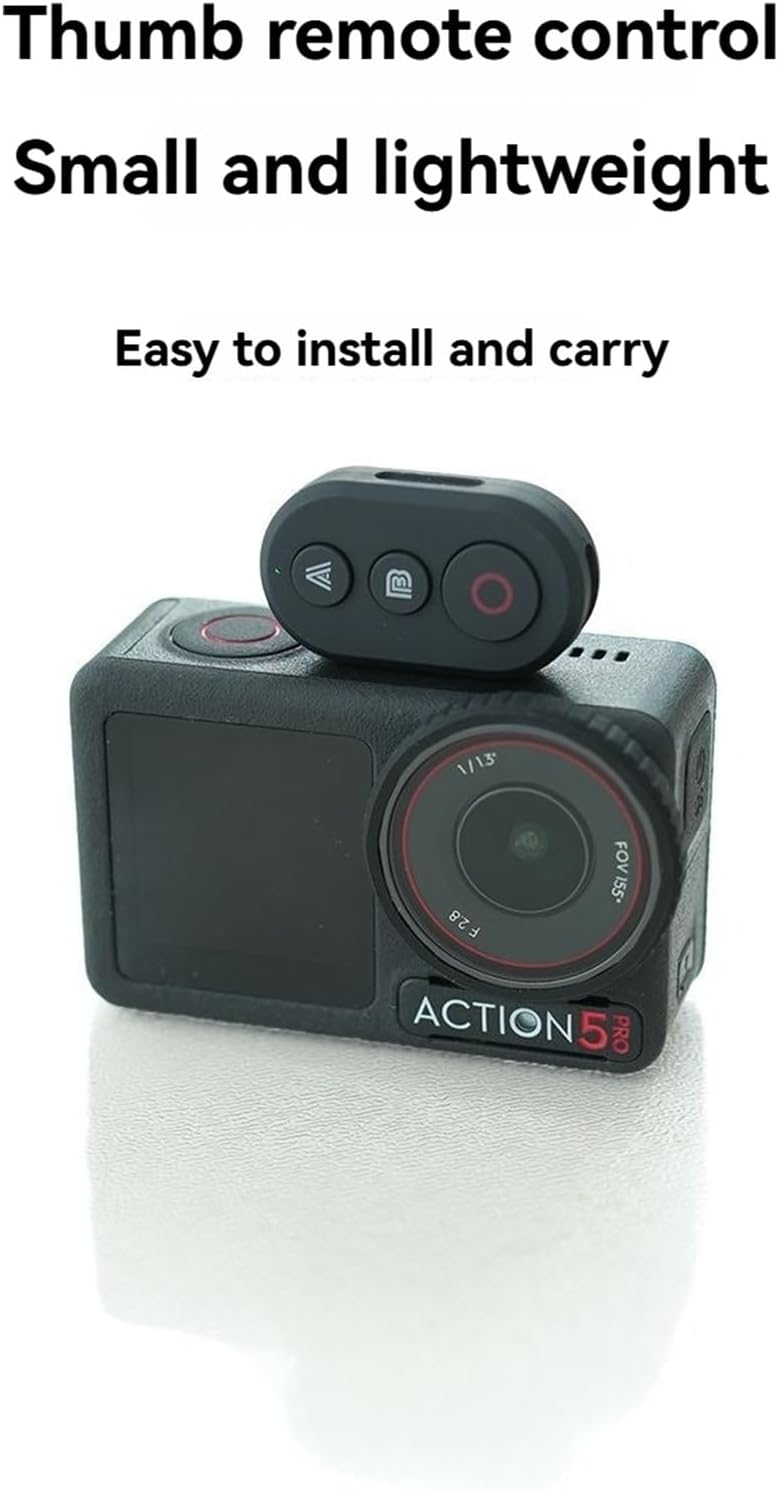
This manual provides detailed instructions for the LICHIFIT Bluetooth Remote Control. This versatile remote is designed for use with DJI OSMO 360, DJI OSMO Action 5 Pro, DJI OSMO Action 4 cameras, and a wide range of Android and iPhone mobile devices. It enables convenient control over camera functions, including shooting, zooming, and instant wake-up, from a distance.
Kandungan Pakej
Sila sahkan bahawa semua item yang disenaraikan di bawah disertakan dalam pakej anda:
- 1 x Alat Kawalan Jauh Bluetooth
- 1 x Strap Base
- 2 x Elastic Straps
- 1 x Tali pergelangan tangan
- 1 x Connecting Rope for Fishing Rod
- 1 x Kabel Pengecas USB

Spesifikasi
| Nombor Model | B0FXGKHGS5 |
| Jenama | LICHIFIT |
| Teknologi Ketersambungan | Bluetooth |
| Peranti Serasi | DJI OSMO 360, DJI OSMO Action 5 Pro, DJI OSMO Action 4, Android phones, iPhones |
| Maximum Range (Camera) | 30 meter (98 kaki) |
| Maximum Range (Mobile Phone) | 25 meter (82 kaki) |
| Hayat Bateri | Sehingga 30 jam dengan sekali cas |
| Jenis Pengecasan | Type-C (Rechargeable, built-in) |
| Bilangan Butang | 4 |
| Ciri Khas | Instant Wake-up, Long-distance Control |

Persediaan
1. Memadankan Alat Kawalan Jauh
- Pastikan alat kawalan jauh dicas.
- Turn on your DJI camera or enable Bluetooth on your mobile phone.
- On the remote, press and hold the 'A' button until the indicator light flashes, indicating pairing mode.
- On your camera or phone, search for Bluetooth devices and select the LICHIFIT remote control to pair.
- Once paired, the indicator light will stop flashing and remain solid or turn off, depending on the device.
2. Attachment Methods
The remote control offers multiple ways to attach it for convenience during various activities:
- Pemasangan Hendal: Use the strap base and elastic straps to secure the remote to bicycle handlebars or similar poles.
- Wrist Wear: Attach the remote to the wrist strap and wear it for easy access during activities. The wrist strap is adjustable to fit most users.
- Fishing Rod Attachment: Utilize the connecting rope to secure the remote to a fishing rod, allowing for remote control while fishing.
- Selfie Stick Mounting: The elastic straps can also be used to attach the remote to a selfie stick.

Arahan Operasi
1. Butang Berfungsi Berakhirview

- Butang 'A': Primarily used for waking up the camera or device from sleep mode without initiating a shot. When controlling a mobile phone, this button typically functions as 'Zoom In'.
- Butang 'B': Used to wake up the camera and immediately begin shooting. It can also be used for main mode switching or marking. When controlling a mobile phone, this button typically functions as 'Zoom Out'.
- Red Circular Button: The main shooting button for both cameras and mobile phones.
- Three-color Indicator Light: Provides visual feedback on the remote's status (e.g., pairing, connected, low battery).
2. Instant Wake-up and Shooting
The remote control features an instant wake-up function for your camera:
- If the camera is in a dormant state, pressing the 'B' button will wake up the camera and immediately start recording or taking photos.
- Menekan 'A' button will only wake up the camera without initiating a shot, allowing you to prepare before recording.

3. Mobile Phone Control
The remote control supports most Android phones and iPhones for taking photos and zooming:
- Butang 'A': Zum Masuk
- Butang 'B': Zum Keluar
- Red Circular Button: Take Photo / Start Recording

4. Charging the Remote Control
The remote control features a built-in rechargeable battery and supports Type-C charging.
- Connect the provided USB charging cable to the Type-C port on the remote control and to a standard USB power source.
- The indicator light will show charging status (e.g., solid red while charging, off when fully charged).
- The remote can be used while it is charging.

Penyelenggaraan
- Keep the remote control dry. Do not expose it to moisture or liquids.
- Clean the remote with a soft, dry cloth. Avoid using harsh chemicals or abrasive cleaners.
- Simpan alat kawalan jauh di tempat yang sejuk dan kering apabila tidak digunakan.
- Elakkan daripada menjatuhkan alat kawalan jauh atau terkena impak yang kuat.
Menyelesaikan masalah
Alat kawalan jauh tidak berpasangan:
- Pastikan alat kawalan jauh dicas.
- Make sure the remote is in pairing mode (indicator light flashing).
- Verify Bluetooth is enabled on your camera or mobile phone.
- Move the remote closer to the device you are trying to pair with.
- Restart both the remote and the device, then attempt pairing again.
Remote not controlling device:
- Confirm the remote is successfully paired and connected to your device.
- Periksa tahap bateri alat kawalan jauh.
- Ensure the device (camera or phone) is within the operational range (30m for camera, 25m for phone).
- Some camera or phone settings might interfere with remote control. Consult your device's manual.
Lampu penunjuk tidak berfungsi:
- The battery may be completely depleted. Charge the remote.
- If the remote is fully charged and still unresponsive, contact customer support.
Waranti dan Sokongan
Specific warranty information for this product is not provided in the available documentation. For warranty claims, technical support, or further assistance, please refer to the seller or manufacturer's official weblaman web, atau hubungi khidmat pelanggan mereka secara langsung.