
1. Pengenalan
Terima kasih kerana membeliasing the ThermoPro TP210B Wireless Refrigerator/Freezer Thermometer. This device is designed to help you monitor the temperature of your refrigerator and freezer wirelessly, ensuring your food is stored at optimal temperatures. With a strong 500ft/150m wireless range and customizable alarms, you can easily keep track of temperature fluctuations.
2. Kandungan Pakej
- 1 x Unit Penerima
- 1 x Unit Pemancar
- 2 x Bateri AAA (untuk Penerima)
- 1 x USB Charging Cable (for Transmitter)
- 1 x Manual Pengguna
3. Ciri-ciri Utama
- Julat Wayarles Lanjutan: Up to 500ft/150m using advanced RF technology for stable connection.
- Pra-Pasangan untuk Kegunaan Segera: No complex setup required; units are pre-paired from the factory.
- Julat Pengukuran Luas: Accurate readings within ±0.9°F across -40°F to 158°F (-40°C to 70°C).
- Amaran Suhu Pintar: Customizable high/low temperature limits with audio-visual alarms.
- Easy-to-Read Backlit Display: Shows fridge and freezer readings, Max/Min records, and low-battery status.
- Considerate Power Design: Receiver uses AAA batteries, transmitter features a rechargeable lithium battery.
- Pilihan Peletakan Fleksibel: Receiver has hook, stand, or magnet; transmitter has clip or stand.
4. Persediaan
4.1. Receiver Battery Installation
- Open the battery compartment on the back of the receiver unit.
- Masukkan 2 bateri AAA, pastikan kekutuban (+/-) betul.
- Tutup petak bateri dengan selamat.
Note: The receiver requires 2 AAA batteries, which are included in the package.
4.2. Transmitter Charging
- Locate the charging port on the transmitter unit.
- Connect the provided USB charging cable to the transmitter and a standard USB power source (e.g., wall adapter, computer USB port).
- Allow the transmitter to charge fully before first use. The charging indicator will change when fully charged.
Note: The transmitter uses a rechargeable lithium battery designed for low-temperature environments.
4.3. Initial Pairing (Pre-Paired)
The ThermoPro TP210B units are pre-paired at the factory. Simply power on both the receiver and transmitter, and they should automatically connect. If connection issues occur, refer to the Troubleshooting section.
4.4. penempatan
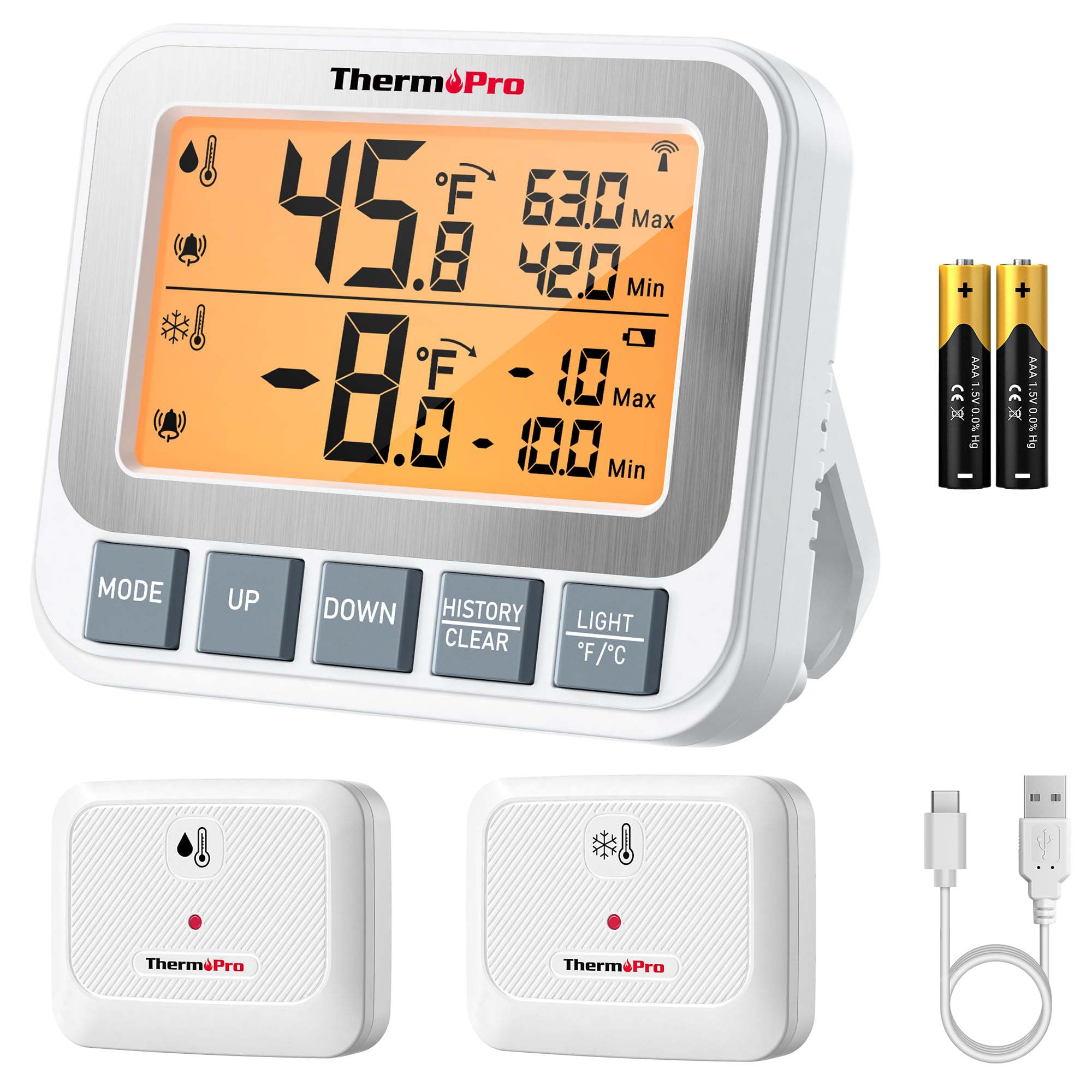
Image: ThermoPro TP210B Receiver and Transmitter. The receiver displays temperatures, while the transmitter sends data from inside the appliance.
Peletakan Penerima:
- Use the integrated stand to place it on a countertop.
- Utilize the magnetic back to attach it to a metallic surface.
- Hang it using the hook on the back.
- Place the receiver in a location where you can easily view the display and hear alarms, within the 500ft/150m range of the transmitter.
Penempatan Pemancar:
- Place the transmitter inside your refrigerator or freezer.
- Use the integrated clip to attach it to a shelf or rack.
- Ensure the transmitter is not obstructed by large items that could block the wireless signal.
5. Arahan Operasi
5.1. Hidupkan/Mati Kuasa
- Tekan ke KUASA button on both the receiver and transmitter to turn them on or off.
5.2. Reading Temperatures
- The receiver's backlit LCD display will show the current temperature from the transmitter.
- The display typically shows both the current temperature and the all-time Max/Min records.
5.3. Setting Temperature Alarms
The TP210B allows you to set custom high and low temperature limits for alerts.
- Tekan ke ALERT button on the receiver. The high limit will flash.
- Gunakan UP or TURUN buttons to adjust the high temperature limit.
- Tekan ALERT again to confirm the high limit and move to the low limit setting.
- Gunakan UP or TURUN buttons to adjust the low temperature limit.
- Tekan ALERT a third time to confirm the low limit and exit alarm setting mode.
When the temperature exceeds the set range, the receiver will emit an audio-visual alarm.
5.4. Max/Min Temperature Records
- The receiver automatically records the maximum and minimum temperatures detected since the last reset.
- Tekan ke MAX/MIN button to cycle through current, maximum, and minimum temperature readings.
- To reset the Max/Min records, press and hold the MAX/MIN butang selama 3 saat viewing the Max/Min display.
5.5. Lampu latar
- The receiver features a bright backlit display for easy reading in low-light conditions.
- The backlight will activate automatically when a button is pressed and will turn off after a short period of inactivity to conserve battery.
6. Penyelenggaraan
6.1. Pembersihan
- Lap unit dengan iklanamp kain. Jangan rendam dalam air.
- Jangan gunakan pembersih atau pelarut yang melelas.
6.2. Battery Replacement (Receiver)
- When the low battery indicator appears on the receiver display, replace the 2 AAA batteries.
- Pastikan kekutuban yang betul semasa memasang bateri baharu.
6.3. Transmitter Charging
- Recharge the transmitter's lithium battery when the low battery indicator appears.
- Gunakan kabel pengecas USB yang disediakan.
6.4. Penyimpanan
- If storing the device for an extended period, remove the AAA batteries from the receiver.
- Simpan di tempat yang kering jauh dari suhu yang melampau.
7. Penyelesaian masalah
| Masalah | Kemungkinan Punca | Penyelesaian |
|---|---|---|
| No temperature reading / "--" displayed | Transmitter not powered on, out of range, or low battery. |
|
| Bacaan suhu tidak tepat | Sensor obstruction, extreme environmental conditions, or sensor malfunction. |
|
| Penggera tidak berbunyi | Alarm limits not set correctly or alarm function disabled. |
|
| Transmitter battery drains quickly | Operating in extremely low temperatures or frequent signal transmission. |
|
8. Spesifikasi
- Julat Suhu: -40°F hingga 158°F (-40°C hingga 70°C)
- Ketepatan Suhu: ± 0.9 ° F (± 0.5 ° C)
- Julat Tanpa Wayar: Sehingga 500 kaki (150m) di udara terbuka
- Kekerapan Penghantaran: 433 MHz
- Kuasa Penerima: 2 x bateri AAA (termasuk)
- Kuasa Pemancar: Rechargeable Lithium battery (included, with USB charging cable)
- paparan: LCD bercahaya belakang
- Dimensi (Penerima): Approximately 4.33 inches (length)
- Berat (Item): Kira-kira 11.2 auns
9. Waranti & Sokongan
ThermoPro menyediakan jaminan untuk produk ini terhadap kecacatan pada bahan dan mutu kerja. Untuk maklumat jaminan terperinci, pendaftaran produk atau sokongan teknikal, sila lawati ThermoPro rasmi webtapak atau hubungi perkhidmatan pelanggan mereka secara langsung.
rasmi Webtapak: www.thermopro.com
Sokongan Pelanggan: Refer to the contact information provided on the ThermoPro webtapak atau pembungkusan produk.