
1. Pengenalan
Thank you for choosing the JeeBer VB619 1080P No WiFi Video Baby Monitor. This manual provides detailed instructions for the safe and effective use of your new baby monitor. Please read this manual thoroughly before operation and retain it for future reference. This monitor is designed to provide clear video and audio surveillance of your baby, ensuring peace of mind with its secure, non-Wi-Fi connection.
2. Kandungan Pakej
Ensure all items are present in the package. If any items are missing or damaged, please contact customer support.
- Baby Monitor Unit (Parent Unit)
- Baby Camera Unit (Baby Unit)
- Charging Cable (x2, one for each unit)
- Manual Arahan (Dokumen ini)
3. Produk Lebihview
The JeeBer VB619 baby monitor system consists of a parent unit with a 5-inch 1080P IPS display and a baby unit (camera). It features a secure FHSS wireless connection, eliminating the need for Wi-Fi.

Imej 3.1: Berakhirview of the JeeBer VB619 Baby Monitor system, showing the parent unit (monitor) and the baby unit (camera) with a baby in the background. Key features like 5-inch IPS screen, VOX mode, 1080P HD clarity, FHSS encrypted transmission, no WiFi, 4 camera support, two-way audio, 3x zoom, fixed view with digital pan, 8-meter HD night vision, temperature monitoring, feeding reminder, and lullabies are highlighted.

Imej 3.2: The JeeBer baby monitor highlighting its "No WiFi Required" feature, emphasizing privacy protection through FHSS technology.
3.1 Parent Unit (Monitor) Features:
- 5-inch 1080P IPS Display: Provides a clear, wide-angle view bayi anda.
- Perbincangan Dua Hala: Berkomunikasi dengan bayi anda dari jauh.
- Mod VOX: Voice-activated screen for power saving.
- Pemantauan Suhu: Displays real-time room temperature.
- Lullabies: Built-in soothing melodies.
- Zum Digital 3X: Magnify the view for closer inspection.
- Boleh dikembangkan: Supports up to four cameras (sold separately).
- Bateri 3050mAh: Long-lasting power for continuous monitoring.
3.2 Baby Unit (Camera) Features:
- Video HD 1080P: High-definition video capture.
- Penglihatan Malam yang Jelas: 10 invisible infrared LEDs for clear images in darkness.
- Penderia Suhu: Detects room temperature.
- Mikrofon & Pembesar Suara: Untuk komunikasi audio dua hala.
4. Persediaan
Follow these steps for initial setup of your baby monitor system.
- Cas Unit Induk: Connect the charging cable to the parent unit and a power outlet. Charge fully before first use.
- Kuasakan Unit Bayi: Connect the charging cable to the baby unit and a power outlet. The camera requires continuous power to operate.
- Letakkan Unit Bayi: Place the baby unit (camera) in a secure location in your baby's room, ensuring a clear view of the crib. Keep it at least 3 feet (1 meter) away from the crib to prevent entanglement hazards.
- Hidupkan kuasa: Turn on both the parent unit and the baby unit. The units are pre-paired at the factory and should automatically connect.
- Sambungan Ujian: Verify that you can see and hear your baby through the parent unit. Adjust the camera angle as needed.

Imej 4.1: A woman in a kitchen observing her baby on the 5-inch 1080P IPS Eye-Care Display of the JeeBer baby monitor. The image emphasizes the clear view dari sudut mana pun.
5. Arahan Operasi
5.1 Operasi Asas
- Hidupkan/Mati Kuasa: Press and hold the power button on the parent unit.
- Kawalan Kelantangan: Use the dedicated volume buttons on the parent unit to adjust audio levels.
- Kawalan Kecerahan: Adjust screen brightness via the menu settings.
5.2 VOX Mode (Voice-Activated Screen)
VOX mode conserves battery life by turning off the screen when no sound is detected from the baby unit. The screen automatically reactivates when sound is detected.
- Activate/Deactivate VOX: Access the menu on the parent unit and select the VOX option to turn it on or off.
- Sensitiviti VOX: Adjust the sensitivity level in the menu to determine how loud a sound needs to be to activate the screen.

Imej 5.1: A visual comparison demonstrating the enhanced clarity of JeeBer's night vision, powered by 10 infrared LED bulbs, compared to another brand's night vision.

Imej 5.2: An image depicting a baby sleeping peacefully, with musical notes floating around, symbolizing the 8 soothing lullabies feature designed to aid healthy sleep habits.
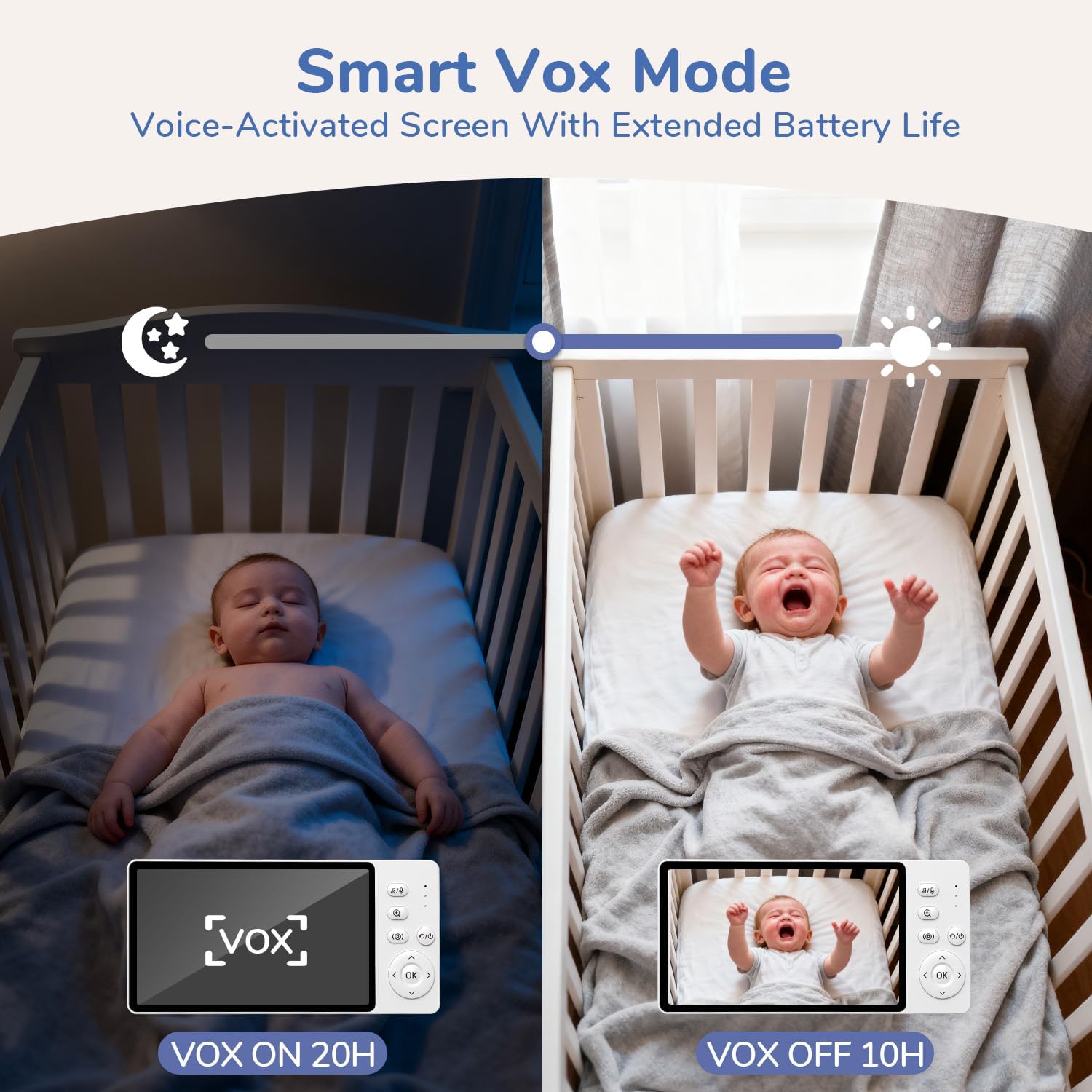
Imej 5.3: This image illustrates the Smart VOX Mode, showing the monitor screen off when the baby is sleeping (VOX ON, 20H battery life) and the screen on when the baby is crying (VOX OFF, 10H battery life), highlighting its voice-activated screen and extended battery life.
5.3 Ceramah Dua Hala
To speak to your baby, press and hold the "Talk" button on the parent unit. Release the button to hear your baby.

Imej 5.4: A woman in a kitchen using the two-way noise-canceling call feature of the JeeBer baby monitor to communicate with her baby in the crib, with speech bubbles indicating "I hear you, my love." and "Ah-goo... ba-ba...".
5.4 Lagu pengantar tidur
Access the lullaby menu on the parent unit to select and play soothing melodies for your baby. You can choose from 8 built-in lullabies.
5.5 Zum Digital
Press the zoom button on the parent unit to digitally zoom in on the video feed (up to 3X). Press again to zoom out.
5.6 Penglihatan Malam
The baby unit automatically activates its infrared night vision in low-light conditions, providing a clear black and white image of your baby without disturbing red lights.
5.7 Pemantauan Suhu
The parent unit displays the real-time temperature of your baby's room, detected by the baby unit's sensor.

Imej 5.5: An image showing the precise temperature monitoring feature of the JeeBer baby monitor, displaying "28.8°C" on the screen while a parent interacts with a baby. This highlights scientific care powered by accurate temperature readings.
5.8 Adding/Managing Cameras (Optional)
Your monitor supports up to four cameras. To add additional cameras, refer to the "Camera Pairing" section in the menu settings on your parent unit.
6. Penyelenggaraan
- Pembersihan: Gunakan kain lembut dan kering untuk membersihkan permukaan kedua-dua unit. Jangan gunakan pembersih atau pelarut yang kasar.
- Penjagaan Lensa: Gently wipe the camera lens with a lens cleaning cloth if it becomes dirty.
- Storan: If storing the monitor for an extended period, ensure both units are fully charged and then powered off. Store in a cool, dry place.
7. Penyelesaian masalah
| Masalah | Penyelesaian yang Mungkin |
|---|---|
| Tiada imej/bunyi pada unit induk. |
|
| Kualiti gambar yang buruk. |
|
| Hayat bateri pendek. |
|
| Interference/Static. |
|
8. Spesifikasi
| Ciri | Perincian |
|---|---|
| Nama Model | VB619 |
| Penggunaan Dalaman/Luar | Dalaman |
| Sumber Kuasa | Battery Powered (Parent Unit), AC Powered (Baby Unit) |
| Teknologi Ketersambungan | Tanpa Wayar (FHSS) |
| Resolusi Tangkapan Video | 1080p |
| Paparan Unit Induk | LCD IPS 5-inci |
| Ciri Khas | 2-Way Audio, Cry Detection (VOX), HD Resolution, Night Vision, Temperature Monitoring, Lullabies, 3X Zoom |
| Dimensi Item (L x W x H) | 2.6 x 4.33 x 5.91 inci |
| Berat Barang | 1.23 paun |
| Bateri | 1 C battery required (included for parent unit) |
9. Waranti dan Sokongan
JeeBer offers a Polisi pemulangan percuma 90 hari dan a Waranti 2 tahun for this product. For any questions, technical assistance, or warranty claims, please contact JeeBer customer service.
Our dedicated customer service team is available to provide one-on-one support. Please refer to the contact information provided with your purchase or visit the official JeeBer webtapak untuk butiran sokongan.