1. Pengenalan
This manual provides detailed instructions for the installation, operation, and maintenance of your ZSUS X99-8D4 Motherboard Set Kit. This kit includes the ZSUS X99-8D4 motherboard, an Intel Xeon E5 2650 V4 CPU, and 16GB (1x16GB) of DDR4 2133MHz memory. Please read this manual thoroughly before proceeding with installation to ensure proper setup and optimal performance.
2. Produk Lebihview
The ZSUS X99-8D4 motherboard is designed for high-performance computing, supporting Intel LGA2011-3 processors and DDR4 memory. It features an NVMe M.2 slot for high-speed storage and Gigabit Ethernet for reliable network connectivity.
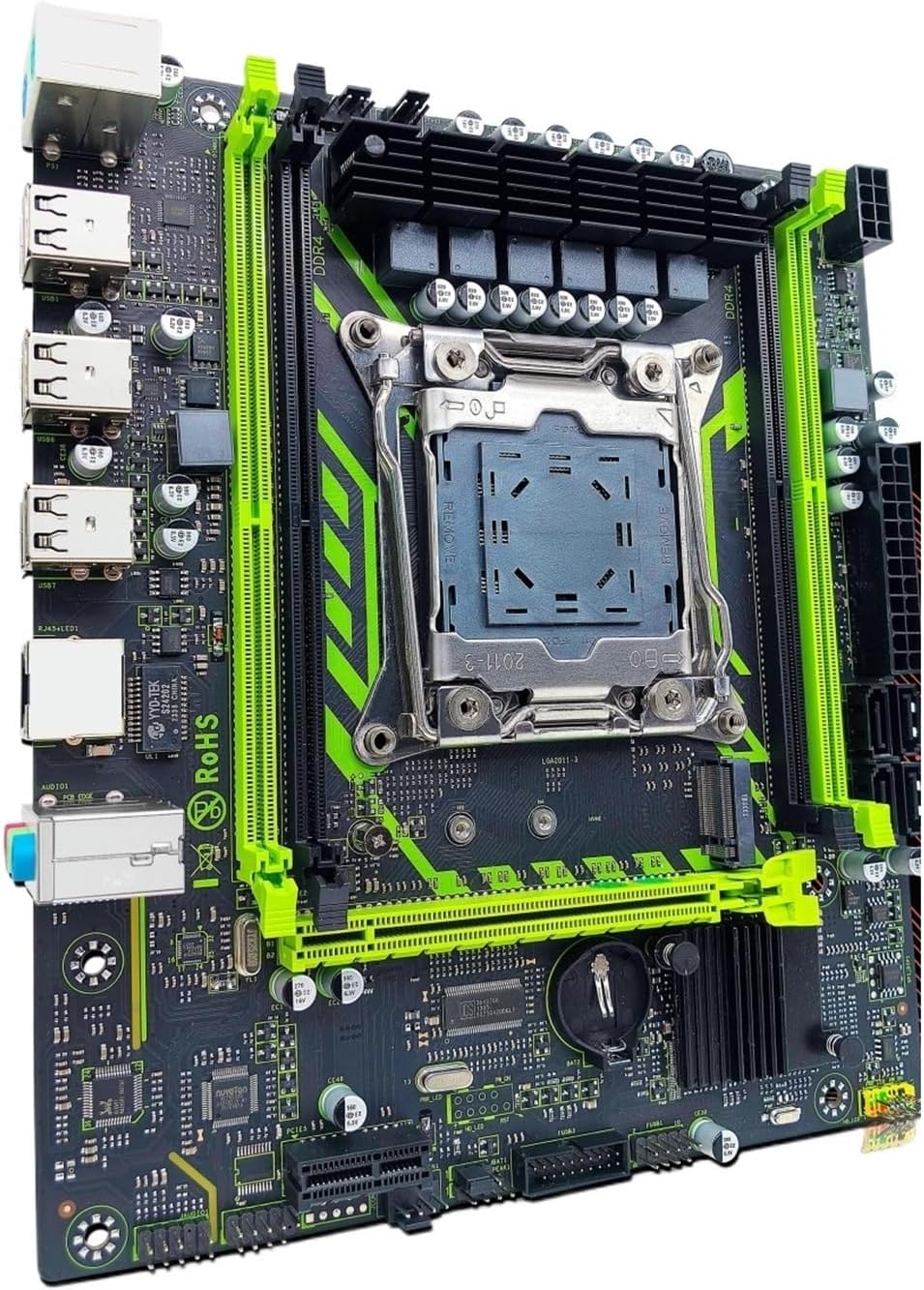
Rajah 2.1: ZSUS X99-8D4 Motherboard Set Kit. This image displays the complete motherboard kit, including the motherboard, CPU, and RAM, ready for installation.
Ciri-ciri Utama:
- Sokongan CPU: LGA2011-3 socket for Intel Xeon E5 V3/V4 series processors.
- Ingatan: 4x DDR4 memory slots, supporting up to 128GB of RAM.
- Storan: NVMe M.2 slot (2280 form factor) for high-speed SSDs, and multiple SATA 2.0 ports.
- Pengembangan: 1x PCIe x16 slot (PCI-E 3.0) for graphics cards, 1x PCIe x1 slot.
- Rangkaian: Integrated Gigabit Ethernet (1000Mbps).
- USB: Multiple USB 2.0 ports.
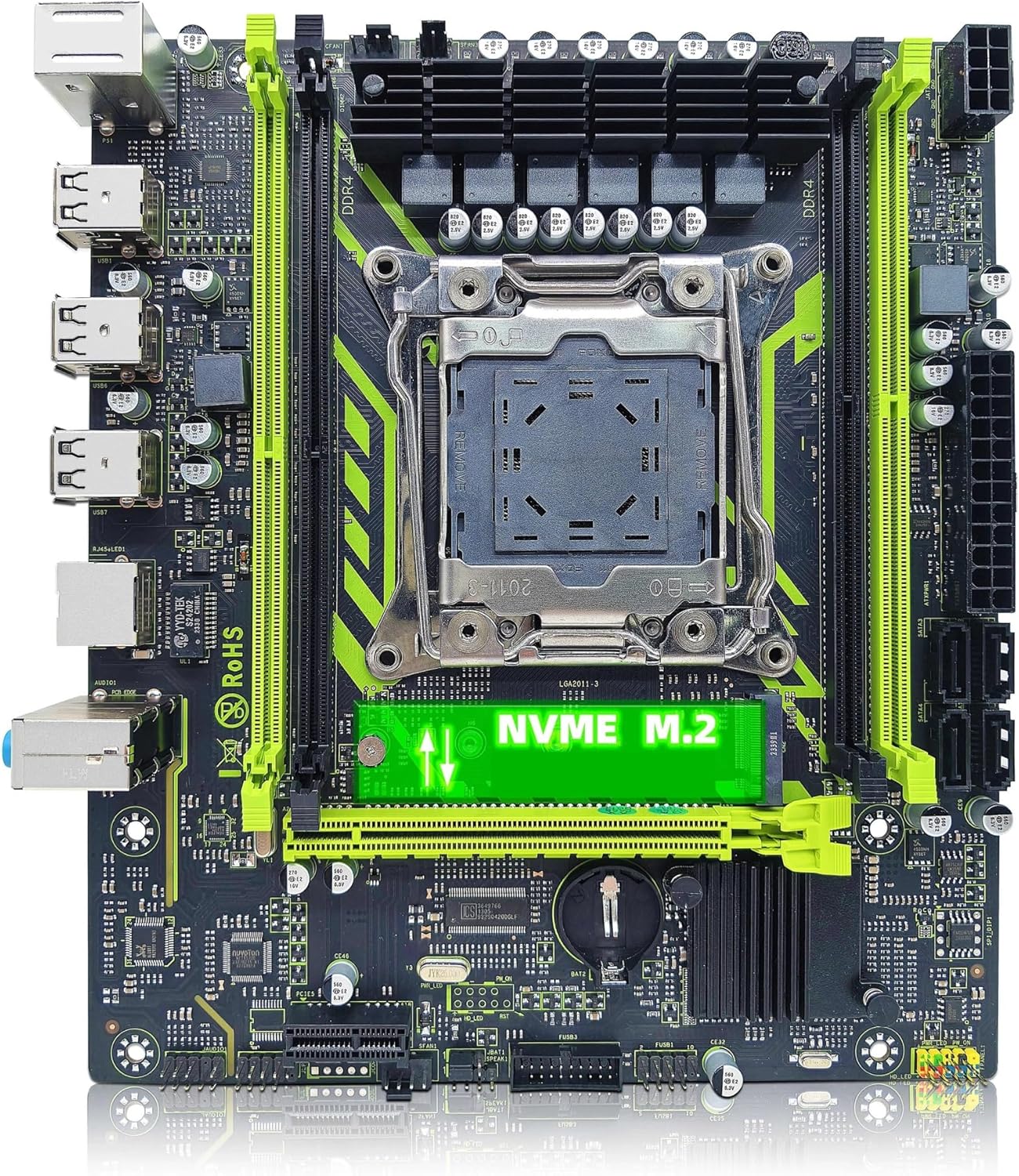
Rajah 2.2: ZSUS X99-8D4 Motherboard highlighting the NVMe M.2 slot. This image shows the motherboard with the NVMe M.2 slot clearly visible, indicating its location for SSD installation.
3. Persediaan dan Pemasangan
Sebelum memulakan pemasangan, pastikan sistem anda dimatikan dan dicabut daripada plag elektrik. Pakai tali pergelangan tangan anti-statik untuk mengelakkan kerosakan nyahcas elektrostatik (ESD) pada komponen.
3.1 Membongkar dan Pemeriksaan
Carefully remove all components from their packaging. Verify that all items listed in your kit are present and undamaged. The kit typically includes the motherboard, CPU, RAM, I/O shield, and SATA cable.
3.2 Pemasangan Motherboard
- Pasang perisai I/O ke dalam bukaan belakang sarung komputer anda.
- Align the motherboard with the standoffs inside your computer case.
- Selamatkan papan induk dengan skru, pastikan ia terpasang dengan kukuh dan tidak menyentuh mana-mana bahagian logam kes itu secara langsung.

Rajah 3.1: ZSUS X99-8D4 Motherboard with dimensions. This image illustrates the physical dimensions of the motherboard, showing a width of 215mm and a length of 190mm, which is useful for case compatibility.
3.3 CPU Installation (Intel Xeon E5 2650 V4)
- Locate the LGA2011-3 CPU socket on the motherboard.
- Open the CPU socket retention mechanism by pushing down and out on the lever(s).
- Carefully place the Intel Xeon E5 2650 V4 CPU into the socket, aligning the gold triangle on the CPU with the corresponding mark on the socket. Do not force the CPU into place.
- Tutup mekanisme pengekalan untuk menjamin CPU.
- Sapukan lapisan pes haba yang nipis dan sekata pada bahagian atas CPU.
- Pasang penyejuk CPU anda mengikut arahan pengeluarnya.
3.4 RAM Installation (DDR4)
- Locate the four DDR4 memory slots on the motherboard.
- Buka klip di kedua-dua hujung slot memori.
- Align the notch on the 16GB DDR4 memory module with the key in the memory slot.
- Tekan ke bawah dengan kuat pada kedua-dua hujung modul memori sehingga klip terpasang pada tempatnya.
3.5 NVMe M.2 SSD Installation
- Locate the NVMe M.2 slot on the motherboard.
- Tanggalkan skru pemutus M.2.
- Masukkan SSD M.2 ke dalam slot pada sudut 30 darjah.
- Push the SSD down and secure it with the standoff screw.
3.6 Graphics Card and Other PCIe Devices
- Locate the PCIe x16 slot for your graphics card.
- Buka klip pengekalan di hujung slot.
- Jajarkan kad grafik anda dengan slot dan tekan ke bawah dengan kuat sehingga ia klik pada tempatnya.
- Pasangkan kad grafik pada bekas dengan skru.
- Install any other PCIe x1 expansion cards as needed.
3.7 Sambungan Bekalan Kuasa
- Sambungkan penyambung kuasa ATX 24-pin daripada bekalan kuasa anda ke papan induk.
- Connect the 8-pin CPU power connector (and 4-pin if available/needed) to the corresponding sockets near the CPU.
- Connect SATA power cables to your storage devices.
3.8 Panel Hadapan dan Sambungan Persisian
- Connect the front panel headers (Power SW, Reset SW, HDD LED, Power LED) to the designated pins on the motherboard. Refer to the motherboard diagram for correct pin assignments.
- Connect USB 2.0 headers from your case to the motherboard.
- Sambungkan pengepala audio panel hadapan.
- Connect SATA data cables from your storage devices to the SATA 2.0 ports on the motherboard.

Rajah 3.2: ZSUS X99-8D4 Motherboard with labeled ports and connectors. This image provides a detailed layout of the motherboard, indicating the locations of the CPU socket, DDR4 slots, PCIe slots, SATA ports, USB headers, and power connectors.

Rajah 3.3: ZSUS X99-8D4 Motherboard I/O Shield and SATA Cable. This image shows the included I/O shield for the rear panel and a SATA data cable, essential accessories for system assembly.
4. Arahan Operasi
4.1 But Pertama
- After all connections are made, connect your monitor, keyboard, and mouse.
- Plug in the power cord and turn on your power supply.
- Tekan butang kuasa pada sarung komputer anda.
- Sistem ini sepatutnya dihidupkan dan memaparkan skrin percikan BIOS/UEFI.
4.2 Persediaan BIOS/UEFI
During the initial boot, press the designated key (usually DEL or F2) to enter the BIOS/UEFI setup utility. Here you can configure boot order, system time, and other hardware settings. Ensure your storage device with the operating system is set as the primary boot device.
4.3 Pemasangan Pemandu
After installing your operating system, install the necessary drivers for the motherboard chipset, LAN, and audio. These drivers are typically provided on a CD/DVD or can be downloaded from the manufacturer's website. Installing the correct drivers ensures optimal performance and stability.
5. Penyelenggaraan
5.1 Pembersihan
Regularly clean your computer's interior to prevent dust buildup, which can lead to overheating. Use compressed air to remove dust from fans, heatsinks, and motherboard components. Ensure the system is powered off and unplugged before cleaning.
5.2 Kemas Kini BIOS
Periksa pengeluar secara berkala weblaman web untuk kemas kini BIOS/UEFI. Kemas kini boleh meningkatkan kestabilan sistem, menambah sokongan untuk perkakasan baharu atau membetulkan pepijat. Ikuti arahan kemas kini dengan teliti untuk mengelakkan kerosakan pada papan induk.
6. Penyelesaian masalah
Bahagian ini menangani isu biasa yang mungkin anda hadapi.
6.1 Tiada Kuasa / Tiada But
- Check all power connections: 24-pin ATX, 8-pin CPU, and power button header.
- Pastikan suis bekalan kuasa berada dalam kedudukan 'ON'.
- Test the power supply with another system or a power supply tester if possible.
6.2 Tiada Paparan
- Ensure your monitor is connected to the graphics card (not the motherboard's I/O if no integrated graphics are present).
- Letakkan semula kad grafik dan modul memori.
- Cuba kabel paparan atau monitor yang berbeza.
6.3 Memory Errors
- Ensure memory modules are fully seated in their slots.
- Try booting with one memory module at a time to identify a faulty stick or slot.
- Verify memory compatibility with the motherboard.
6.4 Ketidakstabilan Sistem / Ranap
- Semak suhu CPU dan GPU untuk memastikan ia berada dalam had operasi yang selamat.
- Pastikan semua pemandu dikemas kini.
- Jalankan alat diagnostik memori untuk menyemak ralat RAM.
7. Spesifikasi
| Ciri | Spesifikasi |
|---|---|
| Model | ZSUS X99-8D4 |
| Soket CPU | LGA 2011-3 |
| Supported CPU | Intel Xeon E5 V3/V4 series (e.g., E5 2650 V4 included) |
| Jenis Memori | DDR4 |
| Slot memori | 4 |
| Kapasiti Memori Maks | 128 GB |
| Antaramuka Penyimpanan | M.2 (NVMe 2280), SATA 2.0 |
| Slot PCIe x16 | 1 (PCI-E 3.0) |
| Slot PCIe x1 | 1 |
| Kelajuan LAN | 1000Mbps (Ethernet Gigabit) |
| Port USB | 6 x USB 2.0 (rear I/O) |
| Port Audio | 3 x Jacks |
| Faktor Bentuk | ATX (approx. 215mm x 190mm) |
| Pensijilan | RoHS, CE |
8. Waranti dan Sokongan
Untuk maklumat jaminan dan sokongan teknikal, sila rujuk dokumentasi yang disediakan bersama pembelian anda atau hubungi penjual secara langsung. Simpan bukti pembelian anda untuk tuntutan jaminan.