
1. Pengenalan
The LAUNCH CRP 129MT is a professional motorcycle diagnostic tool designed for comprehensive system diagnosis and maintenance services. This device operates on an Android system, featuring a 5-inch touch screen and a robust hardware configuration to efficiently identify and resolve potential faults in various motorcycle systems.
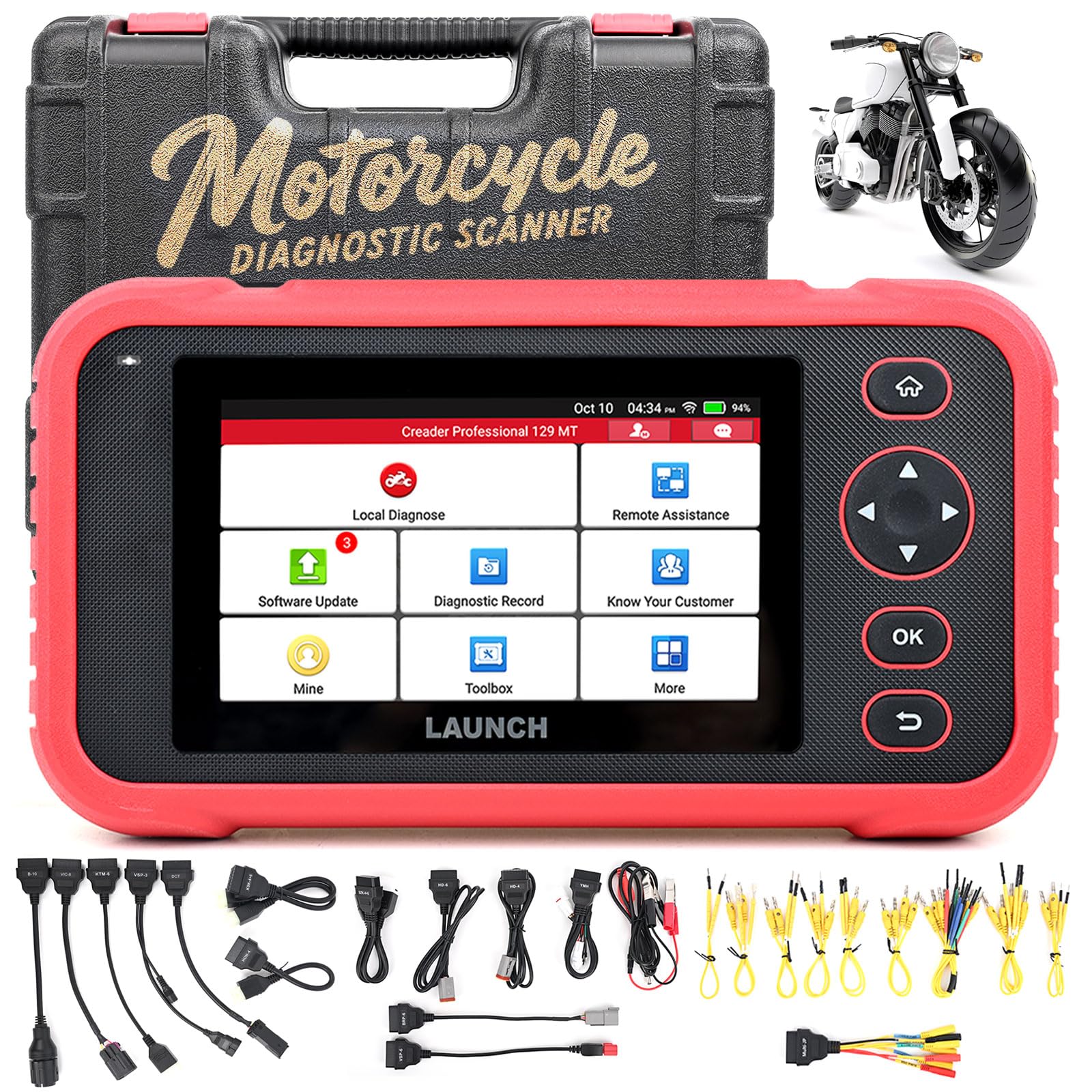
Gambar 1: Lebihview of the LAUNCH CRP 129MT Diagnostic Scanner, showcasing its compact design and user interface.
2. Persediaan
2.1 Membuka Kotak dan Kandungan Pakej
Carefully unpack the device and verify all components are present according to the packing list. Retain all packaging materials for future storage or shipping.

Figure 2: The complete packing list for the LAUNCH CRP 129MT, including the main unit, various connectors, and documentation.
Pakej biasanya termasuk:
- Main Unit (CRP 129MT Diagnostic Scanner)
- Manual Pengguna
- Panduan Mula Pantas
- Senarai Penyambung
- Kabel Utama
- Kabel USB-C
- Various Motorcycle Adapters (e.g., HD-4, HD-6, DCT-4, VIC-8, KT-6, KSK-4+6, KZK-4+6, YMH-4+3+3+1+1, VSP-3, VSP-6, HON-4, B-10, BR-6)
- Clipper (double clamp kabel kuasa)
- Kabel Jumper
- Membawa Sarung
2.2 Peranti Selesaiview
Familiarize yourself with the device's physical components, including the 5-inch touch screen, navigation buttons, and diagnostic port.

Rajah 3: Depan view of the CRP 129MT, highlighting the display and control buttons.
2.3 Connecting to a Motorcycle
To begin diagnosis, connect the CRP 129MT to your motorcycle's diagnostic port using the appropriate adapter cable. The device supports various motorcycle brands and models through its included adapter set.
- Identify the diagnostic port on your motorcycle.
- Select the correct adapter cable from the provided set (refer to the "Connector List" document for guidance).
- Connect the adapter cable to the motorcycle's diagnostic port.
- Connect the other end of the adapter cable to the main cable, and then to the CRP 129MT diagnostic tool.
- Pastikan semua sambungan selamat sebelum menghidupkan peranti.

Figure 4: A visual guide to the various motorcycle connectors included with the CRP 129MT, designed for multi-brand compatibility.
3. Operasi
3.1 Menghidupkan dan Persediaan Awal
Press the power button to turn on the device. The Android 8.1 operating system will boot up. Follow any on-screen prompts for initial language and network settings.
3.2 System-Wide Diagnosis
The CRP 129MT provides comprehensive diagnostic capabilities for all available motorcycle modules. This includes, but is not limited to, engines, ABS, suspension, and infotainment systems.
- From the main menu, select the "Diagnose" option.
- Choose the motorcycle brand and model.
- The scanner will automatically identify the vehicle's systems.
- Select the desired system for diagnosis (e.g., Engine, ABS).
- The device will read fault codes, display live data streams, and perform other diagnostic functions.

Figure 5: The CRP 129MT displaying its capability for full system diagnosis, including engine, ABS, battery, and TPMS systems.
3.3 Advanced Maintenance Services
The CRP 129MT offers a range of maintenance and reset functions to assist with common service tasks.
- Instrument Code Resetting: For resetting instrument cluster codes.
- TPMS Tire Pressure Monitoring: For monitoring and resetting tire pressure systems.
- Maintenance Light Resetting: To turn off service reminder lights after maintenance.
- Pelarasan Kelajuan Terbiar: For adjusting the engine's idle speed.
- ABS Resetting: For resetting the Anti-lock Braking System.
- Transmission Memory Resetting: To clear and relearn transmission adaptive values.
- Other functions include RESET, MATCH, RELEARN, CALIBRATION, ADAPTION, and INITIALIZATION.
3.4 Multi-Brand Compatibility
The device supports a wide array of motorcycle brands. Ensure you select the correct brand and model from the menu for accurate diagnosis.

Figure 6: The CRP 129MT interface showing a comprehensive list of supported motorcycle brands for diagnostic and service functions.
4. Penyelenggaraan
Proper maintenance ensures the longevity and optimal performance of your CRP 129MT diagnostic scanner.
- Pembersihan: Gunakan kain lembut dan kering untuk membersihkan peranti. Elakkan pembersih atau pelarut yang kasar.
- Storan: Store the device in its carrying case in a cool, dry place when not in use.
- Kemas Kini Perisian: Regularly check for and install software updates to ensure compatibility with new vehicle models and improved functionality. Updates can typically be performed via Wi-Fi.
- Penjagaan Bateri: Charge the device regularly. Avoid fully discharging the battery for extended periods.
5. Penyelesaian masalah
This section addresses common issues you might encounter with the CRP 129MT.
5.1 Peranti Tidak Menghidupkan
- Check the battery level. Connect the device to a power source using the USB-C cable and charger.
- Ensure the power button is pressed firmly and held for a few seconds.
5.2 Connection Error with Motorcycle
- Verify that the correct adapter cable is being used for your motorcycle model.
- Pastikan semua sambungan kabel selamat dan bebas daripada kerosakan.
- Confirm the motorcycle's ignition is turned on (if required by the diagnostic system).
- Check the motorcycle's diagnostic port for any obstructions or damage.
5.3 Perisian Terhenti atau Prestasi Perlahan
- Mulakan semula peranti.
- Ensure the device has sufficient storage space. Clear unnecessary data if needed.
- Perform a software update to the latest version.
5.4 Inaccurate Readings or Functions Not Working
- Pastikan perisian tersebut dikemas kini.
- Verify that the correct motorcycle model and year are selected in the diagnostic software.
- Consult the motorcycle's service manual for specific diagnostic procedures.
- Jika masalah berterusan, hubungi sokongan teknikal.
6. Spesifikasi
Key technical specifications for the LAUNCH CRP 129MT diagnostic scanner:
| Ciri | Perincian |
|---|---|
| Nombor Model | Creader Professional 129 MT |
| Sistem Operasi | Android 8.1 |
| CPU | 4-core 1.3 GHz |
| Saiz Skrin | 5 inci |
| Resolusi Skrin | 1280 x 720 piksel |
| Sumber Kuasa | Dikuasakan Bateri |
| Kapasiti Bateri | 6000 mAh |
| RAM | 2 GB |
| ROM | 32 GB |
| Komponen yang Disertakan | 1 x Creader Professional 129 MT, various cables and adapters |
7. Waranti dan Sokongan
The LAUNCH CRP 129MT comes with a manufacturer's warranty and dedicated technical support.
- Tempoh Waranti: The product is covered by a 2-year manufacturer's warranty.
- Sokongan Teknikal: LAUNCH offers 7*24 technical support. For assistance with product operation, troubleshooting, or warranty claims, please contact LAUNCH customer service.
- Maklumat Hubungan: Refer to the official LAUNCH website or the contact details provided in the Quick Start Guide for the most current support information.