
1. Pengenalan
Thank you for choosing the Angrox Backlit Universal Remote Control for LG Smart TVs. This remote is designed to provide a seamless and enhanced television viewing experience, especially in low-light conditions. It serves as a direct replacement for your original LG TV remote, offering broad compatibility and ease of use without requiring complex setup procedures. This manual provides detailed instructions for setting up, operating, maintaining, and troubleshooting your new remote control.
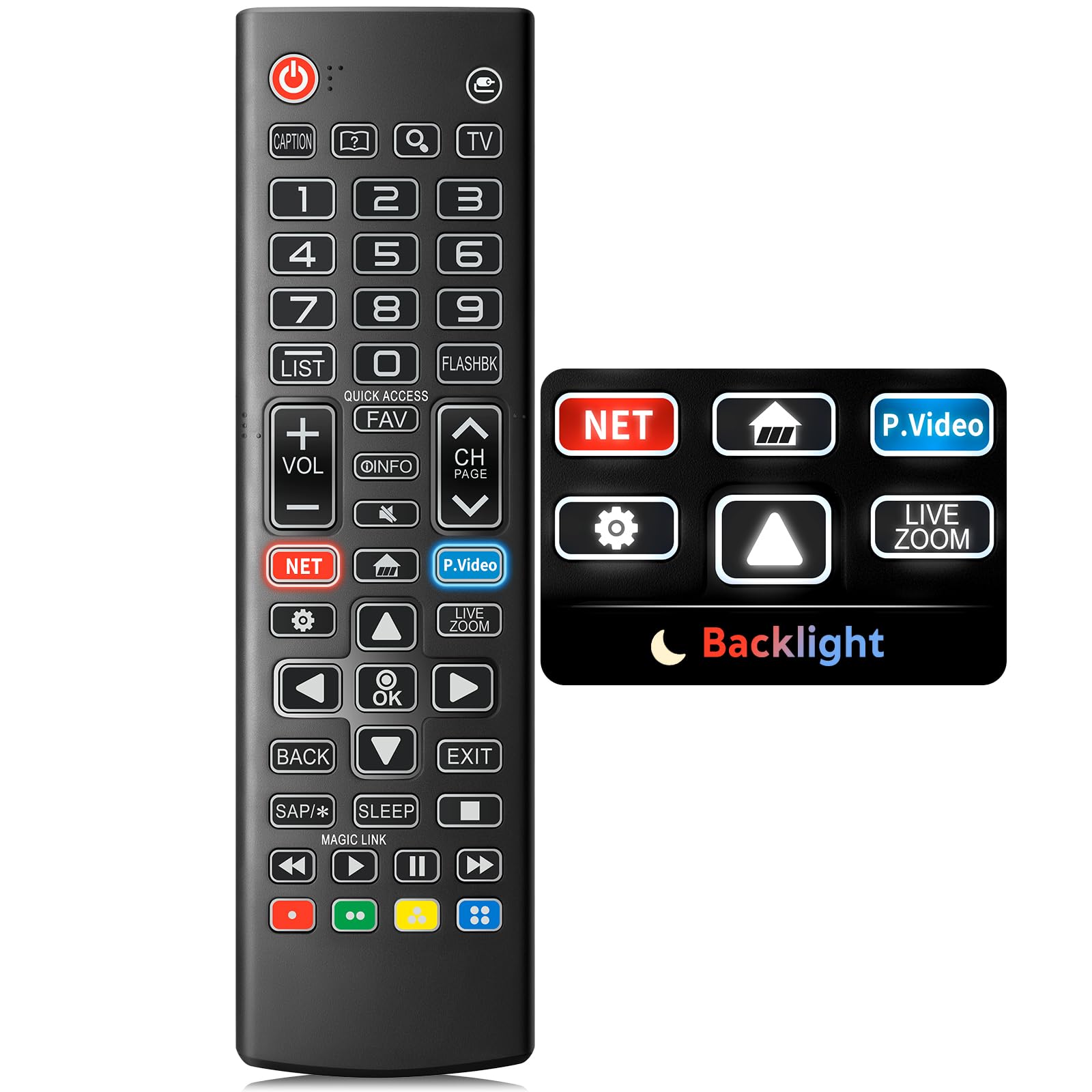
Image: The Angrox Backlit Universal Remote Control, a sleek black remote with clearly labeled buttons.
2. Ciri-ciri Utama
- Easy Nighttime Operation: Features soft glow buttons that illuminate, allowing for clear visibility and use in dark environments without causing glare. The backlight activates with any button press and automatically turns off after 10 seconds of inactivity.
- Keserasian Universal: Designed as a direct replacement for LG TV remotes, compatible with all LG TV models. No programming or complex pairing is required; it works immediately out of the box.
- High-Quality Performance: Equipped with sensitive buttons and stable signal transmission for smooth and responsive operation.
- Reka bentuk ergonomik: Shaped to fit comfortably in the hand, reducing fatigue during extended use. The button layout is intuitive for users of all ages.
- Tahan lama dan boleh dipercayai: Constructed from high-quality, sturdy materials to withstand daily use and accidental drops, ensuring a long lifespan.

Image: A comparison showing the remote control with its backlight off and then with its buttons illuminated, highlighting the easy nighttime operation feature.

Image: The remote control displayed alongside various LG TV models (OLED, UHD, QNED, NanoCell), illustrating its broad compatibility.
3. Arahan Persediaan
3.1 Pemasangan Bateri
- Cari penutup petak bateri di belakang alat kawalan jauh.
- Slide the cover downwards or press the latch to open the compartment.
- Masukkan dua (2) bateri AAA, pastikan terminal positif (+) dan negatif (-) sejajar dengan penunjuk di dalam petak.
- Gantikan penutup petak bateri dengan menggelongsorkannya semula ke tempatnya sehingga ia berbunyi dengan selamat.
Nota: Batteries are not included with the remote control. Please use new AAA alkaline batteries for optimal performance.

Image: A visual guide demonstrating the correct insertion of two AAA batteries into the remote control's battery compartment.
3.2 Initial Use (No Pairing Required)
The Angrox Backlit Universal Remote Control is designed for immediate use with LG Smart TVs. No pairing or programming steps are necessary. Once batteries are installed, the remote is ready to control your LG television.
4. Arahan Operasi
This section details the functions of the buttons on your Angrox remote control.

Image: A comprehensive layout of the remote control, with labels pointing to each button and describing its primary function.
4.1 Fungsi Asas
- kuasa (
 ): Menghidupkan atau mematikan TV.
 - Input (): Changes the input source (e.g., HDMI 1, HDMI 2).
- Kelantangan Naik/Turun (VOL +/-): Melaraskan tahap kelantangan.
- Saluran Atas/Bawah (CH Page): Menukar saluran televisyen.
- bisu (): Membisukan atau menyahredamkan audio TV.
- Butang Nombor (0-9): Memasukkan nombor saluran atau input berangka lain secara langsung.
- Butang Navigasi (Atas/Bawah/Kiri/Kanan): Digunakan untuk menatal melalui menu dan pilihan.
- Butang OK: Selects menu items or confirms your input.
4.2 Butang Fungsi Khas
- Butang Netflix: Launches the Netflix application directly.
- Butang Video Perdana Amazon: Launches the Amazon Prime Video application directly.
- Akses Pantas: A feature that allows you to enter a specified app or Live TV directly by pressing and holding the number buttons.
- Senarai: Mengakses senarai program yang disimpan.
- Flashback: Berbalik kepada sebelumnya viewed channel or input.
- maklumat: Displays information on the current program.
- kegemaran: Akses senarai saluran kegemaran anda.
- Tetapan (): Accesses the Quick Settings menu.
- Belakang: Membersihkan paparan pada skrin dan kembali ke TV viewing.
- Keluar: Keluar dari menu semasa.
- tidur: Accesses the sleep timer.
- Media Control Buttons (Play, Pause, Stop, Fast Forward, Rewind): Controls media content playback.
4.3 Fungsi Lampu Latar
The remote control features a soft backlight for easy use in the dark. Simply press any button, and the backlight will turn on. It will automatically turn off after 10 seconds of inactivity to conserve battery life.
Video: A demonstration of the Angrox Backlit Remote for LG Smart TV, showcasing its easy nighttime use and responsive buttons. This video highlights the convenience of the backlit feature in dark environments.
5. Spesifikasi
| Jenama | Angrox |
| Nama Model | AKB75095307 |
| Nombor Model | AKB75095307 |
| Ciri Khas | Backlit, Ergonomic, Lightweight, No Programming Required, Universal |
| Peranti Serasi | Television (All LG TV models) |
| Bilangan Maks Peranti yang Disokong | 1 |
| Teknologi Ketersambungan | Inframerah |
| Kuantiti Butang | 30 |
| Jenis Pengawal | Kawalan Butang |
| Julat Maksimum | 10 Meter (kira-kira 33 kaki) |
| Bilangan Bateri Diperlukan | 2 bateri AAA |
| Jenis Bateri | Beralkali |
| Dimensi Item (L x W x H) | 9.25"L x 1.89"W x 0.73"H |
6. Penyelesaian masalah
If you encounter issues with your remote control, please refer to the following common solutions:
- Jauh tidak bertindak balas:
- Pastikan bateri dimasukkan dengan betul dengan polariti yang betul (+/-).
- Gantikan bateri lama dengan bateri alkali AAA yang baharu.
- Periksa sebarang halangan antara alat kawalan jauh dan penerima inframerah TV.
- Ensure you are within the maximum operating range (10 meters) of the TV.
- Lampu latar tidak berfungsi:
- Verify battery power. Low batteries may affect backlight functionality.
- The backlight is designed to turn off after 10 seconds of inactivity. Press any button to reactivate it.
- Specific buttons not working (e.g., Netflix, Amazon Prime):
- Ensure your LG Smart TV is connected to the internet and the respective applications are installed and updated.
- Some smart TV features or app shortcuts may vary slightly depending on your TV's model and region.
- Remote feels sluggish or unresponsive:
- Gantikan bateri dengan yang baru.
- Clean the remote's infrared emitter (at the top) and the TV's IR receiver with a soft, dry cloth to ensure a clear signal path.
7. Penyelenggaraan
To ensure the longevity and optimal performance of your Angrox remote control, follow these maintenance guidelines:
- Pembersihan: Use a soft, dry cloth to clean the remote's surface. Avoid using liquid cleaners, aerosols, or harsh chemicals, as they may damage the remote.
- Penggantian Bateri: Replace batteries promptly when the remote's performance declines or if the backlight becomes dim. Remove batteries if the remote will not be used for an extended period to prevent leakage.
- Storan: Simpan alat kawalan jauh di tempat yang sejuk dan kering jauh dari cahaya matahari langsung, suhu yang melampau dan kelembapan yang tinggi.
- Elakkan Titisan: Walaupun tahan lama, titisan berulang boleh merosakkan komponen dalaman. Kendalikan alat kawalan jauh dengan berhati-hati.
8. Waranti & Sokongan
8.1 Maklumat Waranti
The Angrox Backlit Universal Remote Control (Model AKB75095307) is covered by a Waranti 90 hari from the date of purchase. This warranty covers manufacturing defects and ensures the product functions as described under normal use. It does not cover damage caused by misuse, accidents, unauthorized modifications, or normal wear and tear.
8.2 Sokongan Pelanggan
For any questions, technical assistance, or warranty claims, please contact Angrox customer support through the retailer where you purchased the product or visit the official Angrox store online. Please have your purchase receipt and product model number available when contacting support.