
Toputure TP6
Manual Pengguna Treadmill Lipat Toputure TP6
Model: TP6
pengenalan
Thank you for choosing the Toputure TP6 Folding Treadmill. This manual provides essential information for the safe and efficient operation, maintenance, and troubleshooting of your new fitness equipment. Please read it thoroughly before initial use and keep it for future reference.
Arahan Keselamatan Penting
To reduce the risk of serious injury, read all instructions before using the Toputure TP6 treadmill. Keep this manual in a safe place for future reference.
- Sentiasa letakkan treadmill di atas permukaan yang rata.
- Ensure adequate clearance around the treadmill (at least 2 meters behind and 0.6 meters on each side).
- Jauhkan kanak-kanak dan haiwan peliharaan dari treadmill semasa operasi.
- Do not use the treadmill if you weigh more than 130 KG.
- Sentiasa pasangkan klip kunci keselamatan pada pakaian anda sebelum memulakan treadmill.
- Rujuk doktor sebelum memulakan sebarang program senaman.
- Jangan kendalikan treadmill jika ia mempunyai kord atau palam yang rosak, atau jika ia tidak berfungsi dengan betul.
- Pakai kasut dan pakaian sukan yang sesuai.
Persediaan dan Perhimpunan
The Toputure TP6 treadmill is designed for easy setup and does not require complex installation. It is ready to use out of the box.
Membuka Treadmill
- Keluarkan treadmill dari bungkusannya dengan berhati-hati.
- Place the folded treadmill on a flat, stable surface.
- Lift the handrail assembly until it locks into the upright position.
- Secure the handrail assembly using the adjustment knobs.

Rajah 1: Unfolding and securing the handrails of the Toputure TP6 treadmill.
Adjusting Handrails and Incline
The telescopic handrails can be adjusted in height from 82 cm to 115 cm and in angle from 95° to 105° to suit various user heights and exercise preferences.
- To adjust height: Loosen the adjustment knobs on the handrails, slide to the desired height, and tighten securely.
- To adjust angle: Use the angle adjustment mechanism at the base of the handrails to select between 95° and 105° positions.

Rajah 2: Adjustable handrails for personalized comfort and support.
The treadmill also features three incline levels: 1%, 6%, and 12%. These can be manually adjusted to simulate different terrains and increase workout intensity.

Rajah 3: Three incline levels for varied workout intensity.
Arahan Operasi
Bermula
- Palamkan kord kuasa ke salur keluar elektrik yang dibumikan.
- Attach the safety key to the designated area on the console and clip the other end to your clothing. The treadmill will not operate without the safety key in place.
- Step onto the treadmill belt, holding onto the handrails for balance.
- Press the START button on the console or remote control to begin your workout.

Rajah 4: LED display and magnetic remote control for easy operation.
Adjusting Speed and Monitoring Progress
The treadmill offers a speed range of 1 to 12 KM/H. You can adjust the speed using the '+' and '-' buttons on the console or the remote control.
The multifunction LED display shows real-time data including time, calories burned, speed, and distance. This allows you to monitor your exercise status at a glance.
Smart APP Integration
Connect your treadmill to the sports APP via Bluetooth. The intelligent APP control allows you to record all your exercise data and share it. The enhanced device holder securely holds your phone or tablet, allowing you to enjoy media during your workout.
Mod Senaman
The 6-in-1 folding treadmill supports various scenarios:
- Mod Berjalan: Ideal for light exercise or warm-ups.
- Fat Burning Mode: Optimized for calorie expenditure.
- Office Work Mode: Use with a standing desk for active work.
- Pet Training Mode: Suitable for exercising pets.
- Mod Berlari: For moderate to intense cardio workouts.
- Rehabilitation Mode: Gentle exercise for recovery.

Rajah 5: Versatile 6-in-1 functionality for various exercise needs.
Stopping the Treadmill
To stop the treadmill, press the STOP button on the console or remote control. If the safety key is removed, the treadmill will stop immediately.
Penyelenggaraan
Regular maintenance ensures the longevity and optimal performance of your Toputure TP6 treadmill.
Pembersihan
- Lap treadmill selepas setiap penggunaan dengan iklanamp kain untuk mengeluarkan peluh dan habuk.
- Jangan gunakan pembersih atau pelarut yang melelas.
Pelinciran
The treadmill features lubrication holes for easy maintenance. Regular lubrication of the running belt is crucial for smooth operation and to prevent wear.
- Refer to the specific lubrication instructions provided with your treadmill for the correct type and amount of lubricant, and frequency of application.
- The unique design of the lubrication holes allows for easy identification of the lubrication position.
Rajah 6: Lubrication holes for simplified maintenance of the running belt.
Pelarasan Tali Pinggang
If the running belt becomes misaligned or too loose/tight, it may need adjustment. Consult the detailed instructions in the full user manual for proper belt tensioning and centering procedures.
Menyelesaikan masalah
This section addresses common issues you might encounter with your Toputure TP6 treadmill.
| Masalah | Kemungkinan Punca | Penyelesaian |
|---|---|---|
| Treadmill tidak bermula. | Kord kuasa tidak dipasang; Kunci keselamatan tiada di tempatnya; Suis kuasa dimatikan. | Ensure power cord is securely plugged in; Insert safety key; Turn on power switch. |
| Tali pinggang lari tergelincir atau teragak-agak. | Tali pinggang terlalu longgar; Pelinciran tidak mencukupi. | Adjust belt tension (refer to full manual); Lubricate the running belt. |
| Bunyi luar biasa semasa operasi. | Komponen longgar; Jajaran tali pinggang yang salah; Isu motor. | Periksa dan ketatkan semua bolt dan skru yang kelihatan; Laraskan penjajaran tali pinggang; Jika bunyi bising berterusan, hubungi sokongan pelanggan. |
| Bacaan paparan yang tidak tepat. | Sensor malfunction; Calibration needed. | Ensure all connections are secure; Refer to the full manual for calibration steps or contact support. |
For issues not listed here or if solutions do not resolve the problem, please contact Toputure customer support.
Spesifikasi
| Ciri | Perincian |
|---|---|
| Jenama | Toputure |
| Nombor Model | TP6 |
| Kuasa Kuda Motor | 2.5 HP |
| Julat Kelajuan | 1 - 12 KM/J |
| Tahap Kecondongan | 1%, 6%, 12% (manual adjustment) |
| Surface Running | 40 x 100 cm |
| Berat Pengguna Maks | 130 KG |
| Handrail Height Adjustment | 82 cm hingga 115 cm |
| Handrail Angle Adjustment | 95° hingga 105° |
| Paparan | Multifunction LED (Time, Calories, Speed, Distance) |
| Ketersambungan | Bluetooth for APP integration |
| Sistem Kusyen | 7-layer anti-slip belt, 8 silicone shock absorbers, 2 soft rubber pads |
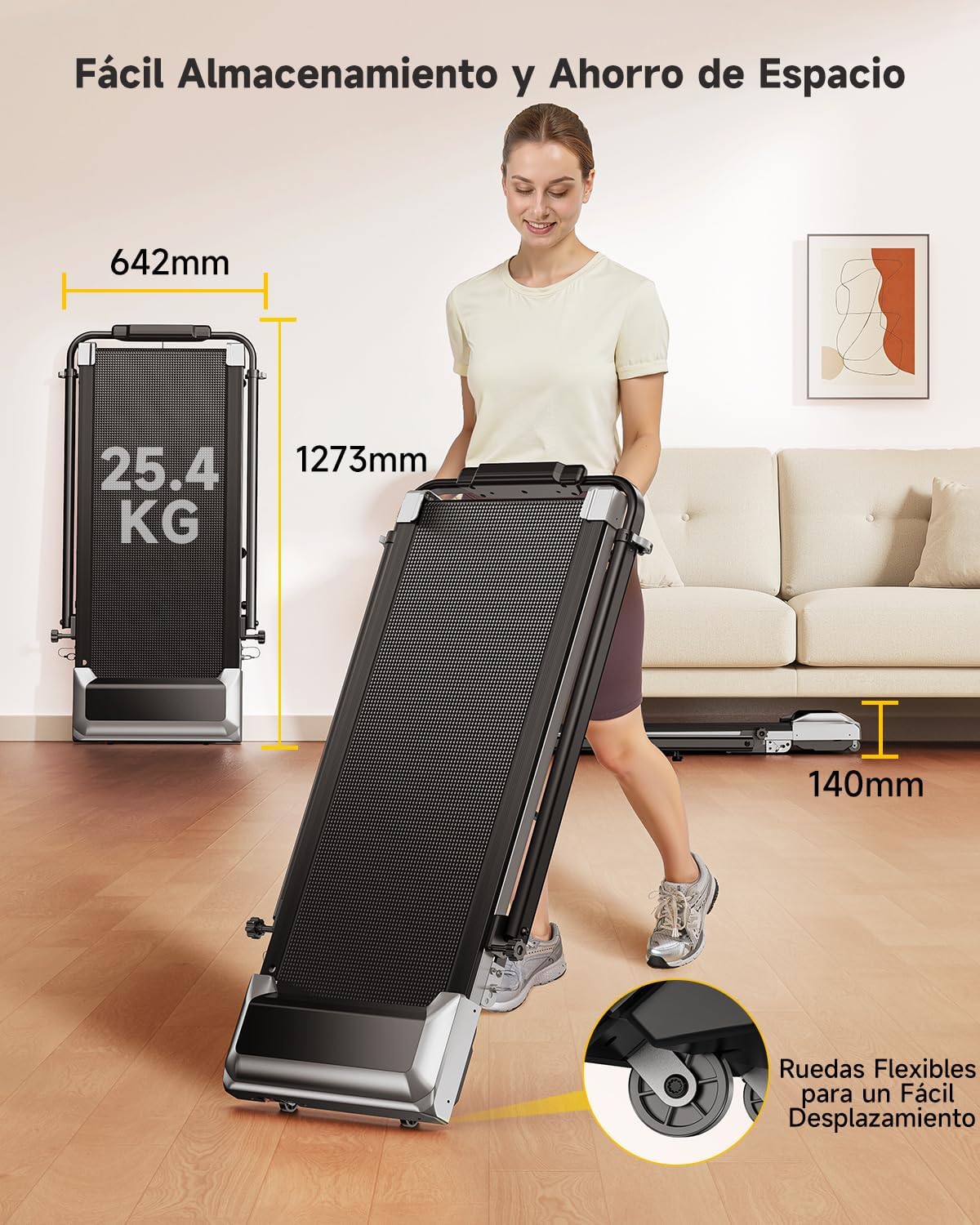
| Dimensi Produk (L x W x H) | 127.3 x 64.2 x 13 cm (dilipat) |
| Berat Produk | 25.4 kg |
| bahan | Keluli Aloi |

Rajah 7: Compact design and transport wheels for easy storage and movement.
Video Produk
Treadmill Setup and Usage
This video demonstrates the setup process and general usage of a similar treadmill model, including unfolding, securing the handrails, and starting a workout. Note: This video features the FITFIU Fitness MC-160, which shares similar operational principles with the Toputure TP6.
Treadmill Features Overview
Video ini memberikan penamatview of the features and benefits of a similar treadmill model, showcasing its compact design, ease of use, and various exercise capabilities. Note: This video features the FITFIU Fitness MC-160, which shares similar operational principles with the Toputure TP6.
Waranti dan Sokongan
For warranty information, product support, or to purchase replacement parts, please contact Toputure customer service. Keep your purchase receipt and model number (TP6) handy when contacting support.
The product includes a user manual in the box. Additional warranty information may be available upon product registration with the manufacturer.