
1. Pengenalan
Thank you for choosing the AULA F3018 Mechanical Keyboard. This keyboard is designed for high-level mechanical performance and robust construction, offering precision for gaming and comfort for typing. It features Blue switches for a tactile and audible click, an ABNT2 layout with 'Ç' for Brazilian Portuguese compatibility, and full RGB lighting with multiple customizable effects. The reinforced braided cable enhances durability and ensures a stable connection. This manual provides essential information for setup, operation, and maintenance of your keyboard.
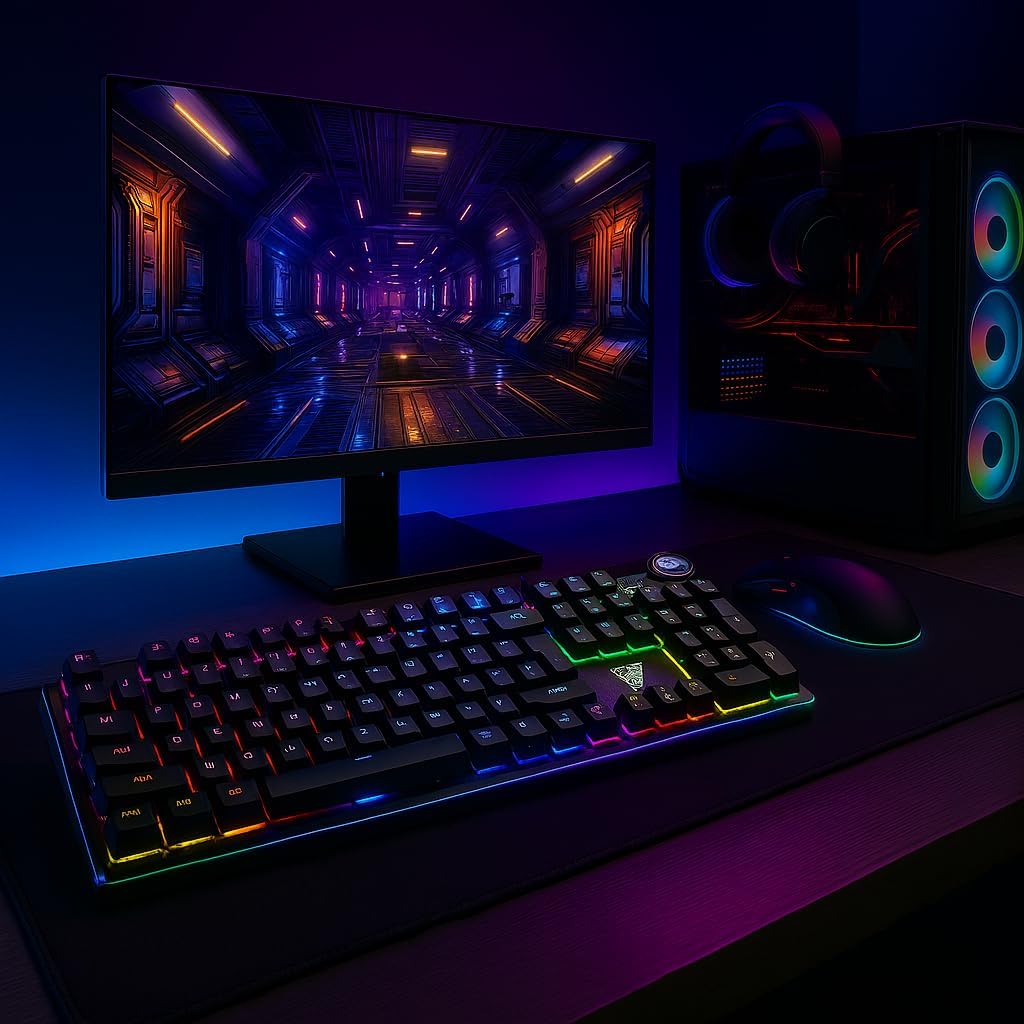
Image 1.1: AULA F3018 Mechanical Keyboard in a typical desktop setup, showcasing its RGB lighting and full-size design.
2. Kandungan Pakej
Pastikan semua item ada dalam pakej:
- Papan Kekunci Mekanikal AULA F3018
- Kabel USB (dilampirkan)
- Manual Pengguna (dokumen ini)
3. Persediaan
Follow these steps to connect your AULA F3018 Mechanical Keyboard:
- Buka pek Papan Kekunci: Tanggalkan papan kekunci dari pembungkusannya dengan berhati-hati.
- Sambung ke Komputer: Insert the USB connector of the keyboard's reinforced cable into an available USB port on your computer (PC, Notebook, or MacBook). The keyboard supports USB 2.0 and USB 3.0 ports.
- Pemasangan Pemandu: Papan kekunci ini boleh dipasang dan digunakan. Sistem pengendalian anda akan mengesan dan memasang pemacu yang diperlukan secara automatik. Tiada pemasangan perisian tambahan diperlukan untuk fungsi asas.
- Sahkan Sambungan: Once connected, the keyboard's RGB lighting should illuminate, indicating a successful connection. You can now begin using your keyboard.

Imej 3.1: Bersudut view of the AULA F3018 keyboard, highlighting the durable, reinforced USB cable for connection.
4. Arahan Operasi
4.1. Fungsi Asas
The AULA F3018 is a full-size ABNT2 layout keyboard with 108 keys, providing all standard typing and navigation functions.
4.2. Kawalan Pencahayaan RGB
The keyboard features full RGB backlighting with multiple effects. Use the following key combinations to control the lighting:
- Fn + [Key]: Specific keys may have secondary functions for lighting control. Refer to the keycaps for symbols indicating lighting adjustments.
- Mod Pencahayaan: Cycle through various lighting effects and patterns.
- Pelarasan Kecerahan: Increase or decrease the brightness of the backlighting.
- Pelarasan Kelajuan: Tukar kelajuan kesan pencahayaan dinamik.

Image 4.1: The AULA F3018 keyboard illuminated with vibrant RGB lighting, demonstrating customizable visual effects.
4.3. Kawalan Multimedia
The keyboard includes dedicated multimedia keys and a volume control knob for convenient media management:
- Tombol Kelantangan: Rotate the knob clockwise to increase volume, counter-clockwise to decrease volume. Press the knob to mute/unmute audio.
- Kekunci Multimedia Khusus: Located above the numeric keypad, these keys provide quick access to functions like Play/Pause, Stop, Previous Track, and Next Track.

Imej 4.2: Terperinci view of the volume control knob and adjacent multimedia keys on the AULA F3018 keyboard.
5. Penyelenggaraan
Penyelenggaraan yang betul memastikan ketahanan dan prestasi optimum papan kekunci anda:
- Pembersihan: Use a soft, dry cloth to wipe the surface of the keyboard. For dust and debris between keys, use compressed air. Avoid using harsh chemicals or abrasive materials.
- Pencegahan Tumpahan: While the keyboard is moisture-resistant, avoid direct liquid spills. In case of a spill, immediately disconnect the keyboard and allow it to dry completely before reconnecting.
- Penjagaan Kabel: Do not bend or twist the reinforced cable excessively. Store it neatly to prevent damage.
- Storan: Apabila tidak digunakan untuk tempoh yang lama, simpan papan kekunci di persekitaran yang bersih dan kering, jauh daripada cahaya matahari langsung dan suhu yang melampau.
6. Penyelesaian masalah
If you encounter issues with your AULA F3018 keyboard, refer to the following common problems and solutions:
- Papan Kekunci Tidak Membalas:
- Pastikan kabel USB disambungkan dengan selamat ke kedua-dua papan kekunci dan komputer.
- Cuba sambungkan papan kekunci ke port USB lain pada komputer anda.
- Mulakan semula komputer anda.
- Uji papan kekunci pada komputer lain untuk menolak isu khusus komputer.
- Pencahayaan RGB Tidak Berfungsi:
- Check if the lighting is turned off or set to minimum brightness using the keyboard's lighting control functions (e.g., Fn + [Key]).
- Pastikan papan kekunci disambungkan dengan betul dan menerima kuasa.
- Kunci Tidak Mendaftar atau Menaip Dua Kali:
- Clean the affected key(s) with compressed air to remove any debris.
- If the issue persists, it might indicate a hardware fault. Contact customer support.
- Kekunci Multimedia Tidak Berfungsi:
- Ensure your operating system's media player is active and in focus.
- Periksa sebarang perisian atau pemacu yang bercanggah.
7. Spesifikasi
| Ciri | Penerangan |
|---|---|
| Nama Model | Papan Kekunci Mekanikal AULA F3018 |
| Nombor Model | F3018 |
| Jenama | AULA (Generic) |
| Jenis Suis | Tactile Blue Switch |
| Susun atur papan kekunci | ABNT2 (Portuguese) |
| Bilangan Kunci | 108 |
| Ketersambungan | Wired (USB, USB 2.0, USB 3.0) |
| Lampu latar | Full RGB, Adjustable |
| Peranti Serasi | MacBook, Notebook, PC |
| bahan | Akrilonitril Butadiena Stirena (ABS) |
| warna | Hitam |
| Dimensi (L x W x H) | 44 cm x 14 cm x 3 cm |
| Tahap Ketahanan Air | Tahan Lembapan |
| Penggunaan yang Disyorkan | Gaming, Personal, Programming |
| Komponen yang Disertakan | Kabel USB |
| Negara Asal | China |

Image 7.1: Dimensions of the AULA F3018 Mechanical Keyboard, showing its length, width, and height.

Image 7.2: Key features of the AULA F3018 keyboard, including switch type, layout, and connectivity.
8. Waranti dan Sokongan
The AULA F3018 Mechanical Keyboard comes with a 30-day seller warranty dari tarikh pembelian. Waranti ini meliputi kecacatan pembuatan di bawah penggunaan biasa.
For technical support, warranty claims, or any questions regarding your product, please contact your retailer or the seller directly. Please retain your proof of purchase for warranty validation.