
1. Pengenalan
Thank you for choosing the Nillkin Pocket Foldable Wireless Keyboard. This manual provides essential information for setting up, operating, and maintaining your new keyboard. Please read it thoroughly before use to ensure proper functionality and to maximize your user experience.
2. Kandungan Pakej
Sahkan bahawa semua item terdapat dalam pakej anda:
- Nillkin Pocket Foldable Wireless Keyboard
- Kabel Pengecas USB-C
- Manual Pengguna (dokumen ini)
- Membawa Beg
3. Produk Lebihview
The Nillkin Pocket Foldable Wireless Keyboard is designed for portability and versatility, featuring a full-size (small) layout, integrated touchpad, and numerical pad. It connects wirelessly via Bluetooth to multiple devices.

Image: The Nillkin Pocket Foldable Wireless Keyboard in its fully unfolded state, displaying the complete QWERTY layout alongside the integrated numerical pad and touchpad.
The keyboard features a durable organic silicone cover and magnetic folding mechanism, making it compact for travel. Its design includes dedicated function keys for media control and shortcuts, enhancing productivity across various operating systems.

Image: The keyboard in its compact, folded state, demonstrating its portability as it is easily stored in a bag.
4. Persediaan
4.1 Mengecas Papan Kekunci
Before first use, fully charge the keyboard using the provided USB-C cable. Connect the cable to the keyboard's USB-C port and a compatible power source (e.g., computer USB port, USB wall adapter). The charging indicator light will show charging status (refer to Section 5.5 for details).
4.2 Berpasangan Bluetooth
The keyboard supports connection to up to three devices simultaneously.
- Pastikan Bluetooth peranti anda dihidupkan.
- Pada papan kekunci, tekan Fn + Q (untuk BT1), Fn + W (untuk BT2), atau Fn + E (for BT3) to select a Bluetooth channel.
- Tekan Fn + C to enter pairing mode. The Bluetooth indicator light will flash.
- On your device, search for "Cube Pocket Keyboard" in the Bluetooth settings and select it to connect.
- Once connected, the Bluetooth indicator light will turn off.
- To connect additional devices, repeat steps 2-5 for BT2 and BT3.
Video: A tutorial demonstrating Bluetooth connection and switching between multiple devices on the Nillkin Pocket Foldable Wireless Keyboard.
5. Arahan Operasi
5.1 Bertukar Antara Peranti Bersambung
After pairing with multiple devices, you can switch between them by pressing Fn + Q (untuk Peranti 1), Fn + W (untuk Peranti 2), atau Fn + E (for Device 3).

Image: Visual guide on seamlessly switching between up to three paired devices using the designated function key combinations.
5.2 Touchpad and Numerical Pad Functionality
The numerical pad area also functions as a touchpad. To switch between touchpad mode and numerical keypad mode, press Fn + Command.
- In numerical keypad mode, press a multi-function key alone to input numbers.
- Tekan Shift + multi-function key for punctuation.
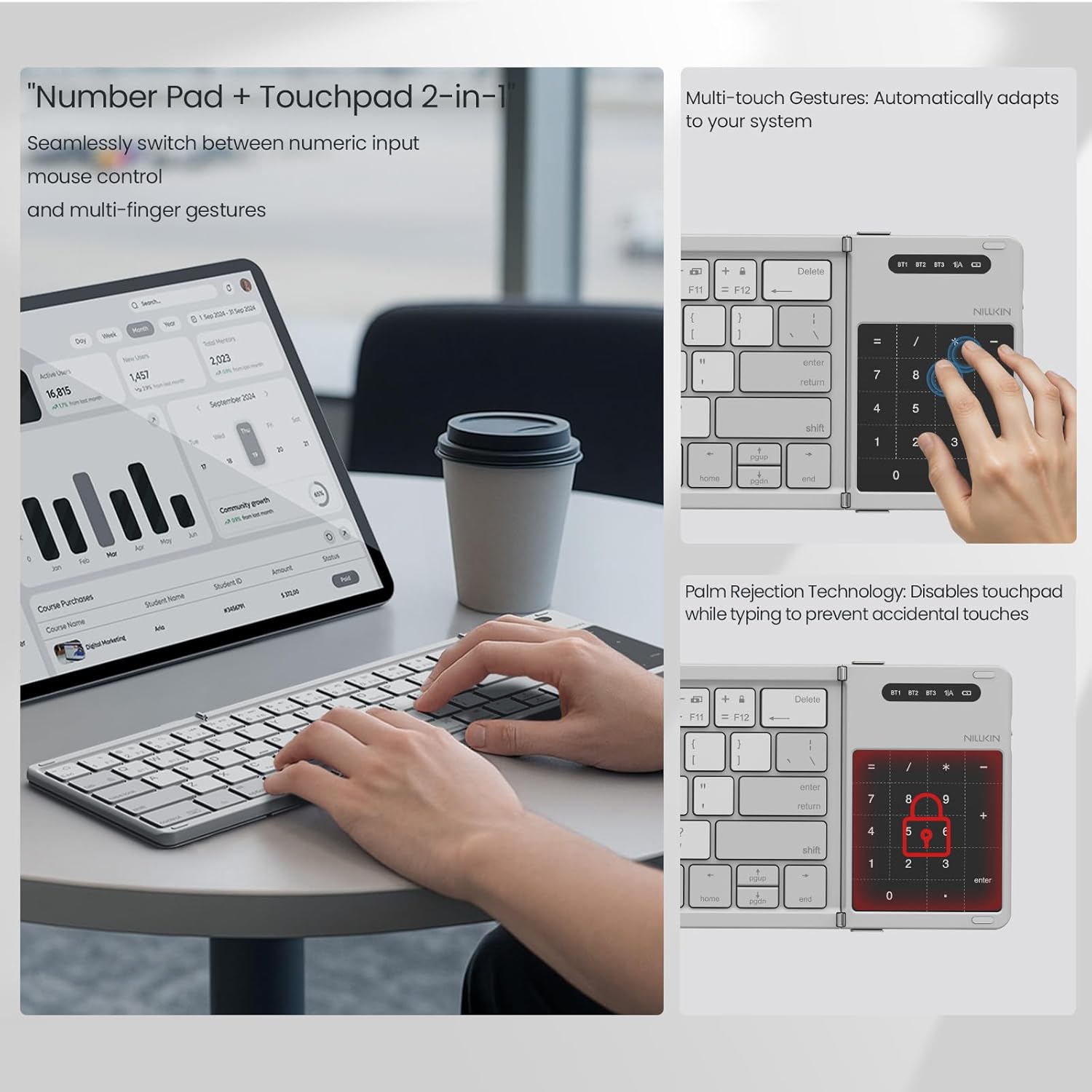
Image: The numerical pad area, highlighting its dual functionality as a touchpad with support for multi-touch gestures.

Image: A visual representation of how the touchpad and numerical keypad functions are combined into one area.
5.3 Fn Keyboard Shortcuts (Multimedia and F-keys)
The keyboard's function keys have dual purposes:
- Tekan pertama Fn + Tab: Keys output multimedia controls (e.g., volume, play/pause).
- Akhbar kedua Fn + Tab: Keys output standard ESC/F1-F12 functions.
- Akhbar ketiga Fn + Tab: Keys return to number mode.
5.4 Pertukaran Bahasa
To switch input languages:
- For iOS/Mac devices: Press Ctrl + Ruang.
- Untuk peranti Android: Tekan Ctrl + Ruang or Shift + Space.
- Untuk peranti Windows: Tekan Alt + Shift.
5.5 Menyemak Tahap Bateri
To check the current battery level, press Fn + Command. The indicator light will flash:
- Green light flashes 3 times: 70-100% battery.
- Blue light flashes 3 times: 30-70% battery.
- Red light flashes 3 times: 0-30% battery.
During charging, the red light stays on. When fully charged, the light turns off.
6. Penyelenggaraan
To ensure the longevity of your Nillkin keyboard:
- Pembersihan: Gunakan kain lembut dan kering untuk mengelap permukaan papan kekunci. Untuk kotoran degil, sedikit dampen kain dengan air atau larutan pembersih lembut. Elakkan kelembapan berlebihan.
- Storan: When not in use, fold the keyboard and store it in the provided carrying bag to protect it from dust and scratches.
- Elakkan Ekstrem: Jangan dedahkan papan kekunci kepada suhu yang melampau, cahaya matahari langsung atau kelembapan yang tinggi.
- Tumpahan cecair: The keyboard is made from organic silicone that resists spills, but it is not waterproof. In case of a spill, immediately power off the keyboard and allow it to dry completely before reuse.
7. Penyelesaian masalah
| Masalah | Kemungkinan Punca | Penyelesaian |
|---|---|---|
| Papan kekunci tidak dihidupkan. | Bateri lemah. | Charge the keyboard using the USB-C cable. |
| Tidak dapat berpasangan melalui Bluetooth. | Bluetooth not enabled on device; keyboard not in pairing mode; device too far. | Ensure device Bluetooth is on. Press Fn + C to enter pairing mode. Move keyboard closer to the device. |
| Kekunci tidak bertindak balas atau menaip dengan salah. | Incorrect operating system mode; low battery; connection issue. | Ensure the correct operating system mode is selected (if applicable). Recharge the keyboard. Re-pair the keyboard. |
| Touchpad/Numerical pad not working as expected. | Mod salah dipilih. | Tekan Fn + Command to toggle between touchpad and numerical pad modes. |
8. Spesifikasi
- Jenama: Nillkin
- model: Pocket Foldable Wireless Keyboard
- Teknologi Ketersambungan: Wayarles (Bluetooth)
- Peranti Serasi: iPad, most tablets (e.g., Samsung, Pixel), Laptops, PCs, Fold Mobile Phones
- Penerangan Papan Kekunci: Multi-functional, Foldable, Portable, Numeric Keypad, Trackpad, Hotkeys and Media Keys, Lightweight, Rechargeable, Silent and Quiet
- Bahan: PC Basic + Organic Silicone Cover + Magnets
- Saiz Lipatan: Kira-kira 18 x 10.8 x 1.6 cm (7.09 x 4.25 x 0.63 inci)
- Saiz Lanjutan: Kira-kira 34 x 10.8 x 0.95 cm (13.39 x 4.25 x 0.37 inci)
- Berat Barang: Kira-kira 0.52 paun (0.24 kg)
- Bateri: 1 Bateri Bukan Standard (termasuk)

Image: Detailed dimensions of the keyboard in both folded and unfolded states, presented with other devices for size comparison.
9. Waranti dan Sokongan
Nillkin products are manufactured to high-quality standards. For warranty information, technical support, or service inquiries, please refer to the warranty card included in your package or visit the official Nillkin webtapak. Simpan resit pembelian anda sebagai bukti pembelian.