
AOPUTTRIVER AP-9000F
AOPUTTRIVER AP-9000F Hot Wire Anemometer User Manual
Model: AP-9000F
1. Pengenalan dan Lebihview
The AOPUTTRIVER AP-9000F is a professional handheld hot wire anemometer designed for precise measurement of air velocity, airflow volume (CFM/CMM), and air temperature. This device is equipped with a retractable sensor probe, making it suitable for various applications, including HVAC system diagnostics, environmental monitoring, and industrial air flow analysis. This manual provides essential information for the safe and effective operation of your AP-9000F anemometer.
2. Apa yang ada di dalam Kotak
Selepas membongkar, sila sahkan bahawa semua item yang disenaraikan di bawah ada dan dalam keadaan baik:
- AP-9000F Hot Wire Anemometer Unit
- Manual Pengguna
- Kabel Data Jenis-C

3. Ciri-ciri Produk
The AP-9000F anemometer offers a range of features designed for precision and convenience:
- Pengukuran 3-dalam-1: Accurately measures wind speed (m/s, km/h, ft/min, knots, mph), airflow (CFM/CMM), and wind temperature (°C/°F).
- Retractable Sensor Probe: Features a flexible, extendable probe tip for convenient measurements in confined or hard-to-reach spaces, such as air conditioning vents. Probe dimensions: 298.5 × 40.84 × 23.7 mm.
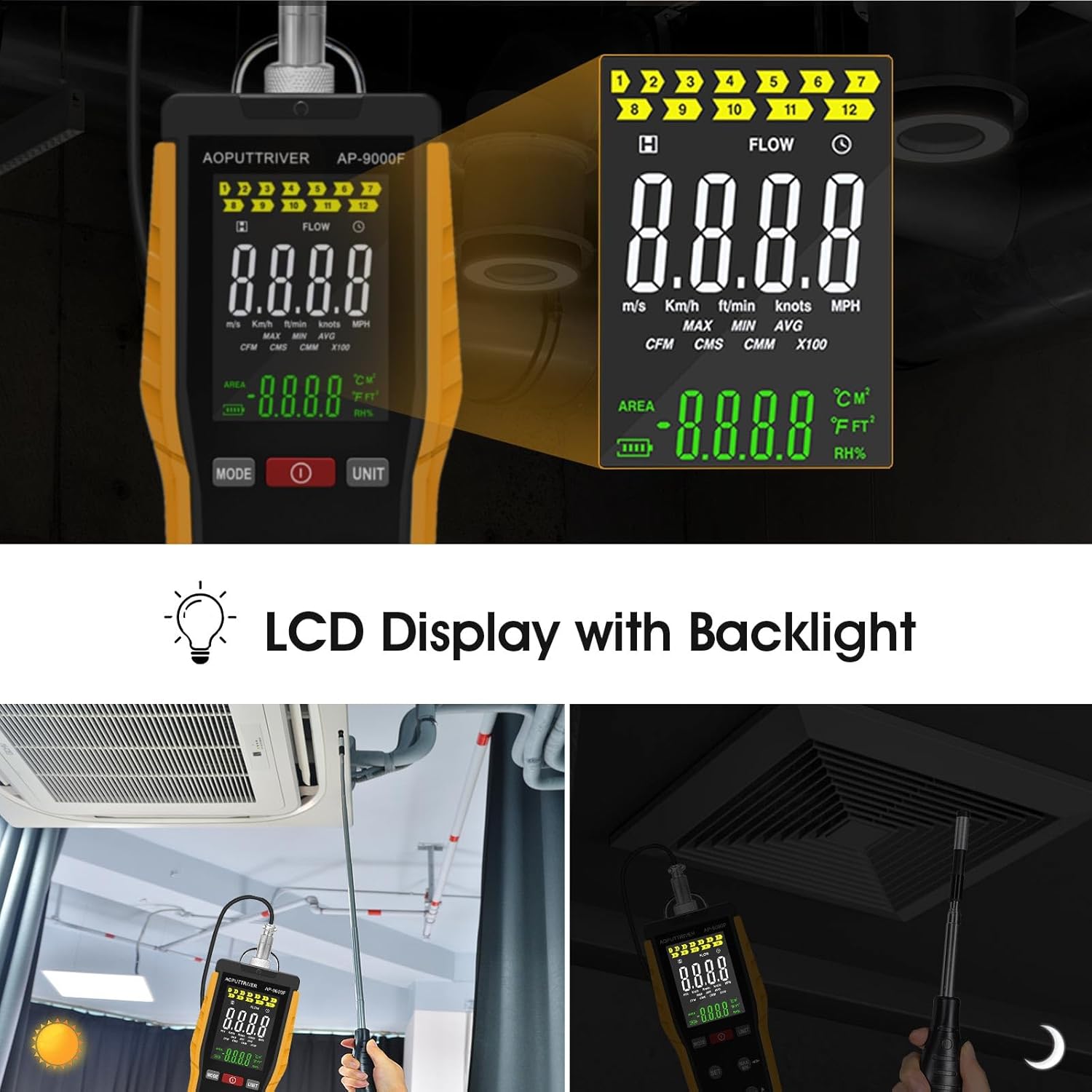
- Paparan LCD: A clear, backlit LCD presents wind speed (Max, Min, Real-time), airflow, temperature, and humidity data. Includes anti-interference buttons and a low battery indicator.
- Antaramuka Jenis-C: Equipped with a Type-C charging port and powered by a 1000mAh lithium-ion battery. Supports an optional auto-shutdown function.
- Aplikasi luas: Suitable for environmental measurements, air transportation, and air conditioning monitoring systems.


4. Persediaan
4.1 Mengecas Bateri
The AP-9000F is powered by a built-in 1000mAh lithium-ion battery. Before first use, or when the low battery indicator appears on the LCD, charge the device using the provided Type-C data cable.
- Connect the Type-C cable to the charging port on the anemometer and the other end to a standard USB power adapter (not included).
- Cas penuh biasanya mengambil masa 2 hingga 3 jam.
- Nota: The device cannot be turned on or operated while it is charging.
4.2 Extending the Sensor Probe
The hot wire sensor is located at the tip of the retractable probe. Carefully extend the probe to the desired length for measurement. The probe can be rotated 360 degrees for optimal positioning.
- Gently pull the probe from the main unit to extend it.
- Adjust the angle of the probe tip as needed.
- After use, retract the probe back into the unit for protection.
5. Arahan Operasi
5.1 Device Layout and Buttons

- Power Button (Red Circle): Tekan untuk menghidupkan atau MATI peranti.
- Butang MOD: Switches between different measurement modes (e.g., wind speed, airflow).
- Butang UNIT: Changes the unit of measurement for wind speed (m/s, km/h, ft/min, knots, mph) or airflow (CFM, CMM).
- Butang SET: Used to set the air volume area for accurate CFM/CMM calculations.
- Butang MAX/MIN: Toggles between maximum, minimum, and real-time values on the display.
- Butang TAHAN: Membekukan bacaan semasa pada paparan. Tekan sekali lagi untuk melepaskan.
- Butang °C/°F: Switches the temperature unit between Celsius and Fahrenheit.
5.2 Basic Measurement Procedure
- Hidupkan kuasa: Tekan ke Butang Kuasa to turn on the anemometer. The LCD will illuminate.
- Extend Probe: Carefully extend the sensor probe and position it in the airflow you wish to measure. Ensure the sensor tip is fully exposed to the air stream.
- Pilih Mod: Tekan ke Butang MOD to select between wind speed, airflow, or temperature measurement.
- Pilih Unit: Tekan ke Butang UNIT to choose your preferred unit (e.g., m/s, CFM, °C).
- Set Area (for Airflow): If measuring airflow (CFM/CMM), press the Butang SET to input the cross-sectional area of the duct or vent. Refer to the specifications for area input range.
- Baca Pengukuran: The current readings will be displayed on the LCD.
- Pegangan Data: Tekan ke Butang HOLD to freeze the current reading. Press again to resume live measurement.
- Max/Min/Avg: Gunakan Butang MAX/MIN kepada view the maximum, minimum, or average readings recorded during the measurement session.


6. Penyelenggaraan
6.1 Membersihkan Peranti
- Lap unit utama dengan kain lembut dan kering. Jangan gunakan pembersih atau pelarut yang kasar.
- For the sensor probe, gently clean any dust or debris. Avoid touching the delicate hot wire sensor directly.
6.2 Penjagaan dan Penyimpanan Bateri
- Cas bateri dengan kerap, walaupun peranti tidak kerap digunakan, untuk mengekalkan kesihatan bateri.
- Store the anemometer in a cool, dry place, away from direct sunlight and extreme temperatures.
- Ensure the sensor probe is fully retracted and protected during storage.
7. Penyelesaian masalah
If you encounter issues with your AP-9000F, please refer to the following common problems and solutions:
| Masalah | Kemungkinan Punca | Penyelesaian |
|---|---|---|
| Peranti tidak dihidupkan | Low battery; Device is charging | Charge the battery fully; Disconnect from charger before powering on. |
| Bacaan tidak tepat | Sensor obstructed or dirty; Incorrect unit/mode selected; Probe not properly positioned | Clean the sensor gently; Verify selected mode and unit; Ensure sensor is fully in the airflow. |
| Paparan kosong atau beku | Battery low; HOLD function active; Device malfunction | Recharge battery; Press HOLD button to release; If problem persists, contact support. |
| Cannot change units/modes | Buttons unresponsive; Device in a locked state | Ensure buttons are pressed firmly; Power cycle the device (turn off and on). |
8. Spesifikasi
Detailed technical specifications for the AOPUTTRIVER AP-9000F Hot Wire Anemometer:
| Parameter | Nilai |
|---|---|
| Julat Pengukuran Kelajuan Angin | 0.1 – 30 m/s |
| Air Temperature Measurement Range | 0 - 45 ° C (32 - 113 ° F) |
| Airflow Measurement Range (CFM) | 0 – 999,900 ft³/min |
| Airflow Measurement Range (CMM) | 0 – 999,900 m³/min |
| Dimensi Probe | 298.5 × 40.84 × 23.7 mm |
| Jenis Bateri | 1000mAh Litium-ion |
| Port Pengecasan | Jenis-C |
| Paparan | LCD dengan Lampu Latar |
| Berat badan | 0.12 Paun (lebih kurang 54g) |

9. Waranti dan Sokongan
9.1 Maklumat Waranti
AOPUTTRIVER products are manufactured to high-quality standards. This product is covered by a limited warranty against defects in materials and workmanship. Please refer to the warranty card included with your product for specific terms and conditions, or visit the official AOPUTTRIVER webtapak untuk maklumat lanjut.
9.2 Sokongan Pelanggan
For technical assistance, troubleshooting, or inquiries regarding your AP-9000F Hot Wire Anemometer, please contact AOPUTTRIVER customer support. Contact information can typically be found on the product packaging, the official AOPUTTRIVER webtapak, atau melalui platform pembelian anda.
When contacting support, please have your product model (AP-9000F) and a detailed description of the issue ready.
Ask a question about this manual
Ask about setup, troubleshooting, compatibility, parts, safety, or missing instructions. Manuals+ will review the question and use this page’s manual context to help answer it.