
1. Pengenalan
The GMKtec M7 Ultra Mini PC is a versatile and compact computing device designed for high performance in a small form factor. Equipped with an AMD Ryzen 7 PRO 6850U processor, ample DDR5 RAM, and fast PCIe SSD storage, it is capable of handling demanding tasks such as photo/video editing, gaming, and streaming. Its sleek design allows it to integrate seamlessly into various environments, from home offices to entertainment setups. This manual provides essential information for setting up, operating, and maintaining your M7 Ultra Mini PC.
2. Apa yang ada di dalam Kotak
Upon unboxing your GMKtec M7 Ultra Mini PC, please ensure all the following items are present:
- GMKtec Nucbox M7 Ultra AMD Ryzen 7 PRO 6850U Mini PC Computer
- Bekalan Kuasa & Kabel
- Kabel HDMI
- Pemasangan dan Skru VESA
- Manual Pengguna

3. Produk Lebihview
The GMKtec M7 Ultra Mini PC is engineered for high performance in a compact design. It features an AMD Ryzen 7 PRO 6850U processor with 8 cores and 16 threads, capable of boosting up to 4.7 GHz. Integrated AMD Radeon 680M graphics provide robust visual performance, suitable for demanding applications and gaming with FSR 3.0+ technology support.


4. Pelabuhan dan Ketersambungan
The M7 Ultra offers extensive connectivity options for various peripherals and displays.
4.1 Front Ports
- Pelabuhan Oculink: For high-bandwidth external GPU connections (PCIe 4.0 x4).
- Port USB4: Supports USB-C video output, power delivery, and data transfer.
- USB 3.2 (Gen2) Ports (x2): For high-speed peripheral connections.
- 3.5mm Audio Jack (CTIA): Untuk fon kepala atau mikrofon.
- Butang Kuasa: Untuk menghidupkan/mematikan peranti.
4.2 Port Belakang
- Port USB2.0 (x2): Untuk menyambungkan peranti USB standard.
- Port HDMI 2.1: Menyokong output paparan sehingga 8K@60Hz.
- DisplayPort 2.0: Menyokong output paparan sehingga 8K@60Hz.
- Port LAN 2.5G (x2): Dual Intel i226V 2.5Gbps Ethernet for high-speed wired network connections.
- Port USB4: Supports USB-C video output, power delivery, and data transfer.
- Slot Kunci Kensington: Untuk keselamatan fizikal.
- DC IN (19V 6.32A): Input kuasa.

4.3 Kesambungan Wayarles
- WiFi 6: Untuk akses internet tanpa wayar yang pantas dan boleh dipercayai.
- Bluetooth 5.2: For connecting wireless peripherals like keyboards, mice, and audio devices.
5. Display Capabilities
The M7 Ultra supports simultaneous quad-screen display, offering extensive options for multitasking and immersive experiences.
- Dual USB4 USB-C Video output (supports 4K@144Hz).
- HDMI 2.1 port (supports up to 8K@60Hz).
- DisplayPort 2.0 (supports up to 8K@60Hz).

6. Storage and RAM Expansion
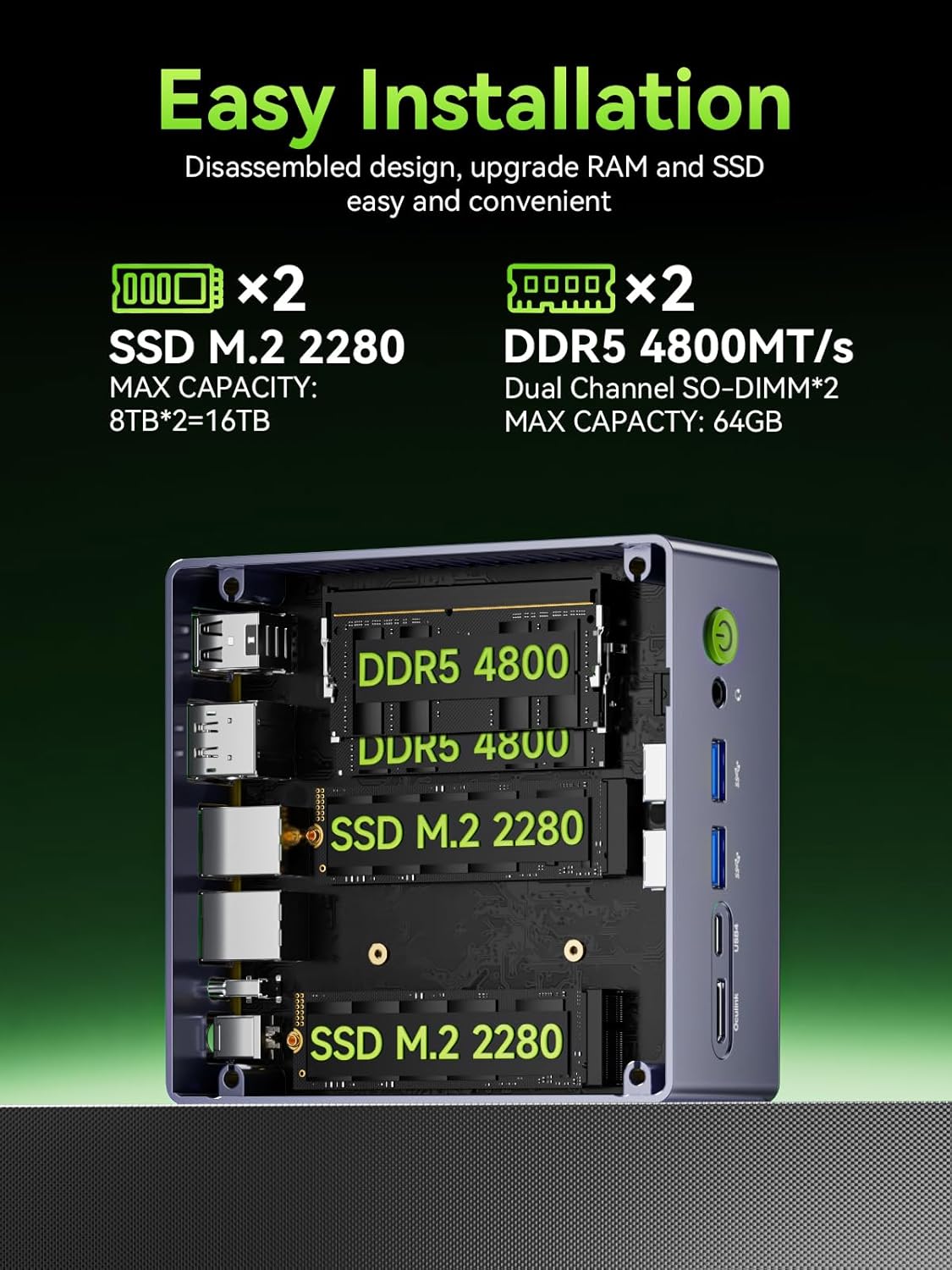
The M7 Ultra is designed for easy upgrades to meet your evolving needs.
- RAM: Comes with 16GB DDR5 4800MHz (Dual Channel 2x8GB) and supports expansion up to 96GB RAM.
- SSD: Features a 1TB M.2 2280 PCIe 3.0 SSD and supports dual slot expansion to 2*PCIe 4.0 2TB SSD, totaling up to 4TB.
7. Oculink Port Usage
The M7 Ultra features an Oculink port, which provides a direct PCIe x4 connection for external GPUs, offering higher bandwidth and lower latency compared to Thunderbolt connections.
- Faedah: Enables higher bandwidth capabilities, better frame rates, and lower lag for eGPU setups, beneficial for gamers and content creators.
- Nota: Oculink does NOT support hot-plugging. Always power off the PC before connecting/disconnecting devices.

8. Sistem Penyejukan
The M7 Ultra incorporates an upgraded dual cooling fan system, the Hyper Ice Chamber 2.0, designed for efficient heat dissipation and quiet operation.
- Features larger top and bottom cooling fans with 360-degree airflow.
- Copper base helps maintain optimal temperatures.
- Fan noise is reduced to 35dB in Quiet mode.

9. Arahan Operasi
9.1 Mod Prestasi
The M7 Ultra offers three distinct performance modes, configurable via the updated BIOS, to suit different usage scenarios:
- Mod Senyap: 35W TDP, optimized for silent operation.
- Mod Baki: 50W TDP, offering a balance between performance and noise.
- Mod Prestasi: 65W-70W TDP, for maximum computing power.
9.2 Tetapan BIOS
The updated BIOS allows for advanced configurations, including VRAM allocation, Auto Power On, and Wake-on-LAN options.
10. Spesifikasi
| Ciri | Perincian |
|---|---|
| Jenama | GMKtec |
| Siri | M7 Ultra |
| Nombor model item | M7 Ultra |
| Sistem Operasi | 11 Pro |
| Model CPU | AMD Ryzen 7 |
| Pemproses | 4.7 GHz amd_ryzen_7 |
| Bilangan Pemproses | 8 |
| RAM | DDR5 |
| Kelajuan Memori | 4800 MHz |
| Kapasiti Penyimpanan Memori | 16 GB |
| Pemacu Keras | 2 TB M.2 2280 PCIE 4.0 NVME SSD DUAL SLOTS |
| Antara Muka Pemacu Keras | PCIE x 16 |
| Kelajuan Putaran Cakera Keras | 7200 RPM |
| Pemproses bersama Grafik | AMD Radeon 680M |
| Penerangan Kad Grafik | Bersepadu |
| Saiz Ram Kad Grafik | 16 GB |
| Resolusi Skrin Maks | 4096x2160 Piksel |
| Jenis Wayarles | 2.4 GHz Radio Frequency, 5 GHz Radio Frequency, 802.11ax, Bluetooth |
| Bilangan USB 2.0 Port | 2 |
| Bilangan USB 3.0 Port | 2 |
| Berat Barang | 1.39 paun |
| Dimensi Pakej | 5.19 x 4.9 x 2.28 inci |
| warna | Black Metallic |
11. Waranti dan Sokongan
GMKtec is committed to providing reliable products and customer satisfaction.
- Waranti: GMKtec offers a 1-year limited warranty for each mini PC, starting from the date of purchase. This covers all defects due to design and workmanship.
- Sokongan: A professional after-sales team is available to assist with any needs or issues you may encounter with your mini PC.