
1. Produk Lebihview
The Secretlab Magnus Evo XL Electric Standing Desk is designed for ergonomic comfort and efficient workspace management. It features an integrated power supply column, magnetic cable management, and precise electric height adjustment for seamless transitions between sitting and standing positions.
This extra-large model provides ample space for your gaming or work setup, ensuring a clutter-free and organized environment.

Figure 1: Secretlab Magnus Evo XL Electric Standing Desk with monitor, keyboard, mouse, and cable management accessories.
2. Maklumat Keselamatan Penting
AMARAN:
- Always assemble this product with two people to avoid injury.
- Do not place objects on the desk that exceed 265 pounds to prevent stability issues and potential injuries.
- Ensure all cables are properly managed and secured to prevent pinching or damage during height adjustments.
- Jauhkan kanak-kanak dan haiwan peliharaan daripada meja semasa operasi untuk mengelakkan kemalangan.
3. Persediaan dan Pemasangan
Assembly of the Secretlab Magnus Evo XL desk requires two people. Follow the detailed steps below and refer to the assembly video for visual guidance.
3.1 Membongkar dan Semakan Komponen
Carefully unpack all components and verify against the parts list in your physical manual. Ensure all parts are present and undamaged before proceeding.
3.2 Desk Frame Assembly
Assemble the desk frame according to the instructions provided. Ensure all screws are tightened securely once the frame is fully assembled.
Video 1: Secretlab MAGNUS Evo: Complete Assembly Video. This video provides a step-by-step guide for assembling your Secretlab Magnus Evo desk.
3.3 Integrated Power Supply Column
The desk features a patent-pending integrated power supply column. This design uses a single concealed cable within your desk leg and a built-in electrical socket to power your desk and devices with just one cable.

Figure 2: The integrated power supply column, designed for a single, concealed power cable.
4. Arahan Operasi
The Secretlab Magnus Evo XL desk offers precise electric height adjustment and an intuitive control panel.
4.1 Pelarasan Ketinggian Elektrik
Fine-tune the height of your desk down to the millimeter, from 28.3" to 46.1". Use the integrated backlit control panel for effortless adjustments.

Figure 3: The desk adjusting to different heights, controlled by the integrated panel.
4.2 Integrated Backlit Control Panel
The seamless built-in control panel never gets in the way of your chair's armrests. It features three custom height presets for quick and effortless transitions between your preferred sitting and standing heights.

Figure 4: Close-up of the integrated backlit control panel with height presets.
Video 2: How to Use the Secretlab MAGNUS Evo. This video demonstrates the operation of the desk's height adjustment and control panel features.
5. Pengurusan Kabel
The Secretlab Magnus Evo XL desk is designed with advanced cable management features to keep your workspace tidy.
5.1 Magnetic Drop-Down Cable Management Tray
Keep your cords tucked away in the spacious magnetic drop-down cable management tray, accessible via an extra-wide 30° drop-down opening. This helps to hide power strips and chargers, reducing clutter.
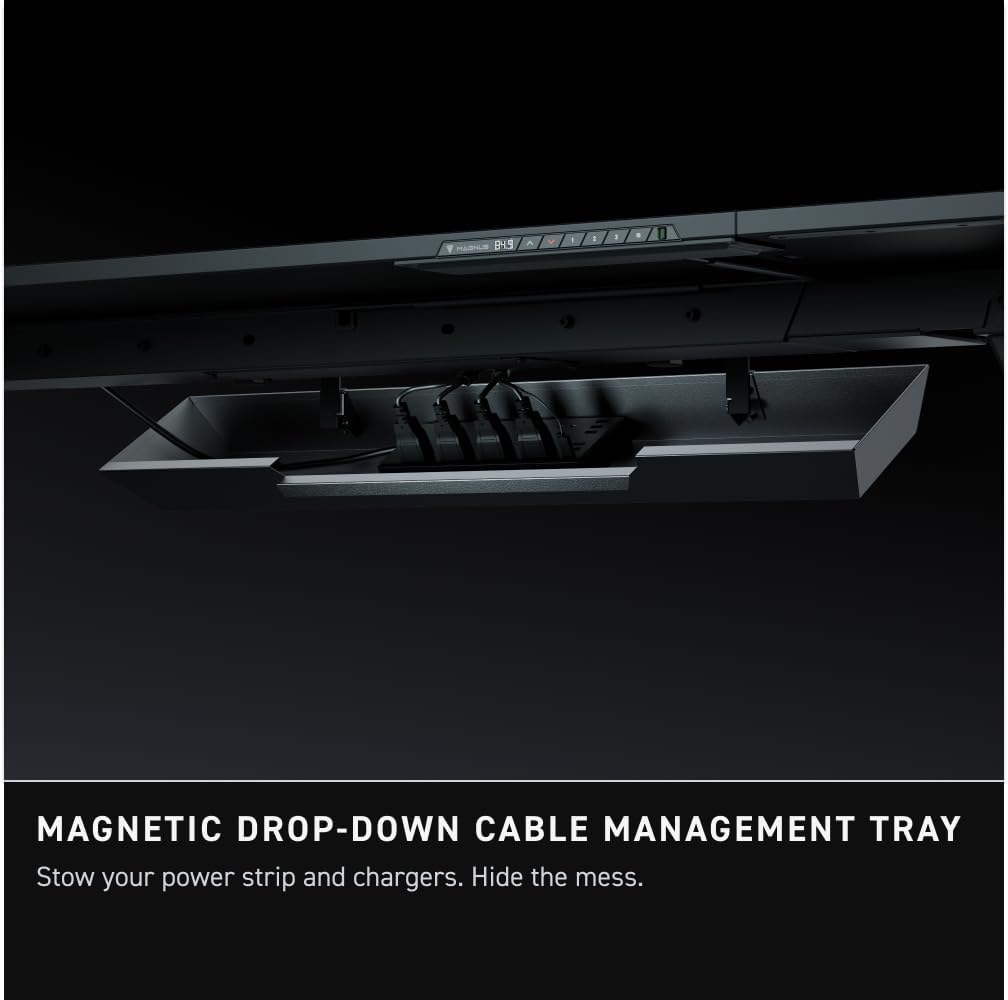
Figure 5: The magnetic drop-down cable management tray, shown with cables neatly stored.
5.2 Dedicated Magnetic Zones and Accessories
Dedicated magnetic zones along the entire rear edge of the desk and on either side allow you to keep your cables and accessories exactly where you need them. A dedicated suite of modular, magnetic desk accessories (sold separately) is available to further organize your space with monitor arms, cable anchors, and more.

Rajah 6: Atas-bawah view illustrating the dedicated magnetic zones on the desk surface.

Figure 7: Magnetic cable anchors, part of the modular accessory suite, for streamlined cable management.
6. Spesifikasi
| Ciri | Perincian |
|---|---|
| Jenama | Secretlab |
| Nama Model | MAGNUS Evo XL |
| Nombor Model | 3MAGE-B17B |
| Dimensi Produk | 25.2"D x 70"W x 28.3"H |
| Berat Barang | 117.9 paun |
| Jenis Bahan Atas | MDF with Steel |
| Bahan Asas | Keluli Aloi |
| Mekanisme Mengangkat | Elektrik |
| Julat Ketinggian Boleh Laras | 28.3" hingga 46.1" |
| Cadangan Berat Maksimum | 265 paun |
| Perhimpunan yang Diperlukan | Ya (2 orang disyorkan) |
7. Penyelenggaraan
To ensure the longevity and optimal performance of your Secretlab Magnus Evo XL desk, follow these maintenance guidelines:
- Pembersihan: Lap permukaan desktop dengan kain lembut,amp cloth. Avoid abrasive cleaners or harsh chemicals that may damage the laminate finish.
- Pengurusan Kabel: Periodically check the cable management tray and magnetic zones to ensure cables are neatly organized and not interfering with desk movement.
- Penjagaan Motor: Avoid overloading the desk beyond its maximum weight capacity (265 pounds) to prevent strain on the electric lifting mechanism.
- ScrewFit Mechanism: The patent-pending ScrewFit mechanism ensures precise alignment. Avoid excessive force when assembling or disassembling desktop panels.
8. Penyelesaian masalah
If you encounter any issues with your Secretlab Magnus Evo XL desk, refer to the following common troubleshooting tips:
- Meja Tidak Melaraskan Ketinggian:
- Check if the power cable is securely connected to both the desk and the wall outlet.
- Pastikan tiada halangan yang menghalang meja daripada bergerak ke atas atau ke bawah.
- Reset the control panel by unplugging the desk for 30 seconds and then plugging it back in.
- Uneven Desk Surface:
- Verify that the floor surface is level.
- Adjust the adjustable feet at the bottom of the desk legs to stabilize the desk.
- Noise During Adjustment:
- A slight hum is normal during operation. If the noise is excessive or unusual, ensure all screws are properly tightened.
- Periksa sebarang komponen atau halangan yang longgar.
For further assistance, please contact Secretlab customer support.
9. Waranti dan Sokongan
Secretlab products come with a limited warranty. Please refer to the official Secretlab webtapak atau dokumentasi pembelian anda untuk terma dan syarat waranti tertentu.
For customer support, technical assistance, or warranty claims, please visit the Secretlab Store on Amazon or the official Secretlab webtapak.