
pengenalan
This manual provides detailed instructions for setting up, operating, maintaining, and troubleshooting your GMKtec M5 Ultra Mini PC. Please read this manual thoroughly before using the device to ensure optimal performance and longevity.
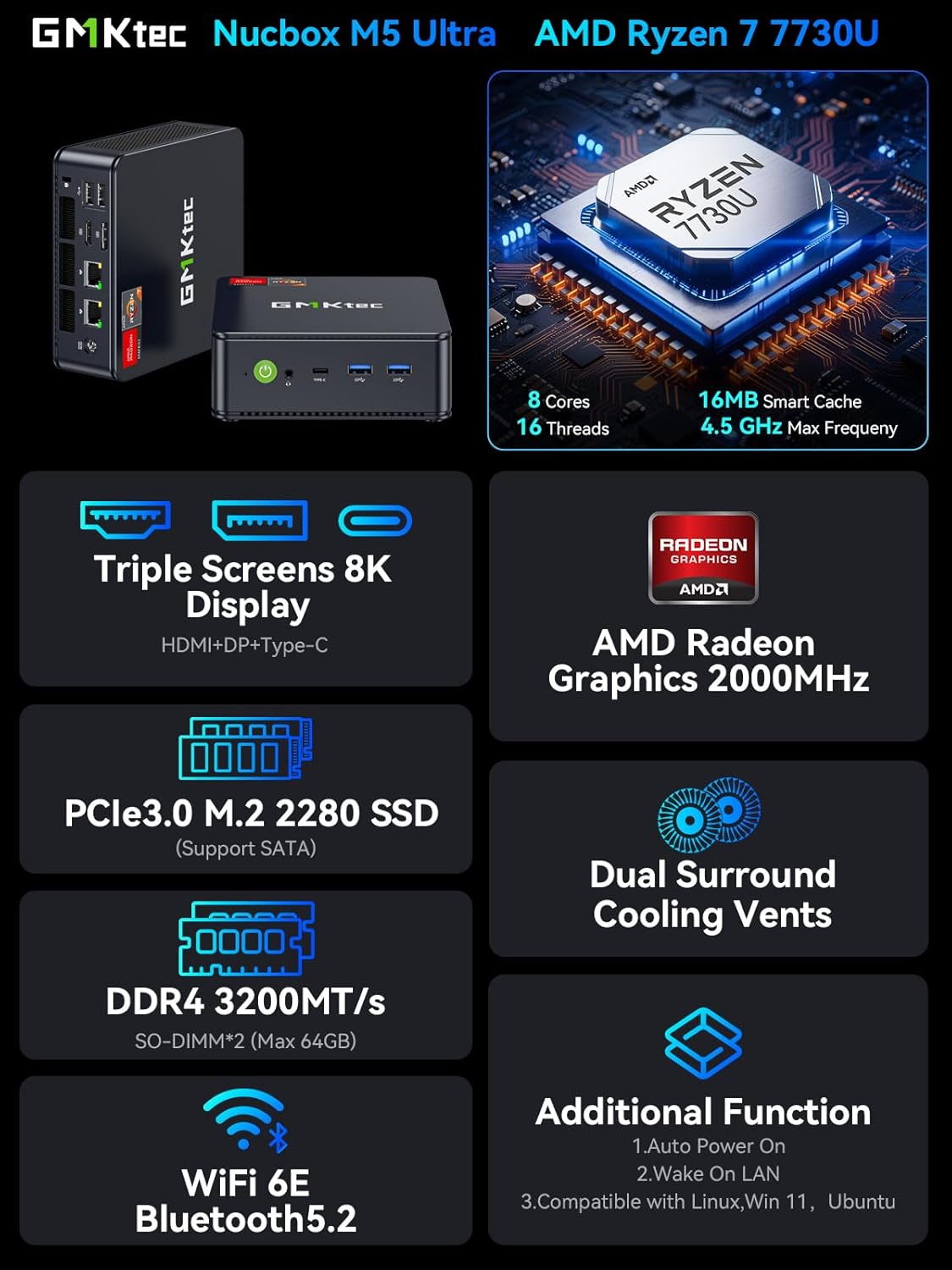
Image: The GMKtec M5 Ultra Mini PC, showcasing its compact design and key features like the AMD Ryzen 7 7730U processor, PCIe 3.0 M.2 2280 SSD, DDR4 RAM, Dual Surround Cooling Vents, WiFi 6E, Bluetooth 5.2, and triple 8K display support.
Apa yang ada dalam Kotak
Sahkan bahawa semua item ada di dalam pembungkusan sebelum meneruskan persediaan.
- GMKtec Nucbox M5 Ultra AMD Ryzen 7 7730U Mini PC Computer
- Bekalan Kuasa & Kabel
- Kabel HDMI
- Pemasangan dan Skru VESA
- Manual Pengguna (dokumen ini)

Image: Contents of the GMKtec M5 Ultra Mini PC retail box, including the mini PC, power supply, HDMI cable, VESA mount with screws, and user manual.
Panduan Persediaan
1. Menyambung Peranti
- Paparan Sambungkan: Use the provided HDMI cable or a DisplayPort/USB-C cable to connect your monitor(s) to the Mini PC. The device supports up to three displays simultaneously.
- Sambungkan Papan Kekunci dan Tetikus: Plug your USB keyboard and mouse into the available USB 2.0 or USB 3.2 ports. Wireless peripherals can be connected via Bluetooth 5.2.
- Sambungkan Rangkaian (Pilihan): For a wired internet connection, connect an Ethernet cable to one of the two 2.5GbE RJ45 LAN ports. For wireless, the device supports WiFi 6E.
- Sambungkan Kuasa: Plug the power supply into the DC Power Port on the Mini PC, then connect the power cable to an electrical outlet.

Imej: Terperinci view of the GMKtec M5 Ultra Mini PC's front and rear ports, including USB 3.2, USB 2.0, USB-C, HDMI, DisplayPort, 2.5G Ethernet, and audio jack.
2. Hidupkan Awal dan Persediaan Sistem Pengendalian
- Tekan butang kuasa yang terletak di hadapan Mini PC.
- Follow the on-screen instructions to complete the Windows 11 Pro setup. This typically involves selecting your region, language, creating a user account, and connecting to a network.
3. VESA Mount Installation (Optional)
The GMKtec M5 Ultra Mini PC can be mounted to the back of a compatible monitor using the included VESA mount and screws for a clutter-free workspace.

Image: The GMKtec M5 Ultra Mini PC shown in both desktop placement and VESA mount installation configurations, highlighting its space-saving design.
Arahan Operasi
Hidupkan/Mati Kuasa
- Hidupkan kuasa: Tekan butang kuasa sekali.
- Matikan: From Windows, go to Start > Power > Shut down. Alternatively, press and hold the power button for 5 seconds to force a shutdown (use only when necessary).
- Hidupkan Auto: This feature can be enabled in the BIOS settings.
- Bangun Pada LAN: This feature can be enabled in the BIOS settings.
Kesambungan Rangkaian
- LAN berwayar: Connect an Ethernet cable to the 2.5GbE RJ45 ports for high-speed wired network access.
- Wireless (WiFi 6E): Connect to available Wi-Fi networks through the Windows network settings. The device supports 2.5G/5G/6G triple band for faster speeds and lower latency.
- Bluetooth 5.2: Pair Bluetooth devices such as headsets, mice, or keyboards through Windows Bluetooth settings.

Image: The GMKtec M5 Ultra Mini PC connected via its dual 2.5G Ethernet ports, illustrating high-speed wired LAN capabilities.
Triple Display Output
The Mini PC supports connecting up to three displays simultaneously via HDMI 2.0, DisplayPort, and USB-C, providing 4K@60Hz UHD video output for enhanced productivity or entertainment.

Image: The GMKtec M5 Ultra Mini PC connected to three external monitors, demonstrating its triple-display output capability with 4K support.
Mod Prestasi
The AMD Ryzen 7 7730U processor can operate in different power modes. You can adjust these settings in the BIOS:
- Power Saving Quiet Mode: Base 2.00GHz. Optimized for lower power consumption and reduced fan noise.
- Mod Prestasi: Turbo Boost up to 4.50GHz. Optimized for maximum processing power.
RAM & SSD Upgrades
The GMKtec M5 Ultra Mini PC features an easily accessible design for memory and storage upgrades.
- RAM: Two SO-DIMM slots support DDR4 3200MT/s RAM. The device comes with 32GB (2x16GB) pre-installed and can be expanded up to 64GB.
- SSD: Two M.2 2280 SSD slots are available. One slot supports both SATA and PCIe 3.0, while the other supports PCIe 3.0 only. Storage can be expanded up to 4TB per slot.

Image: Internal components of the GMKtec M5 Ultra Mini PC, highlighting the dual M.2 2280 SSD slots and dual SO-DIMM RAM slots for easy upgrades.
Penyelenggaraan
Sistem Penyejukan
The GMKtec M5 Ultra features an advanced cooling design with dual surround air intakes to ensure quiet and efficient operation. Regular maintenance helps maintain optimal performance.
- Penyingkiran habuk: Periodically clean the air vents to prevent dust buildup, which can hinder airflow and lead to overheating. Use compressed air for best results.
- Operasi Kipas: Ensure the cooling fan operates correctly. If you notice unusual noises or reduced airflow, inspect the fan for obstructions.

Image: Illustration of the GMKtec M5 Ultra Mini PC's advanced cooling design, showing air intake and exhaust for efficient heat dissipation.
Kemas Kini Pemandu
To ensure optimal performance and compatibility, regularly check for and install the latest drivers from the official GMKtec website. Outdated drivers can lead to performance issues, especially in graphics-intensive applications or games.
Menyelesaikan masalah
- Tiada Output Paparan:
- Ensure all display cables (HDMI, DP, USB-C) are securely connected to both the Mini PC and the monitor.
- Sahkan monitor ditetapkan kepada sumber input yang betul.
- Uji dengan kabel atau monitor yang berbeza jika boleh.
- System Overheating / Fan Issues:
- Ensure the Mini PC is placed in a well-ventilated area and that air vents are not obstructed.
- Clean dust from the air vents and fan.
- If the fan is not spinning, gently nudge it to see if it starts. If the issue persists, contact support.
- Poor Performance / Lag:
- Update all drivers, especially graphics drivers, from the GMKtec webtapak.
- Ensure the Mini PC is operating in "Performance Mode" if high performance is required (check BIOS settings).
- Tutup aplikasi latar belakang yang tidak diperlukan.
- Isu Ketersambungan Rangkaian:
- For wired connections, check Ethernet cable connections and router status.
- For Wi-Fi, ensure you are connected to the correct network and the signal strength is adequate. Restart your router if necessary.
- Update network drivers.
- Security Concerns (Malware/Viruses):
- It is recommended to perform a full system scan with reputable antivirus software immediately after initial setup and before connecting to the internet, especially if you have concerns about pre-installed software.
- Keep your operating system and antivirus software updated.
Spesifikasi
| Komponen | Perincian |
|---|---|
| Pemproses | AMD Ryzen 7 7730U (8 Cores, 16 Threads, Base 2.00GHz, Turbo up to 4.50GHz) |
| Grafik | Grafik AMD Radeon (8 Teras, 2000 MHz) |
| RAM | 32GB DDR4 3200MHz (2x16GB SO-DIMM, expandable to 64GB) |
| Penyimpanan | 512GB M.2 2280 PCIe 3.0 SSD (Dual slot, expandable up to 4TB per slot) |
| Sistem Operasi | Windows 11 Pro |
| Rangkaian Berwayar | Dual 2.5GbE RJ45 LAN Ports (Realtek RTL8125) |
| Kesambungan Wayarles | WiFi 6E (2.5G/5G/6G Triple Band), Bluetooth 5.2 |
| Output Video | 1x HDMI 2.0 (4K@60Hz), 1x DisplayPort, 1x USB-C (supports DP Alt Mode) - Triple Display Support |
| Port USB | 2x USB 3.2, 2x USB 2.0, 1x USB-C (PD/DP/DATA) |
| Audio | 1x 3.5mm Audio Jack (Headphone & Microphone) |
| Input Kuasa | DC 19V/3.42A |
| Dimensi | Kira-kira 7.36 x 7.28 x 4.29 inci |
| Berat badan | Kira-kira 2.79 paun |

Image: A performance graph illustrating the capabilities of the AMD Ryzen 7 7730U processor, comparing its multi-core performance against other CPUs.
Waranti & Sokongan
GMKtec menawarkan a Waranti terhad 1 tahun untuk setiap Mini PC, berkuat kuasa dari tarikh pembelian. Waranti ini melindungi semua kecacatan akibat reka bentuk dan mutu kerja.
Sokongan Pelanggan
For technical assistance, warranty claims, or any product-related inquiries, please use the following contact methods:
- Sokongan Amazon: Log in to your Amazon account, navigate to "Your Orders," and select "Ask Product Question" for your GMKtec M5 Ultra purchase.
- E-mel Sokongan Selepas Jualan: Contact the GMKtec After-Sales Team directly at support@gmktec.com.

Image: GMKtec warranty and support details, including contact information for Amazon support and direct email for after-sales service.