
pengenalan
Thank you for choosing the TOZO NC9 Bluetooth 5.3 Hybrid ANC Wireless Earbuds. These earbuds are designed to provide a superior audio experience with advanced features such as Hybrid Active Noise Cancellation, clear call quality, and extended battery life. This manual will guide you through the setup, operation, and maintenance of your new earbuds.
Kandungan Pakej
Sila pastikan semua item ada dalam pakej anda:
- TOZO NC9 Wireless Earbuds (Left and Right)
- Kes Pengecasan
- Ear Tips (Multiple Sizes)
- Kabel Pengecas USB-C
- Manual Pengguna (dokumen ini)
Produk Selesaiview
Familiarize yourself with the components of your TOZO NC9 earbuds and charging case.
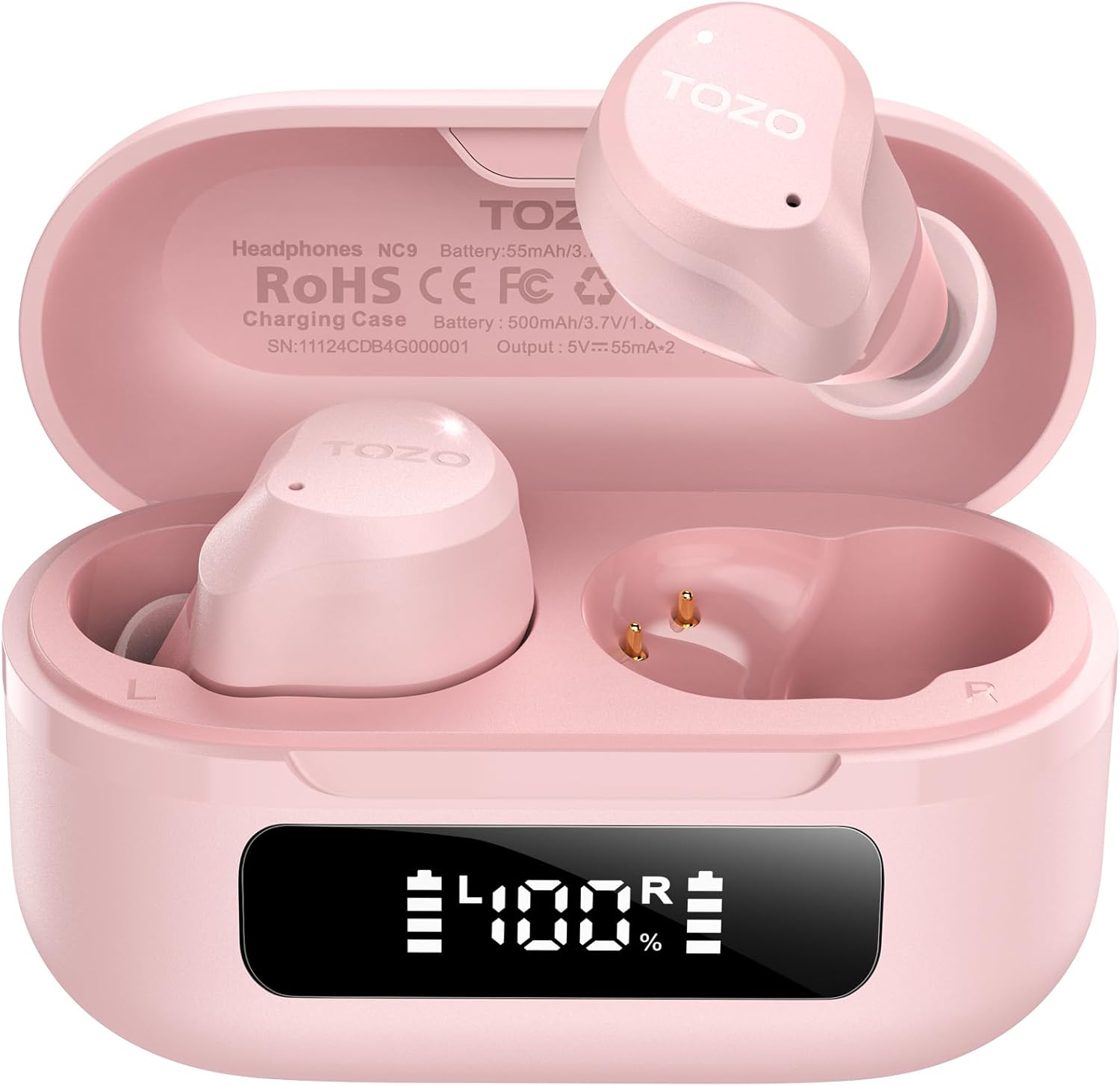
Image: The TOZO NC9 earbuds shown with their charging case. The earbuds are pink and feature an in-ear design. The charging case is also pink with a smooth, compact form factor. This image provides a general view daripada komponen produk.

Image: The TOZO NC9 earbuds are placed inside their open charging case, revealing an LED display on the front of the case that shows battery percentage. This illustrates how the earbuds are stored and charged within the case.

Image: A detailed diagram illustrating the internal driver components of the TOZO NC9 earbud, highlighting the OrigX Acoustics Technology. This visual explains the audio engineering behind the sound quality.
Persediaan
1. Mengecas Fon Telinga dan Sarung
Sebelum penggunaan pertama, cas sepenuhnya fon telinga dan bekas pengecas.
- Letakkan fon telinga ke dalam bekas pengecasan. Pastikan mereka duduk dengan betul.
- Sambungkan kabel pengecas USB-C ke port pengecasan pada kes dan ke sumber kuasa.
- The LED display on the charging case will indicate the charging status. A full charge may take approximately 5 hours if completely depleted.

Image: The TOZO NC9 charging case with earbuds, displaying "60 hrs" to indicate the total playtime. This image emphasizes the extended battery life of the product.

Image: A close-up of the TOZO NC9 charging case's LED display showing "100%" battery charge, with the "SmartPow Power Management" logo. This highlights the intelligent battery optimization feature.
2. Berpasangan dengan Peranti Anda
The TOZO NC9 earbuds use Bluetooth 5.3 for a stable connection.
- Buka bekas pengecas. Fon telinga akan memasuki mod berpasangan secara automatik.
- Pada peranti anda (telefon pintar, tablet, komputer), pergi ke tetapan Bluetooth.
- Cari untuk "TOZO NC9" in the list of available devices and select it to connect.
- Sebaik sahaja disambungkan, anda akan mendengar gesaan audio dan fon telinga akan sedia untuk digunakan.

Image: A visual representation of the TOZO App interface on a smartphone, showing various settings like ANC modes, EQ adjustments, and white noise tracks. This demonstrates the app's capabilities for customizing the earbud experience.
Arahan Operasi
Kawalan Sentuh
The TOZO NC9 earbuds feature intuitive touch controls. Specific functions can be customized via the TOZO App.
| Tindakan | Fungsi |
|---|---|
| Ketik Tunggal (L/R) | Main/Jeda, Jawab Panggilan |
| Ketik Dua Kali (L) | Trek Sebelumnya |
| Ketik Dua Kali (R) | Trek Seterusnya |
| Ketik Tiga Kali (L/R) | Aktifkan Pembantu Suara |
| Tekan Lama (L/R) | Switch ANC/Transparency/Normal Mode, Reject Call |
Mod Pembatalan Bunyi Aktif (ANC)
The TOZO NC9 offers Hybrid ANC to reduce ambient noise by up to 45dB, along with a Transparency Mode.
- Mod Pembatalan Bunyi Aktif (ANC): Reduces external noise, ideal for travel or noisy environments.
- Mod Ketelusan: Allows you to hear your surroundings without removing the earbuds, useful for conversations or awareness.
- Mod Biasa: Standard audio experience without noise cancellation or transparency.
Cycle through these modes by long-pressing either earbud (customizable via app).

Image: A person wearing TOZO NC9 earbuds on an airplane, illustrating the effectiveness of the up to 45dB advanced noise cancellation feature for a peaceful listening experience.
Panggilan Jernih
Equipped with 6 ENC (Environmental Noise Cancellation) microphones, the NC9 ensures your voice is clear during calls, even in noisy environments.

Image: A person wearing TOZO NC9 earbuds while walking in a city environment, making a phone call. This image highlights the crystal-clear call quality provided by the six ENC microphones, minimizing background noise.
TOZO App Integration
Download the TOZO App for enhanced control and customization:
- Adjustable Noise Control Modes (6 options)
- 32 Preset EQ Modes and access to over 2000 user-shared EQs
- 100+ White Noise Tracks
- Kemas kini perisian tegar
The app allows for a personalized audio experience.
Penyelenggaraan
Pembersihan
- Bersihkan fon telinga dengan kerap, terutamanya hujung telinga dan sesentuh pengecasan, dengan kain lembut, kering dan tidak berbulu.
- Jangan gunakan pembersih atau pelarut yang melelas.
Penyimpanan
- Apabila tidak digunakan, simpan fon telinga dalam bekas pengecasnya untuk melindunginya dan memastikan ia dicas.
- Simpan di tempat yang sejuk dan kering jauh dari suhu yang melampau.
Rintangan Air (IPX8)
The TOZO NC9 earbuds are IPX8 waterproof, meaning they are protected against immersion in water up to 1 meter for up to 30 minutes. This makes them suitable for workouts and light rain, but they are not designed for swimming or prolonged submersion.

Image: A person wearing TOZO NC9 earbuds while reading, demonstrating the ergonomic design for all-day comfort and a secure fit. This image emphasizes the comfort aspect of the earbuds.
Menyelesaikan masalah
| Isu | Penyelesaian yang Mungkin |
|---|---|
| Fon telinga tidak dicas | Ensure earbuds are correctly seated in the case. Check charging cable and power source. Clean charging contacts. |
| Tidak boleh berpasangan dengan peranti | Ensure Bluetooth is enabled on your device. Place earbuds in case, close, then open to re-enter pairing mode. Forget "TOZO NC9" from your device's Bluetooth list and try pairing again. |
| Tiada bunyi dari satu fon telinga | Place both earbuds back in the case, close it, then open again. Ensure both earbuds are charged. Perform a factory reset (refer to TOZO App or online support for specific steps). |
| ANC tidak berfungsi dengan berkesan | Ensure ear tips provide a good seal. Try different sized ear tips. Ensure ANC mode is activated. |
| Kualiti panggilan yang lemah | Ensure microphones are not obstructed. Check network signal. |
For further assistance, please refer to the TOZO App or contact TOZO customer support.
Spesifikasi
| Nama Model | NC9 |
| Versi Bluetooth | 5.3 |
| Kawalan Bunyi | Hybrid Noise Reduction (up to 45dB ANC) |
| Mikrofon | 6 ENC Microphones |
| Jenis Pemacu Audio | Dynamic (10mm drivers) |
| Julat Kekerapan | 15 Hz - 20,000 Hz |
| Hayat Bateri (Earbud) | Lebih kurang 14 jam (cas sekali) |
| Jumlah Masa Main (dengan Kes) | Sehingga 60 jam |
| Penilaian Ketahanan Air | IPX8 (kalis air) |
| Jenis Kawalan | Kawalan Sentuh, Kawalan Apl |
| Peranti Serasi | Phones, Laptops, Tablets, Smart Speakers |
| GTIN / UPC | 810102982537 |
Waranti dan Sokongan
TOZO products come with a standard warranty. For detailed warranty information, product registration, or technical support, please visit the official TOZO webtapak atau hubungi perkhidmatan pelanggan mereka. Simpan resit pembelian anda untuk tuntutan waranti.
Polisi Pemulangan: The product has a return policy duration of 30 days for refund/replacement.