
pengenalan
The TFA 35.8105 TFA.me ID-08 Wireless Weather Station provides professional weather forecasts via the online weather service wetter.com for a five-day period, accessible via Wi-Fi. It features a detailed display with 40 different weather symbol variants for clear visualization of weather conditions. Local forecasts include daily maximum and minimum temperatures, rain probability, and predicted rain quantity. Additionally, it accurately indicates sunshine hours, UV index, wind speed, and wind direction.
A special warning function activates under distinctive or potentially dangerous weather conditions, such as storms, heavy rain, extreme heat, high UV index, or lightning ice. The station also displays indoor temperature and humidity. Wireless transmission allows outdoor temperature and humidity to be shown on the LCD for up to five transmitters. This weather station acts as a gateway for the TFA.me system, allowing up to 50 additional transmitters and other sensor types (sold separately) to be monitored online via the free TFA.me portal. Weather forecasts are "Made in Germany," ensuring high-quality standards. The display features a backlight and a dimmer function with four brightness levels. The time display shows either the date or the day of the week and supports six languages.
Persediaan
1. Membongkar dan Komponen
Carefully unpack all components. The package includes:
- 1 Stesen Pangkalan
- 1 Thermo-Hygro Transmitter (TFA 30.3900.02)
- 1 Power Adapter (EU plug)
- Manual Arahan (dokumen ini)
Please note that batteries are not included and must be purchased separately.
2. Menghidupkan Stesen Pangkalan
The base station can be powered by batteries or the included power adapter.
- Kuasa Bateri: Insert 3 x 1.5 V AA batteries into the battery compartment on the back of the base station. Ensure correct polarity.
- Kuasa Penyesuai: Connect the power adapter to the base station and plug it into a suitable power outlet.

Imej: Belakang view of the base station, highlighting the battery compartment and power adapter port for setup.
3. Setting up the Thermo-Hygro Transmitter
Insert 2 x 1.5 V AA batteries into the thermo-hygro transmitter. Place the transmitter outdoors in a shaded, well-ventilated area, protected from direct sunlight and rain, to ensure accurate readings. The maximum range for wireless transmission is 100 meters.
4. Initializing and Wi-Fi Connection
Once powered, the base station will begin searching for the outdoor transmitter and attempt to connect to your Wi-Fi network (2.4 GHz, 802.11 b/g/n). Follow the on-screen prompts to configure the Wi-Fi connection. This connection is essential for receiving professional weather forecasts from wetter.com and for integrating with the TFA.me system.
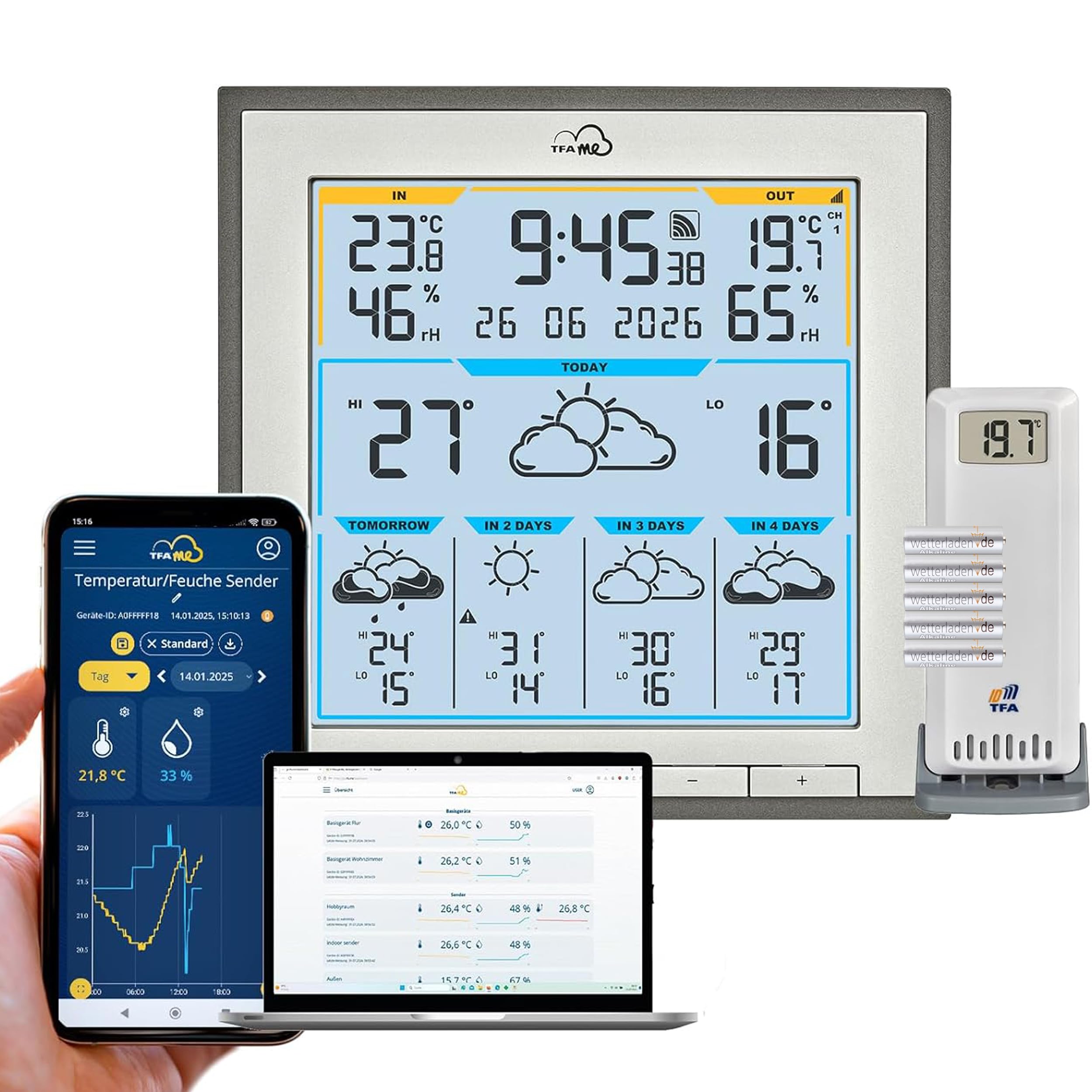
Image: The main display of the weather station, showing various weather data and time, ready for operation after setup.
5. Placement of the Base Station
The base station can be placed on a flat surface using its integrated stand or mounted on a wall. Choose a location indoors that allows for good Wi-Fi reception and is easily visible.

Imej: Side profile of the weather station, illustrating its design for desktop placement or wall mounting.
Arahan Operasi
1. Paparan Lebihview
Paparan LCD menyediakan gambaran menyeluruhview of current and forecasted weather conditions. Key information includes:
- Suhu dan Kelembapan Dalam/Luar Ruangan: Current readings from the base station and connected transmitters.
- Masa dan Tarikh: Displays current time, date, or day of the week (configurable in 6 languages).
- Ramalan cuaca: Professional 5-day forecast with 40 different weather symbols.
- Local Forecast Details: Daily max/min temperatures, rain probability, predicted rain quantity, sunshine hours, UV index, wind speed, and wind direction.

Imej: Terperinci view of the weather station's LCD, showing current conditions and a multi-day forecast with various meteorological data.

Image: The weather station display presenting a clear 5-day weather forecast, including temperature ranges and weather icons.
2. Warning Function
The station features an alert system for significant or potentially hazardous weather. Warnings are displayed for conditions such as storms, heavy rainfall, extreme heat, high UV index, or lightning ice. Pay attention to these alerts for safety and planning.
3. Display Backlight and Dimmer
The display has a backlight for visibility in low light conditions. Use the dimmer function to adjust brightness to one of four levels for optimal viewkeselesaan.
4. TFA.me System Integration
The weather station acts as a gateway for the TFA.me system. This allows you to monitor data from up to 50 additional transmitters (sold separately) online via the free TFA.me portal. You can access measured values worldwide through the portal.

Image: The TFA.me ecosystem, showing how weather data can be accessed and monitored across multiple devices like laptops, tablets, and smartphones.

Image: The weather station integrated into a home office setup, with the TFA.me online portal visible on a computer screen, displaying comprehensive sensor data.
Penyelenggaraan
1. Pembersihan
Clean the weather station and transmitter with a soft, damp cloth. Do not use abrasive cleaners or solvents, as these can damage the surfaces and electronic components.
2. Penggantian Bateri
Replace batteries in both the base station and the outdoor transmitter when the low battery indicator appears on the display. Always use fresh, high-quality batteries of the specified type (AA). Ensure correct polarity during installation.
3. Transmitter Placement Check
Periodically check the outdoor transmitter's placement to ensure it remains in a shaded, well-ventilated location, free from obstructions that could affect its readings or wireless signal.
Menyelesaikan masalah
1. No Display / Blank Screen
- Check if the power adapter is securely connected or if batteries are correctly inserted and not depleted.
- Pastikan salur keluar kuasa berfungsi.
2. No Outdoor Temperature/Humidity Reading
- Verify that the outdoor transmitter has fresh batteries and is powered on.
- Ensure the transmitter is within the 100m range of the base station and there are no major obstructions (thick walls, metal objects) between them.
- Try re-pairing the transmitter with the base station (refer to the full manual for specific pairing instructions if needed).
3. Isu Sambungan Wi-Fi
- Pastikan rangkaian Wi-Fi anda ialah 2.4 GHz (802.11 b/g/n). Stesen ini tidak menyokong rangkaian 5 GHz.
- Check your Wi-Fi password and re-enter it if necessary.
- Move the base station closer to your Wi-Fi router.
- Restart your Wi-Fi router and the weather station.
4. Inaccurate Forecasts
- Ensure the Wi-Fi connection is stable, as forecasts are retrieved online.
- Verify that the location settings on the device or via the TFA.me portal are correct for your area.
Spesifikasi Teknikal
| Nombor Model | TFA 35.8105 |
| Jenama | TFA Dostmann |
| Dimensions (Base Station) | 172 x 172 (168) x 29 (61) mm |
| Julat Suhu Luar | -40 °C hingga +60 °C |
| Julat Suhu Dalaman | 0 °C hingga +50 °C |
| Julat Kelembapan | 10% hingga 99% Kelembapan Relatif |
| Ketepatan Suhu | ± 1 °C (0 to +50 °C), otherwise ± 1.5 °C |
| Ketepatan Kelembapan | ± 5 % (at 25 °C from 30 to 80 % RH) |
| Kekerapan Penghantaran Tanpa Wayar | 868 MHz |
| Julat Wayarles Maksimum | 100 meters (open field) |
| bahan | plastik |
| Power Supply (Base Station) | 3 x 1.5 V AA batteries or AC adapter |
| Power Supply (Transmitter) | Bateri 2 x 1.5 V AA |
| Max. Number of Transmitters | 5 (on base station), 50 (via TFA.me online portal) |
| Kekerapan Wi-Fi | 2.4 GHz (802.11 b/g/n) |
| Max. Transmission Power (Wi-Fi) | <25 mW |
| Jenis Paparan | LCD |
Waranti dan Sokongan
For detailed warranty information, please refer to the warranty card included with your product or visit the official TFA Dostmann website. For technical support, troubleshooting assistance, or to purchase additional transmitters, please contact TFA Dostmann customer service or visit their online portal at www.tfa-dostmann.de.
The free online portal TFA.me allows you to retrieve measured values worldwide and manage your connected sensors.