
pengenalan
Terima kasih kerana membeliasing the LG 43QNED70A 43 inch Class 70A Series QNED AI 4K Smart TV. This manual provides essential information for the safe and efficient use of your television. Please read it thoroughly before operating the product and retain it for future reference.
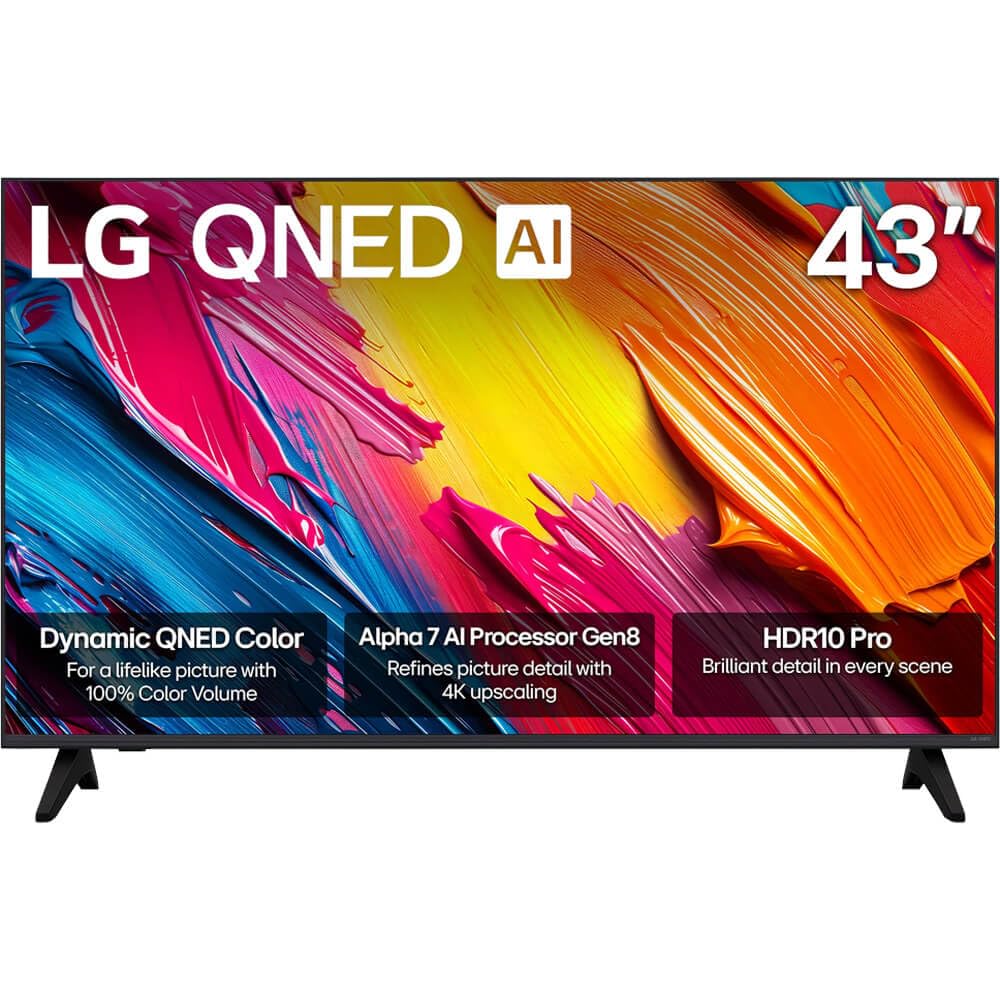
Rajah 1: Depan view of the LG 43QNED70A Smart TV.
Maklumat Keselamatan
Before using your TV, please read these safety instructions carefully to prevent damage and ensure safe operation.
- Sumber Kuasa: Sambungkan TV ke soket kuasa AC 100-240V, 50/60Hz. Jangan bebankan soket dinding secara berlebihan.
- Pengudaraan: Pastikan pengudaraan yang mencukupi di sekeliling TV. Jangan sekat bukaan pengudaraan.
- Air dan Kelembapan: Jangan dedahkan TV kepada hujan atau lembapan. Jangan letakkan objek yang diisi dengan cecair pada TV.
- Pembersihan: Cabut plag TV sebelum membersihkan. Gunakan kain lembut dan kering. Elakkan pencuci cecair.
- penempatan: Letakkan TV pada permukaan yang stabil dan rata. Elakkan meletakkannya di bawah cahaya matahari langsung atau berhampiran sumber haba.
- Kanak-kanak: Awasi kanak-kanak untuk mengelakkan mereka daripada memanjat TV atau berdiri.
- Servis: Jangan cuba servis TV sendiri. Rujuk semua servis kepada kakitangan perkhidmatan yang berkelayakan.
Kandungan Pakej
Sahkan bahawa semua item terdapat dalam kotak produk anda:
- LG 43QNED70A 43 inch QNED AI 4K Smart TV
- AI Magic Remote Control
- Kord Kuasa
- Penyangga TV (2 keping) dan Skru
- Manual Pengguna (dokumen ini)
- Batteries for Remote Control (AA or AAA, depending on region)
Persediaan
1. Physical Setup (Stand Installation or Wall Mounting)
Before installing the TV, ensure the power cord is disconnected. Place the TV face down on a soft cloth or cushion to protect the screen.
Pemasangan Stand:
- Align the two stand pieces with the corresponding slots on the bottom of the TV.
- Selamatkan dirian menggunakan skru yang disediakan. Pastikan ia diketatkan dengan kuat.
- Angkat TV dengan berhati-hati ke kedudukan tegak pada permukaan yang stabil.
Pemasangan Dinding:
This TV supports VESA mount standard 200 x 200 mm. Wall mounting requires a compatible wall mount bracket (sold separately) and professional installation. Refer to the wall mount bracket's instructions for proper installation.
2. Menyambung Peranti Luaran
Your LG 43QNED70A TV provides various ports for connecting external devices such as Blu-ray players, game consoles, soundbars, and USB storage devices.

Rajah 2: Belakang view TV dengan port input.
- Port HDMI: Connect high-definition devices like Blu-ray players or game consoles. This model has 1 HDMI port.
- Port USB: Connect USB storage devices for media playback. This model has 1 USB 3.0 port.
- Input Audio (RCA): For connecting older audio devices.
- Pelabuhan Ethernet: Untuk sambungan internet berwayar.
After connecting devices, ensure all cables are securely fastened.
3. Hidupkan Awal dan Persediaan Rangkaian
- Sambungkan kord kuasa ke TV dan kemudian ke saluran keluar dinding.
- Tekan butang kuasa pada alat kawalan jauh atau TV untuk menghidupkannya.
- Follow the on-screen instructions for the initial setup, which includes language selection, country, and network connection.
- For network setup, you can choose between Wi-Fi or a wired Ethernet connection. Follow the prompts to connect to your home network.
Beroperasi
1. AI Magic Remote Control Overview
The AI Magic Remote allows for intuitive control of your TV with point-and-click, scrolling, and voice commands.

Figure 3: LG AI Magic Remote Control.

Figure 4: Key features of the AI Magic Remote.
- Butang Kuasa: Menghidupkan atau mematikan TV.
- Butang AI: Activates AI features for search and recommendations.
- Scroll Wheel (OK Button): Menavigasi menu dan mengesahkan pilihan.
- Butang Arah: Moves cursor or navigates menus.
- Butang rumah: Mengakses ke webSkrin utama TV Pintar OS.
- Butang Kelantangan/Saluran: Adjusts volume and changes channels.
- Butang Perkhidmatan Penstriman: Quick access to popular streaming apps like Netflix, Prime Video, Disney+, and LG Channels.
2. Ciri TV Pintar (webOS)
Your LG QNED AI 4K Smart TV runs on webOS, providing a user-friendly interface for accessing content and applications.
- AI Search & Recommendations: Use voice commands or the AI button to search for content, get personalized recommendations, and control smart home devices.
- Perkhidmatan Penstriman: Access a wide range of popular streaming applications directly from the home screen.
- Saluran LG: Enjoy free access to a variety of streaming channels provided by LG.
3. Tetapan Gambar dan Bunyi
Optimumkan anda viewing experience with advanced picture and sound technologies.

Figure 5: Dynamic QNED Color technology for enhanced color reproduction.

Figure 6: The α7 AI Processor Gen8 enhances brightness, sound, and picture detail.

Figure 7: HDR10 Pro delivers a dramatic visual experience by enhancing colors.

Figure 8: 4K Super Upscaling transforms regular content into sharper 4K definition.
- Mod Gambar: Select from various preset picture modes (e.g., Vivid, Standard, Cinema, Game, Filmmaker Mode) or customize settings like brightness, contrast, and color.
- Mod Suara: Choose sound presets (e.g., Standard, Cinema, Clear Voice) or adjust equalizer settings. The TV also supports immersive sound with LG Soundbars.
- AI Picture Pro / AI Sound Pro: The α7 AI Processor Gen8 automatically optimizes picture and sound based on content and environment.
- Pemetaan Nada Dinamik: Enhances HDR content for optimal brightness and contrast.
Penyelenggaraan
1. Cleaning the Screen and Cabinet
Untuk mengekalkan penampilan dan prestasi TV anda:
- Skrin: Lap skrin perlahan-lahan dengan kain mikrofiber yang lembut dan kering. Untuk tanda degil, ringankan dampen kain dengan air atau pembersih skrin khusus (jangan sembur terus pada skrin).
- Kabinet: Lap kabinet dengan kain lembut dan kering. Elakkan daripada menggunakan pembersih yang melelas, lilin atau pelarut.
- Sentiasa cabut plag TV sebelum membersihkan.
2. Kemas Kini Perisian
LG regularly releases software updates to improve performance and add new features. Ensure your TV is connected to the internet to receive these updates.
- Navigasi ke Tetapan > Semua Tetapan > Umum > Perihal TV Ini > Semak Kemas Kini.
- Ikuti arahan pada skrin untuk memuat turun dan memasang sebarang kemas kini yang tersedia.
Menyelesaikan masalah
Jika anda menghadapi masalah dengan TV anda, rujuk masalah dan penyelesaian biasa berikut:
| Masalah | Penyelesaian yang Mungkin |
|---|---|
| Tiada kuasa / TV tidak akan dihidupkan | Check if the power cord is securely plugged into the TV and the wall outlet. Try a different outlet. Ensure the remote control batteries are not depleted. |
| Tiada gambar, tetapi bunyi hadir | Semak sumber input. Pastikan peranti luaran dihidupkan dan disambungkan dengan betul. Cuba kabel HDMI yang berbeza. |
| Tiada bunyi, tetapi ada gambar | Check the volume level. Ensure the TV is not muted. Check audio output settings (e.g., internal speakers, external soundbar). |
| Alat kawalan jauh tidak berfungsi | Replace the batteries. Ensure there are no obstructions between the remote and the TV. Re-pair the AI Magic Remote if necessary (refer to the on-screen guide). |
| Kualiti gambar yang buruk | Check the input source resolution. Adjust picture settings (brightness, contrast, sharpness). Ensure the antenna/cable connection is secure. |
| Tidak dapat menyambung ke Wi-Fi | Pastikan penghala Wi-Fi anda dihidupkan dan berfungsi. Masukkan semula kata laluan Wi-Fi. Cuba mulakan semula TV dan penghala. |
Jika masalah berterusan selepas mencuba penyelesaian ini, sila hubungi sokongan pelanggan LG.
Spesifikasi
Detailed technical specifications for the LG 43QNED70A Smart TV:
| Ciri | Spesifikasi |
|---|---|
| Nama Model | 43QNED70A |
| Saiz Skrin | 43 Inci |
| Teknologi Paparan | QNED |
| Resolusi | 4K (3840 x 2160) |
| Kadar Segar Semula | 120 Hz |
| Nisbah Aspek | 16:9 |
| Pemproses | Pemproses AI α7 Gen8 |
| Picture Quality Enhancement | Dynamic Tone Mapping, HDR10 Pro |
| Display Backlight Technology | Self-Luminous |
| Perkhidmatan Internet yang Disokong | Netflix, YouTube, Amazon Prime, etc. |
| warna | Hitam |
| Tahun Model | 2025 |
| Jumlah Port HDMI | 1 |
| Total USB 3.0 Ports | 1 |
| Input Audio | USB, RCA |
| Kaedah Kawalan | Jauh |
| Pemasangan VESA Standard | 200 x 200 mm |
| Pengeluar | LG |
Waranti dan Sokongan
Your LG 43QNED70A TV comes with a limited warranty. Please refer to the warranty card included in your package for specific terms and conditions, including coverage duration and limitations.
For technical support, service, or warranty claims, please contact LG Customer Service:
- Webtapak: Lawati LG rasmi webtapak untuk sumber sokongan, Soalan Lazim dan maklumat hubungan. www.lg.com/us/support
- telefon: Rujuk kad jaminan anda atau LG website for the appropriate customer service phone number in your region.
When contacting support, please have your TV's model number (43QNED70A) and serial number ready.