
1. Pengenalan
The AJAZZ AKP03 Macro Keypad Stream Controller is a versatile device designed to enhance productivity and streamline workflows for gamers, streamers, and professionals. Featuring six programmable keys with LCD displays, three physical knobs, and three toggle switches, it offers extensive customization options for various tasks.
This manual provides detailed instructions for setting up, operating, and maintaining your AKP03 device, ensuring optimal performance and user experience.
2. Ciri-ciri Produk
- Six Programmable Macro Keys: Customizable LCD displays for single or continuous actions.
- Three Physical Knobs: For precise control over various functions.
- Three Toggle Switches: Additional control options.
- Operasi Satu Klik: Instant execution of macro commands, text input, application launches, and media control.
- Intuitive Driver Software: Drag-and-drop functionality for easy key assignment and property configuration.
- Keserasian Luas: Seamless integration with platforms like Streamlabs, Twitch, YouTube, and various software applications on Windows and Mac.
- Removable 40° Stand: Provides an ergonomic viewing angle and stable placement.

Gambar 2.1: Lebihview of the AJAZZ AKP03 Macro Keypad, highlighting its programmable buttons, toggle switches, and scroll wheels.
3. Kandungan Pakej
Sahkan bahawa semua item terdapat dalam pakej anda:
- AJAZZ AKP03 Macro Keypad Stream Controller
- Kabel USB-C ke USB-A
- Removable 40° Stand
- Manual Pengguna (dokumen ini)
4. Persediaan
4.1 Sambungan Fizikal
- Attach the removable 40° stand to the bottom of the AKP03 for an ergonomic angle, if desired.
- Connect the provided USB-C cable to the USB-C port on the AKP03.
- Connect the USB-A end of the cable to an available USB port on your computer (PC or Mac).
- Peranti akan dihidupkan secara automatik.

Figure 4.1: Attaching the removable 40° stand to the AKP03.
4.2 Pemasangan Perisian
To unlock the full customization capabilities of your AKP03, you must install the dedicated driver software.
- Buka anda web browser and navigate to the official AJAZZ webtapak: www.a-jazz.com.
- Locate the 'Driver Download' section.
- Cari untuk 'AKP03' or browse for the corresponding driver for your model.
- Download the driver software compatible with your operating system (Windows or macOS).
- Jalankan pemasang dan ikut arahan pada skrin untuk menyelesaikan pemasangan.
- Mulakan semula komputer anda jika digesa.
Video 4.1: Demonstrates the software installation process and initial setup for the AJAZZ Macro Keypad.
5. Arahan Operasi
5.1 Customizing Keys and Knobs
The AKP03's driver software provides a user-friendly interface for customization:
- Launch the 'Stream Dock AJAZZ' software from your desktop or applications folder.
- The software will display a visual representation of your AKP03.
- To assign an action, drag and drop a desired function (e.g., launch application, media control, macro command) from the software's library onto one of the six programmable keys.
- For knobs, select the knob in the software and assign functions such as volume control, scrolling, or zooming.
- You can configure properties for each assigned action, including specific file laluan, web URLs, or macro sequences.
- The LCD displays on the keys will update to show the assigned icon or text.
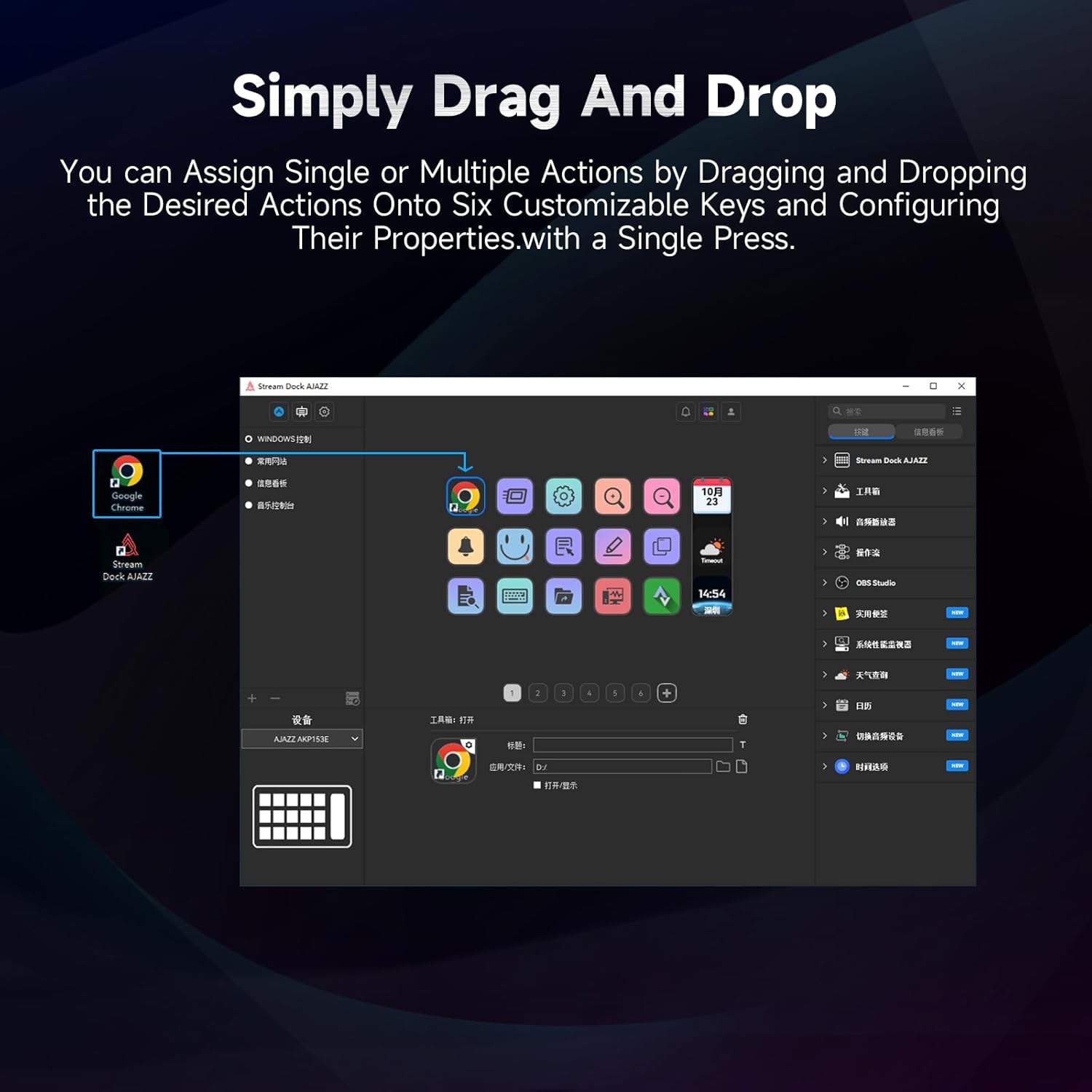
Figure 5.1: Customizing keys using the drag-and-drop interface in the AJAZZ software.
Video 5.1: Demonstration of assigning actions to keys for launching web pages and software with a single click.
5.2 Using Profiles and Pages
The software supports multiple profiles and pages, allowing you to switch between different sets of key assignments for various applications or tasks.
- Buat pro baharufiles for specific games, editing software, or streaming setups.
- Dalam setiap profile, you can create multiple pages of key assignments, accessible by navigating through the device's buttons or software interface.
- The AKP03 automatically switches to the relevant profile when a linked application is in focus.
Video 5.2: Illustrates the multi-functional capabilities and profile switching of the AKP03 for various tasks.
6. Penyelenggaraan
To ensure the longevity and optimal performance of your AJAZZ AKP03, follow these maintenance guidelines:
- Pembersihan: Use a soft, dry cloth to wipe the surface of the device. Avoid abrasive cleaners or solvents.
- Storan: Simpan peranti di tempat yang sejuk dan kering jauh dari cahaya matahari langsung dan suhu yang melampau.
- Penjagaan Kabel: Elakkan membengkokkan atau memusingkan kabel USB secara berlebihan untuk mengelakkan kerosakan.
- Kemas Kini Perisian: Regularly check the AJAZZ website for software and firmware updates to ensure compatibility and access to new features.
7. Penyelesaian masalah
If you encounter issues with your AKP03, refer to the following common troubleshooting steps:
- Peranti Tidak Dikenali:
- Ensure the USB cable is securely connected to both the AKP03 and your computer.
- Cuba sambungkan ke port USB lain.
- Mulakan semula komputer anda.
- Verify that the driver software is correctly installed and up to date.
- Kunci Tidak Menjawab:
- Check the software to ensure keys are properly assigned and the correct profile sedang aktif.
- Pastikan perisian pemacu berjalan di latar belakang.
- Isu Perisian:
- Reinstall the driver software.
- Check for software updates on the AJAZZ webtapak.
8. Spesifikasi
| Ciri | Perincian |
|---|---|
| Jenama | AJAZZ |
| Nama Model | AKP03 |
| Peranti Serasi | PC, Laptop |
| Jenis Pengawal | papan kekunci |
| Teknologi Ketersambungan | USB-C |
| Kuantiti Butang | 6 Programmable Keys (with LCD displays), 3 Physical Knobs, 3 Toggle Switches |
| Berat Barang | 0.32 Kilogram |
| Dimensi Item (L x W x H) | 5 x 3 x 2 inci |
| Sumber Kuasa | Elektrik Bertali |
9. Waranti dan Sokongan
9.1 Maklumat Waranti
The AJAZZ AKP03 Macro Keypad Stream Controller comes with a Waranti Terhad 1 Tahun dari tarikh pembelian. Waranti ini meliputi kecacatan pembuatan dan kerosakan dalam penggunaan biasa. Ia tidak melindungi kerosakan yang disebabkan oleh penyalahgunaan, kemalangan, pengubahsuaian yang tidak dibenarkan, atau pemasangan yang tidak betul.
Sila simpan bukti pembelian anda untuk tuntutan waranti.
9.2 Sokongan Pelanggan
For technical assistance, troubleshooting, or warranty inquiries, please contact AJAZZ customer support:
- Webtapak: www.a-jazz.com (Refer to the 'Support' or 'Contact Us' section)
- e-mel: [Insert Customer Support Email, if available]
- telefon: [Insert Customer Support Phone Number, if available]
Our support team is available to assist you with any questions or concerns regarding your product.