
1. Pengenalan
The THOMSON RT400DABBTBK is a versatile portable radio designed to provide a comprehensive audio experience. It features DAB+ and FM radio reception, Bluetooth connectivity for wireless audio streaming, USB playback for MP3 files, and an AUX-IN port for external devices. Additionally, it includes a dual alarm clock function, making it a practical and convenient device for various settings.
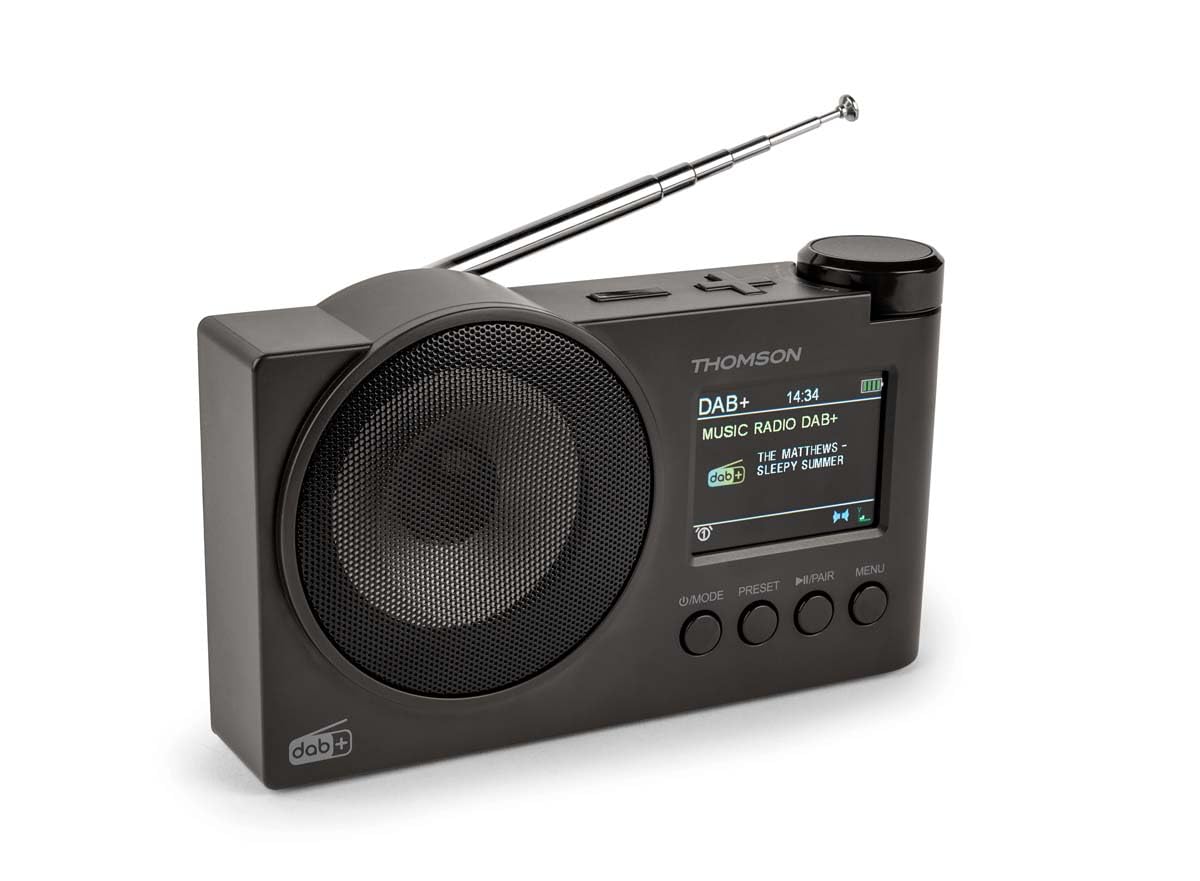
Rajah 1.1: THOMSON RT400DABBTBK portable radio. This image shows the front of the radio, featuring the speaker grille on the left and the LED display with control buttons on the right. The display indicates the time, date, and battery level.
2. Arahan Keselamatan Penting
- Baca semua arahan dengan teliti sebelum mengendalikan peranti.
- Simpan manual ini untuk rujukan masa hadapan.
- Jangan dedahkan peranti kepada hujan, lembapan atau suhu yang melampau.
- Jangan buka unit ini. Rujuk semua servis kepada kakitangan yang berkelayakan.
- Use only the specified power adapter (DC 5V 2A) and USB-C cable.
- Pastikan pengudaraan yang betul di sekeliling peranti.
- Elakkan meletakkan peranti berhampiran sumber haba atau cahaya matahari langsung.
3. Kandungan Pakej
Sila pastikan semua item ada:
- THOMSON RT400DABBTBK Radio
- Kabel Pengecas USB-C
- Manual Pemilik (dokumen ini)
4. Product Layout and Controls

Rajah 4.1: Front Panel Controls and Display. This image provides a detailed view of the radio's front panel, featuring the circular speaker on the left and the rectangular LED display on the right. Below the display are four control buttons: MODE, PRESET, PLAY/PAIR, and MENU. The display shows '12/8/2025 Mardi 16:24' with alarm and stop icons.
4.1. Butang Kawalan
- POWER / MODE: Press to turn on/off. Press to switch between DAB+, FM, Bluetooth, USB, and AUX-IN modes.
- PRESET: Access and save preset radio stations.
- PLAY / PAIR: In Bluetooth mode, press to play/pause or initiate pairing. In USB mode, play/pause.
- MENU: Access system settings and options for the current mode.
- Rotary Knob (Top Right): Adjust volume, navigate menus, or tune frequencies. Press to confirm selections.
4.2. Paparan Maklumat
The LED display shows various information depending on the operating mode:
- Current time and date (12/24h format).
- Radio station name, frequency, or DAB+ service information.
- Status sambungan Bluetooth.
- USB track information.
- Penunjuk aras bateri.
- Alarm icons (Alarm 1, Alarm 2).
5. Persediaan
5.1. Menghidupkan
The radio can be powered in two ways:
- Kuasa AC: Connect the supplied USB-C cable to the DC 5V 2A input on the radio and to a suitable USB power adapter (not included).
- Bateri boleh dicas semula: The radio has a built-in 1500mAh Lithium rechargeable battery. Ensure it is fully charged before portable use. The battery charges automatically when connected to AC power.
5.2. Pelarasan Antena
For optimal DAB+ and FM radio reception, fully extend the telescopic antenna. Adjust its position for the best signal quality.
5.3. Tetapan Awal
Pada penggunaan pertama atau selepas tetapan semula kilang, anda mungkin perlu mengkonfigurasi tetapan asas:
- Pemilihan Bahasa: Use the MENU button to navigate to System Settings, then select 'Language' to choose your preferred language (French, English, German, Italian, Spanish, Portuguese, Dutch).
- Masa dan Tarikh: The time and date are often automatically updated in DAB+ mode. If not, navigate to System Settings > Time/Date to set manually.
6. Mengendalikan Radio
6.1. Mod Radio DAB+
- Tekan ke MODE butang untuk memilih mod DAB+.
- The radio will automatically perform a scan for available DAB+ stations.
- Use the rotary knob to scroll through the list of found stations. Press the knob to select a station.
- Untuk menyimpan stesen sebagai pratetap, tekan dan tahan PRESET button, select a preset number using the rotary knob, and press the knob to confirm.
6.2. Mod Radio FM
- Tekan ke MODE butang untuk memilih mod FM.
- To auto-scan for stations, press and hold the rotary knob. The radio will scan and save stations.
- To manually tune, rotate the knob to adjust the frequency.
- Untuk menyimpan stesen sebagai pratetap, tekan dan tahan PRESET button, select a preset number using the rotary knob, and press the knob to confirm.
6.3. Mod Pembesar Suara Bluetooth
- Tekan ke MODE button to select Bluetooth mode. The display will show 'Bluetooth Pairing'.
- On your smartphone or tablet, enable Bluetooth and search for 'THOMSON RT400DABBTBK'.
- Select the device to pair. Once connected, the display will show 'Bluetooth Connected'.
- Play audio from your paired device. Use the radio's rotary knob to adjust volume.
6.4. Main semula USB
- Masukkan pemacu kilat USB yang mengandungi MP3 files ke dalam port USB.
- Tekan ke MODE butang untuk memilih mod USB.
- The radio will automatically start playing MP3 files. Use the rotary knob to navigate tracks and the PLAY/PAIR butang untuk bermain / berhenti seketika.
6.5. Mod AUX-IN
- Connect an external audio device (e.g., MP3 player) to the AUX-IN 3.5mm port using an audio cable (not included).
- Tekan ke MODE butang untuk memilih mod AUX-IN.
- Control playback from your external device. Use the radio's rotary knob to adjust volume.
6.6. Penggunaan Fon Kepala
Connect headphones (not supplied) to the 3.5mm headphone jack for private listening. The main speaker will be muted automatically.
7. Jam Penggera
The radio features a dual alarm clock.
- Tekan ke MENU button and navigate to 'Alarm Settings'.
- Select 'Alarm 1' or 'Alarm 2' to configure.
- Tetapkan Masa: Use the rotary knob to set the desired alarm time.
- Sumber penggera: Choose your preferred wake-up sound: DAB+, FM, USB, or Bluetooth.
- Tempoh Penggera: Set the alarm duration (15, 30, 45, 60, or 90 minutes).
- Kekerapan Penggera: Select how often the alarm should sound: Once, Daily, Weekdays, or Weekends.
- Kelantangan: Laraskan kelantangan penggera.
- Dayakan/Lumpuhkan: Turn the alarm ON or OFF.
8. Tetapan Sistem
Access system settings by pressing the MENU button and navigating to 'System Settings'.
- Tetapan Paparan: Adjust backlight duration (10 to 180 seconds) and choose between 12-hour or 24-hour time format.
- Bahasa: Select the display language (French, English, German, Italian, Spanish, Portuguese, Dutch).
- Automatic Station Update: Enable or disable automatic updates for radio stations.
- Tetapan semula kilang: Tetapkan semula semua tetapan kepada nilai lalainya.
9. Penyelenggaraan
9.1. Pembersihan
Wipe the radio's surface with a soft, dry cloth. Do not use abrasive cleaners, waxes, or solvents, as these may damage the finish.
9.2. Penjagaan Bateri
To prolong the life of the built-in Lithium battery:
- Elakkan menyahcas sepenuhnya bateri dengan kerap.
- Charge the battery regularly, even if the radio is not in use for extended periods.
- Simpan radio di tempat yang sejuk dan kering apabila tidak digunakan.
10. Penyelesaian masalah
| Masalah | Kemungkinan Punca | Penyelesaian |
|---|---|---|
| Tiada kuasa | Battery discharged or power cable not connected. | Connect the USB-C cable to a power source. Charge the battery. |
| Penerimaan radio yang lemah | Antena tidak dilanjutkan atau kawasan isyarat lemah. | Fully extend and adjust the telescopic antenna. Try moving the radio to a different location. |
| Bluetooth tidak bersambung | Radio not in pairing mode or device already paired. | Ensure the radio is in Bluetooth mode and 'Bluetooth Pairing' is displayed. Forget the device on your phone/tablet and try pairing again. |
| Main balik USB tidak berfungsi | Pemacu USB tidak diformat dengan betul atau tidak disokong file taip. | Ensure USB drive is formatted to FAT32 and contains MP3 files. Cuba pemacu USB yang lain. |
| Penggera tidak berbunyi | Alarm disabled or incorrect settings. | Check alarm settings (time, source, frequency, enable/disable status). |
11. Spesifikasi
| Ciri | Spesifikasi |
|---|---|
| Jenama | THOMSON |
| Nombor Model | RT400DABBTBK |
| Pancaragam Radio Disokong | DAB+, FM |
| Teknologi Ketersambungan | Bluetooth |
| Ciri Khas | Mudah alih |
| Sumber Kuasa | Battery Powered, Corded Electric (DC 5V 2A via USB-C) |
| Bateri | Litium Boleh Dicas Semula 1500mAh |
| Jenis Paparan | LED |
| Dimensi Produk (L x W x H) | 8 x 5 x 15 sentimeter |
| Berat Barang | 300 Gram |
| Peranti Serasi | MP3 Player, Speaker, Headphones, Tablet |
12. Waranti dan Sokongan
This THOMSON RT400DABBTBK radio comes with a Waranti pengilang 1 tahun.
For further support, troubleshooting, or warranty claims, please refer to your point of purchase or visit the official THOMSON brand store: