
1. Pengenalan
The JIGUUN 1500W Pure Sine Wave Power Inverter converts 12V DC battery power to 110-120V AC household power. This device is designed to provide clean, stable power for various applications, including home use, RVs, camping, cars, and trucks. It features multiple AC outlets, a USB charging port, and an LCD display for monitoring system status.
2. Maklumat Keselamatan
AMARAN: Kegagalan mematuhi arahan keselamatan ini boleh mengakibatkan kecederaan serius atau kerosakan harta benda.
- Read the entire manual before operating the inverter.
- Pastikan pengudaraan yang betul di sekitar inverter. Jangan halang lubang penyejukan.
- Jangan dedahkan inverter kepada air, hujan atau kelembapan berlebihan.
- Jangan kendalikan inverter berhampiran bahan mudah terbakar atau dalam persekitaran dengan gas letupan.
- Sambungkan penyongsang hanya kepada sumber kuasa 12V DC. Menyambung ke voltages boleh merosakkan unit.
- Pastikan semua sambungan ketat dan kukuh untuk mengelakkan pemanasan melampau dan arka.
- Jangan buka penyongsang casing. Tiada bahagian yang boleh diservis pengguna di dalamnya.
- Jauhkan kanak-kanak daripada inverter semasa operasi.
- Always disconnect the inverter from the battery before performing any maintenance or cleaning.
- The inverter generates heat; avoid touching the casing during prolonged operation.
3. Kandungan Pakej
Sahkan bahawa semua item terdapat dalam pakej anda:
- 1x JIGUUN 1500W Pure Sine Wave Inverter
- 1x Manual Pengguna
- 2 Sets of Battery Cables (2x Red, 2x Black)
- 1x Alat Kawalan Jauh
- 10x 30A Spare Fuses (Note: Fuses are pre-installed; these are spares)
- 1x Alligator Clip Safety Ground
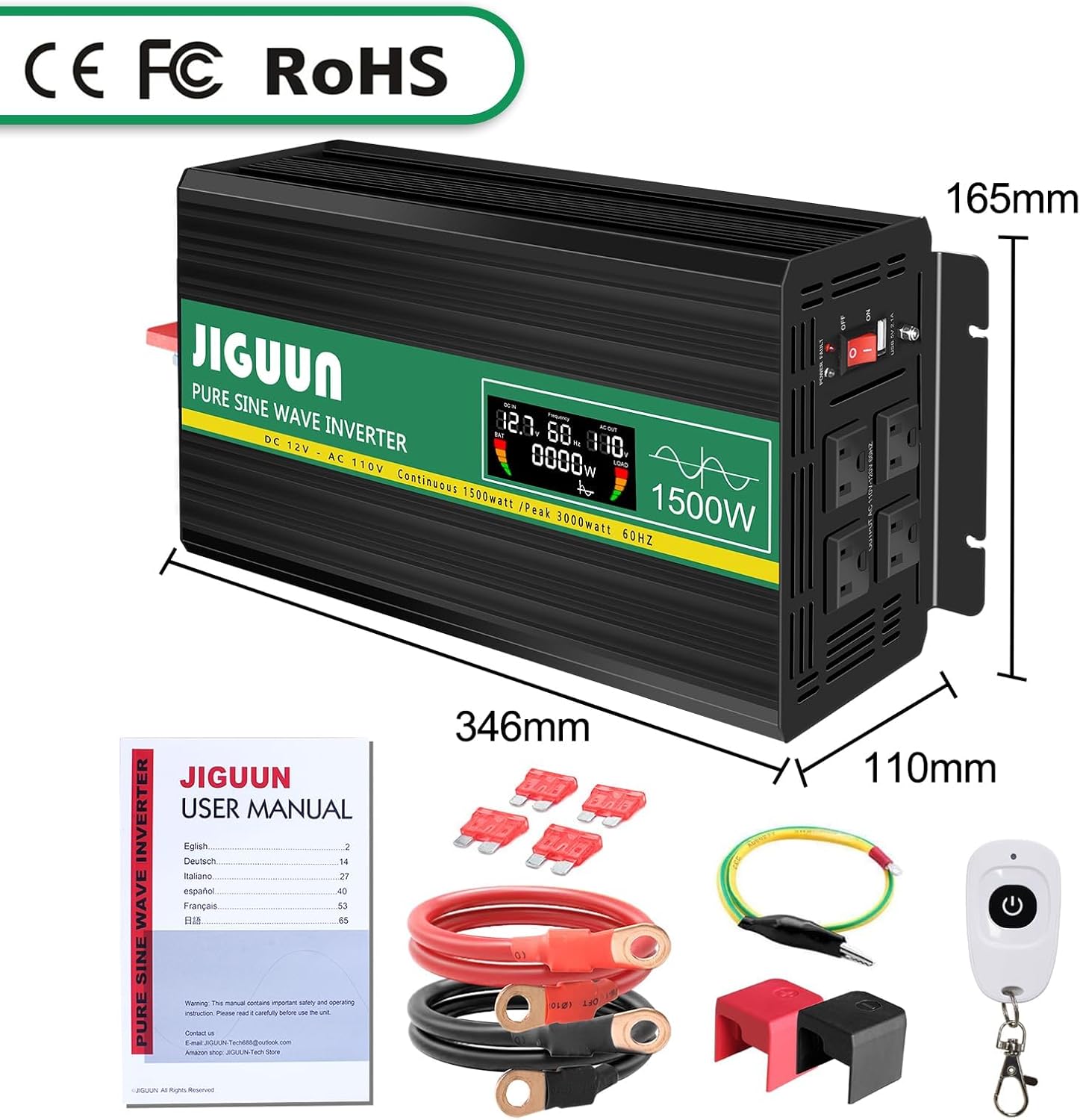
Image: Contents of the JIGUUN 1500W Pure Sine Wave Inverter package.
4. Ciri-ciri Produk
- Output Gelombang Sinus Tulen: Provides clean, stable power suitable for sensitive electronics.
- Output Kuasa Tinggi: Continuous 1500W, Peak 3000W.
- Input/Output: 12V DC input to 110-120V AC output.
- Pelbagai Outlet: 3 AC outlets and 1x 2.1A USB charging port.
- Paparan LCD: Menunjukkan volum input/outputtage, output frequency, and load power for real-time monitoring.
- Perlindungan Komprehensif: Includes under-voltage, lebihan voltage, overload, over-temperature, short circuit, AC ground terminal, and reverse connection protection.
- Penyejukan yang cekap: Equipped with 2 high-speed heat dissipation silent fans that activate when temperature exceeds 45°C.
- Reka bentuk tahan lasak: Aluminum alloy shell for lasting protection.
- Kawalan Jauh: Untuk operasi yang mudah.
5. Pengenalan Komponen

Image: Front and Rear Panel Components.
Panel Depan:
- AC Receptacles (x3): For connecting AC-powered devices.
- USB Ports (2.1A): Untuk mengecas peranti berkuasa USB.
- Suis ON / OFF: To power the inverter on or off.
- Penunjuk Kuasa: LED light indicating operational status.
- Paparan LCD: Shows real-time operational data.
Panel belakang:
- Terminal Input DC: Red for positive (+), Black for negative (-). Connect battery cables here.
- Kipas penyejuk: Two high-speed fans for heat dissipation.
- Terminal Darat: Untuk pembumian keselamatan.
6. Persediaan dan Pemasangan
- Sediakan Bateri: Ensure your 12V DC battery has sufficient capacity for the appliances you intend to power. Insufficient battery capacity may prevent high-power appliances from running.
- Pastikan Voltage Padanan: Confirm that the inverter's input voltage (12V DC) matches your battery's voltage.
- Sambungkan Kabel Bateri:
- Connect the red battery cable to the positive (+) terminal of the inverter and the positive (+) terminal of your 12V battery.
- Connect the black battery cable to the negative (-) terminal of the inverter and the negative (-) terminal of your 12V battery.
- Ensure connections are tight and secure. Use the provided wrench for the inverter terminals.
- Pembumian: Connect the alligator clip safety ground to the inverter's ground terminal and to a suitable ground point (e.g., vehicle chassis).
- Kuasa Awal Hidup: Before connecting any appliances, turn the inverter's ON/OFF switch to the "ON" position. The LCD display should illuminate, showing input voltage dan parameter lain.
- Sambungkan Perkakas: Once the inverter is powered on and stable, connect your AC-powered devices to the AC outlets and USB devices to the USB port. Ensure the total wattage of connected equipment does not exceed the inverter's continuous power rating (1500W).
IMPORTANT: Do not connect the inverter directly to an AC circuit breaker panel or any other AC power source. This inverter is for DC to AC conversion only.
7. Arahan Operasi
Menghidupkan/Mematikan:
- To turn on the inverter, press the ON/OFF switch to the "ON" position.
- To turn off the inverter, press the ON/OFF switch to the "OFF" position.
Menggunakan Paparan LCD:
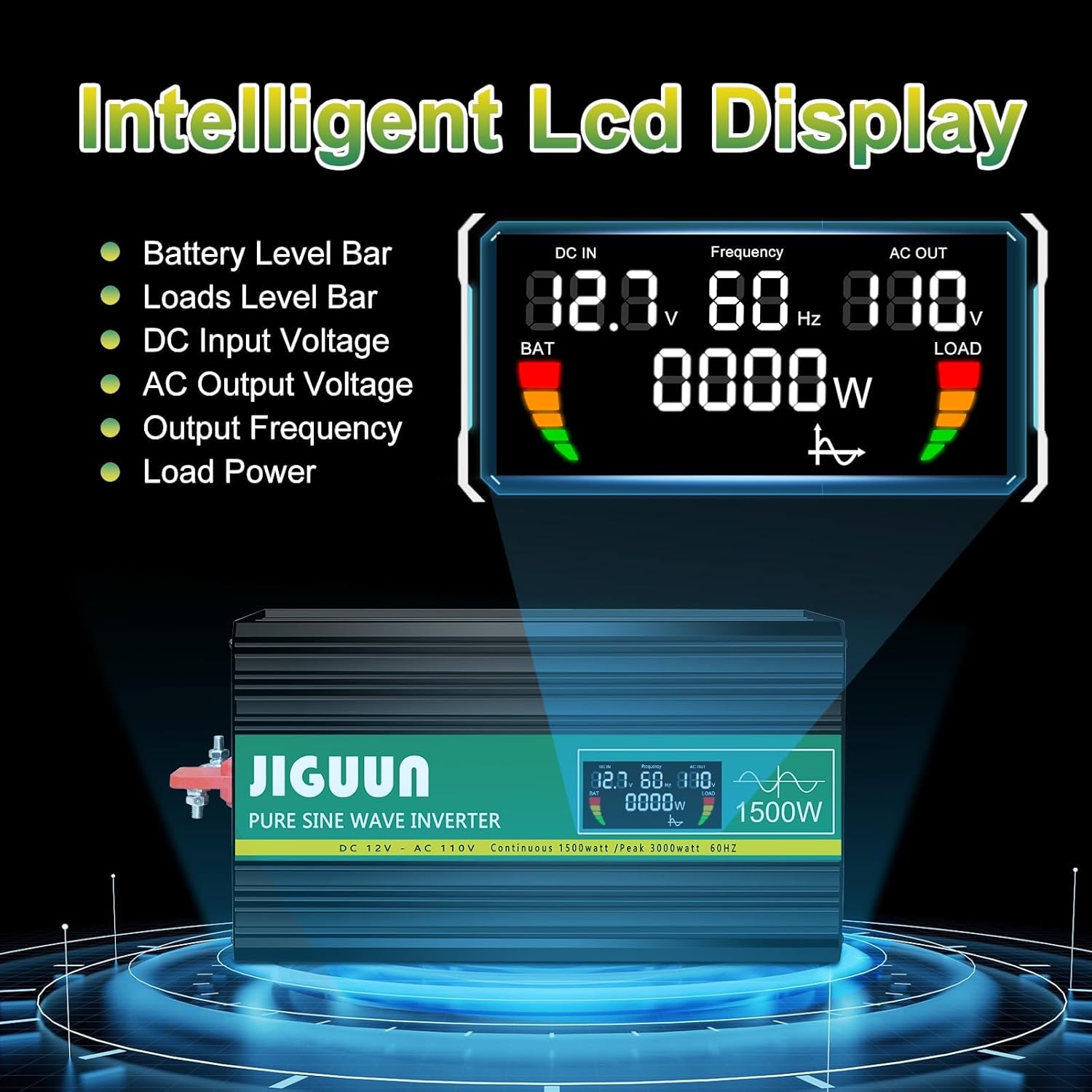
Image: Intelligent LCD Display.
The intelligent LCD display provides real-time information:
- Bar Aras Bateri: Menunjukkan baki cas bateri.
- Load Level Bar: Shows the current power draw from connected devices.
- Input DC Voltage: Memaparkan voltage daripada bateri 12V anda.
- Keluaran AC Voltage: Menunjukkan volum outputtage (110-120V AC).
- Kekerapan Output: Memaparkan frekuensi output (60Hz).
- Kuasa Beban: Indicates the current wattage being used by connected appliances.
Menggunakan Alat Kawalan Jauh:

Image: Remote Control for convenient operation.
The included remote control allows you to power the inverter on and off from a distance, providing convenience in various setups.
Menyambung Peranti:
- Plug AC appliances into the 3-prong AC outlets.
- Plug USB devices into the 2.1A USB charging port.
- Always ensure the total power consumption of all connected devices does not exceed the inverter's continuous power rating (1500W). Overloading the inverter will trigger protection mechanisms.
8. Protection System

Image: Upgraded BMS System Protection Features.
The JIGUUN inverter incorporates an advanced protection system to ensure safe and reliable operation:
- Di bawah Voltage Perlindungan: Mematikan inverter jika volum DC inputtage drops too low (10.0±0.5V DC) to protect the battery from over-discharge.
- Lebih Voltage Perlindungan: Mematikan inverter jika volum DC inputtage exceeds a safe level (15.0±0.5V DC).
- Perlindungan Lebihan: Automatically shuts down if the connected load exceeds the inverter's capacity.
- Perlindungan Suhu Lebih: Activates cooling fans when the internal temperature exceeds 45°C and shuts down if it becomes too high.
- Perlindungan Litar pintas: Protects against short circuits in the output.
- AC Ground Terminal: Provides a safety ground connection.
- Perlindungan Sambungan Terbalik: Protects the inverter and battery from damage due to incorrect polarity connection.
If any protection is triggered, the inverter will typically shut down. Disconnect the load, resolve the issue, and then restart the inverter.
9. Penyelenggaraan
- Pembersihan: Periodically clean the exterior of the inverter with a dry, soft cloth. Ensure cooling vents are free from dust and debris. Do not use liquid cleaners.
- Sambungan: Regularly check all DC input connections to ensure they are tight and free from corrosion. Loose connections can cause overheating.
- Storan: When not in use for extended periods, store the inverter in a cool, dry place away from direct sunlight and moisture. Disconnect it from the battery.
- Penyelenggaraan Bateri: Ensure your 12V battery is properly maintained and charged according to its manufacturer's instructions. A healthy battery is crucial for optimal inverter performance.
10. Penyelesaian masalah
| Masalah | Kemungkinan Punca | Penyelesaian |
|---|---|---|
| Inverter tidak menyala. | No power from battery; loose connections; low battery voltage. | Semak sambungan bateri dan voltage. Ensure battery is charged. |
| Tiada output AC. | Overload; short circuit; over-temperature; low/high input voltage. | Reduce load. Check for short circuits. Allow inverter to cool. Check battery voltage. |
| Fans are constantly running or very loud. | High internal temperature due to heavy load or poor ventilation. | Ensure adequate ventilation. Reduce load. Clean vents if blocked. |
| Connected appliance not working correctly. | Appliance power requirement exceeds inverter capacity; appliance not compatible with pure sine wave. | Periksa kuasa perkakastage. Ensure appliance is suitable for pure sine wave power. |
If troubleshooting steps do not resolve the issue, please contact JIGUUN customer support.
11. Spesifikasi
| Parameter | Nilai |
|---|---|
| Gelombang Keluaran | Gelombang Sinus Tulen |
| Kuasa Keluaran Berterusan | 1500W |
| Kuasa Output Lonjakan | 3000W |
| Masukan Nominal Voltage | 12-13.2V DC |
| Keluaran Nominal Voltage | 110-120V AC |
| Kekerapan Output | 60Hz |
| Input Lebih Voltage Penutupan | 15.0±0.5V DC |
| Input Bawah-Voltage Penggera | 10.5±0.5V DC |
| Input Rendah Voltage Penutupan | 10.0±0.5V DC |
| Pengaktifan Kipas Penyejuk | 45°C |
| Kecekapan Penukaran | >90% |
| Berat Barang | 8 paun |
| Dimensi Pakej | 13 x 11 x 6 inci |
12. Waranti dan Sokongan
The JIGUUN 1500W Pure Sine Wave Power Inverter comes with a Waranti 1 tahun, including free replacement for manufacturing defects.
For any questions, issues, or support needs during use, please feel free to contact the JIGUUN team. We are committed to assisting you.
Contact information can typically be found on the product packaging or through the retailer's support channels.