
1. Pengenalan
This manual provides detailed instructions for the safe and effective use of your Moukey MPS5 Portable Karaoke Machine. Please read this manual thoroughly before operating the device and retain it for future reference. The MPS5 is a versatile portable speaker system designed for various audio playback needs, including karaoke, music streaming, and public address, featuring wireless microphones and multiple connectivity options.
2. Apa yang ada di dalam Kotak
Carefully unpack all items from the box. Ensure all components listed below are present and in good condition.
- Moukey MPS5 Portable Karaoke Machine (1 unit)
- Wireless Microphones (2 units)
- Kabel Pengecas USB (1 unit)
- 3.5mm AUX Cable (1 unit)
- Shoulder Strap (1 unit)
- Manual Pengguna (1 unit)
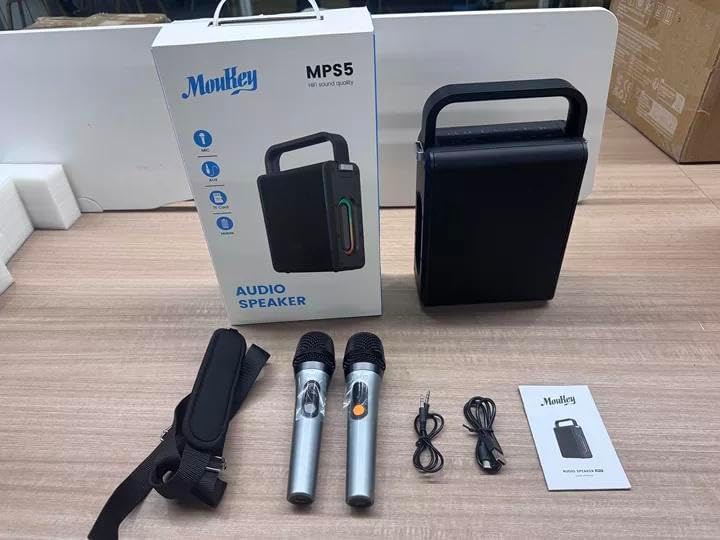
Image: All components included in the Moukey MPS5 package.
3. Produk Lebihview
The Moukey MPS5 is a compact yet powerful portable karaoke machine. It features a robust design with integrated LED lighting on the sides, enhancing the user experience. A sturdy handle and an included shoulder strap provide convenient portability.
Imej: Depan view of the Moukey MPS5 speaker.

Imej: Sisi view of the Moukey MPS5, showing the LED lighting.
4. Ciri-ciri Utama
- Excellent Sound Output: The MPS5 delivers 200W peak power (RMS 60W) through a 4-inch woofer and two 2-inch tweeters, providing full-range stereo sound with enhanced bass.
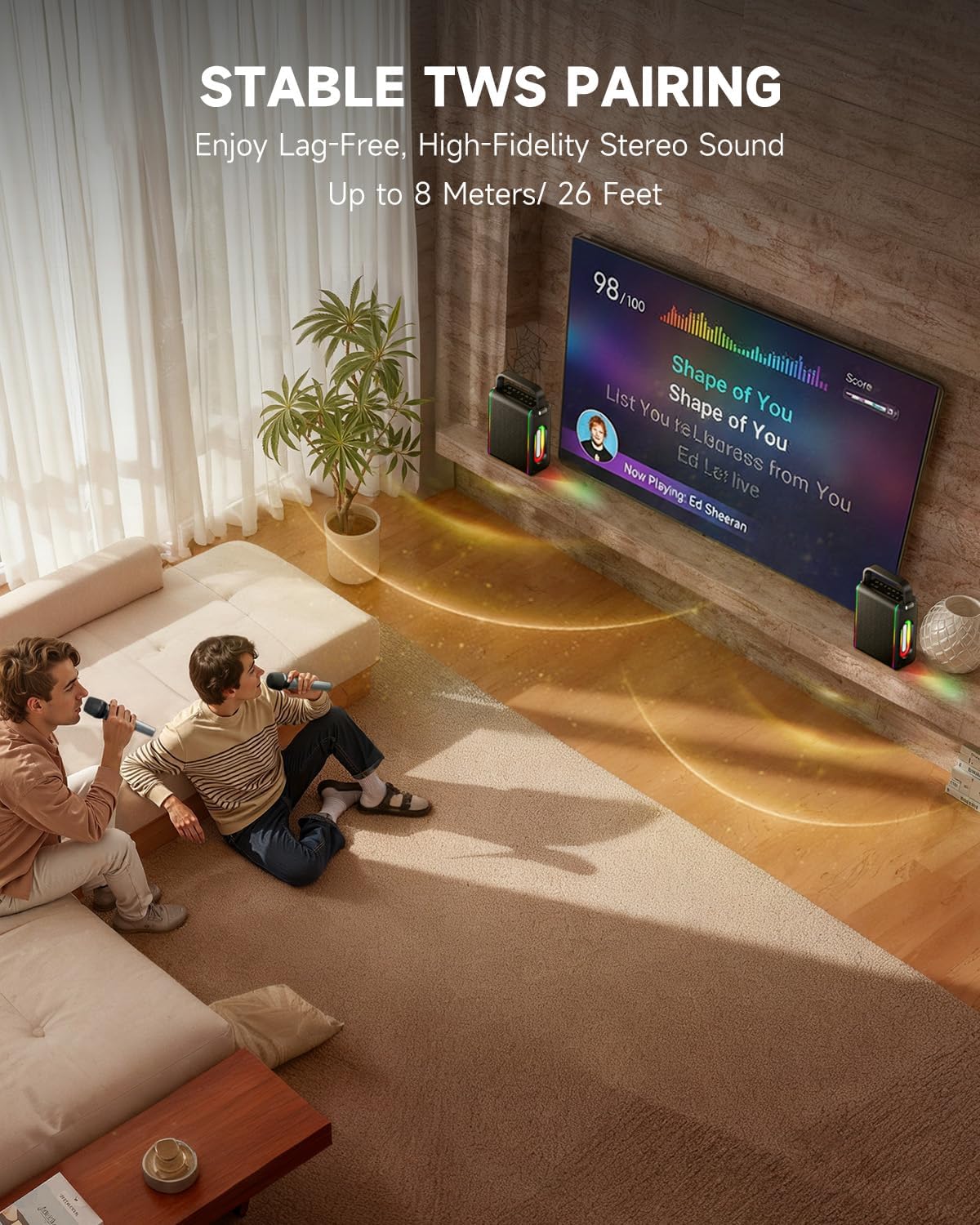
- Powerful Functionality: Supports Bluetooth 5.3 for wireless connection to various devices. Also includes Micro TF card, Flash USB, MP3, and AUX IN playback options. Features stable TWS (True Wireless Stereo) pairing for connecting two MPS5 units for a wider stereo soundstage.
- Hayat Bateri Ultra-Panjang: The rechargeable battery provides up to 8 hours of continuous music playback on a 2-hour charge, suitable for extended use indoors or outdoors.
- Reka Bentuk Ringan & Mudah Alih: Weighing only 2kg, the MPS5 is designed for easy transport. It can be carried by hand using the integrated handle or with the included shoulder strap.
- Dwi Mikrofon Wayarles: Includes two 2.4Ghz rechargeable microphones with a connection range of up to 60 feet and up to 8 hours of use time per charge (2-3 hours charging time). Features one-tap connectivity for effortless pairing.

Image: Internal speaker components of the MPS5.

Image: MPS5 connected to multiple devices via Bluetooth.

Image: Battery life and charging details for the MPS5.

Image: Demonstrating the portability of the MPS5 with hand and shoulder strap options.

Image: The two wireless microphones for the MPS5.
5. Persediaan
5.1 Mengecas Pembesar Suara dan Mikrofon
Before first use, fully charge the MPS5 speaker and both wireless microphones.
- Penceramah: Connect the provided USB Type-C cable to the charging port on the speaker and to a compatible USB power adapter (not included). The charging indicator light will show charging status. A full charge takes approximately 2 hours.
- Mikrofon: Each microphone has a charging port. Connect them to a USB power source using the provided USB cable. Charging time for microphones is 2-3 hours.
5.2 Hidupkan/Mati Kuasa
- Untuk menghidupkan pembesar suara, tekan dan tahan butang kuasa (U) on the top panel for 2 seconds.
- To power off, press and hold the power button (U) sekali lagi selama 2 saat.
5.3 Berpasangan Bluetooth
- Ensure the MPS5 speaker is powered on and in Bluetooth mode (indicated by a blue LED). If not, press the 'M' (Mode) button to switch to Bluetooth mode.
- Pada peranti mudah alih anda (telefon pintar, tablet, dll.), dayakan Bluetooth dan cari peranti yang tersedia.
- Select 'Moukey MPS5' from the list of devices to pair. A voice prompt will confirm successful connection.
5.4 TWS (Stereo Wayarles Sejati) Berpasangan
To achieve stereo sound, you can pair two Moukey MPS5 speakers together.
- Ensure both MPS5 speakers are powered on and in Bluetooth mode, but not connected to any other device.
- On one of the speakers, double-press the 'M' (Mode) button. The speaker will enter TWS pairing mode.
- The two speakers will automatically connect to each other. A voice prompt will confirm successful TWS pairing.
- Once TWS is established, connect your mobile device to one of the MPS5 speakers via Bluetooth as described in section 5.3. Both speakers will then play audio in stereo.
Video: Perbincangan ringkasview of the MPS5 Karaoke Machine, demonstrating TWS pairing and other features.
6. Arahan Operasi
6.1 Kawalan Ke Atasview
The top panel of the MPS5 speaker features several buttons for controlling playback, volume, and microphone settings.
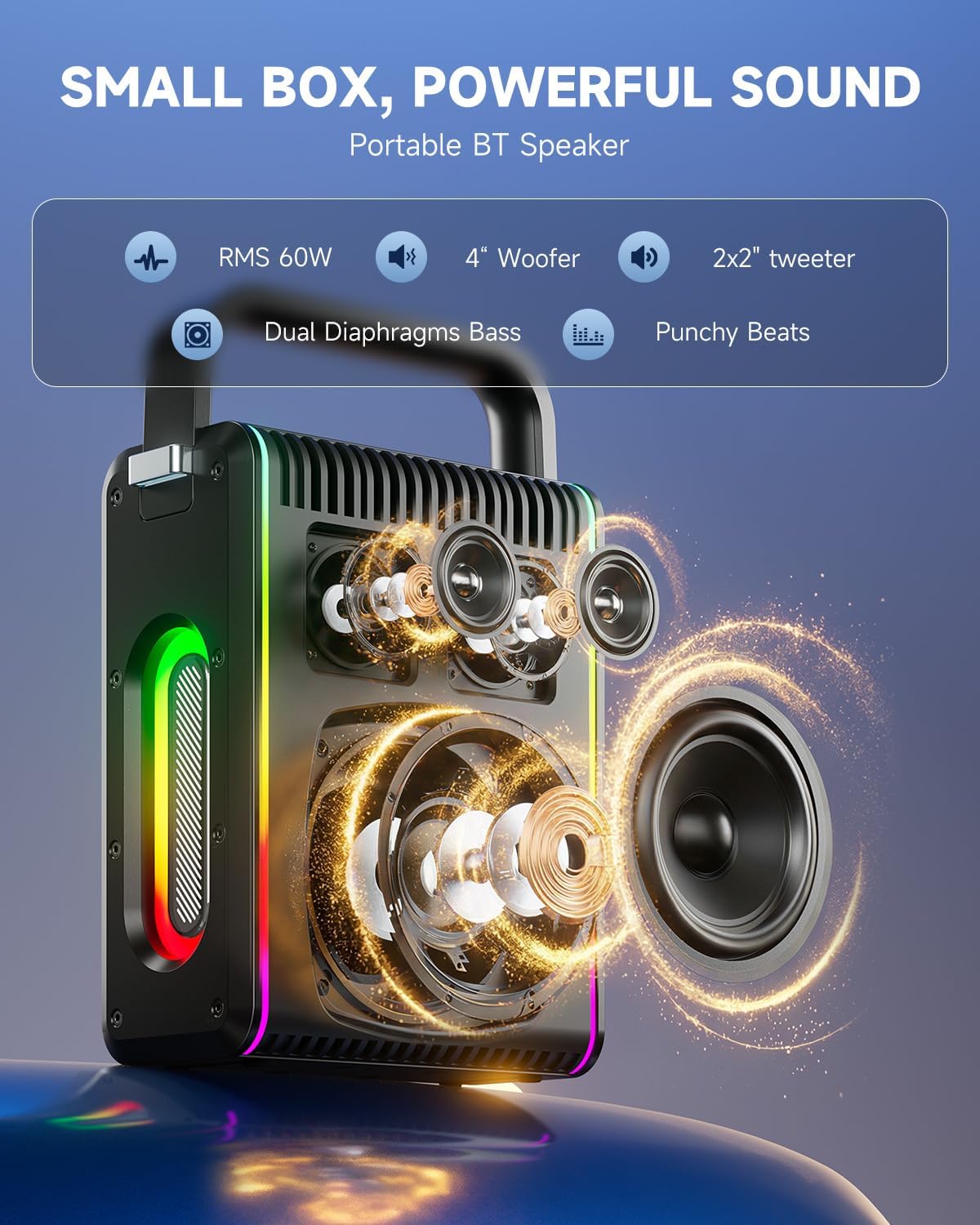
Image: Top control panel of the MPS5.
- Butang kuasa (U): Tekan dan tahan selama 2 saat untuk menghidupkan/mematikan kuasa.
- Butang Mod (M): Short press to cycle through input modes (Bluetooth, AUX, USB, TF Card). Double-press to initiate TWS pairing.
- Microphone Volume (Mic - / Mic +): Melaraskan kelantangan mikrofon yang disambungkan.
- Echo Adjustment (R- / R+): Melaraskan kesan gema untuk mikrofon.
- Main/Jeda (▶): Memainkan atau menjeda trek semasa.
- Kelantangan Rendah (-): Decreases the main speaker volume.
- Naikkan Kelantangan (+): Increases the main speaker volume.
- EQ A/E: Short press to switch between EQ modes. Long press to toggle between original sound and accompaniment elimination.
6.2 Penggunaan Mikrofon
The MPS5 comes with two wireless microphones for karaoke and vocal performances.
- Hidupkan/Mati Kuasa: Press and hold the power button on the microphone to turn it on or off.
- Berpasangan: The microphones are pre-paired with the speaker. If re-pairing is needed, ensure the speaker is on, then power on the microphone. They should connect automatically.
- Microphone Disconnect/Reconnect: Press the dedicated microphone button on the speaker's control panel to quickly disconnect or reconnect the microphones.
6.3 Audio Input Modes
In addition to Bluetooth, the MPS5 supports several wired and local storage input options.

Image: Input ports on the MPS5 speaker.
- Input AUX: Connect an external audio device using the 3.5mm AUX cable. Select AUX mode using the 'M' button.
- Main balik USB: Masukkan pemacu kilat USB yang mengandungi audio MP3 files ke dalam port USB. Pembesar suara secara automatik akan bertukar kepada mod USB dan mula main balik.
- Main balik Kad TF: Insert a Micro TF card containing MP3 audio files ke dalam slot kad TF. Pembesar suara secara automatik akan bertukar kepada mod kad TF dan mula main balik.
6.4 Lampu LED
The MPS5 features dynamic LED lighting on its sides. Use the dedicated LED button (if available, or refer to the 'M' button for light control if combined) to cycle through different light modes or turn them off.
7. Penyelenggaraan
- Pembersihan: Gunakan kain lembut dan kering untuk membersihkan bahagian luar pembesar suara. Jangan gunakan pembersih cecair atau bahan yang melelas.
- Storan: Simpan peranti di tempat yang sejuk dan kering jauh dari cahaya matahari langsung dan suhu yang melampau.
- Penjagaan Bateri: Untuk memanjangkan hayat bateri, elakkan daripada menyahcas sepenuhnya bateri dengan kerap. Cas peranti dengan kerap, walaupun tidak digunakan untuk tempoh yang lama.
8. Penyelesaian masalah
If you encounter issues with your Moukey MPS5, refer to the following common problems and solutions:
| Masalah | Kemungkinan Punca | Penyelesaian |
|---|---|---|
| Tiada kuasa | Bateri habis. | Cas pembesar suara menggunakan kabel USB Type-C yang disediakan. |
| Tiada bunyi dari pembesar suara | Kelantangan terlalu rendah atau diredamkan. Mod input salah dipilih. | Increase volume using the '+' button. Press 'M' to cycle through input modes. |
| Penggandingan Bluetooth gagal | Pembesar suara tidak berada dalam mod berpasangan. Peranti terlalu jauh. | Ensure speaker is in Bluetooth mode. Move device closer to speaker. Try restarting both devices. |
| Mikrofon tidak berfungsi | Microphone is off or uncharged. Microphone is disconnected. | Ensure microphone is charged and powered on. Press the microphone button on the speaker to reconnect. |
| Gandingan TWS gagal | Speakers are already connected to another device. | Ensure both speakers are not connected to any other Bluetooth device before initiating TWS pairing. |
9. Spesifikasi
- Jenama: Moukey
- Nombor Model: MPS5
- Output Wattage: 200 Watt (Puncak)
- Teknologi Ketersambungan: Bluetooth 5.3
- Input Audio: Bluetooth, TF card, USB, MP3, AUX, Wired microphones
- Bilangan Saluran: 2
- Sumber Kuasa: Dikuasakan Bateri
- Jenis Penyambung: USB Jenis C
- Dimensi Item (L x W x H): 2.36 x 6.3 x 12.2 inci
- Berat Barang: Kira-kira 2 kg
- Peranti Serasi: Smartphone, Tablet, Laptop, MP3 Player, Microphone
- warna: Black with Silver Accents
10. Waranti & Sokongan
The Moukey MPS5 Portable Karaoke Machine comes with a Waranti 1 Tahun dari tarikh pembelian. Waranti ini meliputi kecacatan pembuatan dan mutu kerja di bawah penggunaan biasa. Sila simpan bukti pembelian anda untuk tuntutan waranti.
For technical support, troubleshooting assistance, or warranty inquiries, please contact Moukey customer service through the retailer where the product was purchased or visit the official Moukey webtapak untuk maklumat hubungan.