
1. Pengenalan
This manual provides essential instructions for the safe and effective use of your DNT Optics TNC335R ThermNight Thermal & Night Vision Multispectral Scope, bundled with the QDM150 Quick Detach Mount. The TNC335R is an advanced optical device designed for enhanced observation capabilities in various lighting conditions, offering both thermal and night vision functionalities. Please read this manual thoroughly before operating the device.
2. Maklumat Keselamatan
- Keselamatan Mata: Never look directly at the sun or other intense light sources through the scope, as this can cause permanent eye damage.
- Keselamatan Bateri: Gunakan hanya jenis bateri yang disyorkan. Jangan campurkan bateri lama dan baharu, atau jenis bateri yang berbeza. Lupuskan bateri mengikut peraturan tempatan.
- Pemasangan: Ensure the scope is securely mounted to your firearm using the QDM150 mount. Improper mounting can lead to injury or damage to the device.
- Keadaan Persekitaran: Avoid exposing the device to extreme temperatures, direct impact, or corrosive substances.
- Penyelenggaraan: Do not attempt to disassemble or modify the scope. Refer all servicing to authorized DNT Optics personnel.
3. Kandungan Pakej
Sahkan bahawa semua item terdapat dalam pakej anda:
- DNT Optics TNC335R ThermNight Multispectral Scope
- QDM150 Quick Detach Mount
- Penutup Lensa
- Bateri boleh dicas semula
- Kabel Pengecas USB
- Kain Pembersih Lensa
- Manual Pengguna (dokumen ini)
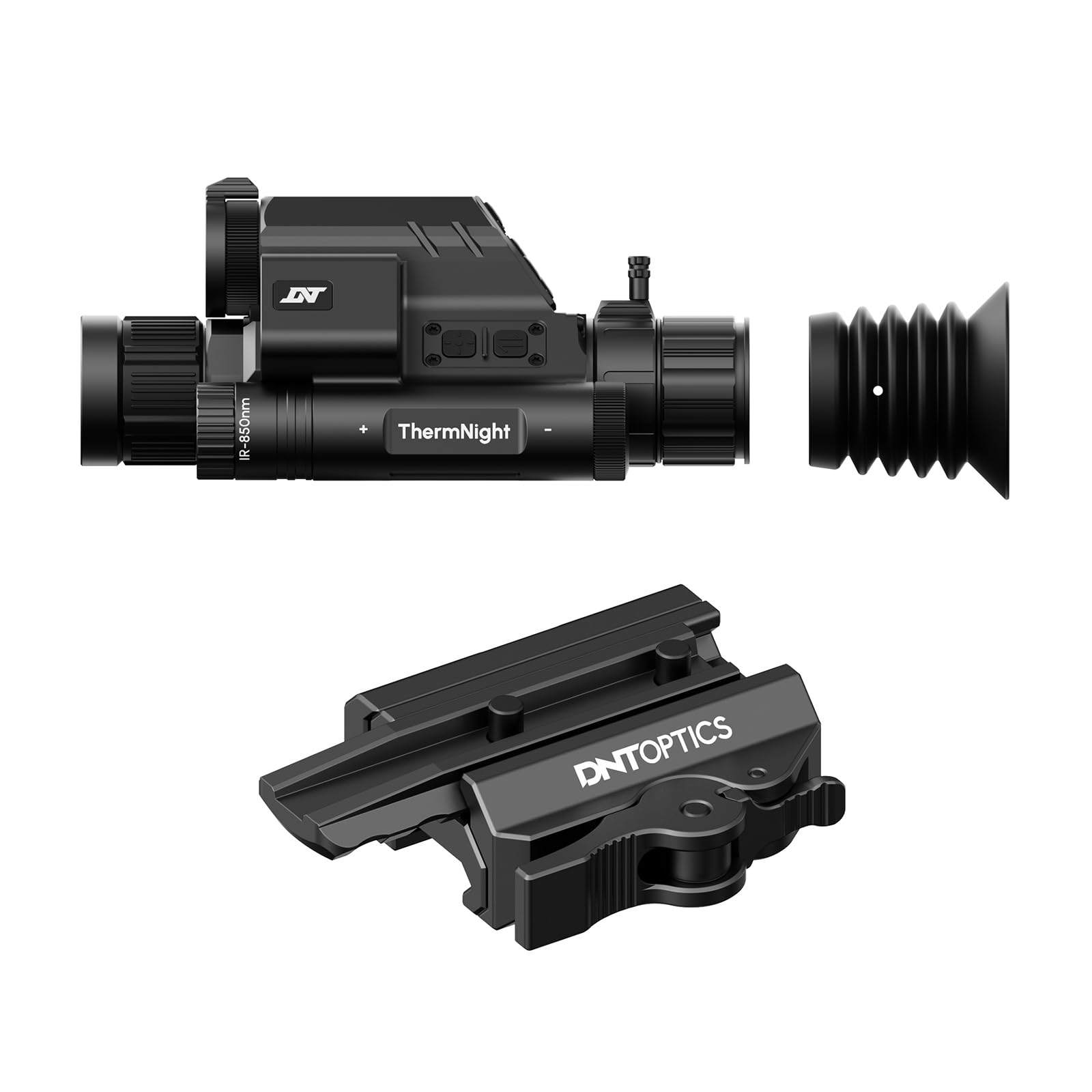
Image 1: DNT Optics TNC335R ThermNight Multispectral Scope with QDM150 mount. This image displays the main scope unit alongside its quick-detach mounting system, providing a visual reference for the product.
4. Persediaan
4.1 Pemasangan Bateri
- Locate the battery compartment on the scope.
- Tanggalkan penutup bateri.
- Insert the rechargeable battery, ensuring correct polarity (+/-).
- Securely replace the battery cap.
- Cas bateri sepenuhnya sebelum penggunaan pertama menggunakan kabel USB yang disediakan.
4.2 Mounting the QDM150
- Attach the QDM150 mount to the scope according to the mount's specific instructions, ensuring it is firmly secured.
- Position the scope with the QDM150 mount onto your rifle's Picatinny rail.
- Engage the quick-detach levers to lock the mount onto the rail. Verify that the scope is stable and does not wobble.
4.3 Initial Power-On and Zeroing
- Tekan dan tahan butang kuasa sehingga paparan menyala.
- Perform initial zeroing of the scope according to standard rifle scope zeroing procedures. Refer to the detailed zeroing guide available on the DNT Optics weblaman web untuk arahan yang komprehensif.
5. Beroperasi
5.1 Hidupkan/Mati Kuasa
- Hidupkan kuasa: Tekan dan tahan butang kuasa selama lebih kurang 3 saat.
- Matikan: Press and hold the power button for approximately 5 seconds until the display shuts down.
5.2 Pemilihan Mod
The TNC335R offers multiple observation modes:
- Mod Terma: Detects heat signatures. Ideal for low-light or obscured conditions.
- Mod Penglihatan Malam: Amplifies ambient light for clear viewing in near-darkness.
- Mod Hari: Standard optical viewing for daylight conditions.
Press the 'Mode' button to cycle through the available observation modes.
5.3 Reticle Adjustment
Use the directional buttons or rotary dial (depending on model variant) to adjust the reticle's position for precise aiming. Refer to the on-screen menu for specific reticle options and adjustments.
5.4 Brightness and Contrast
Navigate to the 'Display Settings' in the main menu to adjust screen brightness and image contrast for optimal viewdalam persekitaran yang berbeza.
5.5 Zum Digital
Press the 'Zoom' button to cycle through available digital magnification levels. Note that higher digital zoom levels may reduce image clarity.
6. Penyelenggaraan
6.1 Pembersihan
- Kanta: Use the provided lens cleaning cloth or a soft, lint-free cloth specifically designed for optics. Gently wipe the lens surfaces. For stubborn dirt, use a small amount of lens cleaning fluid.
- Badan: Wipe the scope's body with a soft, damp kain. Elakkan pembersih atau pelarut yang melelas.
6.2 Penjagaan Bateri
- Cas semula bateri secara berkala, walaupun tidak kerap digunakan, untuk mengekalkan jangka hayatnya.
- Store the device with a partially charged battery if storing for extended periods.
6.3 Penyimpanan
Store the scope in a cool, dry place, away from direct sunlight and extreme temperatures. Use the lens caps to protect the optical surfaces.
7. Penyelesaian masalah
| Masalah | Kemungkinan Punca | Penyelesaian |
|---|---|---|
| Peranti tidak dihidupkan. | Low or depleted battery; incorrectly installed battery. | Charge the battery; ensure battery is installed with correct polarity. |
| Imej kabur atau tidak jelas. | Lens caps still on; dirty lenses; focus adjustment needed. | Remove lens caps; clean lenses; adjust the focus ring. |
| Butang tidak bertindak balas. | Device frozen; low battery. | Perform a soft reset (refer to DNT Optics website for specific instructions); charge battery. |
| QDM150 mount feels loose. | Levers not fully engaged; mounting screws loose. | Ensure quick-detach levers are fully locked; tighten any accessible mounting screws. |
8. Spesifikasi
- Jenama: DNT Optics
- Nama Model: TNC335R
- Berat Barang: 29.8 Auns
- Bahan: aluminium
- Peranti Serasi: Rifle, Shotgun
- Penglihatan Malam: ya
- Jenis Retikel: salib
- Jenis Benang: 1/2"-28
- warna: Hitam
9. Waranti dan Sokongan
DNT Optics products are covered by a limited warranty. For detailed warranty information, product registration, and technical support, please visit the official DNT Optics webtapak atau hubungi bahagian perkhidmatan pelanggan mereka. Simpan resit pembelian anda sebagai bukti pembelian untuk tuntutan waranti.
rasmi Webtapak: DNT Optics Store on Amazon