
1. Pengenalan
This manual provides essential information for the safe and efficient operation of your Ulefone Armor Pad 5 Pro 5G Rugged Tablet. Please read it thoroughly before using the device.
The Ulefone Armor Pad 5 Pro is a rugged tablet designed for demanding environments, featuring 5G connectivity, a powerful MediaTek Dimensity 7400X processor, a large 24200mAh battery with 120W fast charging, and an 11-inch FHD+ display. It is built to withstand harsh conditions with IP68/IP69K and MIL-STD-810H certifications.
2. Apa yang ada di dalam Kotak
Sahkan bahawa semua item terdapat dalam pembungkusan produk anda:
- 1 x Ulefone Armor Pad 5 Pro Tablet
- 1 x Pengecas Kuasa AC (120W)
- 1 x Kabel Data Jenis-C ke Jenis-C (100cm)
- 1 x Handle Stand & 1 x Screwdriver & 6 x Screws
- 1 x Pry Opener
- 1 x Filem Pelindung (Pra-pasang)
- Manual Pengguna berbilang bahasa
- Charging Instruction Card
- Safety Prompt Statement
- Kad Waranti
Video: Armor Pad 5 Pro Unboxing. This video demonstrates the unboxing process and contents of the Ulefone Armor Pad 5 Pro package.
3. Produk Lebihview
Ciri-ciri Utama
- Global 5G Network: Supports dual SIM dual standby for convenient and efficient connectivity.
- 24200mAh Battery & 120W Fast Charger: Extended battery life with rapid charging and 10W reverse charging capability.
- MediaTek Dimensity 7400X 5G: Advanced 4nm process octa-core CPU for high-level streaming, multitasking, and gaming.
- 32GB RAM + 512GB ROM & Android 15: Ample storage (expandable up to 2TB) and the latest Android OS with enhanced features.
- 11-inch FHD+ Display & IP68/69K & MIL-STD-810H Shield: Durable Corning Gorilla Glass screen with 1920x1200 resolution and 600 nits brightness, certified for ruggedness.
- Dual 64MP Rear Camera & 32MP Front Camera: Includes a 64MP night vision camera with 4 infrared LEDs and a 64MP Sony IMX682 main camera for detailed images.
- Dual Versatile LED Lights & Dual Warning Lights: Two 1000-lumen LED lights (warm/white) and dual warning lights (64 LEDs) for emergency alerts.
- Exclusive Handle Stand: Durable alloy handle stand for secure one-handed operation or use as a robust kickstand.
- Ciri-ciri tambahan: uSmart Expansion Connector, Widevine L1, Wifi 6E, Fingerprint Unlock, NFC, Headset-Free FM Radio, Custom Key, Outdoor Toolbox, 3-Card Slot, GPS+GLONASS+Beidou+Galileo+QZSS+NavIC, Gloves Mode.

Imej: Depan view of the Ulefone Armor Pad 5 Pro tablet, showcasing paparannya.

Imej: Belakang view of the Ulefone Armor Pad 5 Pro, highlighting the dual LED lights and the integrated handle stand.
Video: Armor Pad 5 Series Design. This video provides an overview of the tablet's design and physical features.
4. Persediaan
4.1 Inserting SIM/MicroSD Cards
- Cari dulang kad SIM/MicroSD di sisi tablet.
- Use the provided pry opener to carefully open the protective cover of the card tray.
- Gently pull out the card tray.
- Place your Nano SIM cards and/or MicroSD card into the designated slots on the tray. Ensure correct orientation.
- Carefully reinsert the tray into the tablet and press the protective cover firmly to ensure a watertight seal.
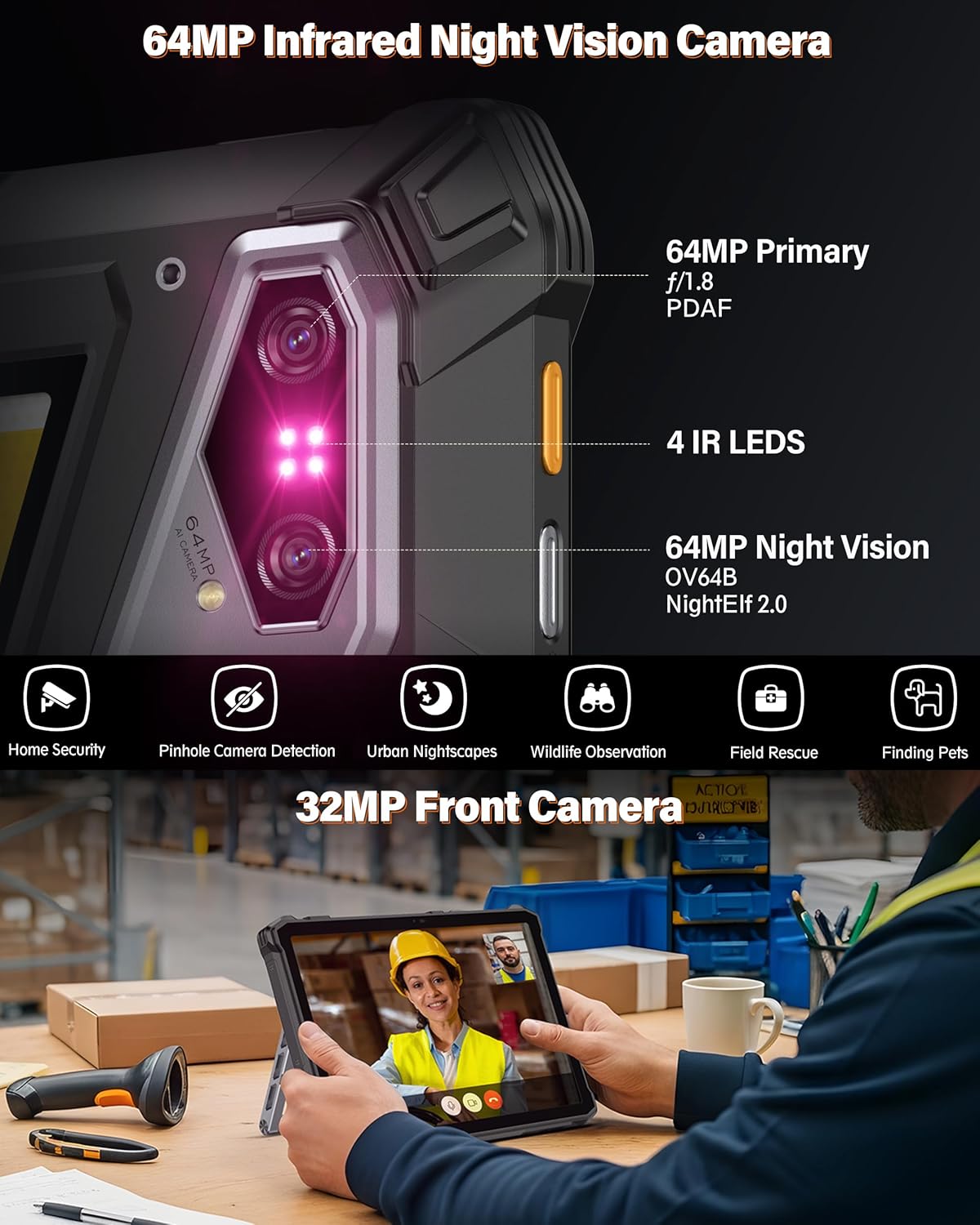
Image: Close-up of the SIM card tray on the Ulefone Armor Pad 5 Pro.
4.2 Kuasa Awal Hidup
- Press and hold the Power button (located on the side) until the Ulefone logo appears on the screen.
- Ikut arahan pada skrin untuk melengkapkan persediaan awal, termasuk pemilihan bahasa, sambungan Wi-Fi dan persediaan akaun Google.
5. Mengendalikan Tablet Anda
5.1 Paparan dan Navigasi
The tablet features an 11-inch FHD+ display with a resolution of 1920x1200 pixels and 600 nits maximum brightness for clear visibility even outdoors. Navigate the Android 15 operating system using touch gestures.

Image: The 11-inch FHD+ display of the Ulefone Armor Pad 5 Pro, showing vibrant visuals.
5.2 Fungsi Kamera
The tablet is equipped with a dual 64MP rear camera system, including a 64MP night vision camera with 4 IR LEDs, and a 32MP front camera. Open the Camera app to access various modes and settings.
- Kamera Penglihatan Malam: Activate night vision mode to capture images and videos in low-light or complete darkness. The 4 IR LEDs enhance visibility.
- Kamera Utama: Use the 64MP main camera for high-resolution photos and 4K video recording.
- Kamera Depan: The 32MP front camera is suitable for video calls and selfies.

Image: The 64MP Night Vision Camera of the Ulefone Armor Pad 5 Pro, showing its infrared capabilities.
5.3 Dual LED Lights and Warning Lights
The tablet features two versatile LED lights and dual warning lights for various situations:
- Versatile LED Lights: Each light provides up to 1000 lumens. You can switch between warm or white light modes to suit your needs, such as for camping or general illumination.
- Lampu Amaran: Activate these powerful twin signals (64 LEDs in total) for immediate attention in emergencies. They can be set to constant or flashing modes.

Image: The Ulefone Armor Pad 5 Pro displaying its Dual Versatile LED Lights in use.
Video: Ulefone Armor Pad 5 Series Dual LED and Warning Lights. This video demonstrates the functionality of the tablet's versatile LED lights and warning lights.
5.4 Handle Stand Usage
The integrated handle stand, crafted from durable alloy, provides multiple functionalities:
- Membawa: Use the handle for secure one-handed carrying across challenging terrain.
- Kickstand: Deploy the stand to prop up the tablet for hands-free viewing or interaction. It offers adjustable viewsudut-sudut.

Image: The Ulefone Armor Pad 5 Pro with its handle stand deployed, allowing for hands-free use.
Video: Armor Pad 5 Series Accessory Ecosystem Showcase. This video highlights the versatility of the handle stand and other accessories.
5.5 Ketersambungan
The Armor Pad 5 Pro supports a range of connectivity options:
- Rangkaian 5G: Nikmati sambungan data mudah alih berkelajuan tinggi.
- Wi-Fi 6E: For fast and stable wireless internet connections.
- NFC: Untuk pembayaran tanpa sentuh dan gandingan pantas dengan peranti yang serasi.
- Bluetooth: Sambungkan fon kepala tanpa wayar, pembesar suara dan aksesori Bluetooth yang lain.
- GPS: Integrated GPS, GLONASS, Beidou, Galileo, QZSS, and NavIC for precise navigation.
5.6 Outdoor Toolbox and Custom Key
The tablet includes a pre-installed Outdoor Toolbox with various utility apps like a compass, sound meter, and magnifier. The Custom Key can be programmed to quickly access frequently used functions or apps.
6. Penyelenggaraan
6.1 Ruggedness Features
The Ulefone Armor Pad 5 Pro is built to be highly durable:
- Penilaian IP68/IP69K: Certified for water and dust resistance, allowing submersion in water and protection against high-pressure water jets.
- Diperakui MIL-STD-810H: Meets military standards for resistance against drops, shocks, and extreme temperatures.
To maintain its ruggedness, ensure all port covers are securely closed before exposing the tablet to water or dust.

Image: Visual representation of the Ulefone Armor Pad 5 Pro's IP68/69K and MIL-STD-810H ruggedness certifications.
6.2 Penjagaan Bateri
The tablet features a 24200mAh battery with 120W fast charging and 10W reverse charging:
- mengecas: Gunakan pengecas 120W dan kabel Jenis-C yang disediakan untuk pengecasan pantas yang optimum.
- Pengecasan Terbalik: The tablet can act as a power bank to charge other devices using its 10W reverse charging capability.
- Ketahanan Bateri: Elakkan suhu yang melampau dan kerap menyahcas bateri sepenuhnya untuk memanjangkan jangka hayatnya.

Image: Details on the 24200mAh dual-cell battery and 120W fast charging feature of the Ulefone Armor Pad 5 Pro.
7. Penyelesaian masalah
If you encounter issues with your Ulefone Armor Pad 5 Pro, consider the following general troubleshooting steps:
- Peranti Tidak Membalas: Tekan dan tahan butang Kuasa selama kira-kira 10-15 saat untuk memaksa mulakan semula.
- Isu Pengecasan: Ensure the charger and cable are securely connected and undamaged. Try a different outlet.
- Kesambungan Rangkaian: Check if airplane mode is off. Verify SIM card insertion and network settings. For Wi-Fi, try restarting your router.
- Kerosakan Apl: Clear the cache and data of the problematic app in Settings > Apps, or uninstall and reinstall the app.
- Kemas Kini Perisian: Ensure your tablet's software is up to date by checking Settings > System > System update.
For persistent issues, refer to the official Ulefone support resources or contact customer service.
8. Spesifikasi
| Ciri | Spesifikasi |
|---|---|
| Jenama | Ulefone |
| Nama Model | Armor Pad 5 Pro |
| Pemproses | MediaTek Dimensity 7400X 5G (Octa-core, up to 2.6 GHz) |
| Memori RAM | 32 GB (12GB + 20GB adjustable RAM) |
| Storan Dalaman | 512 GB (Boleh dikembangkan sehingga 2 TB melalui MicroSD) |
| Sistem Operasi | Android 15 |
| Saiz Skrin | 11 Inci |
| Resolusi Paparan | 1920x1200 pixels (FHD+) |
| Kecerahan Paparan | 600 Nits Max |
| Kadar Muat Semula Paparan | 90 Hz |
| Kamera Belakang | Dual 64MP (64MP Main + 64MP Night Vision with 4 IR LEDs) |
| Kamera Depan | 32 MP |
| Kapasiti Bateri | 24200 mAh |
| Mengecas | Pengecasan Pantas 120W, Pengecasan Songsang 10W |
| Kekasaran | IP68/IP69K, Diperakui MIL-STD-810H |
| Ketersambungan | 5G, Wi-Fi 6E, Bluetooth, NFC, USB |
| Navigasi | GPS, GLONASS, Beidou, Galileo, QZSS, NavIC |
| Dimensi (P x L x T) | 10.62" x 1.09" x 7.07" |
| Berat badan | 1328g (2.9 paun) |
9. Waranti dan Sokongan
The Ulefone Armor Pad 5 Pro comes with a 12-month manufacturer warranty in the US. For any product-related questions, technical assistance, or warranty claims, please contact Ulefone customer support.
You can typically find contact information on the official Ulefone weblaman web atau melalui peruncit tempat anda membeli peranti tersebut.