
1. Pengenalan
Thank you for choosing the LOEWE Leo Wireless Headphones. These premium headphones are designed to deliver an exceptional audio experience with advanced features such as Hi-Res Audio, adaptive noise cancellation, and real-time voice translation. This manual provides essential information for setting up, operating, and maintaining your headphones to ensure optimal performance and longevity.
2. Kandungan Pakej
Sebelum digunakan, sila pastikan semua barang ada di dalam bungkusan:
- LOEWE Leo Wireless Headphones
- Kabel Pengecas USB-C
- AUX to USB-C Audio Cable
- Sarung Pembawa Kulit
- Sarung Tangan Keras
- Cable Pouch
- Manual Pengguna (dokumen ini)
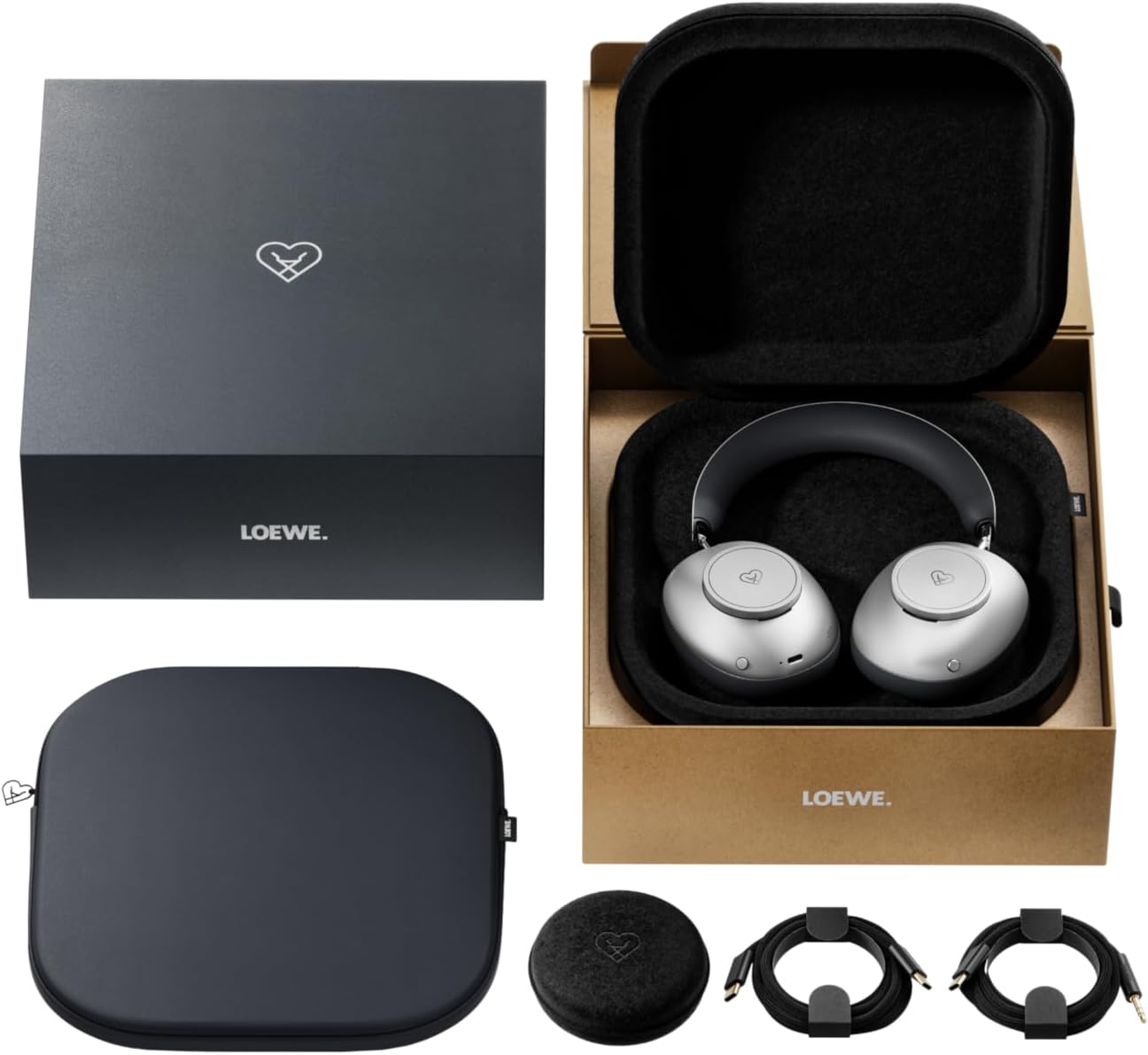
Image: The LOEWE Leo Wireless Headphones package contents, showing the headphones, USB-C cable, AUX cable, leather case, hard case, and cable pouch.
3. Produk Lebihview
Familiarize yourself with the physical components and controls of your LOEWE Leo headphones.

Imej: Depan view of the LOEWE Leo Wireless Headphones, showcasing cup telinga dan ikat kepala.
3.1. Kawalan dan Pelabuhan
The headphones feature intuitive controls for easy operation:
- Dail Kawalan: Two precision-crafted rotary wheels for volume adjustment and navigation.
- Butang Tindakan: Dedicated buttons for playback control, ANC modes, and voice translation activation.
- Port USB-C: For charging and wired audio connection.
- Bicu 3.5mm: For traditional wired audio connection.

Imej: Terperinci view of the earcup, highlighting the control dial, USB-C port, and 3.5mm audio jack.
4. Bermula
4.1. Mengecas Fon Kepala
Before first use, fully charge your LOEWE Leo headphones. A full charge provides up to 65 hours of continuous playback.
- Sambungkan kabel pengecas USB-C yang dibekalkan ke port USB-C pada fon kepala.
- Sambungkan hujung kabel yang satu lagi ke penyesuai kuasa USB yang serasi (tidak disertakan) atau port USB komputer.
- Penunjuk LED pada fon kepala akan menunjukkan status pengecasan. Ia biasanya akan mematikan atau bertukar warna setelah dicas sepenuhnya.
4.2. Hidupkan/Mati Kuasa
- Untuk Menghidupkan: Tekan dan tahan butang Kuasa selama lebih kurang 3 saat sehingga penunjuk LED menyala.
- Untuk Mematikan: Tekan dan tahan butang Kuasa selama lebih kurang 3 saat sehingga penunjuk LED dimatikan.
4.3. Berpasangan Bluetooth
The LOEWE Leo headphones utilize Bluetooth Low Energy (BLE) for faster pairing and reduced power consumption.
- Pastikan fon kepala dimatikan.
- Press and hold the Power button for approximately 5 seconds until the LED indicator flashes rapidly, indicating pairing mode.
- Pada peranti anda (telefon pintar, tablet, komputer), dayakan Bluetooth dan cari peranti yang tersedia.
- Select "LOEWE Leo" from the list of found devices.
- Setelah disambungkan, penunjuk LED akan berhenti berkelip dan kekal biru pejal.
4.4. Sambungan Berwayar
For a wired audio experience, use the supplied AUX to USB-C cable.
- Connect the USB-C end of the AUX cable to the headphones.
- Connect the 3.5mm end of the AUX cable to your audio source's 3.5mm jack.
- Fon kepala akan bertukar secara automatik kepada mod berwayar.
5. Mengendalikan Fon Kepala Anda
5.1. Audio Playback and Volume Control
Use the control dials and action buttons for managing your audio:
- Kelantangan Naik/Turun: Rotate the designated control dial.
- Main/Jeda: Press the central action button once.
- Lagu Seterusnya: Double-press the central action button.
- Trek Sebelumnya: Triple-press the central action button.

Image: Close-up of the earcup's control dial, used for volume and navigation.
5.2. Adaptive Noise Cancellation (ANC)
The LOEWE Leo features advanced adaptive noise cancellation that continuously analyzes your environment and adjusts in real-time.
- Aktifkan/Nyahaktifkan ANC: Press the dedicated ANC button once.
- Mod Ketelusan: Press the ANC button twice to allow ambient sounds to pass through, enhancing situational awareness.

Image: Illustration of the adaptive noise cancellation feature, depicting sound wave management.
5.3. Real-time Voice Translation
Communicate across language barriers with the integrated real-time voice translation feature.
- Ensure your headphones are connected to a device with internet access and the LOEWE companion app installed.
- Activate the translation feature via the dedicated button or the companion app.
- Speak into the headphone's microphone. The translated audio will be played back in real-time.

Image: Earcup detail showing the microphone for voice input and the 'leo' icon, representing the real-time translation function.
5.4. Dolby Atmos and Spatial Audio
Experience immersive sound with Dolby Atmos and spatial audio support. This feature is automatically enabled when compatible content is played through a connected device that supports these audio technologies.
6. Penyelenggaraan dan Penjagaan
6.1. Pembersihan
- Lap fon kepala dengan kain lembut, kering dan tidak berbulu.
- Jangan gunakan pembersih yang melelas, alkohol atau pelarut kimia.
- Keep moisture away from openings.
6.2. Penjagaan Bateri
- Elakkan menyahcas sepenuhnya bateri dengan kerap.
- Store the headphones in a cool, dry place when not in use for extended periods.
- The battery is user-replaceable, contributing to the product's longevity.
6.3. Reka Bentuk Modular
The LOEWE Leo headphones feature a durable modular design with replaceable components, such as ear cushions and headbands. This design allows for easy replacement of worn parts, extending the product's lifespan.

Image: The modular construction of the LOEWE Leo headphones, showing detachable earcups and headband for maintenance or replacement.
7. Penyelesaian masalah
If you encounter issues with your LOEWE Leo headphones, refer to the following common solutions:
- Tiada Kuasa: Pastikan fon kepala dicas sepenuhnya. Sambungkannya ke sumber kuasa menggunakan kabel USB-C.
- Tiada Bunyi:
- Semak tahap kelantangan pada kedua-dua fon kepala dan peranti anda yang disambungkan.
- Ensure the headphones are properly paired via Bluetooth or the AUX cable is securely connected.
- Try restarting both the headphones and the audio source device.
- Pemutusan sambungan Bluetooth:
- Pastikan fon kepala berada dalam julat Bluetooth peranti anda (biasanya 10 meter).
- Disable and re-enable Bluetooth on your device, then attempt to re-pair.
- Clear the LOEWE Leo from your device's Bluetooth history and pair again.
- ANC Tidak Berfungsi Dengan Berkesan:
- Ensure the earcups form a good seal around your ears. Adjust the fit if necessary.
- Verify that ANC is activated.
- Voice Translation Issues:
- Periksa sambungan internet peranti anda.
- Ensure the LOEWE companion app is up-to-date and configured correctly.
- Bercakap dengan jelas dan pada kadar yang sederhana.
If problems persist, please contact LOEWE customer support.
8. Spesifikasi
| Ciri | Penerangan |
|---|---|
| Nama Model | Leo |
| Nombor Model | 64641J10 |
| Teknologi Ketersambungan | Wireless (Bluetooth), Wired |
| Komunikasi Tanpa Wayar | Tenaga Rendah Bluetooth (BLE) |
| Ciri Bunyi | Hi-Res Audio, Dolby Atmos, Spatial Audio |
| Pembatalan Bunyi | Adaptive Noise Reduction (ANC) |
| Ciri Khas | Real-time Voice Translation, Modular Design with Replaceable Components |
| Hayat Bateri | Sehingga 65 jam (lebih kurang) |
| Jenis Kawalan | Button Control, Rotary Dials |
| Peranti Serasi | Cellular Phone, Tablet, Computer, Laptop |
| Berat badan | 3 Kilograms (product weight as listed, may include packaging) |
9. Waranti dan Sokongan
9.1. Waranti Pengeluar
The LOEWE Leo Wireless Headphones come with a Waranti pengilang selama 2 tahun. Waranti ini melindungi kecacatan pada bahan dan mutu kerja di bawah penggunaan biasa. Sila simpan bukti pembelian anda untuk tuntutan waranti.
For specific terms and conditions of the warranty, please refer to the warranty card included in your product packaging or visit the official LOEWE webtapak.
9.2. Sokongan Pelanggan
For technical assistance, troubleshooting, or warranty inquiries, please contact LOEWE customer support through their official webtapak atau maklumat hubungan yang diberikan dalam dokumentasi produk anda.
Sumber Dalam Talian: Visit the official LOEWE weblaman web untuk Soalan Lazim, kemas kini perisian dan sumber sokongan tambahan.