
pengenalan
This manual provides detailed instructions for the setup, operation, maintenance, and troubleshooting of your GMKtec Mini PC M2Pro S. This compact desktop computer is equipped with an 11th generation Intel Core i7-1185G7 processor, 32GB DDR4 RAM, and a 512GB NVMe SSD, designed for efficient performance in various applications. Please read this manual thoroughly before using the device to ensure proper functionality and longevity.
Kandungan Pakej
Sahkan bahawa semua item yang disenaraikan di bawah terdapat dalam pakej anda:
- 1 x GMKtec Nucbox Mini PC Computer
- 1 x Penyesuai Kuasa
- 1 x VESA Mount dengan Skru
- 1 x Kabel HDMI
- 1 x Manual Pengguna (dokumen ini)

Image: Contents of the GMKtec Mini PC M2Pro S retail box.
Produk Selesaiview
The GMKtec Mini PC M2Pro S is a high-performance, compact desktop solution. Key features include:
- Pemproses: 11th Gen Intel Core i7-1185G7 (up to 4.8 GHz, 4 Cores, 8 Threads, 12MB Cache)
- Ingatan: 32GB DDR4 SODIMM (dual-channel, expandable up to 64GB)
- Storan: 512GB M.2 2280 NVMe SSD (PCIe3.0, expandable up to 2TB), additional M.2 2242 SATA slot (expandable up to 2TB)
- Grafik: Intel Iris Xe Graphics G7 96EU
- Output Paparan: Supports triple 4K displays via 2 x HDMI (4K@60Hz) and 1 x USB Type-C (4K@60Hz)
- Rangkaian: 2.5Gbps LAN (RJ45), WiFi 6 (802.11ax), Bluetooth 5.2
- Pelabuhan: USB 3.2, USB Type-C (40Gbps), Audio (3.5mm CTIA)
- penyejukan: Upgraded quiet cooling fan with copper vapor chamber and multiple exhaust vents
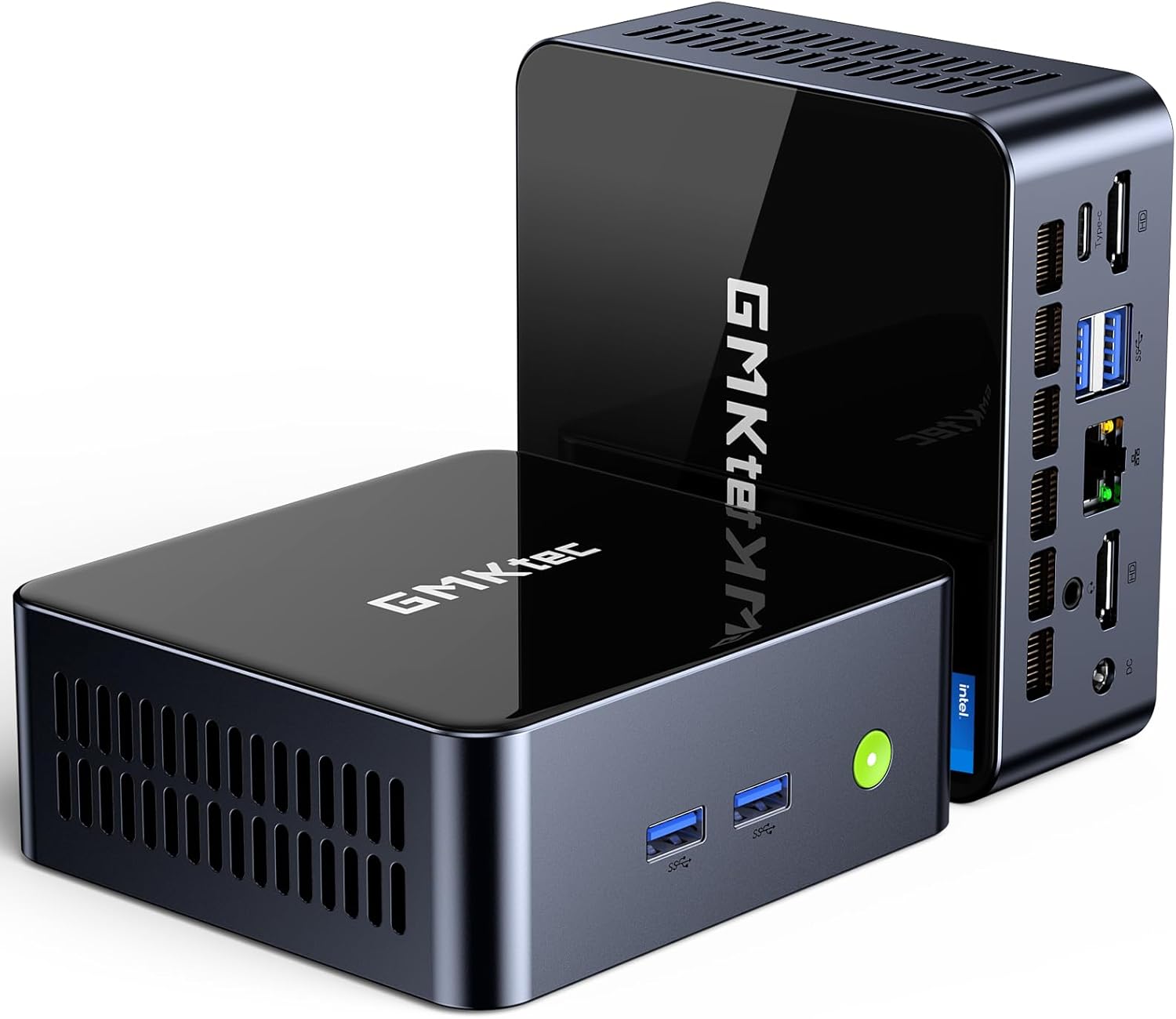
Imej: Depan view of the GMKtec Mini PC M2Pro S.
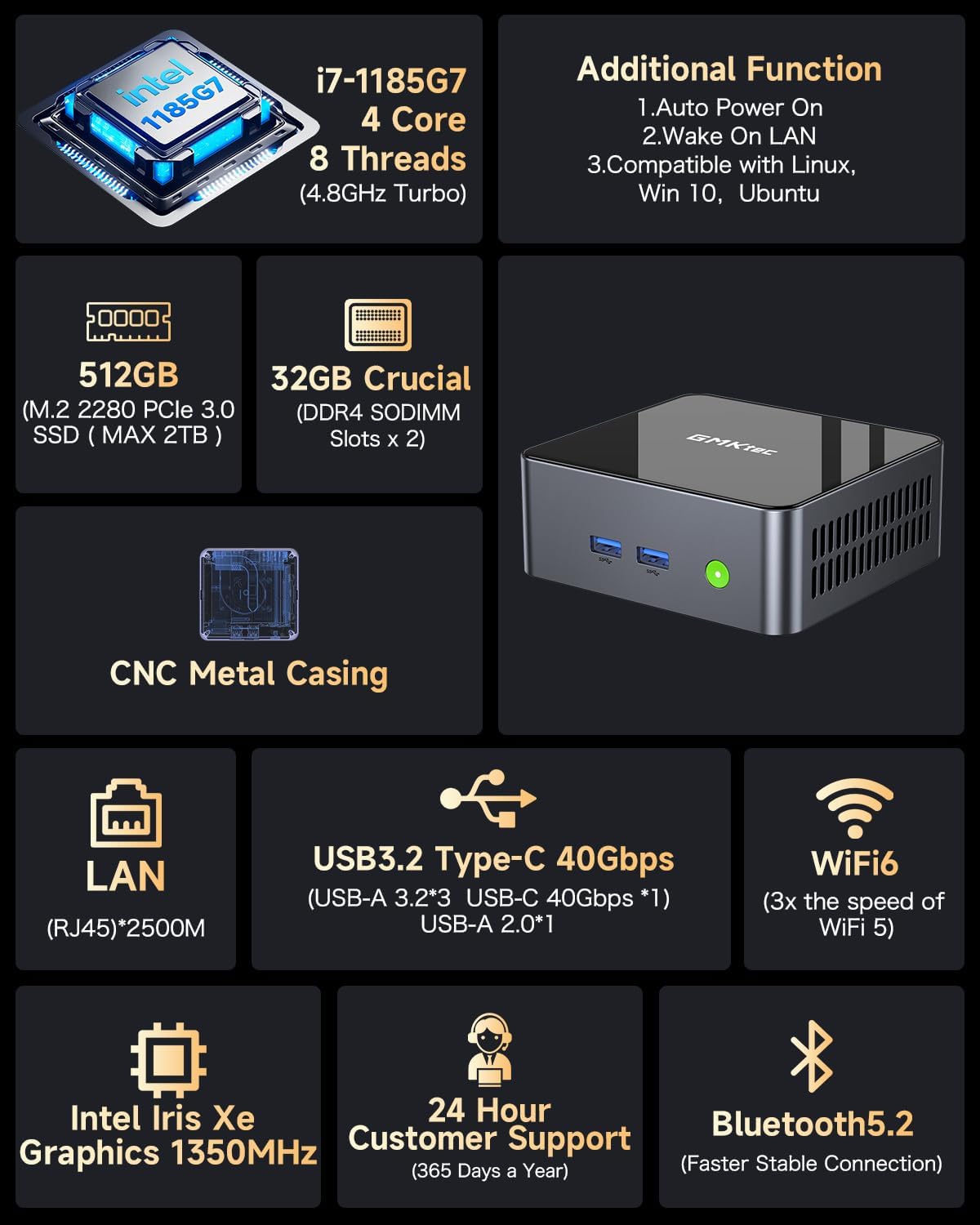
Imej: Selesaiview of the GMKtec Mini PC M2Pro S features and specifications.
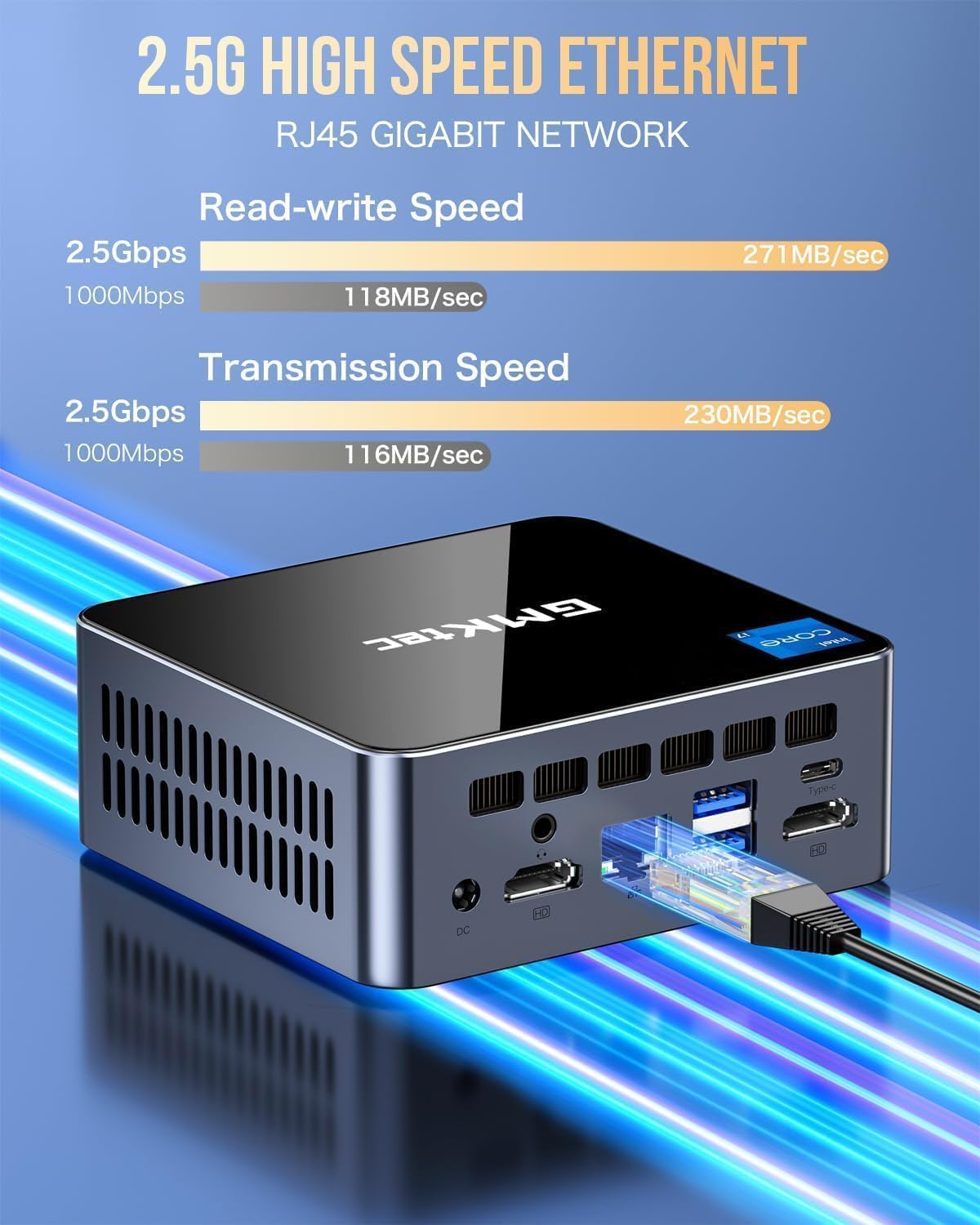
Imej: Terperinci view of the multi-purpose ports on the GMKtec Mini PC M2Pro S.
Panduan Persediaan
- Sambung Peranti: Connect your monitor(s) using the HDMI or USB Type-C ports. Connect your keyboard and mouse to the available USB ports.
- Sambungan Rangkaian: For a wired connection, plug an Ethernet cable into the 2.5Gbps LAN port. For wireless, the device supports WiFi 6 and Bluetooth 5.2, which can be configured after initial boot.
- Sambungan Kuasa: Connect the provided power adapter to the DC IN port on the mini PC and then to a power outlet.
- Hidupkan kuasa: Tekan butang kuasa yang terletak di hadapan PC mini. Sistem akan boot.
- Persediaan Windows Awal: Follow the on-screen instructions to complete the Windows 11 Pro setup, including language, region, network, and user account creation.
Imej: Penempatan desktop dan pilihan pemasangan VESA untuk Mini PC.
Arahan Operasi
Hidupkan/Mati Kuasa
- Untuk Menghidupkan: Tekan butang kuasa pada bahagian hadapan peranti.
- Untuk Mematikan: Klik butang Mula dalam Windows, kemudian pilih Kuasa > Matikan.
- Untuk Mulakan Semula: Klik butang Mula dalam Windows, kemudian pilih Kuasa > Mulakan semula.
Persediaan Paparan Tiga Kali
The GMKtec Mini PC M2Pro S supports up to three 4K displays simultaneously. Connect your monitors to the available HDMI ports and the USB Type-C port. Once connected, Windows will automatically detect the displays. You can configure display settings (e.g., extend, duplicate) via Settings > System > Display.

Imej: Cthampcontoh persediaan paparan 4K tiga kali ganda dengan Mini PC.
Kesambungan Rangkaian
- Berwayar (LAN): Connect an Ethernet cable to the RJ45 port for a stable 2.5Gbps connection.
- Wireless (WiFi): Access network settings in Windows to connect to a WiFi 6 network.
- Bluetooth: Pair Bluetooth devices (e.g., headphones, keyboard, mouse) via Windows Bluetooth settings.
Penyelenggaraan dan Peningkatan
Peluasan Storan
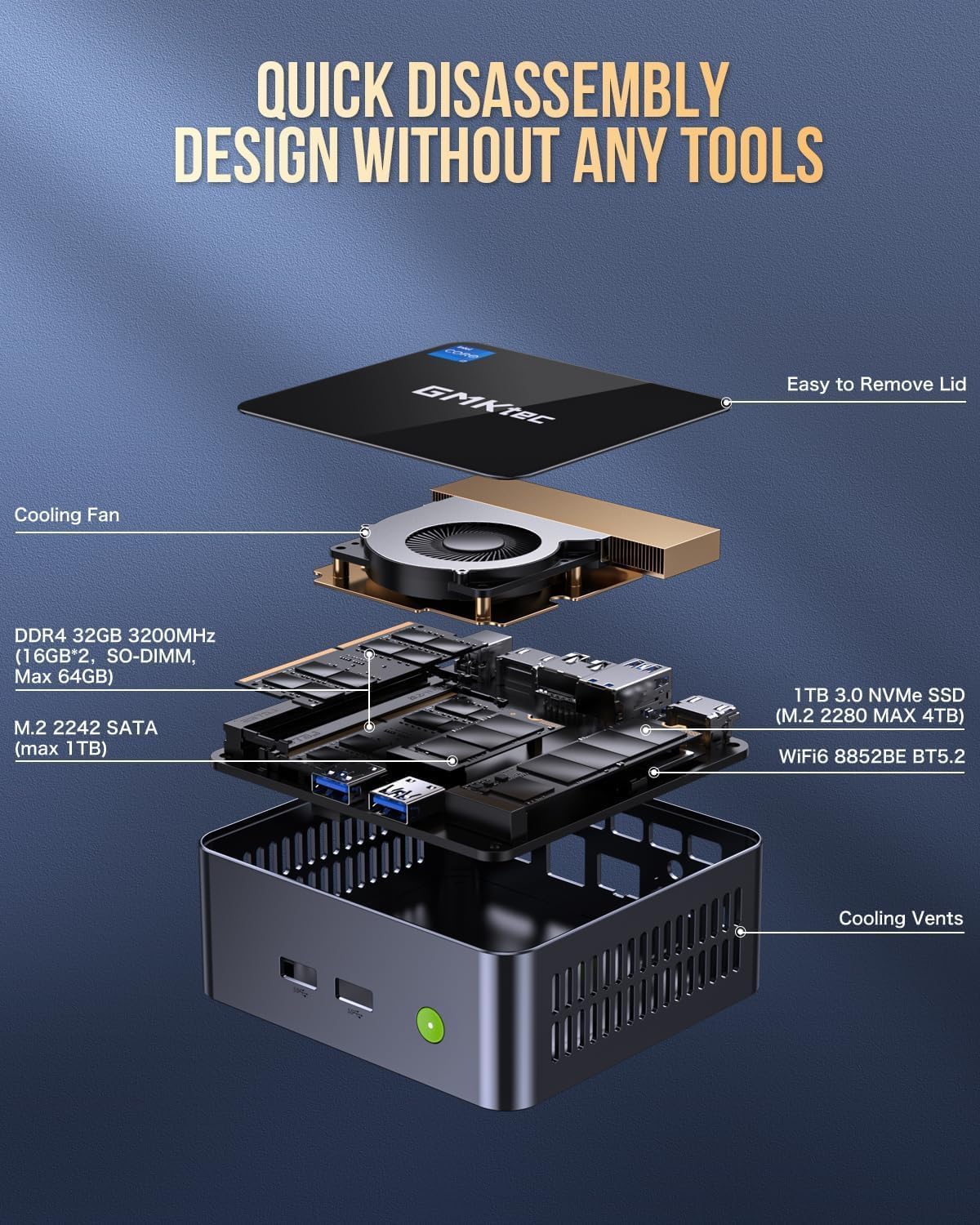
The GMKtec Mini PC M2Pro S supports storage expansion:
- The existing M.2 2280 NVMe (PCIe3.0) SSD can be upgraded to a maximum of 2TB.
- An additional M.2 2242 SATA slot is available for expansion up to 2TB.
Pengembangan RAM
The device comes with 32GB DDR4 SODIMM RAM in a dual-channel configuration. It can be expanded up to a maximum of 64GB by replacing the existing modules with higher capacity ones.
Mengakses Komponen Dalaman
The mini PC features a quick disassembly design for easy access to internal components for upgrades or maintenance. Carefully remove the lid to access the RAM and SSD slots. Refer to the diagram below for guidance.

Image: Quick disassembly design for internal component access.

Image: Illustration of the upgraded quiet cooling fan system.
Menyelesaikan masalah
If you encounter issues with your GMKtec Mini PC M2Pro S, refer to the following common solutions:
- Tiada Kuasa: Ensure the power adapter is securely connected to both the mini PC and a working power outlet. Check the power button for any damage.
- Tiada Paparan: Verify that the monitor is powered on and correctly connected to the mini PC via HDMI or USB Type-C. Try a different cable or monitor if possible. Ensure the correct input source is selected on your monitor.
- Tiada Sambungan Rangkaian (Berwayar): Check if the Ethernet cable is properly connected to both the mini PC and your router/modem. Verify router status.
- No Network Connection (Wireless): Ensure WiFi is enabled in Windows settings. Check if the correct WiFi network is selected and the password is entered correctly.
- Prestasi Perlahan: Close unnecessary applications. Check for background processes. Ensure sufficient free storage space. Consider upgrading RAM or SSD if performance issues persist after basic troubleshooting.
- Isu Pengaktifan Windows: If you experience problems activating Windows 11 Pro, ensure your internet connection is active. If the issue persists, contact GMKtec customer support for assistance.
For further assistance, please contact GMKtec customer support.
Spesifikasi Teknikal
| Ciri | Spesifikasi |
|---|---|
| Jenama | GMKtec |
| Nombor Model | M2 Pro S |
| Pemproses | Intel Core i7-1185G7 (4.8 GHz Turbo, 4 Cores, 8 Threads) |
| RAM | 32GB DDR4 SDRAM (3200 MHz, Dual-channel, expandable to 64GB) |
| Penyimpanan | 512GB M.2 2280 NVMe SSD (PCIe 3.0, expandable to 2TB), M.2 2242 SATA slot (expandable to 2TB) |
| Pemproses bersama Grafik | Intel Iris Xe Graphics G7 96EU |
| Resolusi Skrin Maks | 5120 x 2880 Piksel |
| Sistem Operasi | Windows 11 Pro |
| Jenis Wayarles | WiFi 6 (802.11ax), Bluetooth 5.2 |
| LAN | 2.5Gbps RJ45 Ethernet |
| Port USB | 3 x USB 3.2, 1 x USB Type-C (40Gbps) |
| Output Video | 2 x HDMI (4K@60Hz), 1 x USB Type-C (4K@60Hz) |
| Port Audio | 3.5mm CTIA |
| Berat Barang | 3.3 paun |
| Dimensi Pakej | 6.38 x 6.26 x 4.69 inci |
Waranti dan Sokongan
Your GMKtec Mini PC M2Pro S comes with a standard manufacturer's warranty. Please refer to the warranty card included in your package for specific terms and conditions. For technical support, troubleshooting assistance, or warranty claims, please contact GMKtec customer service directly. Contact information can typically be found on the GMKtec official webtapak atau melalui penjual dari mana anda membeli produk tersebut.
The seller for this product is GMKtec一Store. Please reach out to them for product-specific inquiries.