
1. Pengenalan
This manual provides detailed instructions for the setup, operation, and maintenance of your zhizhi S67 Smartwatch. Please read this guide thoroughly to ensure optimal performance and longevity of your device. The zhizhi S67 Smartwatch is designed to enhance your daily life with smart communication, comprehensive health monitoring, and diverse fitness tracking capabilities.

Image 1.1: The zhizhi S67 Smartwatch, showcasing its sleek design and interchangeable bands.

Imej 1.2: Selesaiview of the smartwatch's key features including AMOLED display, voice assistant, sports modes, and IP68 water resistance.
2. Persediaan
2.1 Kandungan Pakej
Sebelum meneruskan, pastikan semua item terdapat dalam pakej:
- zhizhi S67 Smartwatch
- Kabel Pengecasan
- Manual Pengguna
- Additional Strap (if included in your specific model)

Image 2.1: Illustration of the smartwatch, its dimensions, and the items included in the package.
2.2 Mengecas Jam Pintar
Before first use, fully charge the smartwatch. Connect the magnetic charging cable to the charging points on the back of the watch and plug the USB end into a standard USB power adapter (not included) or a computer USB port.
- Pengecasan penuh biasanya mengambil masa lebih kurang 2 jam.
- Ikon bateri pada skrin akan menunjukkan status pengecasan.
2.3 Pemasangan Apl dan Berpasangan
To unlock the full functionality of your smartwatch, you need to install the companion application on your smartphone and pair the devices.
- Muat turun Apl: Scan the QR code provided in the quick start guide or search for the designated app (e.g., 'VeryFit' as commonly associated with similar devices) in your smartphone's app store (Google Play Store for Android, Apple App Store for iOS).
- Buat Akaun: Buka aplikasi dan ikut arahan pada skrin untuk membuat akaun pengguna.
- Dayakan Bluetooth: Pastikan Bluetooth didayakan pada telefon pintar anda.
- Pasangkan Peranti: In the app, navigate to the 'Device' or 'Add Device' section. Select your zhizhi S67 Smartwatch from the list of available devices. Confirm the pairing request on both your phone and the smartwatch.
- Berikan Kebenaran: Berikan kebenaran yang diperlukan (cth., pemberitahuan, lokasi, kenalan) kepada aplikasi untuk fungsi penuh.
3. Arahan Operasi
3.1 Navigasi Asas
- Skrin sentuh: Leret ke kiri/kanan, atas/bawah untuk menavigasi menu dan ciri. Ketik untuk memilih.
- Butang Sisi: Typically used to return to the home screen, wake the screen, or access the main menu.
3.2 Panggilan dan Pemberitahuan Bluetooth
Jam tangan pintar ini membolehkan anda mengurus panggilan dan menerima pemberitahuan terus pada pergelangan tangan anda.
- Membuat/Menerima Panggilan: Once connected via Bluetooth, you can dial numbers, answer, or reject incoming calls using the watch's built-in speaker and microphone.
- Pemberitahuan: Receive alerts for text messages and various app notifications (e.g., Facebook, Twitter, WhatsApp, Instagram). The watch will vibrate to notify you.

Image 3.1: Visual representation of the smartwatch's Bluetooth call and message notification capabilities.

Image 3.2: The smartwatch showing various app notifications on the display.
3.3 Pembantu Suara AI
Activate your smartphone's voice assistant directly from your smartwatch for hands-free control.
- Tap the voice assistant icon or use the designated gesture/button press to activate.
- Ask questions, set alarms, control music, or initiate calls.

Image 3.3: Demonstrating the AI Voice Assistant functionality on the smartwatch.

Image 3.4: The smartwatch's intelligent voice assistant in action, responding to commands.
3.4 Fungsi Praktikal Lain
The smartwatch includes several convenient features to assist your daily activities:
- Kawalan Muzik: Mainkan, jeda, langkau trek dan laraskan kelantangan untuk muzik yang dimainkan pada telefon pintar anda yang disambungkan.
- Kawalan Kamera: Use your smartwatch as a remote shutter for your smartphone's camera.
- Ramalan cuaca: View current weather conditions and forecasts for your location.
- Jam randik/Pemasa: Utilize built-in stopwatch and timer functions for various activities.
- penggera: Set silent alarms that vibrate on your wrist.
- Cari Telefon: Locate your misplaced smartphone by triggering an audible alert from the watch.
- Peringatan Sedentari: Terima makluman untuk bergerak jika anda tidak aktif terlalu lama.
- Latihan Pernafasan: Guided breathing exercises to help you relax.

Image 3.5: Display of practical functions like weather, camera control, music playback, and stopwatch.

Imej 3.6: Satu kajian komprehensif view of additional practical functions available on the smartwatch.
4. Pemantauan Kesihatan
The zhizhi S67 Smartwatch is equipped with advanced optical sensors for continuous health tracking.
4.1 Pemantauan Kadar Jantung
Monitor your heart rate 24/7 to gain insights into your cardiovascular health.
- Real-time heart rate data is displayed on the watch and recorded in the app.
- Set alerts for abnormally high or low heart rates through the app.

Image 4.1: The smartwatch displaying 24-hour heart rate data and trends.
4.2 Pemantauan Oksigen Darah (SpO2)
Track your blood oxygen saturation levels throughout the day to ensure proper respiratory function.
- The watch provides continuous SpO2 measurements.
- View historical data and trends in the companion app.

Image 4.2: The smartwatch monitoring blood oxygen levels during an activity.
4.3 Pemantauan Tidur
The smartwatch intelligently analyzes your sleep patterns, identifying deep sleep, light sleep, and wake phases.
- Wear the watch during sleep for accurate tracking.
- Review detailed sleep reports in the app to improve your rest habits.

Image 4.3: The smartwatch displaying health metrics and sleep analysis.

Image 4.4: Detailed breakdown of sleep quality, including deep, light, and awake periods.
5. Sport Modes and Water Resistance
The zhizhi S67 Smartwatch supports over 120 sport modes to track your physical activities.
5.1 Tracking Sport Activities
- Select your desired sport mode from the watch's menu (e.g., running, walking, basketball, cycling, football, yoga, climbing).
- The watch will record real-time data such as heart rate, steps, calories burned, and distance.
- Review detailed workout summaries in the companion app.

Image 5.1: The smartwatch displaying various sport modes and activity metrics.

Image 5.2: An array of icons representing the diverse range of sport modes available.
5.2 Rintangan Air IP68
The smartwatch features an IP68 water-resistant design, making it suitable for various daily activities.
- It can withstand splashes, rain, and brief immersion in water (e.g., hand washing, showering).
- Nota: Not suitable for hot water, saunas, or deep diving. Avoid prolonged exposure to water.

Image 5.3: The smartwatch in a natural setting, highlighting its IP68 waterproof capability.
6. Display and Customization
The zhizhi S67 features a vibrant AMOLED display with extensive customization options.
6.1 1.43" AMOLED Touchscreen
- The 1.43-inch HD AMOLED touchscreen offers clear visuals, vivid colors, and a smooth tactile experience.
- The display is designed for durability and lightweight comfort.
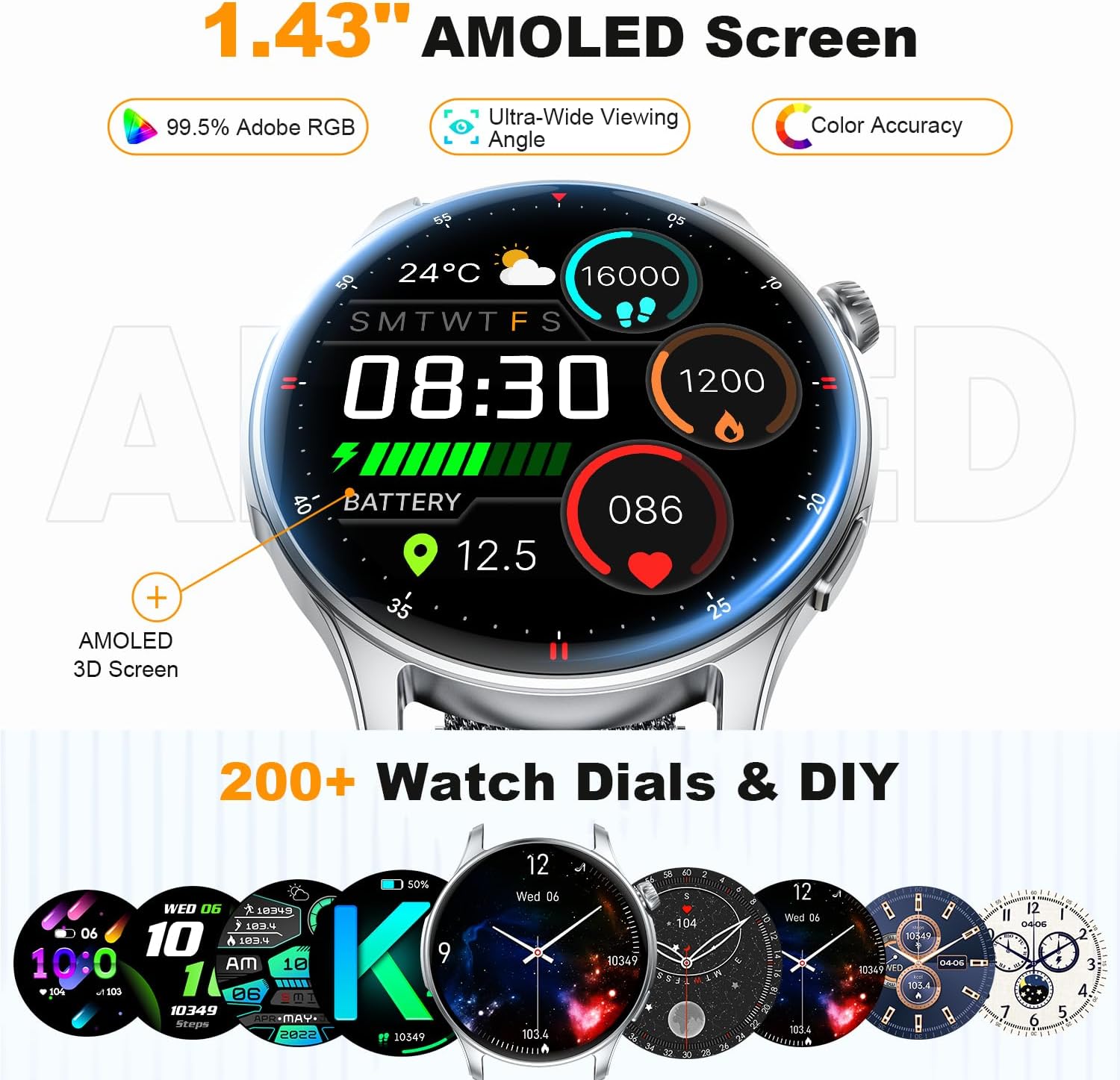
Image 6.1: The smartwatch showcasing its 1.43" AMOLED screen and various watch face options.

Image 6.2: Highlighting the AMOLED display's vibrant colors, color accuracy, and wide color gamut.
6.2 Muka Jam Boleh Disesuaikan
- Choose from over 200 pre-designed watch faces available through the companion app.
- Personalize your watch face by uploading your favorite photos.

Image 6.3: The smartwatch's personalized AMOLED screen with options for custom watch faces.
7. Hayat Bateri
The zhizhi S67 Smartwatch is equipped with a high-capacity battery designed for extended use.
- Penggunaan Berterusan: Up to 7 days of active use.
- Mod bersedia: Sehingga 30 hari.
- Actual battery life may vary based on usage patterns, enabled features, and settings.
8. Penyelenggaraan
Proper care ensures the longevity and optimal performance of your smartwatch.
- Pembersihan: Lap skrin dan tali jam tangan dengan kerap menggunakan kain lembut dan kering. Untuk kotoran degil, lap sedikitamp kain boleh digunakan, diikuti dengan pengeringan.
- Elakkan Bahan Kimia: Jangan gunakan bahan kimia yang keras, pelarut pembersih atau detergen yang kuat, kerana ini boleh merosakkan kemasan dan pengedap jam tangan.
- Pendedahan Air: While IP68 water-resistant, avoid exposing the watch to hot water, steam, or high-pressure water jets. Dry the watch thoroughly after exposure to water.
- Storan: Simpan jam tangan di tempat yang sejuk dan kering apabila tidak digunakan. Elakkan suhu yang melampau.
9. Penyelesaian masalah
If you encounter issues with your zhizhi S67 Smartwatch, refer to the following common solutions:
| Masalah | Penyelesaian yang Mungkin |
|---|---|
| Jam tangan tidak dihidupkan | Pastikan jam tangan dicas sepenuhnya. Sambungkannya ke pengecas selama sekurang-kurangnya 30 minit. |
| Tidak boleh berpasangan dengan telefon pintar | 1. Pastikan Bluetooth didayakan pada telefon anda. 2. Make sure the watch is within range of your phone. 3. Restart both the watch and your phone. 4. Clear the app's cache or reinstall the app. 5. Check if the watch is already paired with another device. |
| Pemberitahuan tidak diterima | 1. Ensure the watch is connected to your phone via Bluetooth. 2. Check app notification permissions on your phone. 3. Verify notification settings within the companion app. 4. Ensure your phone's notification bar displays messages. |
| Data kesihatan yang tidak tepat | 1. Ensure the watch is worn snugly on your wrist, not too tight or too loose. 2. Clean the sensor on the back of the watch. 3. Elakkan pergerakan berlebihan semasa pengukuran. 4. Note that smartwatches are not medical devices and data is for reference only. |
| Hayat bateri pendek | 1. Kurangkan kecerahan skrin. 2. Disable continuous heart rate monitoring if not needed. 3. Limit the number of active notifications. 4. Ensure the watch is fully charged each time. |
10. Spesifikasi
Key technical specifications for the zhizhi S67 Smartwatch:
- Jenama: zhizhi
- model: S67
- paparan: Skrin Sentuh AMOLED 1.43 inci
- Dimensi: 28.5 x 8.7 x 1.7 cm (Package); 45mm (Watch Diameter), 11mm (Thickness)
- Berat: 160 g (Product)
- Bateri: 1 bateri Litium Polimer (termasuk, boleh dicas semula)
- Komposisi Bateri: Polimer Litium
- Tahan Air: IP68
- Keserasian: Android 5.0 dan ke atas, iOS 9.0 dan ke atas
- Ketersambungan: Bluetooth
- ciri-ciri: Bluetooth Calls, Smart Notifications, 24/7 Heart Rate, Blood Oxygen, Sleep Monitor, 120+ Sport Modes, AI Voice Assistant, Music Control, Camera Control, Weather Forecast, Stopwatch, Alarm, Find Phone, Sedentary Reminder, Breathing Training, Customizable Watch Faces.
11. Waranti dan Sokongan
Untuk maklumat jaminan dan sokongan pelanggan, sila rujuk dokumentasi yang disediakan bersama pembelian anda atau hubungi peruncit/pengilang secara langsung. Simpan bukti pembelian anda untuk tuntutan jaminan.
For further assistance, please visit the official zhizhi support webtapak atau hubungi pasukan perkhidmatan pelanggan mereka.