
pengenalan
The Rapoo M308 is a versatile multi-mode wireless mouse designed for efficiency and comfort. It features an ambidextrous design, allowing comfortable use for both right-handed and left-handed individuals. With its dual connectivity options, Bluetooth 5.0 and 2.4 GHz wireless, you can seamlessly connect to up to three devices and switch between them with ease. The mouse is engineered for long-lasting performance, offering a battery life of up to 12 months.
Kandungan Pakej
- Rapoo M308 Multi-mode Wireless Mouse
- Penerima USB (disimpan di dalam tetikus)
- 2 Bateri AA
- Panduan Mula Pantas (manual ini)
Produk Selesaiview
Familiarize yourself with the components of your Rapoo M308 mouse.
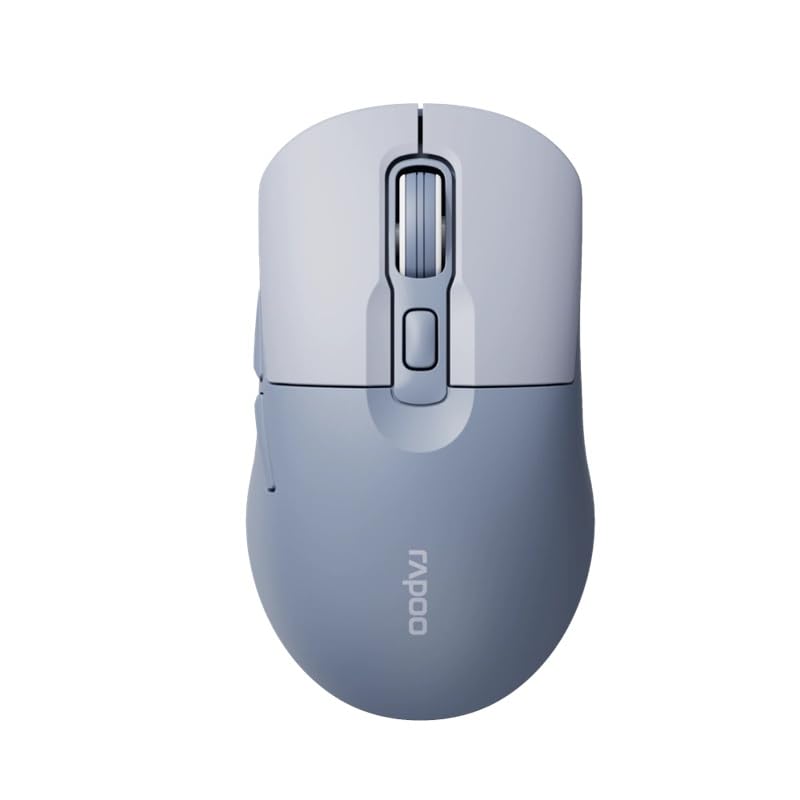
Image: The Rapoo M308 Multi-mode Wireless Mouse in blue, showcasing its ergonomic, ambidextrous design with a scroll wheel and multiple buttons.
- Butang Kiri: Fungsi klik kiri standard.
- Butang Kanan: Fungsi klik kanan standard.
- Roda Tatal: Untuk fungsi skrol dan klik tengah.
- Butang DPI: Adjusts cursor sensitivity (DPI).
- Mode Switch Button/Indicator: Switches between connected devices (2.4G, Bluetooth 1, Bluetooth 2) and indicates current mode.
- Butang Sisi: Forward/Backward navigation (programmable).
- Petak Bateri: Located on the underside, holds 2 AA batteries.
- Slot Penerima USB: Located inside the battery compartment for storage.
Persediaan
1. Pemasangan Bateri
- Buka penutup petak bateri di bahagian bawah tetikus.
- Masukkan dua bateri AA, pastikan kekutuban (+/-) betul.
- Tutup penutup petak bateri.
2. Menyambung melalui Wayarles 2.4 GHz
- Remove the USB receiver from its storage slot inside the battery compartment.
- Palamkan penerima USB ke dalam port USB yang tersedia pada komputer anda.
- Turn on the mouse. The mouse should automatically connect to your computer. The mode indicator light will show a steady green light for a few seconds.
3. Menyambung melalui Bluetooth
The M308 mouse supports two Bluetooth connections (BT1 and BT2).
- Hidupkan tetikus.
- Press the mode switch button to select either Bluetooth 1 (blue light flashes slowly) or Bluetooth 2 (blue light flashes slowly).
- Press and hold the mode switch button for 3 seconds until the blue light starts flashing rapidly. This indicates the mouse is in pairing mode.
- Pada komputer atau peranti anda, pergi ke tetapan Bluetooth dan cari peranti baharu.
- Select "Rapoo M308" from the list of available devices to pair.
- Once paired, the blue light will become steady for a few seconds and then turn off.
Arahan Operasi
Bertukar Antara Peranti
The Rapoo M308 allows you to connect to up to three devices (one 2.4G wireless and two Bluetooth devices) and switch between them.
- Briefly press the mode switch button to cycle through the connected devices: 2.4G (green light), Bluetooth 1 (blue light), Bluetooth 2 (blue light).
- The indicator light will briefly illuminate in the corresponding color to confirm the selected mode.
Pelarasan DPI
Press the DPI button (usually located behind the scroll wheel) to cycle through different DPI settings. This changes the cursor speed and sensitivity. The indicator light may flash to show the current DPI level (e.g., one flash for low DPI, two for medium, etc.).
Penyelenggaraan
- Pembersihan: Gunakan kain lembut dan kering untuk membersihkan tetikus. Untuk kotoran degil, sedikit damp kain boleh digunakan, tetapi pastikan tiada kelembapan memasuki peranti.
- Penggantian Bateri: When the mouse performance degrades or the indicator light signals low battery, replace the two AA batteries following the installation steps.
- Storan: When not in use for extended periods, turn off the mouse to conserve battery life. Store the USB receiver inside the mouse to prevent loss.
Menyelesaikan masalah
- Tetikus tidak bertindak balas:
- Check if the mouse is turned on.
- Pastikan bateri dipasang dengan betul dan tidak habis. Gantikan jika perlu.
- For 2.4G connection, ensure the USB receiver is securely plugged into a working USB port. Try a different USB port.
- For Bluetooth connection, ensure the mouse is in the correct Bluetooth mode (BT1 or BT2) and successfully paired with your device. Re-pair if needed.
- Pergerakan kursor tidak menentu atau perlahan:
- Bersihkan sensor optik di bahagian bawah tetikus.
- Pastikan anda menggunakan tetikus pada permukaan yang sesuai (tidak reflektif, tidak telus).
- Laraskan tetapan DPI menggunakan butang DPI.
- Cannot switch between devices:
- Ensure all devices are properly connected (2.4G receiver plugged in, Bluetooth devices paired).
- Briefly press the mode switch button to cycle through modes. A long press will initiate Bluetooth pairing mode.
Spesifikasi
| Nama Jenama | Rapoo |
| Model | M308 |
| Teknologi Ketersambungan | Bluetooth 5.0, 2.4 GHz Radio Frequency |
| Ciri Khas | Ringan |
| Pengesanan Pergerakan | Optik |
| Kuantiti Butang | 4 |
| Orientasi Tangan | Ambidextrous |
| Penggunaan yang Disyorkan | Pejabat |
| Peranti Serasi | Komputer Peribadi, Komputer Riba |
| Berat Barang | 50 gram |
| Sistem Operasi | Linux, Mac, Windows |
| Hayat Bateri | 12 bulan |
| Bilangan Bateri | 2 AA (Termasuk) |
| Sumber Kuasa | Dikuasakan Bateri |
| OS Minimum Diperlukan | Mac OS 14 Sonoma, Windows 11 |
| bahan | plastik |
| Negara Asal | China |
| Komponen yang Disertakan | tetikus |
Waranti dan Sokongan
The Rapoo M308 Multi-mode Wireless Mouse comes with a Waranti 2 tahun dari tarikh pembelian. Waranti ini meliputi kecacatan pembuatan dan kerosakan dalam penggunaan biasa.
For technical support, warranty claims, or further assistance, please refer to the contact information provided on the Rapoo official website or your local distributor's support channels. Please retain your proof of purchase for warranty validation.


